Timeline
Timeline
2025-12-18
init
This article introduces the core concepts and functions of the Linux input subsystem. The subsystem provides a unified framework and interface for input devices such as keyboards, mice, and touchscreens. By extracting common functions of devices and retaining differentiated code, it simplifies driver development and improves compatibility. The article summarizes three major advantages of the input subsystem: compatibility, a unified driver programming approach, and a unified application operation interface. It also discusses how to determine the correspondence between input devices and device nodes, including methods such as identifying by device name, probing command tests, and viewing the /proc/bus/input/devices file. Finally, the article outlines the framework of the input subsystem, focusing on the Event Handling Layer, which, as the top layer, is responsible for processing input device events.
Linux Driver Notes
| Table of Contents | Links |
|---|---|
| 1. Linux Driver Framework | |
| 2. Linux Driver Loading Logic | |
| 3. Character Device Basics | |
| 4. Concurrency and Race Conditions | |
| 5. Advanced Character Device Topics | |
| 6. Interrupts | |
| 7. Platform Bus | |
| 8. Device Tree | |
| 9. Device Model | |
| 10. Hotplug | |
| 11. pinctrl Subsystem | |
| 12. GPIO subsystem | |
| 13. Input subsystem | |
| 14. 1-Wire | |
| 15. I2C | |
| 16. SPI | |
| 17. UART | |
| 18. PWM | |
| 19. RTC | |
| 20. Watchdog | |
| 21. CAN | |
| 22. Network devices | |
| 23. ADC | |
| 24. IIO | |
| 25. USB | |
| 26. LCD |

Introduction to the Input Subsystem
In Linux, the input subsystem is a subsystem or framework specifically designed for handling input devices. It provides a set of common interfaces and mechanisms for driver developers to write and manage drivers for input devices. Input devices include keyboards, mice, touchscreens, game controllers, and so on.
The main purpose of using the input subsystem is to standardize and simplify the development process of input device drivers, thereby improving the universality and compatibility of drivers. It does this byextracting the common functions and processing logic of input devices and writing them as generic code, while leaving the differentiated code to the specific device driver developersThis division of labor allows driver developers to focus more on device-specific details, thereby greatly reducing the development difficulty for engineers.
In summary, the benefits of using the input subsystem are as follows:
- Compatibility: The input subsystem provides a unified framework and interface, allowing input devices from different manufacturers to be developed according to the same specification. Whether it is a keyboard, mouse, or other input device, as long as it conforms to the interfaces and event formats defined by the input subsystem, it can work properly in the Linux system. In this way, engineers do not need to write and maintain different driver code for each manufacturer’s devices, greatly improving device compatibility.
- Unified driver programming approach: The input subsystem defines a set of common driver programming methods. Engineers only need to develop according to the input subsystem’s specifications. The driver modules for input devices need to implement corresponding interface functions, such as initialization functions and event handling functions. The implementation of these interface functions is the same; whether it is a keyboard driver or a mouse driver, they can be developed in a unified manner. As a result, engineers can focus more on device-specific details without worrying about the common driver framework, simplifying the development process.
- Unified application operation interface: The input subsystem provides a set of unified application operation interfaces, such as
/dev/input/eventX, allowing applications to interact with input devices conveniently. Applications can read these device nodes to obtain input event information and process it accordingly. No matter what type of input device it is, applications can access and operate it in the same way. In this way, application developers do not need to worry about the details of the underlying input devices and can focus more on application logic development.
Determining the relationship between input devices and nodes
In the input subsystem, there is a certain correspondence between input devices and device nodes. The following are methods for determining the relationship between device nodes and input devices:
- Device name: The device nodes of the input subsystem can be divided intogeneric device namesandand dedicated device names. Dedicated device names usually allow the device type to be identified directly from the name, for example
"keyboard"(keyboard) or"mouse"(mouse). Generic device names, on the other hand, do not directly indicate the device type. As shown in the figure below,event0-event4belongs to generic device names, whilemouse0andmouse2It is a dedicated device name.

- Trial method: You can use
"cat"command to open the device node file, then operate the physical device and observe whether the terminal has output. For example, for a keyboard device, you can runcat /dev/input/eventX, where/dev/input/eventXis the path of the device node, then press keyboard keys and observe whether the terminal outputs the corresponding characters. Through this trial method, you can determine the correspondence between device nodes and specific devices. For example, use the following command to test the mouse, as shown below:
12 | sudo cat /dev/input/mouse0sudo hexdump /dev/input/mouse0 |
- View input device information: You can use the following command to view
/proc/bus/input/devicesfile:
1 | cat /proc/bus/input/devices |
Part of the printed output is shown below:

This file records information about all input devices in the current system. You can find information related to device nodes, such as device name, vendor ID, product ID, etc. By comparing the path of the device node with the corresponding fields in the device information, you can determine the relationship between device nodes and specific input devices. For example, from the above printed information, you can see that the device node corresponding to the keyboard is/dev/input/event1, as shown in the figure below

I: Bus=0011 Vendor=0001 Product=0001 Version=ab41
This line shows the device’s bus type, vendor ID, product ID, and firmware version. In this example, the device’s bus type is 0011, vendor ID is 0001,
product ID is 0001, and firmware version is ab41.
N: Name="AT Translated Set 2 keyboard"
This line shows the device name. In this example, the device name is"AT Translated Set 2 keyboard"。
P: Phys=isa0060/serio0/input0
This line shows the physical location of the device. In this example, the physical location of the device isisa0060/serio0/input0。
S: Sysfs=/devices/platform/i8042/serio0/input/input1
This line shows the path of the device in the sysfs file system. In this example, the device path is/devices/platform/i8042/serio0/input/input1。
U: Uniq=
This line shows the unique identifier of the device. In this example, the unique identifier is empty.
H: Handlers=sysrq kbd event1 leds
This line shows the handlers of the device. It indicates the program or module that handles device input events. In this example, the device hassysrq、kbd、event1andledsthese handlers, where event1 indicates that the device node is/dev/input/event1。
B: PROP=0
This line shows the properties of the device. In this example, the device’s property value is 0.
B: EV=120013
This line shows the event types supported by the device. In this example, the device supportsEV_SYN、EV_KEY、EV_MSCandEV_LEDthese event types.
B: KEY=402000000 3803078f800d001 feffffdfffefffff fffffffffffffffe
This line shows the keys supported by the device. Each key corresponds to a bit; 1 indicates the key is pressed, and 0 indicates the key is not pressed. This line shows the state of the keys, represented in hexadecimal.
B: MSC=10
This line shows the miscellaneous events supported by the device. In this example, the device supportsMSC_SCANevents.
B: LED=7
This line shows the LED lights supported by the device. In this example,LED=7i.e., binary0b111, indicating that 3 LED indicators are supported (the corresponding bits are set to 1), namely Num Lock, Caps Lock, and Scroll Lock.
Input subsystem framework
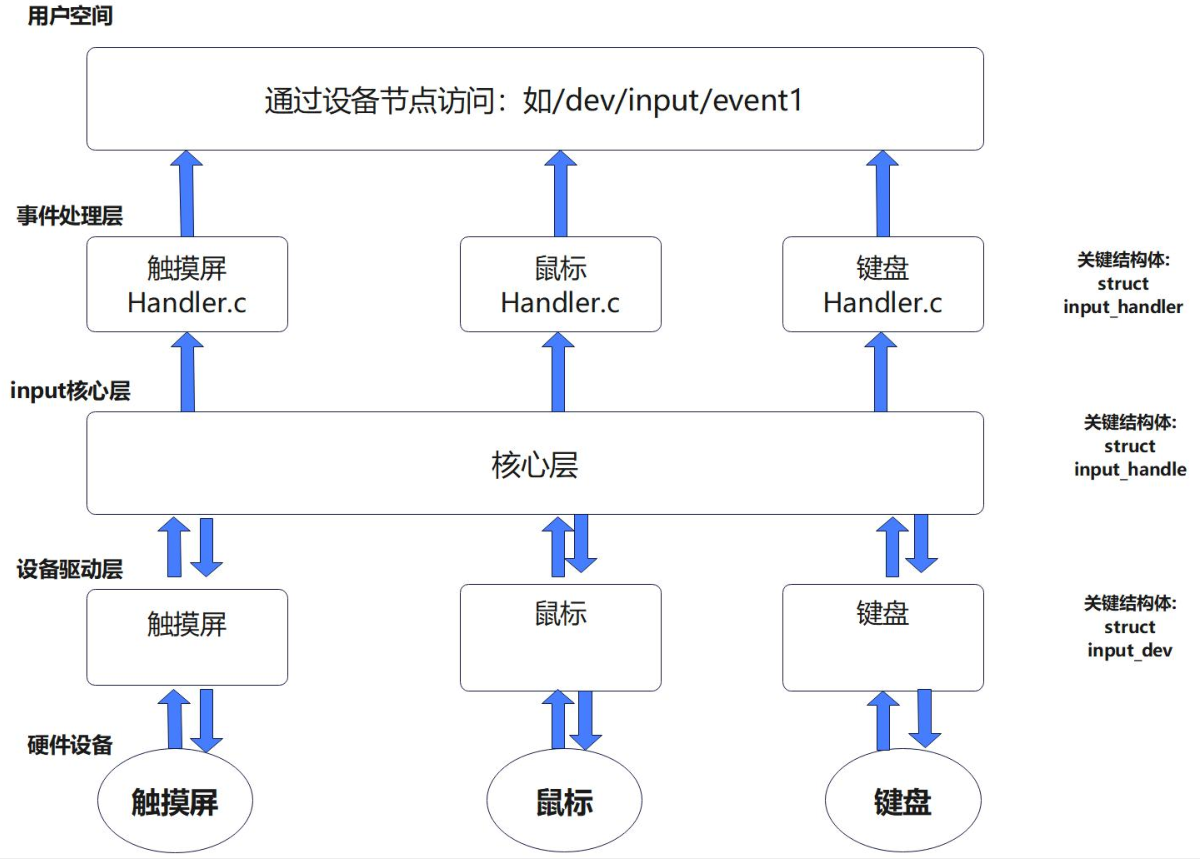
Event Handling Layer
The event handling layer is the topmost layer of the input subsystem and canprocess events generated by input devices and pass them to upper-layer applications, andcreate device nodes in the operating system, so that applications can communicate with input devices through the device nodes. It receives input events from the core layer and processes them accordingly based on the type and attributes of the events.
Core Layer
The main function of the core layer isto act as a matcher located between the event handling layer and the device driver layer. It serves to coordinate and connect these two layers, so as toensure that events from input devices are correctly delivered to the corresponding event handlers. The following are the main functions of the core layer in the input subsystem:
- Event matching: The core layer is responsible formatching the raw input data generated by input devices with the corresponding event handlers. It parses the raw input data and, based on predefined rules and configuration information, determines which event handler the input data should be passed to for processing.
- Device management and control: The core layer is responsible formaintaining the status, attributes, and configuration information of input devices, and providing device registration, deregistration, and management functions. It interacts with the device driver layer, receives input events from the device driver layer, and converts them into an abstract event representation. The core layer provides a consistent interface, allowing upper-layer applications to operate independently of specific hardware devices.
- Event handling and distribution: Core layer**Responsible for handling and distributing events, passing input events to the corresponding event handling layer.**It receives and caches input events from the device driver layer through an event queue mechanism, and distributes events to the corresponding event handling layer or application according to specific rules. In this way, the event handling layer can obtain input events through the interfaces provided by the core layer and process them accordingly.
- Abstract interfaces and event handling mechanism: Core layer**Provides a set of abstract interfaces and event handling mechanisms for upper-layer applications and the event handling layer.**It provides a unified event representation, so that events from different types of input devices (such as keyboards, mice, touch screens, etc.) can be represented and processed. Through the core layer interfaces, the event handling layer can register event listeners, subscribe to specific types of events, and obtain status information of input devices.
Device Driver Layer
The device driver layer is the bottom layer of the input subsystem and is responsible for**communicating and interacting with hardware devices.**Its main responsibility is to abstract the operations and functions of hardware devices into unified interfaces so that the core layer and event handling layer can interact with them. The code in the device driver layer usually includes hardware initialization, interrupt handling, data transmission, and other operations to ensure the normal operation of input devices. Developers write device drivers in this layer to adapt to specific hardware devices.
The Linux source code already contains the core layer code, so when writing input subsystem drivers later,the core layer code does not need to be written.
The event handling layer also provides a template in Linux. Except for some requirements such as fixed device nodes,generally there is no need to write event handling layer code.
Since the device driver layer faces different hardware, and each hardware has a different initialization method,the device driver layer code needs to be filled in when writing input subsystem drivers.。
Input subsystem source code
Path:kernel/drivers/input
| File/Directory | Function |
|---|---|
apm-power.c | Provides input device interfaces related to Advanced Power Management (APM). |
evbug.c | Provides virtual input devices for debugging, which can simulate events such as key presses and mouse movements. |
evdev.c | Provides a generic input event layer that converts events from all input devices into a standardized input event format and provides them to upper-layer user-space programs. |
ff-core.c | Provides support for force feedback devices, allowing input devices to send force feedback information. |
ff-memless.c | Provides force feedback device support without memory allocation, suitable for resource-constrained embedded systems. |
gameport/ | Contains a directory of drivers that support game controllers. |
input.c | Provides operations such as initialization and event handling of the input subsystem. |
input-leds.c | Provides support for LED indicator devices, allowing control of the LED indicator status. |
joydev.c | Provides drivers supporting joysticks, handling input events from joystick devices. |
keyboard/ | Contains a directory of drivers that support keyboards. |
misc/ | Contains a directory of drivers for other types of input devices, such as infrared remote controls, input audio, etc. |
remotectl/ | Provides drivers supporting remote control, handling input events sent via remote controls. |
serio/ | Provides drivers for input devices connected via serial ports, handling communication and processing of serial input devices. |
sensors/ | Contains a directory of sensor-related drivers, used for communicating with and processing various sensor devices. |
sparse-keymap.c | Provides support for sparse keymaps, allowing key assignments by arbitrary key codes, suitable for devices with non-standard keyboard layouts or special function keys. |
tablet/ | Provides drivers supporting graphics tablets and other types of graphic input devices, handling input events from tablet devices. |
touchscreen/ | Provides drivers supporting touchscreens, handling input events from touchscreen devices. |
In menuconfig:
12 | Device Drivers ---> Input device support ---> |
As follows:
123456789101112131415161718192021222324252627 | -*- Generic input layer (needed for keyboard, mouse, ...) //Input core layer <*> Export input device LEDs in sysfs <*> Support for memoryless force-feedback devices -*- Polled input device skeleton < > Sparse keymap support library -*- Matrix keymap support library ***Userland interfaces*** < > Mouse interface < > Joystick interface <*> Event interface < > Event debugging ***Input Device Drivers*** [*] Keyboards ---> [*] Mice ---> [ ] Joysticks/Gamepads ---- [ ] Tablets ---- [*] Touchscreens ---> <*> rockchip remotectl ---> ***handle all sensors*** < > handle angle,accel,compass,gyroscope,lsensor psensor etc [*] Miscellaneous devices ---> < > Synaptics RMI4 bus support Hardware I/O ports ---> |
If you want to trim and configure the kernel, just check or uncheck the options.
Input subsystem data structures and their relationships
The code of the event handling layer is located indrivers/input/evdev.cIn the file, it provides a unified event handling mechanism for upper-layer applications. It defines functions for handling input device events and provides interfaces for reading events, controlling devices, and other functions.
123456789101112131415161718192021222324 | // drivers/input/evdev.cstatic struct input_handler evdev_handler = { .event = evdev_event, // Event handling function pointer, pointing to the function named evdev_event, used to handle input events .events = evdev_events,// Batch event handling function pointer, pointing to the function named evdev_events, used to handle multiple events of the input device .connect = evdev_connect, .disconnect = evdev_disconnect, .legacy_minors = true, .minor = EVDEV_MINOR_BASE, .name = "evdev",// Device name, set to the string "evdev" .id_table = evdev_ids,// Input device ID table, pointing to the table named evdev_ids, used to match input device IDs.};static int __init evdev_init(void){ return input_register_handler(&evdev_handler);}static void __exit evdev_exit(void){ input_unregister_handler(&evdev_handler);}module_init(evdev_init);module_exit(evdev_exit); |
Hereinput_register_handlerThe function willevdev_handlerAdd to the input subsystem’shandlerlist, and assign a uniquehandlernumber:
input_register_handler()
123456789101112131415161718192021222324252627282930313233 | // drivers/input/input.c/** * input_register_handler - register a new input handler * @handler: handler to be registered * * This function registers a new input handler (interface) for input * devices in the system and attaches it to all input devices that * are compatible with the handler. */int input_register_handler(struct input_handler *handler){ struct input_dev *dev; int error; // Try to acquire the input mutex to ensure that the registration of the handler is not interrupted. error = mutex_lock_interruptible(&input_mutex); if (error) return error; // Initialize the handler list head. INIT_LIST_HEAD(&handler->h_list); // Add the handler to the end of the global handler list so that it can interact with other components of the input subsystem. list_add_tail(&handler->node, &input_handler_list); // Traverse the input device list and attach a handler to each device, thereby establishing a connection between each input device and the handler to process input events sent by the devices. list_for_each_entry(dev, &input_dev_list, node) input_attach_handler(dev, handler); // Wake up the procfs reader to notify it that a new handler has been registered, so that the reader can obtain new input event information in a timely manner. input_wakeup_procfs_readers(); // Release the input mutex to allow other threads to continue accessing the input subsystem. mutex_unlock(&input_mutex); return 0;}EXPORT_SYMBOL(input_register_handler); |
struct input_handler
1234567891011121314151617181920212223242526272829303132333435363738394041424344454647484950515253545556575859606162636465666768697071 | // include/linux/input.h/** * struct input_handler - implements one of interfaces for input devices * @private: driver-specific data * @event: event handler. This method is being called by input core with * interrupts disabled and dev->event_lock spinlock held and so * it may not sleep * @events: event sequence handler. This method is being called by * input core with interrupts disabled and dev->event_lock * spinlock held and so it may not sleep * @filter: similar to @event; separates normal event handlers from * "filters". * @match: called after comparing device's id with handler's id_table * to perform fine-grained matching between device and handler * @connect: called when attaching a handler to an input device * @disconnect: disconnects a handler from input device * @start: starts handler for given handle. This function is called by * input core right after connect() method and also when a process * that "grabbed" a device releases it * @legacy_minors: set to %true by drivers using legacy minor ranges * @minor: beginning of range of 32 legacy minors for devices this driver * can provide * @name: name of the handler, to be shown in /proc/bus/input/handlers * @id_table: pointer to a table of input_device_ids this driver can * handle * @h_list: list of input handles associated with the handler * @node: for placing the driver onto input_handler_list * * Input handlers attach to input devices and create input handles. There * are likely several handlers attached to any given input device at the * same time. All of them will get their copy of input event generated by * the device. * * The very same structure is used to implement input filters. Input core * allows filters to run first and will not pass event to regular handlers * if any of the filters indicate that the event should be filtered (by * returning %true from their filter() method). * * Note that input core serializes calls to connect() and disconnect() * methods. */struct input_handler { void *private;// Private data pointer, used to store private data of a specific handler. // Event handler function pointer, called when an input event occurs; parameters include the input handle, event type, event code, and event value. void (*event)(struct input_handle *handle, unsigned int type, unsigned int code, int value); // Batch event handler function pointer, called when an input device has multiple events occurring simultaneously; parameters include the input handle, an array of event values, and the number of events. void (*events)(struct input_handle *handle, const struct input_value *vals, unsigned int count); // Event filter function pointer, used to determine whether to receive and process events of a specific type and code; the return value is a boolean indicating whether the event is accepted. bool (*filter)(struct input_handle *handle, unsigned int type, unsigned int code, int value); // Match function pointer, used to determine whether the handler is applicable to a given input device; the return value is a boolean indicating whether it is applicable. bool (*match)(struct input_handler *handler, struct input_dev *dev); // Connect function pointer, used to establish a connection between an input device and a handler; the return value is an integer indicating the result of the connection. int (*connect)(struct input_handler *handler, struct input_dev *dev, const struct input_device_id *id); // Disconnect function pointer, used to disconnect the connection between an input device and a handler. void (*disconnect)(struct input_handle *handle); // Start function pointer, used to start the data transfer or processing process of the input device. void (*start)(struct input_handle *handle); bool legacy_minors;// Whether to use the legacy minor device number. int minor;// Device minor number. const char *name;// device name const struct input_device_id *id_table;// Input device ID table. struct list_head h_list;// Handler list head. struct list_head node;// Handler list node. ANDROID_KABI_RESERVE(1);}; |
input_attach_handler()
input_register_handler()throughlist_for_each_entry(dev, &input_dev_list, node)Call in a loopinput_attach_handler(dev, handler);, andinput_attach_handlerThe function is as follows:
12345678910111213141516171819 | // drivers/input/input.cstatic int input_attach_handler(struct input_dev *dev, struct input_handler *handler){ const struct input_device_id *id; int error; // Use the match function of the input device and handler to determine whether it applies to the device // This function will look up an ID matching the given input device in the handler's input device ID table, // and return the matching ID. If no matching ID is found, return NULL id = input_match_device(handler, dev); if (!id) return -ENODEV; // Call the handler's connect function to establish a connection between the device and the handler error = handler->connect(handler, dev, id); if (error && error != -ENODEV) pr_err("failed to attach handler %s to device %s, error: %d\n", handler->name, kobject_name(&dev->dev.kobj), error); return error;} |
input_match_device()
The role of this function in the input subsystem is to, in the given input event handler (input_handler), find the input that matches the specified input deviceinput device ID。
The handler’s input device ID table is astruct input_device_idThe structure is an array of elements, each element representing a possible input device ID.
123456789101112131415 | // drivers/input/input.cstatic const struct input_device_id *input_match_device(struct input_handler *handler, struct input_dev *dev){ const struct input_device_id *id; // Iterate through the handler's input device ID table until a matching ID is found or all IDs have been traversed. for (id = handler->id_table; id->flags || id->driver_info; id++) { if (input_match_device_id(dev, id) &&// Use the input device ID matching function to determine whether the given input device matches the current ID. (!handler->match || handler->match(handler, dev))) {// If the input device matches the ID, and the handler's match function returns true (or there is no match function), then return that ID. return id; } } return NULL;} |
input_match_device_id()
input_match_device_id(dev, id)Call the input device ID matching function to determine whether the given input device matches the current ID. The match function compares the attributes of the input device with those specified in the ID, such as vendor ID, product ID, etc.
1234567891011121314151617181920212223242526272829303132333435 | bool input_match_device_id(const struct input_dev *dev, const struct input_device_id *id){ if (id->flags & INPUT_DEVICE_ID_MATCH_BUS) if (id->bustype != dev->id.bustype) return false; if (id->flags & INPUT_DEVICE_ID_MATCH_VENDOR) if (id->vendor != dev->id.vendor) return false; if (id->flags & INPUT_DEVICE_ID_MATCH_PRODUCT) if (id->product != dev->id.product) return false; if (id->flags & INPUT_DEVICE_ID_MATCH_VERSION) if (id->version != dev->id.version) return false; if (!bitmap_subset(id->evbit, dev->evbit, EV_MAX) || !bitmap_subset(id->keybit, dev->keybit, KEY_MAX) || !bitmap_subset(id->relbit, dev->relbit, REL_MAX) || !bitmap_subset(id->absbit, dev->absbit, ABS_MAX) || !bitmap_subset(id->mscbit, dev->mscbit, MSC_MAX) || !bitmap_subset(id->ledbit, dev->ledbit, LED_MAX) || !bitmap_subset(id->sndbit, dev->sndbit, SND_MAX) || !bitmap_subset(id->ffbit, dev->ffbit, FF_MAX) || !bitmap_subset(id->swbit, dev->swbit, SW_MAX) || !bitmap_subset(id->propbit, dev->propbit, INPUT_PROP_MAX)) { return false; } return true;}EXPORT_SYMBOL(input_match_device_id); |
evdev_connect()
edev’sinput_handlerofconnectThe function isevdev_connect()
The main function of this function is to establish a connection with the input device, initialize and register the input handle, set device attributes, and add the character device to the system.
123456789101112131415161718192021222324252627282930313233343536373839404142434445464748495051525354555657585960616263646566676869707172737475767778798081828384858687888990919293949596 | struct evdev { int open; struct input_handle handle; struct evdev_client __rcu *grab; struct list_head client_list; spinlock_t client_lock; /* protects client_list */ struct mutex mutex; struct device dev; struct cdev cdev; bool exist;};struct evdev_client { unsigned int head; unsigned int tail; unsigned int packet_head; /* [future] position of the first element of next packet */ spinlock_t buffer_lock; /* protects access to buffer, head and tail */ wait_queue_head_t wait; struct fasync_struct *fasync; struct evdev *evdev; struct list_head node; enum input_clock_type clk_type; bool revoked; unsigned long *evmasks[EV_CNT]; unsigned int bufsize; struct input_event buffer[];};/* * Create new evdev device. Note that input core serializes calls * to connect and disconnect. */static int evdev_connect(struct input_handler *handler, struct input_dev *dev, const struct input_device_id *id){ struct evdev *evdev; int minor; int dev_no; int error; // Get a new minor device number. minor = input_get_new_minor(EVDEV_MINOR_BASE, EVDEV_MINORS, true); if (minor < 0) { error = minor; pr_err("failed to reserve new minor: %d\n", error); return error; } // Allocate and initialize the evdev structure. evdev = kzalloc(sizeof(struct evdev), GFP_KERNEL); if (!evdev) { error = -ENOMEM; goto err_free_minor; } // Initialize the members of the evdev structure. INIT_LIST_HEAD(&evdev->client_list);// Initialize the client list. spin_lock_init(&evdev->client_lock);// Initialize the spinlock for the client list. mutex_init(&evdev->mutex);// Initialize the mutex lock evdev->exist = true;// Set the evdev existence flag to true dev_no = minor; /* Normalize device number if it falls into legacy range */ if (dev_no < EVDEV_MINOR_BASE + EVDEV_MINORS)// If the device number is within the legacy range, perform normalization. dev_no -= EVDEV_MINOR_BASE; dev_set_name(&evdev->dev, "event%d", dev_no);// Set the device name. evdev->handle.dev = input_get_device(dev);// Set the input device of the input handle. evdev->handle.name = dev_name(&evdev->dev);// Set the name of the input handle to the device name. evdev->handle.handler = handler;// Set the handler of the input handle to the passed-in handler. evdev->handle.private = evdev;// Set the private data pointer of the input handle to the pointer of the evdev structure. evdev->dev.devt = MKDEV(INPUT_MAJOR, minor);// Set the device number. evdev->dev.class = &input_class;// Set the device class. evdev->dev.parent = &dev->dev;// Set the parent device of the device. evdev->dev.release = evdev_free;// Set the release function of the device to evdev_free. device_initialize(&evdev->dev);// Initialize device error = input_register_handle(&evdev->handle);// Register Input Handle if (error) goto err_free_evdev; cdev_init(&evdev->cdev, &evdev_fops);// Initialize the character device structure error = cdev_device_add(&evdev->cdev, &evdev->dev);// Add character device if (error) goto err_cleanup_evdev; return 0; err_cleanup_evdev: evdev_cleanup(evdev);// Clean up the evdev structure input_unregister_handle(&evdev->handle);// Unregister input handle err_free_evdev: put_device(&evdev->dev);// Release Device err_free_minor: input_free_minor(minor);// Release minor device number return error;} |
struct input_handle
When callingconnectfunction (evdevofconnectAfter the function), astruct input_handle, used to record the successfully matched input handler (input_handler) and input device (input_dev), and establish the relationship between them.
123456789101112131415161718192021222324252627 | // include/linux/input.h/** * struct input_handle - links input device with an input handler * @private: handler-specific data * @open: counter showing whether the handle is 'open', i.e. should deliver * events from its device * @name: name given to the handle by handler that created it * @dev: input device the handle is attached to * @handler: handler that works with the device through this handle * @d_node: used to put the handle on device's list of attached handles * @h_node: used to put the handle on handler's list of handles from which * it gets events */struct input_handle { void *private;// Private data pointer int open;// Open count const char *name;// Name struct input_dev *dev;// input device struct input_handler *handler;// Input handler struct list_head d_node;// Node pointing to the input device list struct list_head h_node;// Node pointing to the input handler list}; |
input_register_handle()
123456789101112131415161718192021222324252627282930313233343536373839404142434445464748495051525354555657585960 | /** * input_register_handle - register a new input handle * @handle: handle to register * * This function puts a new input handle onto device's * and handler's lists so that events can flow through * it once it is opened using input_open_device(). * * This function is supposed to be called from handler's * connect() method. */int input_register_handle(struct input_handle *handle){ struct input_handler *handler = handle->handler;// Get the input handler struct input_dev *dev = handle->dev;// Get the input device int error; /* * We take dev->mutex here to prevent race with * input_release_device(). */ /* * Get it here dev->mutex lock,to prevent with input_release_device() competition。 */ error = mutex_lock_interruptible(&dev->mutex); if (error) return error; /* * Filters go to the head of the list, normal handlers * to the tail. */ /* * Add the filter to the head of the linked list.,Ordinary handler added to the tail of the linked list.。 */ if (handler->filter) list_add_rcu(&handle->d_node, &dev->h_list); else list_add_tail_rcu(&handle->d_node, &dev->h_list); mutex_unlock(&dev->mutex); /* * Since we are supposed to be called from ->connect() * which is mutually exclusive with ->disconnect() * we can't be racing with input_unregister_handle() * and so separate lock is not needed here. */ /* * Since we assume being from ->connect() Call,This and ->disconnect() are mutually exclusive, * So we cannot be with input_unregister_handle() competition,Therefore, no additional locking is needed here.。 */ list_add_tail_rcu(&handle->h_node, &handler->h_list); if (handler->start) handler->start(handle); return 0;}EXPORT_SYMBOL(input_register_handle); |
The main purpose of this function is to convert the input handler (input_handler) and input device (input_dev) Establish a link.
- For input devices (
input_devFor ), it can be done by traversinghandler->h_listlinked list to find the matching input handler. This means that an input device can find the corresponding handler by traversing the linked list of input handlers associated with it. - For the input handler (
input_handler) said, it can be done by traversingdev->h_listA linked list is used to find the matching input device. This means that the input handler can find the corresponding device by traversing the linked list of input devices associated with it.
In this way, by establishing an association between the input handler and the input device, the input handler can process and control a specific input device.
input_register_device()
input_handlerStructs should useinput_register_handlerto register; input handler (input_handler) and input device (input_dev) connect (connect) structureinput_handlealso needsinput_register_handlefunction to register
input deviceinput_devThe structure certainly also needs a function to register,input_devThe structure’s registration function isinput_register_device。
123456789101112131415161718192021222324252627282930313233343536373839404142434445464748495051525354555657585960616263646566676869707172737475767778798081828384858687888990919293949596979899100101102103104105106107 | // drivers/input/input.cint input_register_device(struct input_dev *dev){ struct input_devres *devres = NULL;// Input device resource structure pointer struct input_handler *handler;// Input handler pointer unsigned int packet_size;// Packet size const char *path;// Device path string pointer int error; if (test_bit(EV_ABS, dev->evbit) && !dev->absinfo) { dev_err(&dev->dev, "Absolute device without dev->absinfo, refusing to register\n"); return -EINVAL; } if (dev->devres_managed) {// If device resources are managed, allocate the device resource structure devres = devres_alloc(devm_input_device_unregister, sizeof(*devres), GFP_KERNEL); if (!devres) return -ENOMEM; devres->input = dev; } /* Every input device generates EV_SYN/SYN_REPORT events. */ /* Each input device generates EV_SYN/SYN_REPORT event. */ __set_bit(EV_SYN, dev->evbit); /* KEY_RESERVED is not supposed to be transmitted to userspace. */ /* KEY_RESERVED should not be passed to userspace. */ __clear_bit(KEY_RESERVED, dev->keybit); /* Make sure that bitmasks not mentioned in dev->evbit are clean. */ /* Ensure that bitmasks not mentioned in dev->evbit are clean. */ input_cleanse_bitmasks(dev); packet_size = input_estimate_events_per_packet(dev); if (dev->hint_events_per_packet < packet_size) dev->hint_events_per_packet = packet_size; dev->max_vals = dev->hint_events_per_packet + 2; dev->vals = kcalloc(dev->max_vals, sizeof(*dev->vals), GFP_KERNEL); if (!dev->vals) { error = -ENOMEM; goto err_devres_free; } /* * If delay and period are pre-set by the driver, then autorepeating * is handled by the driver itself and we don't do it in input.c. */ /* * If the delay and period are preset by the driver, * then auto-repeat is handled by the driver itself,We do not input.c handle in。 */ if (!dev->rep[REP_DELAY] && !dev->rep[REP_PERIOD]) input_enable_softrepeat(dev, 250, 33); if (!dev->getkeycode) dev->getkeycode = input_default_getkeycode; if (!dev->setkeycode) dev->setkeycode = input_default_setkeycode; if (dev->poller) input_dev_poller_finalize(dev->poller); error = device_add(&dev->dev); if (error) goto err_free_vals; path = kobject_get_path(&dev->dev.kobj, GFP_KERNEL); pr_info("%s as %s\n", dev->name ? dev->name : "Unspecified device", path ? path : "N/A"); kfree(path); error = mutex_lock_interruptible(&input_mutex); if (error) goto err_device_del; list_add_tail(&dev->node, &input_dev_list); // Traverse the input handler linked list and associate the input device with each handler list_for_each_entry(handler, &input_handler_list, node) input_attach_handler(dev, handler); input_wakeup_procfs_readers(); mutex_unlock(&input_mutex); if (dev->devres_managed) { dev_dbg(dev->dev.parent, "%s: registering %s with devres.\n", __func__, dev_name(&dev->dev)); devres_add(dev->dev.parent, devres); } return 0;err_device_del: device_del(&dev->dev);err_free_vals: kfree(dev->vals); dev->vals = NULL;err_devres_free: devres_free(devres); return error;}EXPORT_SYMBOL(input_register_device); |
input_register_devicefunction used to register input device (input_dev), adding the input device to the input subsystem.
struct input_dev
1234567891011121314151617181920212223242526272829303132333435363738394041424344454647484950515253545556575859606162636465666768697071727374757677 | // input/linux/input.hstruct input_dev { const char *name;// device name const char *phys;// physical location of the device const char *uniq;// Device unique identifier struct input_id id;// Input device identification information unsigned long propbit[BITS_TO_LONGS(INPUT_PROP_CNT)];// Device property bitmap unsigned long evbit[BITS_TO_LONGS(EV_CNT)];// Bitmap of event types supported by the device unsigned long keybit[BITS_TO_LONGS(KEY_CNT)];// Bitmap of keys supported by the device unsigned long relbit[BITS_TO_LONGS(REL_CNT)];// Bitmap of relative coordinates supported by the device unsigned long absbit[BITS_TO_LONGS(ABS_CNT)];// Bitmap of absolute coordinates supported by the device unsigned long mscbit[BITS_TO_LONGS(MSC_CNT)];// Bitmap of miscellaneous events supported by the device unsigned long ledbit[BITS_TO_LONGS(LED_CNT)];// Bitmap of LEDs supported by the device unsigned long sndbit[BITS_TO_LONGS(SND_CNT)];// Bitmap of sounds supported by the device unsigned long ffbit[BITS_TO_LONGS(FF_CNT)];// Bitmap of force feedback supported by the device unsigned long swbit[BITS_TO_LONGS(SW_CNT)];// Bitmap of switches supported by the device unsigned int hint_events_per_packet;// Hint for the number of events in each input event report unsigned int keycodemax;// Maximum supported key code unsigned int keycodesize;// Key code byte size void *keycode;// Pointer to key code data int (*setkeycode)(struct input_dev *dev, const struct input_keymap_entry *ke, unsigned int *old_keycode);// Callback function to set key codes int (*getkeycode)(struct input_dev *dev, struct input_keymap_entry *ke);// Callback function to get key codes struct ff_device *ff;// Force feedback device struct input_dev_poller *poller; unsigned int repeat_key;// Repeat key code struct timer_list timer;// Timer for handling key repeat int rep[REP_CNT];// Key repeat settings struct input_mt *mt;// Multi-touch information struct input_absinfo *absinfo;// Absolute coordinate information unsigned long key[BITS_TO_LONGS(KEY_CNT)];// Current key state bitmap unsigned long led[BITS_TO_LONGS(LED_CNT)];// Current LED status bitmap unsigned long snd[BITS_TO_LONGS(SND_CNT)];// Current sound status bitmap unsigned long sw[BITS_TO_LONGS(SW_CNT)];// Current switch status bitmap int (*open)(struct input_dev *dev);// Callback function for opening the device void (*close)(struct input_dev *dev);// Callback function for closing the device int (*flush)(struct input_dev *dev, struct file *file);// Callback function for refreshing the device int (*event)(struct input_dev *dev, unsigned int type, unsigned int code, int value);// Callback function for handling input events struct input_handle __rcu *grab;// Current owner of the device spinlock_t event_lock;// Event lock, used to protect the event queue struct mutex mutex;// Mutex lock, used to protect device state unsigned int users;// Number of users of the device bool going_away;// Whether the device is about to be removed struct device dev;// Device structure struct list_head h_list;// Linked list for device management struct list_head node;// Linked list for device management unsigned int num_vals;// Number of input values unsigned int max_vals;// Maximum number of input values struct input_value *vals;// Array of input values bool devres_managed;// Whether managed by device resources ktime_t timestamp[INPUT_CLK_MAX];// Timestamp array for input events}; |
Data structure relationship diagram

Analyze matching rules
evdev_handlerdefined as follows
12345678910111213141516171819202122232425 | // drivers/input/evdev.cstatic struct input_handler evdev_handler = { .event = evdev_event, // Event handling function pointer, pointing to the function named evdev_event, used to handle input events .events = evdev_events,// Batch event handling function pointer, pointing to the function named evdev_events, used to handle multiple events of the input device .connect = evdev_connect, .disconnect = evdev_disconnect, .legacy_minors = true, .minor = EVDEV_MINOR_BASE, .name = "evdev",// Device name, set to the string "evdev" .id_table = evdev_ids,// Input device ID table, pointing to the table named evdev_ids, used to match input device IDs.};static int __init evdev_init(void){ return input_register_handler(&evdev_handler);}static void __exit evdev_exit(void){ input_unregister_handler(&evdev_handler);}module_init(evdev_init);module_exit(evdev_exit); |
input_register_device()
123456789101112131415161718192021222324252627282930313233343536373839404142434445464748495051525354555657585960616263646566676869707172737475767778798081828384858687888990919293949596979899100101102103104105106 | int input_register_device(struct input_dev *dev){ struct input_devres *devres = NULL;// Input device resource structure pointer struct input_handler *handler;// Input handler pointer unsigned int packet_size;// Packet size const char *path;// Device path string pointer int error; if (test_bit(EV_ABS, dev->evbit) && !dev->absinfo) { dev_err(&dev->dev, "Absolute device without dev->absinfo, refusing to register\n"); return -EINVAL; } if (dev->devres_managed) {// If device resources are managed, allocate the device resource structure devres = devres_alloc(devm_input_device_unregister, sizeof(*devres), GFP_KERNEL); if (!devres) return -ENOMEM; devres->input = dev; } /* Every input device generates EV_SYN/SYN_REPORT events. */ /* Each input device generates EV_SYN/SYN_REPORT event. */ __set_bit(EV_SYN, dev->evbit); /* KEY_RESERVED is not supposed to be transmitted to userspace. */ /* KEY_RESERVED should not be passed to userspace. */ __clear_bit(KEY_RESERVED, dev->keybit); /* Make sure that bitmasks not mentioned in dev->evbit are clean. */ /* Ensure that bitmasks not mentioned in dev->evbit are clean. */ input_cleanse_bitmasks(dev); packet_size = input_estimate_events_per_packet(dev); if (dev->hint_events_per_packet < packet_size) dev->hint_events_per_packet = packet_size; dev->max_vals = dev->hint_events_per_packet + 2; dev->vals = kcalloc(dev->max_vals, sizeof(*dev->vals), GFP_KERNEL); if (!dev->vals) { error = -ENOMEM; goto err_devres_free; } /* * If delay and period are pre-set by the driver, then autorepeating * is handled by the driver itself and we don't do it in input.c. */ /* * If the delay and period are preset by the driver, * then auto-repeat is handled by the driver itself,We do not input.c handle in。 */ if (!dev->rep[REP_DELAY] && !dev->rep[REP_PERIOD]) input_enable_softrepeat(dev, 250, 33); if (!dev->getkeycode) dev->getkeycode = input_default_getkeycode; if (!dev->setkeycode) dev->setkeycode = input_default_setkeycode; if (dev->poller) input_dev_poller_finalize(dev->poller); error = device_add(&dev->dev); if (error) goto err_free_vals; path = kobject_get_path(&dev->dev.kobj, GFP_KERNEL); pr_info("%s as %s\n", dev->name ? dev->name : "Unspecified device", path ? path : "N/A"); kfree(path); error = mutex_lock_interruptible(&input_mutex); if (error) goto err_device_del; list_add_tail(&dev->node, &input_dev_list); // Traverse the input handler linked list and associate the input device with each handler list_for_each_entry(handler, &input_handler_list, node) input_attach_handler(dev, handler); input_wakeup_procfs_readers(); mutex_unlock(&input_mutex); if (dev->devres_managed) { dev_dbg(dev->dev.parent, "%s: registering %s with devres.\n", __func__, dev_name(&dev->dev)); devres_add(dev->dev.parent, devres); } return 0;err_device_del: device_del(&dev->dev);err_free_vals: kfree(dev->vals); dev->vals = NULL;err_devres_free: devres_free(devres); return error;}EXPORT_SYMBOL(input_register_device); |
The key point islist_for_each_entry(handler, &input_handler_list, node)under this loopinput_attach_handler(dev, handler)function
input_attach_handler()
12345678910111213141516171819202122 | // drivers/input/input.cstatic int input_attach_handler(struct input_dev *dev, struct input_handler *handler){ const struct input_device_id *id; int error; // Use the match function of the input device and handler to determine whether it applies to the device // This function will look up an ID matching the given input device in the handler's input device ID table, // and return the matching ID. If no matching ID is found, return NULL id = input_match_device(handler, dev); if (!id) return -ENODEV; // Call the handler's connect function to establish a connection between the device and the handler error = handler->connect(handler, dev, id); if (error && error != -ENODEV) pr_err("failed to attach handler %s to device %s, error: %d\n", handler->name, kobject_name(&dev->dev.kobj), error); return error;} |
input_match_device()
The role of this function in the input subsystem is to, in the given input event handler (input_handler) find the input device ID that matches the specified input device (input device ID).
The handler’s input device ID table is astruct input_device_idThe structure is an array of elements, each element representing a possible input device ID.
123456789101112131415 | // drivers/input/input.cstatic const struct input_device_id *input_match_device(struct input_handler *handler, struct input_dev *dev){ const struct input_device_id *id; // Iterate through the handler's input device ID table until a matching ID is found or all IDs have been traversed. for (id = handler->id_table; id->flags || id->driver_info; id++) { if (input_match_device_id(dev, id) && // Use the input device ID matching function to determine whether the given input device matches the current ID. (!handler->match || handler->match(handler, dev))) {// If the input device matches the ID, and the handler's match function returns true (or there is no match function), then return that ID. return id; } } return NULL;} |
Let’s look at evdev’sinput_handler
1234567891011121314151617 | static const struct input_device_id evdev_ids[] = { { .driver_info = 1 }, /* Matches all devices */ { }, /* Terminating zero entry */};MODULE_DEVICE_TABLE(input, evdev_ids);static struct input_handler evdev_handler = { .event = evdev_event, .events = evdev_events, .connect = evdev_connect, .disconnect = evdev_disconnect, .legacy_minors = true, .minor = EVDEV_MINOR_BASE, .name = "evdev", .id_table = evdev_ids,}; |
Sincedriver_infois 1, soinput_match_device()The condition of the for loop in … will always hold true, and in each iteration it will determine whether the id matches, that is, it matches all …input_dev。
input_match_device_id()
input_match_device_id(dev, id)Call the input device ID matching function to determine whether the given input device matches the current ID. The match function compares the attributes of the input device with those specified in the ID, such as vendor ID, product ID, etc.
123456789101112131415161718192021222324252627282930313233343536 | bool input_match_device_id(const struct input_dev *dev, const struct input_device_id *id)// id = one entry in the handler->id_table array{ if (id->flags & INPUT_DEVICE_ID_MATCH_BUS) if (id->bustype != dev->id.bustype) return false; if (id->flags & INPUT_DEVICE_ID_MATCH_VENDOR) if (id->vendor != dev->id.vendor) return false; if (id->flags & INPUT_DEVICE_ID_MATCH_PRODUCT) if (id->product != dev->id.product) return false; if (id->flags & INPUT_DEVICE_ID_MATCH_VERSION) if (id->version != dev->id.version) return false; if (!bitmap_subset(id->evbit, dev->evbit, EV_MAX) || !bitmap_subset(id->keybit, dev->keybit, KEY_MAX) || !bitmap_subset(id->relbit, dev->relbit, REL_MAX) || !bitmap_subset(id->absbit, dev->absbit, ABS_MAX) || !bitmap_subset(id->mscbit, dev->mscbit, MSC_MAX) || !bitmap_subset(id->ledbit, dev->ledbit, LED_MAX) || !bitmap_subset(id->sndbit, dev->sndbit, SND_MAX) || !bitmap_subset(id->ffbit, dev->ffbit, FF_MAX) || !bitmap_subset(id->swbit, dev->swbit, SW_MAX) || !bitmap_subset(id->propbit, dev->propbit, INPUT_PROP_MAX)) { return false; } return true;}EXPORT_SYMBOL(input_match_device_id); |
In the simplest device driver layer code written above, the flags parameter of id is not defined, soINPUT_DEVICE_ID_MATCH_BUS、INPUT_DEVICE_ID_MATCH_VENDOR、INPUT_DEVICE_ID_MATCH_PRODUCT、INPUT_DEVICE_ID_MATCH_VERSIONNone of these judgment conditions hold.
bitmap_subsetis an inline function used to determine whether two bitmaps have a subset relationship, that is,Determine whether the first bitmap is a subset of the second bitmap。
id does not defineevbit、keybit、relbitetc., sobitmap_subsetThe judgment also does not hold (an empty bitmap is a subset of any bitmap), and ultimately the function returns true. Of course, this is only an analysis ofevdev.cthe analysis of this generic event handling code. After returning true, go back toinput_attach_handlerfunction, and then it will callhandler->connectestablish a connection with the input device.
Many-to-many matching analysis
drivers/input/joydev.cfile’sinput_handlerThe structure content is as follows
joydev_handler
1234567891011121314151617181920212223242526272829303132333435363738394041424344454647484950515253545556575859606162636465666768697071 | static const struct input_device_id joydev_ids[] = { { // First identifier, matches the absolute event of the X axis (ABS_X) .flags = INPUT_DEVICE_ID_MATCH_EVBIT | INPUT_DEVICE_ID_MATCH_ABSBIT, .evbit = { BIT_MASK(EV_ABS) },// The matched event type is EV_ABS (absolute event) .absbit = { BIT_MASK(ABS_X) },// The matched absolute event type is ABS_X (X axis }, { // Second identifier, matches the absolute event of the Z axis (ABS_Z) .flags = INPUT_DEVICE_ID_MATCH_EVBIT | INPUT_DEVICE_ID_MATCH_ABSBIT, .evbit = { BIT_MASK(EV_ABS) },// The matched event type is EV_ABS (absolute event) .absbit = { BIT_MASK(ABS_Z) },// The matched absolute event type is ABS_Z (Z-axis) }, { // The third identifier matches the absolute event of the wheel (ABS_WHEEL) .flags = INPUT_DEVICE_ID_MATCH_EVBIT | INPUT_DEVICE_ID_MATCH_ABSBIT, .evbit = { BIT_MASK(EV_ABS) },// The matched event type is EV_ABS (absolute event .absbit = { BIT_MASK(ABS_WHEEL) },// The matched absolute event type is ABS_WHEEL (wheel) }, { // The fourth identifier matches the absolute event of the throttle (ABS_THROTTLE) .flags = INPUT_DEVICE_ID_MATCH_EVBIT | INPUT_DEVICE_ID_MATCH_ABSBIT, .evbit = { BIT_MASK(EV_ABS) },// The matched event type is EV_ABS (absolute event) .absbit = { BIT_MASK(ABS_THROTTLE) },// The matched absolute event type is ABS_THROTTLE (throttle) }, { // The fifth identifier matches the button event of the joystick (BTN_JOYSTICK) .flags = INPUT_DEVICE_ID_MATCH_EVBIT | INPUT_DEVICE_ID_MATCH_KEYBIT, .evbit = { BIT_MASK(EV_KEY) },// The matched event type is EV_KEY (button event) .keybit = {[BIT_WORD(BTN_JOYSTICK)] = BIT_MASK(BTN_JOYSTICK) },// The matched button type is BTN_JOYSTICK (joystick) }, { // The sixth identifier matches the button event of the gamepad (BTN_GAMEPAD) .flags = INPUT_DEVICE_ID_MATCH_EVBIT | INPUT_DEVICE_ID_MATCH_KEYBIT, .evbit = { BIT_MASK(EV_KEY) },// The matched event type is EV_KEY (button event) .keybit = { [BIT_WORD(BTN_GAMEPAD)] = BIT_MASK(BTN_GAMEPAD) },// The matched button type is BTN_GAMEPAD (gamepad) }, { // The seventh identifier matches the happy key (BTN_TRIGGER_HAPPY) button event .flags = INPUT_DEVICE_ID_MATCH_EVBIT | INPUT_DEVICE_ID_MATCH_KEYBIT, .evbit = { BIT_MASK(EV_KEY) },// The matched event type is EV_KEY (button event .keybit = { [BIT_WORD(BTN_TRIGGER_HAPPY)] = BIT_MASK(BTN_TRIGGER_HAPPY) },// The matched button type is BTN_TRIGGER_HAPPY (happy key) }, { } /* Terminating entry */};MODULE_DEVICE_TABLE(input, joydev_ids);static struct input_handler joydev_handler = { .event = joydev_event, .match = joydev_match, .connect = joydev_connect, .disconnect = joydev_disconnect, .legacy_minors = true, .minor = JOYDEV_MINOR_BASE, .name = "joydev", .id_table = joydev_ids,};static int __init joydev_init(void){ return input_register_handler(&joydev_handler);}static void __exit joydev_exit(void){ input_unregister_handler(&joydev_handler);}module_init(joydev_init);module_exit(joydev_exit); |
with the above generic device driver layerevdev.cofstruct input_handlerthe difference is that the structure,joydev_handlerthe structure has corresponding matching functionsjoydev_match(), that is, when the device driver layer matches with the event handling layer, it is necessary tojoydev_idsthe structure array and the corresponding matching functions jointly determine.
12345 | // drivers/input/evdev.cstatic const struct input_device_id evdev_ids[] = { { .driver_info = 1 }, /* Matches all devices */ { }, /* Terminating zero entry */}; |
Structinput_device_idthe function isDescribe the characteristics of the input device, so that the kernel can identify and match the correct driver. In the generic device driver layerevdev.cinevdev_idsThe struct array is set todriver_infoindicate matching all devices, whilejoydev.cinjoydev_idsThe struct array contains the following fields:
flags: The flag bits of the identifier, used to specify the matching method. Here, useflagsthe field’sINPUT_DEVICE_ID_MATCH_EVBITandINPUT_DEVICE_ID_MATCH_ABSBITflag indicates matching event type and absolute event type.evbit: The bitmask of the event type, used to specify the event type to match. Here,evbitthe bitmask of the field indicates that the event type to match isEV_ABS(absolute event) orEV_KEY(key event).absbit: The bitmask of the absolute event type, used to specify the absolute event type to match. Here,absbitthe bitmask of the field indicates that the absolute event type to match isABS_X(X axis),ABS_Z(Z axis),ABS_WHEEL(wheel) orABS_THROTTLE(throttle).keybit: The bitmask of the key type, used to specify the key type to match. Here,keybitthe bitmask of the field indicates that the key type to match isBTN_JOYSTICK(joystick),BTN_GAMEPAD(gamepad) orBTN_TRIGGER_HAPPY(happy key).
input_match_device()
For the simplest input device driver layer code we wrote earlier:
input_match_device()In the for loop, because eachjoydev_idsAlthough in the struct array,driver_infonot set, but the flags parameters all exist and are non-zero, so the condition of the for loop holds, and within the for loop it will callinput_match_device_idThe function determines whether the given input device matches the current ID.
Sinceid_tableis not set inbustype,vendor,product,version, so checking whether the device’s bus type, vendor ID, product ID, and device version number match will all succeed. However:
123456789101112 | if (!bitmap_subset(id->evbit, dev->evbit, EV_MAX) || !bitmap_subset(id->keybit, dev->keybit, KEY_MAX) || !bitmap_subset(id->relbit, dev->relbit, REL_MAX) || !bitmap_subset(id->absbit, dev->absbit, ABS_MAX) || !bitmap_subset(id->mscbit, dev->mscbit, MSC_MAX) || !bitmap_subset(id->ledbit, dev->ledbit, LED_MAX) || !bitmap_subset(id->sndbit, dev->sndbit, SND_MAX) || !bitmap_subset(id->ffbit, dev->ffbit, FF_MAX) || !bitmap_subset(id->swbit, dev->swbit, SW_MAX) || !bitmap_subset(id->propbit, dev->propbit, INPUT_PROP_MAX)) { return false;} |
bitmap_subsetused forDetermine whether the first bitmap is a subset of the second bitmap. The settings in the simplest device driver layer code are as follows:
12 | __set_bit(EV_KEY, myinput_dev->evbit); // Set to support key events__set_bit(KEY_1, myinput_dev->keybit); // Set to support key 1 |
Determineinput_handlerwhether the event bitmap ofinput_devis a subset of the event bitmap set by, which requires that the event processing device driver layer required by the event handling layer must support all.
You can add a print:
1234567891011121314151617 | if (!bitmap_subset(id->evbit, dev->evbit, EV_MAX) || !bitmap_subset(id->keybit, dev->keybit, KEY_MAX) || !bitmap_subset(id->relbit, dev->relbit, REL_MAX) || !bitmap_subset(id->absbit, dev->absbit, ABS_MAX) || !bitmap_subset(id->mscbit, dev->mscbit, MSC_MAX) || !bitmap_subset(id->ledbit, dev->ledbit, LED_MAX) || !bitmap_subset(id->sndbit, dev->sndbit, SND_MAX) || !bitmap_subset(id->ffbit, dev->ffbit, FF_MAX) || !bitmap_subset(id->swbit, dev->swbit, SW_MAX) || !bitmap_subset(id->propbit, dev->propbit, INPUT_PROP_MAX)) { printk("input dev is error %s\n", dev->name); return false;}printk("input dev is ok %s\n", dev->name); |

Summary
In the input subsystem, the relationship between input devices and input handlers is many-to-many.
This means that oneinput_devcan be associated with multipleinput_handlerassociated, while oneinput_handlercan also handle multipleinput_devevents.
Writing the simplest device driver layer code
Step
- Step 1:Create an input device structure variable In device driver development, you first need to create an input device structure variable, which will be used to represent and manage the device’s attributes and status. You can use
input_allocate_devicefunction to allocate memory for the input device structure. - Step 2:Initialize the input device structure variable After creating the input device structure variable, it needs to be initialized. This includes setting the device name, supported event types, event handler functions, etc. The initialization process can be completed using the member variables and functions provided by the structure.
- Step 3:Register the input device structure variable After initializing the input device structure variable, it needs to be registered with the system so that the system can correctly identify and use the device. You can use
input_register_devicefunction to register the input device structure variable. During the registration process, the system will complete device matching and initialization. - Step 4:Report event Once the device is successfully registered, events can be reported through the input device structure variable. This can be done by calling functions provided by the input device structure, such as
input_eventfunction. Based on the device type and event type, corresponding input events can be generated and sent to the system by calling this function. - Step 5:Unregister and release the input device structure variable When the device is no longer needed, it should be unregistered and released to ensure proper resource release. You can use
input_unregister_devicefunction to unregister the input device structure variable, and useinput_free_devicefunction to release related resources and memory.
Register input device
input_allocate_device()
123456789101112131415161718192021222324252627282930313233343536373839404142434445 | // drivers/input/input.c/** * input_allocate_device - allocate memory for new input device * * Returns prepared struct input_dev or %NULL. * * NOTE: Use input_free_device() to free devices that have not been * registered; input_unregister_device() should be used for already * registered devices. */struct input_dev *input_allocate_device(void){ static atomic_t input_no = ATOMIC_INIT(-1); struct input_dev *dev; // Allocate memory for the input device structure dev = kzalloc(sizeof(*dev), GFP_KERNEL); if (dev) { // Set device type and device class dev->dev.type = &input_dev_type; dev->dev.class = &input_class; // Initialize device device_initialize(&dev->dev); // Initialize mutex and event spinlock mutex_init(&dev->mutex); spin_lock_init(&dev->event_lock); // Initialize timer timer_setup(&dev->timer, NULL, 0); // Initialize list head INIT_LIST_HEAD(&dev->h_list); INIT_LIST_HEAD(&dev->node); // Set device name, use atomic variable increment to ensure uniqueness dev_set_name(&dev->dev, "input%lu", (unsigned long)atomic_inc_return(&input_no)); // Increase module reference count __module_get(THIS_MODULE); } return dev;}EXPORT_SYMBOL(input_allocate_device); |
Initialize the input_dev structure
After usinginput_allocate_devicea function to create ainput_devstruct, the next step is to initializeinput_devthe struct contents. In this step, there are two parts, namelySetting the event typeandsetting the specific type。
Setting the event type
In the header fileinclude/uapi/linux/input-event-codes.h, the Linux kernel has already defined some input event types for us, and their meanings are as follows:
EV_SYN (0x00): Used forsynchronization event, indicating the end of a group of input events.EV_KEY (0x01): Used forkey event, indicating pressing, releasing, or repeating a key.EV_REL (0x02): Used forrelative displacement event, indicating the relative position change of the device, such as mouse movement.EV_ABS (0x03): Used forabsolute displacement event, indicating the absolute position change of the device, such as the coordinates of a touchscreen.EV_MSC (0x04): Used formiscellaneous event, including some special-purpose event types, such as device state changes, etc.EV_SW (0x05): Used forswitch events, indicating state changes of switches, such as power buttons, lid open/close, etc.EV_LED (0x11): Used for LED events, indicating state changes of the LED light.EV_SND (0x12): Used forsound events, indicating events related to sound playback.EV_REP (0x14): Used forrepeat events, indicating keyboard repeat events.EV_FF (0x15): Used forforce feedback events, indicating output events of force feedback devices.EV_PWR (0x16): Used forpower events, indicating power state changes.EV_FF_STATUS (0x17): Used forforce feedback status events, indicating state changes of force feedback devices.EV_MAX (0x1f): The maximum value of input event types.EV_CNT: The number of input event types.
And in theinput_devstructure, a series of bitmaps are defined, which are used in the input subsystem to represent the capabilities and supported functions of input devices, as specifically defined below:
12345678910 | unsigned long propbit[BITS_TO_LONGS(INPUT_PROP_CNT)]; // Device property bitmapunsigned long evbit[BITS_TO_LONGS(EV_CNT)]; // Bitmap of event types supported by the deviceunsigned long keybit[BITS_TO_LONGS(KEY_CNT)]; // Bitmap of keys supported by the deviceunsigned long relbit[BITS_TO_LONGS(REL_CNT)]; // Bitmap of relative coordinates supported by the deviceunsigned long absbit[BITS_TO_LONGS(ABS_CNT)]; // Bitmap of absolute coordinates supported by the deviceunsigned long mscbit[BITS_TO_LONGS(MSC_CNT)]; // Bitmap of miscellaneous events supported by the deviceunsigned long ledbit[BITS_TO_LONGS(LED_CNT)]; // Bitmap of LEDs supported by the deviceunsigned long sndbit[BITS_TO_LONGS(SND_CNT)]; // Bitmap of sounds supported by the deviceunsigned long ffbit[BITS_TO_LONGS(FF_CNT)]; // Bitmap of force feedback supported by the deviceunsigned long swbit[BITS_TO_LONGS(SW_CNT)]; // Bitmap of switches supported by the device |
evbit(Event type bitmap) is an array of lengthEV_CNTwith each element corresponding to an event type. By setting the corresponding bits, the event types supported by the device can be indicated, such as key events, relative movement events, absolute movement events, miscellaneous events, etc.keybit(Key type bitmap) indicates the key types supported by the input device, usually associated withEV_KEYthe event type. By setting the corresponding bits, the keys supported by the device can be indicated.relbit(Relative displacement type bitmap) indicates the relative displacement types supported by the input device, usually associated withEV_RELthe event type. By setting the corresponding bits, the relative displacements supported by the device can be indicated, such as mouse movement.absbit(Absolute displacement type bitmap) indicates the absolute displacement types supported by the input device, usually associated withEV_ABSthe event type. By setting the corresponding bits, the absolute displacements supported by the device can be indicated, such as touchscreen coordinates.mscbit(Miscellaneous type bitmap) indicates the miscellaneous types supported by the input device, usually associated withEV_MSCthe event type. By setting the corresponding bits, the miscellaneous events supported by the device can be indicated, such as device status changes.ledbit(LED type bitmap) indicates the LED types supported by the input device, usually associated withEV_LEDthe event type. By setting the corresponding bits, the LED light control supported by the device can be indicated.sndbit(Sound type bitmap) indicates the sound types supported by the input device, usually associated withEV_SNDthe event type. By setting the corresponding bits, the sound events supported by the device can be indicated.ffbit(Force feedback type bitmap) indicates the force feedback types supported by the input device, usually associated withEV_FFthe event type. By setting the corresponding bits, the force feedback events supported by the device can be indicated.swbit(Switch type bitmap) indicates the switch types supported by the input device, usually related toEV_SWevent types. By setting the corresponding bits, it can indicate the switch state changes supported by the device.
__set_bitis a bit operation function used to set a specific bit in a bitmap. For example, the following code can be used to set the input device to support key events:
1 | __set_bit(EV_KEY,myinput_dev->evbit) |
setting the specific type
After setting the event type, you also need to set the specific type. The macro definitions are defined in the header fileinclude/uapi/linux/input-event-codes.hSome of the contents are as follows:
12345678910111213 | ..... |
The previous section only set the input device to key events, but what exactly does it represent? Whether it is key 1, key 2, or other keys cannot be determined, so it is still necessary to use__set_bitfunction to determine the specific type. For example, use the following program to set the input device to key 1
1 | __set_bit(KEY_1,myinput_dev->keybit) |
example
12345678910111213141516171819202122232425262728293031323334353637383940414243444546 | struct input_dev *myinput_dev;static int __init myinput_dev_test_init(void){ int ret = 0; myinput_dev = input_allocate_device(); if (!myinput_dev) { pr_info("input_allocate_device error\n"); return -EFAULT; } // Set the name of the input device myinput_dev->name = "myinput_dev"; // Set the event type of the input device __set_bit(EV_KEY, myinput_dev->evbit); __set_bit(KEY_1, myinput_dev->keybit); // Set the event types supported by the input device ret = input_register_device(myinput_dev); if(ret < 0){ pr_info("input_register_dev error\n"); goto error; } return 0; error: input_free_device(myinput_dev); return ret;}static void __exit myinput_dev_test_exit(void){ input_unregister_device(myinput_dev);}module_init(myinput_dev_test_init);module_exit(myinput_dev_test_exit);MODULE_LICENSE("GPL");MODULE_AUTHOR("even629<asqwgo@outlook.com>");MODULE_DESCRIPTION("This is a test sample for input dev"); |
Note: No event is reported here.
- Use input_free_device() to free devices that have not been registered;
- Use input_unregister_device() should be used for already registered devices.
Test:
123456789101112 | root@topeet:/root# insmod input_dev_test.ko[17081.726702] input: myinput_dev as /devices/virtual/input/input6[09:44:20.762] event3 - myinput_dev: is tagged by udev as: Keyboard[09:44:20.763] event3 - myinput_dev: device is a keyboard[09:44:20.768] libinput: configuring device "myinput_dev".[09:44:20.773] associating input device event3 with output DSI-1 (none by udev)root@topeet:/root# ls /dev/input/by-path event0 event1 event2 event3root@topeet:/root# rmmod input_dev_test.ko[09:45:12.391] event3 - myinput_dev: device removedroot@topeet:/root# ls /dev/input/by-path event0 event1 event2 |
Improve the device driver layer code
Report event
Reporting events means that in the device driver layer, when an input device generates an event, the event is notified to the input subsystem。
Before reporting an event, you must first determine the type of event to report. The event type can be a key event, relative position event, absolute position event, etc., depending on the characteristics and capabilities of the input device.
In the Linux kernel, event types are represented by predefined constants, such asEV_KEYrepresents key events,EV_RELrepresents relative position events,EV_ABSrepresents absolute position events, etc.
In the second step of the simplest device driver layer code written earlier, the event type and specific event have already been confirmed.
After determining the event type, you need to use the corresponding reporting function to pass the event data to the input subsystem. Commonly used reporting functions include:
input_report_key(): reports key events, used to notify the pressed and released states of keys.input_report_rel(): reports relative position events, used to notify the relative movement of the device, such as mouse movement.input_report_abs(): reports absolute position events, used to notify the absolute position of the device, such as touchscreen coordinates.

Report function
input_report_key()
| Item | Description |
|---|---|
| Header file | <linux/input.h> |
| Function prototype | void input_report_key(struct input_dev *dev, unsigned int code, int value) |
| Parameters | -dev: pointing to the input device structureinput_devpointer to - code: key event code (e.g.KEY_A,BTN_TOUCHetc.) - value: key state (0 = released, non-zero = pressed) |
| Return value | None (void) |
| Function | report a key event (EV_KEY). Used in scenarios such as keyboards, buttons, and touchscreen taps. |
input_report_rel()
| Item | Description |
|---|---|
| Header file | <linux/input.h> |
| Function prototype | void input_report_rel(struct input_dev *dev, unsigned int code, int value) |
| Parameters | -dev: points toinput_devpointer to - code: relative axis type (e.g.REL_X,REL_Y,REL_WHEEL) - value: offset relative to the last position (can be positive or negative) |
| Return value | None (void) |
| Function | report a relative coordinate event (EV_REL). Commonly used in devices such as mice and scroll wheels. |
input_report_abs()
| Item | Description |
|---|---|
| Header file | <linux/input.h> |
| Function prototype | void input_report_abs(struct input_dev *dev, unsigned int code, int value) |
| Parameters | -dev: points toinput_devpointer to - code: absolute axis type (e.g.ABS_X,ABS_Y,ABS_MT_POSITION_X) - value: current absolute coordinate value |
| Return value | None (void) |
| Function | report a absolute coordinate event (EV_ABS). Used in devices such as touchscreens, graphics tablets, and game controller joysticks. |
input_report_ff_status()
| Item | Description |
|---|---|
| Header file | <linux/input.h> |
| Function prototype | void input_report_ff_status(struct input_dev *dev, unsigned int code, int value) |
| Parameters | -dev: points toinput_devpointer to - code: force feedback effect ID (usually allocated by user space) - value: force feedback state (0 = stopped, non-zero = playing) |
| Return value | None (void) |
| Function | Report Force Feedback status event (EV_FF_STATUS), used to notify userspace of the current running status of a force feedback effect. |
⚠️ Note: This function is rarely used; most force feedback is actively controlled by the kernel rather than reported by the device.
input_report_switch()
| Item | Description |
|---|---|
| Header file | <linux/input.h> |
| Function prototype | void input_report_switch(struct input_dev *dev, unsigned int code, int value) |
| Parameters | -dev: points toinput_devpointer to - code: switch type (e.g.SW_LID,SW_TABLET_MODE)- value: switch state (0 = lid closed/open, non-0 = lid open/closed, exact meaning depends on the type) |
| Return value | None (void) |
| Function | report a switch state event (EV_SW). Commonly used for hardware switches such as laptop lid detection and tablet mode switching. |
input_sync()
| Item | Description |
|---|---|
| Header file | <linux/input.h> |
| Function prototype | void input_sync(struct input_dev *dev) |
| Parameters | -dev: points toinput_devpointer to |
| Return value | None (void) |
| Function | send a synchronization event (EV_SYN / SYN_REPORT), indicating that a group of related events has been fully reported. Userspace will treat all previously unsynchronized events as a single event packet that occurred at the same time.This function must be called after each set of data is reported, otherwise events may not be processed. |
input_event()
12345678910111213141516171819202122232425262728293031 | /** * input_event() - report new input event * @dev: device that generated the event * @type: type of the event * @code: event code * @value: value of the event * * This function should be used by drivers implementing various input * devices to report input events. See also input_inject_event(). * * NOTE: input_event() may be safely used right after input device was * allocated with input_allocate_device(), even before it is registered * with input_register_device(), but the event will not reach any of the * input handlers. Such early invocation of input_event() may be used * to 'seed' initial state of a switch or initial position of absolute * axis, etc. */void input_event(struct input_dev *dev, unsigned int type, unsigned int code, int value){ unsigned long flags; if (is_event_supported(type, dev->evbit, EV_MAX)) { spin_lock_irqsave(&dev->event_lock, flags); input_handle_event(dev, type, code, value); spin_unlock_irqrestore(&dev->event_lock, flags); }}EXPORT_SYMBOL(input_event); |
- All the above functions are inline functions, and internally ultimately call
input_event(dev, type, code, value)。 - event type (
type) is implicitly determined by the function:input_report_key→EV_KEYinput_report_rel→EV_RELinput_report_abs→EV_ABSinput_report_ff_status→EV_FF_STATUSinput_report_switch→EV_SWinput_sync→EV_SYN(code = SYN_REPORT)
These functions are the most essential APIs in Linux input subsystem driver development, used to convert raw data generated by hardware into standard input events for use by userspace (e.g., evdev, libinput, X11/Wayland).
After using the reporting function, one usually callsinput_sync()the function to synchronize. The purpose of the synchronization event is to inform the input subsystem of the end of the event, so that the subsystem can pass the event to the corresponding application or system component for processing. Calling the synchronization event can prevent loss or confusion of event data.
example
driver, using a timer to report events at regular intervals.
12345678910111213141516171819202122232425262728293031323334353637383940414243444546474849505152535455565758 | struct input_dev *myinput_dev;static int value = 0;static void test_timer_func(struct timer_list *t){ value = !value; input_event(myinput_dev, EV_KEY, KEY_1, value); // report key events input_sync(myinput_dev); // Send synchronization event mod_timer(t, jiffies + msecs_to_jiffies(1000)); // Update timer}DEFINE_TIMER(test_timer, test_timer_func);static int input_report_event_test_init(void){ int ret; myinput_dev = input_allocate_device(); if (myinput_dev == NULL) return -ENOMEM; myinput_dev->name = "myinput_dev"; set_bit(EV_KEY, myinput_dev->evbit); set_bit(EV_SYN, myinput_dev->evbit); set_bit(KEY_1, myinput_dev->keybit); ret = input_register_device(myinput_dev); if (ret < 0) goto err; mod_timer(&test_timer, jiffies + msecs_to_jiffies(1000)); return 0;err: input_free_device(myinput_dev); return ret;}static void input_report_event_test_exit(void){ del_timer_sync(&test_timer); input_unregister_device(myinput_dev);}module_init(input_report_event_test_init);module_exit(input_report_event_test_exit);MODULE_LICENSE("GPL");MODULE_AUTHOR("even629<asqwgo@outlook.com>");MODULE_DESCRIPTION("This is a test sample for input subsys"); |
The application layer obtains the reported data
input_event structure
The data read by the application layer isinput_eventStructure:
1234567891011121314151617181920 | struct input_event { struct timeval time; __kernel_ulong_t __sec; unsigned int __usec; unsigned int __pad; __kernel_ulong_t __usec; __u16 type;// Type __u16 code;// Specific event __s32 value;// Corresponding value}; |
- type: type is used to describe which type of event occurred (classification of events). The input event types supported by the Linux system are as follows, and these macro definitions are also in
<linux/input.h>the header file, so the application needs to include this header file;EV_SYN (0x00): Used forsynchronization event, indicating the end of a group of input events.EV_KEY (0x01): Used forkey event, indicating pressing, releasing, or repeating a key.EV_REL (0x02): Used forrelative displacement event, indicating the relative position change of the device, such as mouse movement.EV_ABS (0x03): Used forabsolute displacement event, indicating the absolute position change of the device, such as the coordinates of a touchscreen.EV_MSC (0x04): Used formiscellaneous event, including some special-purpose event types, such as device state changes, etc.EV_SW (0x05): Used forswitch events, indicating state changes of switches, such as power buttons, lid open/close, etc.EV_LED (0x11): Used for LED events, indicating state changes of the LED light.EV_SND (0x12): Used forsound events, indicating events related to sound playback.EV_REP (0x14): Used forrepeat events, indicating keyboard repeat events.EV_FF (0x15): Used forforce feedback events, indicating output events of force feedback devices.EV_PWR (0x16): Used forpower events, indicating power state changes.EV_FF_STATUS (0x17): Used forforce feedback status events, indicating state changes of force feedback devices.EV_MAX (0x1f): The maximum value of input event types.EV_CNT: The number of input event types.
- code: code indicates which specific event within that event type. Each of the event types listed above contains a series of specific events. For example, a keyboard usually has many keys, and the code variable tells the application which key generated the input event.
123456789101112131415 |
For code values of other input events, you can refer toinput-event-codes.hthe header file (which is<linux/input.h>included).
- value: The kernel sends a data value to the application layer for each reported event, and the interpretation of the value changes with the code.
- For example, for key events:
- If value equals 1, it means the key is pressed;
- value equal to 0 indicates the key is released
- value equal to 2 indicates the key is held down.
- In absolute displacement events (type=3),
code=0(touch point X coordinateABS_X), then the value equals the X-axis coordinate of the touch point;code=1(touch point Y coordinateABS_Y), at this time the value is equal to the Y-axis coordinate of the touch point.
- For example, for key events:
Report data format
to use the commandhexdump /dev/input/event4to view the reported information.

1234567891011121314151617181920 | struct input_event { struct timeval time; __kernel_ulong_t __sec; unsigned int __usec; unsigned int __pad; __kernel_ulong_t __usec; __u16 type;// Type __u16 code;// Specific event __s32 value;// Corresponding value}; |
- Before
input_eventIn the data packet, there are four member variables:time,type,code,value。time.tv_secandtime.tv_usecis of typelong int, occupies 8 bytes, sotimeoccupies 16 bytes__u16 typeis of typeunsigned short int, occupies 2 bytes__u16 codeis of typeunsigned short int, occupies 2 bytes__s32 valueis of typeunsigned int, occupies 4 bytes
Therefore, ainput_eventdata packet occupies bytes
In general,
input_eventThe byte order of the data packet is little-endian (Little Endian). This means that the lower byte is located at a higher memory address.
Assume the data output by hexdump (represented in hexadecimal) is as follows:
1234567 | root@topeet:~$ hexdump /dev/input/event20000000 0f09 65d3 0000 0000 36fb 0001 0000 00000000010 0003 0039 0000 0000 0f09 65d3 0000 00000000020 36fb 0001 0000 0000 0003 0035 00f5 00000000030 0f09 65d3 0000 0000 36fb 0001 0000 00000000040 0003 0036 02b2 0000 0f09 65d3 0000 00000000050 36fb 0001 0000 0000 0003 0030 0021 0000 |
The firstinput_eventThe corresponding members are as follows:
tv_sec:0f09 65d3 0000 0000tv_usec:36fb 0001 0000 0000type:0003code:0039value:0000 0000
example
1234567891011121314151617181920212223242526272829303132333435363738394041424344454647484950515253545556575859606162636465 | int main(int argc, char **argv){ int fd, ret = 0; struct input_event evt; fd = open("/dev/input/event3", O_RDONLY); if (fd < 0) { perror("open /dev/input/event3 error"); exit(EXIT_FAILURE); } while (1) { ret = read(fd, &evt, sizeof(struct input_event)); if (ret < 0) goto err; switch (evt.type) { case EV_KEY: switch (evt.code) { case KEY_1: switch (evt.value) { case 0: printf("value is 0\n"); break; case 1: printf("value is 1\n"); break; case 2: printf("value is 2\n"); break; default: printf("no support, event.value is %d\n", evt.value); break; } break; default: printf("no support, event.code is %d\n", evt.code); break; } break; case EV_SYN: printf("SYN\n"); break; default: printf("no support, event.type is %d\n", evt.type); break; } } return 0;err: close(fd); return ret;} |
Test:
1234567891011 | root@topeet:/root# insmod input_report_event.ko[ 7406.160492] input: myinput_dev as /devices/virtual/input/input5[13:13:06.168] event3 - myinput_dev: is tagged by udev as: Keyboard[13:13:06.168] event3 - myinput_dev: device is a keyboard[13:13:06.174] libinput: configuring device "myinput_dev".[13:13:06.179] associating input device event3 with output DSI-1 (none by udev)root@topeet:/root# ./test_input_report_event.ovalue is 1no support, event.type is 0value is 0no support, event.type is 0 |
Code analysis of the generic event handling layer evdev
Analysis of the connect function
evdev_handler
123456789101112131415 | // drivers/input/evdev.cstatic struct input_handler evdev_handler = { .event = evdev_event, // Event handling function pointer, pointing to the function named evdev_event, used to handle input events .events = evdev_events,// Batch event handling function pointer, pointing to the function named evdev_events, used to handle multiple events of the input device .connect = evdev_connect,// When input_dev and input_Connection handler function executed after handler matches successfully .disconnect = evdev_disconnect,// Disconnect handler function .legacy_minors = true,// Set to true to support traditional minor device numbers; if set to false, dynamic minor device number allocation is used. .minor = EVDEV_MINOR_BASE,// Base minor device number of the input device .name = "evdev",// Device name, set to the string "evdev" .id_table = evdev_ids,// Input device ID table, pointing to the table named evdev_ids, used to match input device IDs.};static int __init evdev_init(void){ return input_register_handler(&evdev_handler);} |
struct evdev
1234567891011 | struct evdev { int open;// Records the open state of the evdev device. struct input_handle handle;// Handle of the input event handler struct evdev_client __rcu *grab;// Points to the client currently occupying the evdev device. struct list_head client_list;// Linked list of clients associated with the evdev device. spinlock_t client_lock; /* protects client_list */ // Spinlock used to protect the client linked list. struct mutex mutex;// Used to protect mutually exclusive access to the evdev device. struct device dev;// Device structure associated with the evdev device. struct cdev cdev;// Character device structure of the evdev device. bool exist;// Indicates whether the evdev device exists.}; |
open: Records the open state of the evdev device, possible values are 0 (closed) or 1 (open).handle: Handle used to process input events, containing information related to the event handler, such as the opened input device and event handling functions.grab: Points to the client currently exclusively occupying the evdev device. When a clientEVIOCGRABuses ioctl to grab (exclusively occupy) the evdev device, other clients cannot receive events from the device.client_list: Linked list of clients associated with the evdev device, used to manage clients connected to the device.client_lock: Spinlock used to protect the client linked list, ensuring thread-safe operations on the client linked list in a multi-threaded environment.mutex: Used to protect mutually exclusive access to the evdev device, ensuring that operations on the device are mutually exclusive in a multi-threaded environment.dev: Device structure associated with the evdev device, used to represent specific device information, such as device name, device number, etc.cdev: Character device structure of the evdev device, used to register and manage character devices.exist: Flag indicating whether the evdev device exists. If the device exists, it is true; otherwise, it is false.
struct evdev_client
This structure defines the relevant information and status of an evdev client, used to manage clients associated with an evdev device. In an application, each time an event device node is opened, astruct evdev_clientstructure is used to represent it. The system can maintain multiple clients for each evdev device and manage the state and attributes of each client.
Beforeevdev.cIn this context, this structure is also operated on, and based on the client’s state and attributes, received events are written to the buffer or the client is notified.
123456789101112131415 | struct evdev_client { unsigned int head; // The head pointer of the buffer, pointing to the next writable position. unsigned int tail; // The tail pointer of the buffer, pointing to the next readable position. unsigned int packet_head; /* [future] position of the first element of next packet */ // [Future] The position of the first element of the next packet. spinlock_t buffer_lock; /* protects access to buffer, head and tail */ // A spinlock used to protect access to the buffer, head pointer, and tail pointer. wait_queue_head_t wait; struct fasync_struct *fasync;// A structure pointer used for asynchronous notification. struct evdev *evdev;// The evdev device pointer associated with the client. struct list_head node;// The client list node associated with the evdev device. enum input_clock_type clk_type;// Input clock type. bool revoked;// A flag indicating whether the client has been revoked. unsigned long *evmasks[EV_CNT];// An array for event masks. unsigned int bufsize;// The size of the buffer. struct input_event buffer[];// Input event buffer, a variable-length array.}; |
head: The head pointer of the buffer, pointing to the next writable position.tail: The tail pointer of the buffer, pointing to the next readable position.packet_head: The position of the first element of the next packet.buffer_lock: A spinlock used to protect access to the buffer, head pointer, and tail pointer, ensuring that operations on the buffer are thread-safe in a multi-threaded environment.fasync: A structure pointer used for asynchronous notification; when asynchronous notification is needed, set it to the corresponding value.evdev: The evdev device pointer associated with the client, indicating the evdev device to which the client belongs.node: The client list node associated with the evdev device, used to manage clients associated with the device.clk_type: Input clock type, indicating the input clock type used by the client.revoked: A flag indicating whether the client has been revoked.evmasks: An array for event masks, storing masks for different types of events; the size of the array is determined byEV_CNTDefinition.bufsize: The size of the buffer, indicating the number of input events the buffer can hold.buffer[]: The input event buffer, which is a variable-length array that stores input event data.
evdev_connect()
input_handlerThe connect function.
input_register_handler()call ininput_attach_handler(), this function in turn callsinput_handlerthe connect function,error = handler->connect(handler, dev, id)that is,evdev_connect()
The main function of this function is to establish a connection with the input device, initialize and register the input handle, set device attributes, and add the character device to the system.
1234567891011121314151617181920212223242526272829303132333435363738394041424344454647484950515253545556575859606162636465666768697071 | /* * Create new evdev device. Note that input core serializes calls * to connect and disconnect. */static int evdev_connect(struct input_handler *handler, struct input_dev *dev, const struct input_device_id *id){ struct evdev *evdev; int minor; int dev_no; int error; // Get a new minor device number. minor = input_get_new_minor(EVDEV_MINOR_BASE, EVDEV_MINORS, true); if (minor < 0) { error = minor; pr_err("failed to reserve new minor: %d\n", error); return error; } // Allocate and initialize the evdev structure. evdev = kzalloc(sizeof(struct evdev), GFP_KERNEL); if (!evdev) { error = -ENOMEM; goto err_free_minor; } // Initialize the members of the evdev structure. INIT_LIST_HEAD(&evdev->client_list);// Initialize the client list. spin_lock_init(&evdev->client_lock);// Initialize the spinlock for the client list. mutex_init(&evdev->mutex);// Initialize the mutex lock evdev->exist = true;// Set the evdev existence flag to true, indicating that evdev exists. dev_no = minor;// Calculate the device number dev_no based on the minor device number, and normalize it to a device number within the traditional range as appropriate. /* Normalize device number if it falls into legacy range */ if (dev_no < EVDEV_MINOR_BASE + EVDEV_MINORS)// If the device number is within the legacy range, perform normalization. dev_no -= EVDEV_MINOR_BASE; dev_set_name(&evdev->dev, "event%d", dev_no);// Set the device name. evdev->handle.dev = input_get_device(dev);// Set the input device of the input handle. evdev->handle.name = dev_name(&evdev->dev);// Set the name of the input handle to the device name. evdev->handle.handler = handler;// Set the handler of the input handle to the passed-in handler. evdev->handle.private = evdev;// Set the private data pointer of the input handle to the pointer of the evdev structure. evdev->dev.devt = MKDEV(INPUT_MAJOR, minor);// Set the device number. evdev->dev.class = &input_class;// Set the device class. evdev->dev.parent = &dev->dev;// Set the parent device of the device. evdev->dev.release = evdev_free;// Set the release function of the device to evdev_free. device_initialize(&evdev->dev);// Initialize device error = input_register_handle(&evdev->handle);// Register Input Handle if (error) goto err_free_evdev; cdev_init(&evdev->cdev, &evdev_fops);// Initialize the character device structure error = cdev_device_add(&evdev->cdev, &evdev->dev);// Add character device if (error) goto err_cleanup_evdev; return 0; err_cleanup_evdev: evdev_cleanup(evdev);// Clean up the evdev structure input_unregister_handle(&evdev->handle);// Unregister input handle err_free_evdev: put_device(&evdev->dev);// Release Device err_free_minor: input_free_minor(minor);// Release minor device number return error;} |
It can be seenconnectThe main task of the function is to associate input devices with event handlers, so that the corresponding handler function is called when an event occurs.
It achieves this association by registering input handlers and setting callback functions, and ensures that the correct event handler is called. This association mechanism allows developers to customize handling functions as needed, so as to perform corresponding processing based on events reported by input devices.
Device Number Allocation Analysis

From the above figure, it can be found thatevdev.cThe device nodes event0, event1, event2, and event3 created by the program all have major device number 13, and minor device numbers 64, 65, 66, and 67. The pattern for all device numbers is that the major device number is always 13, and the minor device numbers start from 64 and increment sequentially.
major device number
In the connect function, useevdev->dev.devt = MKDEV(INPUT_MAJOR, minor);Set the major device number, which is INPUT_MAJOR, i.e., 13.
12 | // include/uapi/linux/major.h |
secondary device number
In the connect function, we usedminor = input_get_new_minor(EVDEV_MINOR_BASE, EVDEV_MINORS, true);The function obtained the minor device number. And
12 |
input_get_new_minor()
123456789101112131415161718192021222324252627282930313233 | /** * input_get_new_minor - allocates a new input minor number * @legacy_base: beginning or the legacy range to be searched * @legacy_num: size of legacy range * @allow_dynamic: whether we can also take ID from the dynamic range * * This function allocates a new device minor for from input major namespace. * Caller can request legacy minor by specifying @legacy_base and @legacy_num * parameters and whether ID can be allocated from dynamic range if there are * no free IDs in legacy range. */int input_get_new_minor(int legacy_base, unsigned int legacy_num, bool allow_dynamic){ /* * This function should be called from input handler's ->connect() * methods, which are serialized with input_mutex, so no additional * locking is needed here. */ if (legacy_base >= 0) { int minor = ida_simple_get(&input_ida, legacy_base, legacy_base + legacy_num, GFP_KERNEL); if (minor >= 0 || !allow_dynamic) return minor; } return ida_simple_get(&input_ida, INPUT_FIRST_DYNAMIC_DEV, INPUT_MAX_CHAR_DEVICES, GFP_KERNEL);}EXPORT_SYMBOL(input_get_new_minor); |
The above function is used to obtain a new secondary device number. Its main function is to obtain a new secondary device number based on specified conditions. If specifiedlegacy_base, then it will first try to obtain the secondary device number from that range. If the acquisition fails or dynamic allocation is not allowed, it will try to obtain the secondary device number from the dynamically allocated range. Finally, it returns the obtained secondary device number.
if
legacy_baseIf greater than or equal to 0, execute the following logic:use
ida_simple_get()Function frominput_idaobtain a minor device number fromminor, the range islegacy_basetolegacy_base + legacy_numIf the obtained minor device number minor is greater than or equal to 0, or dynamic allocation is not allowed (
allow_dynamicis false), then return the minor device number minor.
If the above conditions are not met, execute the following logic:
- use
ida_simple_get()Function frominput_idaobtain a minor device number fromminor, the range isINPUT_FIRST_DYNAMIC_DEVtoINPUT_MAX_CHAR_DEVICES。
- use
Andida_simple_get()defined as:
12 |
ida_alloc_rangeThe function is used to allocate a contiguous range of IDs in the ID allocator. The macro parameters are explained as follows:
ida: Represents a pointer to the IDA object, used to manage the allocation and release of ID ranges.start: Represents the starting ID of the allocated ID range.end: Represents the ending ID of the allocated ID range.gfp: Represents the GFP flags used for memory allocation.
File operation set functions
BeforeconnectIn the function, throughcdev_init(&evdev->cdev, &evdev_fops);Creating a character device. The most important operation in creating a character device is implementing the functions in the file operation set, as follows:
1234567891011121314 | static const struct file_operations evdev_fops = { .owner = THIS_MODULE, .read = evdev_read, .write = evdev_write, .poll = evdev_poll, .open = evdev_open, .release = evdev_release, .unlocked_ioctl = evdev_ioctl, .compat_ioctl = evdev_ioctl_compat, .fasync = evdev_fasync, .llseek = no_llseek,}; |
open function analysis
BeforeconnectIn the function, throughcdev_init(&evdev->cdev, &evdev_fops);Creating a character device. The most important operation in creating a character device is implementing the functions in the file operation set, as follows:
1234567891011121314 | static const struct file_operations evdev_fops = { .owner = THIS_MODULE, .read = evdev_read, .write = evdev_write, .poll = evdev_poll, .open = evdev_open, .release = evdev_release, .unlocked_ioctl = evdev_ioctl, .compat_ioctl = evdev_ioctl_compat, .fasync = evdev_fasync, .llseek = no_llseek,}; |
evdev_open()
12345678910111213141516171819202122232425262728293031323334353637383940414243 | static int evdev_open(struct inode *inode, struct file *file){ // Obtain the pointer to the evdev structure from the i_cdev member of the inode. struct evdev *evdev = container_of(inode->i_cdev, struct evdev, cdev); // Calculate the buffer size. unsigned int bufsize = evdev_compute_buffer_size(evdev->handle.dev); // Define a pointer to the evdev_client structure. struct evdev_client *client; int error; // Allocate memory for storing the evdev_client structure and the input event buffer. client = kvzalloc(struct_size(client, buffer, bufsize), GFP_KERNEL); if (!client) return -ENOMEM; // Initialize the wait queue. init_waitqueue_head(&client->wait); // Initialize the member variables of the client structure. client->bufsize = bufsize; spin_lock_init(&client->buffer_lock); client->evdev = evdev; // Add the client to the evdev client list. evdev_attach_client(evdev, client); // Open the underlying device. error = evdev_open_device(evdev); if (error) goto err_free_client; // Set the client structure as the file's private data. file->private_data = client; // Use stream_open to open, marking the file as a non-seekable stream device that does not support random access. stream_open(inode, file); return 0; err_free_client: // If opening the device fails, error handling is required to remove the client from evdev's client list. evdev_detach_client(evdev, client); // Free the memory allocated for the client. kvfree(client); return error;} |
stream_open()
123456789101112131415161718 | /* * stream_open is used by subsystems that want stream-like file descriptors. * Such file descriptors are not seekable and don't have notion of position * (file.f_pos is always 0 and ppos passed to .read()/.write() is always NULL). * Contrary to file descriptors of other regular files, .read() and .write() * can run simultaneously. * * stream_open never fails and is marked to return int so that it could be * directly used as file_operations.open . */int stream_open(struct inode *inode, struct file *filp){ filp->f_mode &= ~(FMODE_LSEEK | FMODE_PREAD | FMODE_PWRITE | FMODE_ATOMIC_POS); filp->f_mode |= FMODE_STREAM; return 0;}EXPORT_SYMBOL(stream_open); |
edev_open_device()
1234567891011121314151617181920 | static int evdev_open_device(struct evdev *evdev){ int retval; retval = mutex_lock_interruptible(&evdev->mutex);// Acquire the mutex lock of the input device. if (retval)// If the lock cannot be acquired, the function returns the corresponding error code. return retval; if (!evdev->exist)// If this field is false (0), it indicates that the input device does not exist. retval = -ENODEV; else if (!evdev->open++) { retval = input_open_device(&evdev->handle);// Call input_open_The device function opens the input device and stores the return value in the retval variable. if (retval)// If opening the device fails, the function decrements evdev->open, indicating that the device's open counter is decremented. evdev->open--; } mutex_unlock(&evdev->mutex); // Release the mutex lock of the input device. return retval;} |
input_open_device()
evdev_open_device()call ininput_open_device()The function opens the input device. This function callsinput_devofopen()function
1234567891011121314151617181920212223242526272829303132333435363738394041424344454647484950515253 | /** * input_open_device - open input device * @handle: handle through which device is being accessed * * This function should be called by input handlers when they * want to start receive events from given input device. */int input_open_device(struct input_handle *handle){ struct input_dev *dev = handle->dev; int retval; retval = mutex_lock_interruptible(&dev->mutex); if (retval) return retval; if (dev->going_away) { retval = -ENODEV; goto out; } handle->open++; if (dev->users++) { /* * Device is already opened, so we can exit immediately and * report success. */ goto out; } if (dev->open) { retval = dev->open(dev); if (retval) { dev->users--; handle->open--; /* * Make sure we are not delivering any more events * through this handle */ synchronize_rcu(); goto out; } } if (dev->poller) input_dev_poller_start(dev->poller); out: mutex_unlock(&dev->mutex); return retval;}EXPORT_SYMBOL(input_open_device); |
ioctl function analysis.
evdev_ioctl()
1234567 | static long evdev_ioctl(struct file *file, unsigned int cmd, unsigned long arg){ // Call evdev_ioctl_handler function to handle the IO control operation, passing it the file pointer, cmd, and // the type-converted arg as parameters. The function converts arg to void __user * type, so that between user space and kernel space // between spaces to pass pointers. The function passes evdev_ioctl_handler's return value as its own return value, and returns it directly to the caller. return evdev_ioctl_handler(file, cmd, (void __user *)arg, 0);} |
evdev_ioctl_handler()
1234567891011121314151617181920212223242526 | static long evdev_ioctl_handler(struct file *file, unsigned int cmd, void __user *p, int compat_mode){ // Get the pointer to evdev_client from the file structure. struct evdev_client *client = file->private_data; // Get the pointer to evdev from evdev_client. struct evdev *evdev = client->evdev; int retval; // Try to acquire the mutex lock of evdev, and return the corresponding error code if it cannot be acquired. retval = mutex_lock_interruptible(&evdev->mutex); if (retval) return retval; // Check whether the device exists or whether the client has been revoked. if (!evdev->exist || client->revoked) { retval = -ENODEV;// If the device does not exist or the client has been revoked, return the error code indicating that the device does not exist. goto out; } // Call evdev_do_ioctl function to perform the actual IO control operation, and store the return value in the retval variable. retval = evdev_do_ioctl(file, cmd, p, compat_mode); out: mutex_unlock(&evdev->mutex);// Unlock the evdev mutex. return retval;} |
evdev_do_ioctl()
123456789101112131415161718192021222324252627282930313233343536373839404142434445464748495051525354555657585960616263646566676869707172737475767778798081828384858687888990919293949596979899100101102103104105106107108109110111112113114115116117118119120121122123124125126127128129130131132133134135136137138139140141142143144145146147148149150151152153154155156157158159160161162163164165166167168169170171172173174175176177178179180181182183184185186187188189190191192193194195196197198199200201202203204205206207208209210211212213214215216217218219220221222223224225226227 | static long evdev_do_ioctl(struct file *file, unsigned int cmd, void __user *p, int compat_mode){ struct evdev_client *client = file->private_data; struct evdev *evdev = client->evdev; struct input_dev *dev = evdev->handle.dev; struct input_absinfo abs; struct input_mask mask; struct ff_effect effect; int __user *ip = (int __user *)p; unsigned int i, t, u, v; unsigned int size; int error; /* First we check for fixed-length commands */ switch (cmd) { case EVIOCGVERSION: return put_user(EV_VERSION, ip); case EVIOCGID: if (copy_to_user(p, &dev->id, sizeof(struct input_id))) return -EFAULT; return 0; case EVIOCGREP: if (!test_bit(EV_REP, dev->evbit)) return -ENOSYS; if (put_user(dev->rep[REP_DELAY], ip)) return -EFAULT; if (put_user(dev->rep[REP_PERIOD], ip + 1)) return -EFAULT; return 0; case EVIOCSREP: if (!test_bit(EV_REP, dev->evbit)) return -ENOSYS; if (get_user(u, ip)) return -EFAULT; if (get_user(v, ip + 1)) return -EFAULT; input_inject_event(&evdev->handle, EV_REP, REP_DELAY, u); input_inject_event(&evdev->handle, EV_REP, REP_PERIOD, v); return 0; case EVIOCRMFF: return input_ff_erase(dev, (int)(unsigned long) p, file); case EVIOCGEFFECTS: i = test_bit(EV_FF, dev->evbit) ? dev->ff->max_effects : 0; if (put_user(i, ip)) return -EFAULT; return 0; case EVIOCGRAB: if (p) return evdev_grab(evdev, client); else return evdev_ungrab(evdev, client); case EVIOCREVOKE: if (p) return -EINVAL; else return evdev_revoke(evdev, client, file); case EVIOCGMASK: { void __user *codes_ptr; if (copy_from_user(&mask, p, sizeof(mask))) return -EFAULT; codes_ptr = (void __user *)(unsigned long)mask.codes_ptr; return evdev_get_mask(client, mask.type, codes_ptr, mask.codes_size, compat_mode); } case EVIOCSMASK: { const void __user *codes_ptr; if (copy_from_user(&mask, p, sizeof(mask))) return -EFAULT; codes_ptr = (const void __user *)(unsigned long)mask.codes_ptr; return evdev_set_mask(client, mask.type, codes_ptr, mask.codes_size, compat_mode); } case EVIOCSCLOCKID: if (copy_from_user(&i, p, sizeof(unsigned int))) return -EFAULT; return evdev_set_clk_type(client, i); case EVIOCGKEYCODE: return evdev_handle_get_keycode(dev, p); case EVIOCSKEYCODE: return evdev_handle_set_keycode(dev, p); case EVIOCGKEYCODE_V2: return evdev_handle_get_keycode_v2(dev, p); case EVIOCSKEYCODE_V2: return evdev_handle_set_keycode_v2(dev, p); } size = _IOC_SIZE(cmd); /* Now check variable-length commands */ switch (EVIOC_MASK_SIZE(cmd)) { case EVIOCGPROP(0): return bits_to_user(dev->propbit, INPUT_PROP_MAX, size, p, compat_mode); case EVIOCGMTSLOTS(0): return evdev_handle_mt_request(dev, size, ip); case EVIOCGKEY(0): return evdev_handle_get_val(client, dev, EV_KEY, dev->key, KEY_MAX, size, p, compat_mode); case EVIOCGLED(0): return evdev_handle_get_val(client, dev, EV_LED, dev->led, LED_MAX, size, p, compat_mode); case EVIOCGSND(0): return evdev_handle_get_val(client, dev, EV_SND, dev->snd, SND_MAX, size, p, compat_mode); case EVIOCGSW(0): return evdev_handle_get_val(client, dev, EV_SW, dev->sw, SW_MAX, size, p, compat_mode); case EVIOCGNAME(0): return str_to_user(dev->name, size, p); case EVIOCGPHYS(0): return str_to_user(dev->phys, size, p); case EVIOCGUNIQ(0): return str_to_user(dev->uniq, size, p); case EVIOC_MASK_SIZE(EVIOCSFF): if (input_ff_effect_from_user(p, size, &effect)) return -EFAULT; error = input_ff_upload(dev, &effect, file); if (error) return error; if (put_user(effect.id, &(((struct ff_effect __user *)p)->id))) return -EFAULT; return 0; } /* Multi-number variable-length handlers */ if (_IOC_TYPE(cmd) != 'E') return -EINVAL; if (_IOC_DIR(cmd) == _IOC_READ) { if ((_IOC_NR(cmd) & ~EV_MAX) == _IOC_NR(EVIOCGBIT(0, 0))) return handle_eviocgbit(dev, _IOC_NR(cmd) & EV_MAX, size, p, compat_mode); if ((_IOC_NR(cmd) & ~ABS_MAX) == _IOC_NR(EVIOCGABS(0))) { if (!dev->absinfo) return -EINVAL; t = _IOC_NR(cmd) & ABS_MAX; abs = dev->absinfo[t]; if (copy_to_user(p, &abs, min_t(size_t, size, sizeof(struct input_absinfo)))) return -EFAULT; return 0; } } if (_IOC_DIR(cmd) == _IOC_WRITE) { if ((_IOC_NR(cmd) & ~ABS_MAX) == _IOC_NR(EVIOCSABS(0))) { if (!dev->absinfo) return -EINVAL; t = _IOC_NR(cmd) & ABS_MAX; if (copy_from_user(&abs, p, min_t(size_t, size, sizeof(struct input_absinfo)))) return -EFAULT; if (size < sizeof(struct input_absinfo)) abs.resolution = 0; /* We can't change number of reserved MT slots */ if (t == ABS_MT_SLOT) return -EINVAL; /* * Take event lock to ensure that we are not * changing device parameters in the middle * of event. */ spin_lock_irq(&dev->event_lock); dev->absinfo[t] = abs; spin_unlock_irq(&dev->event_lock); return 0; } } return -EINVAL;} |
The commands in the above code are explained as follows
EVIOCGVERSION: Get version numberEVIOCGID: Get input device ID informationEVIOCSREP: Get key repeat settingsEVIOCGKEYCODE: Get key codeEVIOCGKEYCODE_V2: Get key mapping tableEVIOCSKEYCODE: Set key valueEVIOCSKEYCODE_V2: Set key mapping tableEVIOCGNAME(len): Get device nameEVIOCGPHYS(len): Get physical locationEVIOCGUNIQ(len): Get unique identifierEVIOCGPROP(len): Get device propertiesEVIOCGMTSLOTS(len): Get multi-touch informationEVIOCGKEY(len): Get global key stateEVIOCGLED(len): Get all LED statesEVIOCGSND(len): Get all sound statesEVIOCGSW(len): Get all switch statesEVIOCGBIT(ev,len): Get event bitmapEVIOCGABS(abs): Get absolute value/rangeEVIOCSABS(abs): Set absolute value/rangeEVIOCSFF: Send force feedback effect to force feedback deviceEVIOCRMFF: Delete force feedback effectEVIOCGEFFECTS: Report the number of simultaneously playable effectsEVIOCGRAB: Occupy/release input deviceEVIOCREVOKE: Revoke device access permissionEVIOCGMASK: Retrieve current event maskEVIOCSMASK: Set event maskEVIOCSCLOCKID: Set clock id for timestamps
poll function analysis
12345678910111213141516171819202122232425262728 | /* No kernel lock - fine */static __poll_t evdev_poll(struct file *file, poll_table *wait){ // Get the evdev_client structure pointer from the file private data struct evdev_client *client = file->private_data; // Get the evdev pointer from the evdev_client structure struct evdev *evdev = client->evdev; __poll_t mask; // Add the current process to the wait queue, waiting for the wake-up event of evdev->wait poll_wait(file, &client->wait, wait); // Check the values of evdev->exist and client->revoked if (evdev->exist && !client->revoked) // If evdev exists and client is not revoked, set mask to EPOLLOUT | EPOLLWRNORM mask = EPOLLOUT | EPOLLWRNORM; else // Otherwise, set mask to EPOLLHUP | EPOLLERR mask = EPOLLHUP | EPOLLERR; // Check the values of packet_head and tail in client if (client->packet_head != client->tail) // If packet_head and tail are not equal, set mask to mask | EPOLLIN | EPOLLRDNORM mask |= EPOLLIN | EPOLLRDNORM; return mask;} |
fasync function analysis
12345678910 | static int evdev_fasync(int fd, struct file *file, int on){ // Get the evdev_client structure pointer from the file private data struct evdev_client *client = file->private_data; // Call the fasync_helper function to handle the process's asynchronous notification // This function adds the process to or removes it from the asynchronous notification list based on the value of on // And store the notification-related data in client->fasync return fasync_helper(fd, file, on, &client->fasync);} |
llseek function analysis
1234 | loff_t no_llseek(struct file *file, loff_t offset, int whence){ return -ESPIPE;} |
will-ESPIPEReturn directly as the return value. This function is used to prevent llseek operations on the device file, that is, it does not allow random access to the device file by changing the file position pointer.
release function analysis
1234567891011121314151617181920212223242526272829303132333435 | static int evdev_release(struct inode *inode, struct file *file){ // Get the evdev_client structure pointer from the file private data struct evdev_client *client = file->private_data; // Get the evdev pointer from the evdev_client structure struct evdev *evdev = client->evdev; unsigned int i; // Get the evdev mutex to ensure that operations on evdev are atomic mutex_lock(&evdev->mutex); // Check the values of evdev->exist and client->revoked if (evdev->exist && !client->revoked) // If evdev exists and the client has not been revoked, call input_flush_The device function refreshes the device's input buffer input_flush_device(&evdev->handle, file); // Release evdev's exclusive state and remove the client from the grab state evdev_ungrab(evdev, client); // Unlock the evdev mutex. mutex_unlock(&evdev->mutex); // Detach and free the client from evdev evdev_detach_client(evdev, client); // Free the client's event mask memory for (i = 0; i < EV_CNT; ++i) bitmap_free(client->evmasks[i]); // Free the client's memory kvfree(client); // Close the evdev device evdev_close_device(evdev); return 0;} |
Data reporting process analysis
When using the read function to read data reported by the input device, the file operation set in the driver will executeevdev_read()function. Similarly, when we use the write function to write data to the input device, the file operation set in the driver will executeevdev_write()function.
The device input layer is responsible for processing the data of the input device and passing it to the driver. When the input device reports data, the device input layer receives the data and forwards it to the registered driver.
event function analysis
input_event()
When reporting an event, it is necessary to callinput_event
123456789101112131415161718192021222324252627282930313233 | /** * input_event() - report new input event * @dev: device that generated the event * @type: type of the event * @code: event code * @value: value of the event * * This function should be used by drivers implementing various input * devices to report input events. See also input_inject_event(). * * NOTE: input_event() may be safely used right after input device was * allocated with input_allocate_device(), even before it is registered * with input_register_device(), but the event will not reach any of the * input handlers. Such early invocation of input_event() may be used * to 'seed' initial state of a switch or initial position of absolute * axis, etc. */void input_event(struct input_dev *dev, unsigned int type, unsigned int code, int value){ unsigned long flags; // Used to save the interrupt flag // Check whether the input device supports the specified event type if (is_event_supported(type, dev->evbit, EV_MAX)) { // Acquire the event lock to ensure that event processing is atomic spin_lock_irqsave(&dev->event_lock, flags); // Call input_handle_The event function processes the input event input_handle_event(dev, type, code, value); // Release the event lock spin_unlock_irqrestore(&dev->event_lock, flags); }}EXPORT_SYMBOL(input_event); |
input_handle_event()
1234567891011121314151617181920212223242526272829303132333435363738394041424344454647484950515253545556575859 | static void input_handle_event(struct input_dev *dev, unsigned int type, unsigned int code, int value){ // Get the handling method of the input event, that is, determine whether the event should be ignored, passed to the device, or passed to the handler int disposition = input_get_disposition(dev, type, code, &value); // If the event should not be ignored and is not an EV_SYN type event, add the event's type, code, and value to the input random number pool if (disposition != INPUT_IGNORE_EVENT && type != EV_SYN) add_input_randomness(type, code, value); // If the event should be passed to the device and the device has an event handler function, call the event handler function if ((disposition & INPUT_PASS_TO_DEVICE) && dev->event) dev->event(dev, type, code, value); // If the input device has no value list, return directly if (!dev->vals) return; // If the event should be passed to the handler if (disposition & INPUT_PASS_TO_HANDLERS) { struct input_value *v; // If the event needs to be passed to the handler's slot, add the slot information to the value list if (disposition & INPUT_SLOT) { v = &dev->vals[dev->num_vals++]; v->type = EV_ABS; v->code = ABS_MT_SLOT; v->value = dev->mt->slot; } // Add the event type, code, and value to the value list v = &dev->vals[dev->num_vals++]; v->type = type; v->code = code; v->value = value; } // If the event needs to refresh the value list if (disposition & INPUT_FLUSH) { // If the value in the value list is greater than or equal to 2, pass the value in the value list to the device's handler function if (dev->num_vals >= 2) input_pass_values(dev, dev->vals, dev->num_vals); dev->num_vals = 0; /* * Reset the timestamp on flush so we won't end up * with a stale one. Note we only need to reset the * monolithic one as we use its presence when deciding * whether to generate a synthetic timestamp. */ /* * Reset the timestamp when refreshing,To avoid stale timestamps。 * Note,We only need to reset a single timestamp(INPUT_CLK_MONO), * Because when deciding whether to generate a synthetic timestamp,We use its existence。 */ dev->timestamp[INPUT_CLK_MONO] = ktime_set(0, 0); } else if (dev->num_vals >= dev->max_vals - 2) {// If the value in the value list is greater than or equal to the device's maximum value minus 2 // Add the sync event to the value list dev->vals[dev->num_vals++] = input_value_sync; // Pass the value in the value list to the device's handler function input_pass_values(dev, dev->vals, dev->num_vals); dev->num_vals = 0; }} |
input_get_disposition()
123456789101112131415161718192021222324252627282930313233343536373839404142434445464748495051525354555657585960616263646566676869707172737475767778798081828384858687888990919293949596979899100101102103104105106107108 | static int input_get_disposition(struct input_dev *dev, unsigned int type, unsigned int code, int *pval){ int disposition = INPUT_IGNORE_EVENT;// How the event is handled, defaults to ignore int value = *pval; switch (type) { case EV_SYN: switch (code) { case SYN_CONFIG: disposition = INPUT_PASS_TO_ALL;// Pass the event to all handlers break; case SYN_REPORT: disposition = INPUT_PASS_TO_HANDLERS | INPUT_FLUSH;// Pass the event to the handler and refresh the value list break; case SYN_MT_REPORT: disposition = INPUT_PASS_TO_HANDLERS;// Pass the event to the handler break; } break; case EV_KEY: if (is_event_supported(code, dev->keybit, KEY_MAX)) { /* auto-repeat bypasses state updates */ // Auto-repeat events do not update state, pass directly to the handler if (value == 2) { disposition = INPUT_PASS_TO_HANDLERS; break; } // Determine whether the key state has changed; if changed, update the state and pass to the handler if (!!test_bit(code, dev->key) != !!value) { __change_bit(code, dev->key); disposition = INPUT_PASS_TO_HANDLERS; } } break; case EV_SW: if (is_event_supported(code, dev->swbit, SW_MAX) && !!test_bit(code, dev->sw) != !!value) { // Determine whether the switch state has changed; if changed, update the state and pass to the handler __change_bit(code, dev->sw); disposition = INPUT_PASS_TO_HANDLERS; } break; case EV_ABS: if (is_event_supported(code, dev->absbit, ABS_MAX)) disposition = input_handle_abs_event(dev, code, &value);// Handle special cases of absolute events break; case EV_REL: if (is_event_supported(code, dev->relbit, REL_MAX) && value) disposition = INPUT_PASS_TO_HANDLERS;// Pass the event to the handler break; case EV_MSC: if (is_event_supported(code, dev->mscbit, MSC_MAX)) disposition = INPUT_PASS_TO_ALL;// Pass the event to all handlers break; case EV_LED: if (is_event_supported(code, dev->ledbit, LED_MAX) && !!test_bit(code, dev->led) != !!value) { // Determine whether the LED state has changed; if changed, update the state and pass to all handlers __change_bit(code, dev->led); disposition = INPUT_PASS_TO_ALL; } break; case EV_SND: if (is_event_supported(code, dev->sndbit, SND_MAX)) { // Determine whether the sound state has changed; if changed, update the state and pass to all handlers if (!!test_bit(code, dev->snd) != !!value) __change_bit(code, dev->snd); disposition = INPUT_PASS_TO_ALL; } break; case EV_REP: if (code <= REP_MAX && value >= 0 && dev->rep[code] != value) { // Update the repeat event settings and pass the event to all handlers dev->rep[code] = value; disposition = INPUT_PASS_TO_ALL; } break; case EV_FF: if (value >= 0) disposition = INPUT_PASS_TO_ALL;// Pass the event to all handlers break; case EV_PWR: disposition = INPUT_PASS_TO_ALL;// Pass the event to all handlers break; } *pval = value; // Update the event's value to the processed value return disposition; // Return the event's disposition} |
This function is used to determine how an event is handled based on the type, code, and value of the input device. First, it branches based on the event type. In each branch, it determines how the event is handled based on the event type and code, and updates the disposition (the way the event is handled) accordingly. The disposition has the following modes:
INPUT_IGNORE_EVENT: indicates that the input event is ignored and no processing is performed.INPUT_PASS_TO_HANDLERS: indicates that the input event is passed to a handler for processing. The handler can be a callback function in the input driver, or an application or service process in user space.INPUT_PASS_TO_DEVICE: indicates that the input event is passed to the device for processing. Devices may include physical devices (such as keyboards, mice) or virtual devices (such as touchscreen simulators).INPUT_SLOT: used for touchscreen simulators, indicating that the input event is an event for a specific slot on the touch screen. Usually, when processing multi-touch events, each contact point corresponds to a slot.INPUT_FLUSH: indicates that the input event queue needs to be flushed. When the input event queue accumulates to a certain number or becomes full, this flag can be used to flush the queue and pass events to the device for processing.INPUT_PASS_TO_ALL(INPUT_PASS_TO_HANDLERS|INPUT_PASS_TO_DEVICE): indicates that the input event is passed to both the handler and the device for processing, i.e., a combination of the above.INPUT_PASS_TO_HANDLERSandINPUT_PASS_TO_DEVICEfunctionality.
input_pass_values()
input_handle_event()Called in the function.input_pass_values(dev, dev->vals, dev->num_vals);This function is used to pass the value of the input device to the corresponding handle for processing, and to trigger automatic repetition of key events.
123456789101112131415161718192021222324252627282930313233343536373839404142434445464748 | /* * Pass values first through all filters and then, if event has not been * filtered out, through all open handles. This function is called with * dev->event_lock held and interrupts disabled. */static void input_pass_values(struct input_dev *dev, struct input_value *vals, unsigned int count){ struct input_handle *handle;// The handle of the input device struct input_value *v;// The value currently being processed if (!count) return;// If the number of values is 0, return directly. rcu_read_lock();// Read RCU lock. handle = rcu_dereference(dev->grab);// Get the device handle. if (handle) { count = input_to_handler(handle, vals, count);// Pass the value to the handle for processing, and update the number of values. } else { // Iterate over the device's handle list, pass the value to each open handle for processing, and update the number of values. list_for_each_entry_rcu(handle, &dev->h_list, d_node) if (handle->open) { count = input_to_handler(handle, vals, count); if (!count) break; } } rcu_read_unlock();// Unlock RCU lock. /* trigger auto repeat for key events */ /* Trigger automatic repetition of key events. */ if (test_bit(EV_REP, dev->evbit) && test_bit(EV_KEY, dev->evbit)) { // Iterate over the value list. For events with type EV_KEY and value not equal to 2: // If the value is true, start automatic repetition of the key; // If the value is false, stop automatic repetition of the key. for (v = vals; v != vals + count; v++) { if (v->type == EV_KEY && v->value != 2) { if (v->value) input_start_autorepeat(dev, v->code); else input_stop_autorepeat(dev); } } }} |
input_to_handler()
123456789101112131415161718192021222324252627282930313233343536 | /* * Pass event first through all filters and then, if event has not been * filtered out, through all open handles. This function is called with * dev->event_lock held and interrupts disabled. */static unsigned int input_to_handler(struct input_handle *handle, struct input_value *vals, unsigned int count){ struct input_handler *handler = handle->handler; // The handler corresponding to the input handle struct input_value *end = vals; // The end of the processed values struct input_value *v; // The value currently being processed if (handler->filter) { // If the handler defines a filter function, filter each value in the value list. for (v = vals; v != vals + count; v++) { if (handler->filter(handle, v->type, v->code, v->value)) continue;// If the filter function returns true, skip the current value. if (end != v) *end = *v;// Copy the current value to the end of the processed values. end++; } count = end - vals;// Update the count of processed values. } if (!count) return 0;// If the count of processed values is 0, return directly. if (handler->events) handler->events(handle, vals, count);// If the handler defines an event handler function, pass the processed values to the event handler function. else if (handler->event)// If the handler defines a single event handler function, call the event handler function for each value. for (v = vals; v != vals + count; v++) handler->event(handle, v->type, v->code, v->value); return count;} |
It can be seen that: according to the definition of the handler, if an event handler function is defined (events is not NULL), it passes the processed values to the event handler function. Otherwise, if only a single event handler function is defined (event is not NULL), it calls the event handler function for each value, passing the handle, type, code, and value as parameters.
evdev_event()
handler->eventisevdev_event
1234567 | static void evdev_event(struct input_handle *handle, unsigned int type, unsigned int code, int value){ struct input_value vals[] = { { type, code, value } }; evdev_events(handle, vals, 1);} |
edev_eventis to callevdev_events
evdev_events()
12345678910111213141516171819202122 | /* * Pass incoming events to all connected clients. */static void evdev_events(struct input_handle *handle, const struct input_value *vals, unsigned int count){ struct evdev *evdev = handle->private;// Get the private data of the input handle, which is the evdev structure type here. struct evdev_client *client;// Define an evdev client pointer. ktime_t *ev_time = input_get_timestamp(handle->dev);// Get the timestamp of the input device. rcu_read_lock();// Start reading the RCU-protected section. client = rcu_dereference(evdev->grab);// Safely obtain the current evdev client via RCU. if (client)// If an exclusive client (grab) exists, pass the value to that client. evdev_pass_values(client, vals, count, ev_time); else list_for_each_entry_rcu(client, &evdev->client_list, node) evdev_pass_values(client, vals, count, ev_time);// Otherwise, pass the value to all registered clients. rcu_read_unlock();// End the RCU read-side critical section.} |
Here RCU refers to the Linux kernel’s Read-Copy Update mechanism, which is a lock-free read synchronization mechanism。
When an input event arrives, the event must be sent to all clients.
The problem is:
- A thread is iterating over the client list
- Another thread may be deleting a client
If a regular lock is used, it will lead to:
- High lock contention
- Increased input latency
- Interrupt context may be unsafe
RCU allows readers to access data with almost no locking, while ensuring writers can safely update data.
RCU = Read + Copy + Update
When a writer updates data, it does not modify it directly, but instead:
- Make a copy of the data
- Modify the new data
- Switch the pointer (atomically change the shared pointer from the old object to the new object)
- Wait for all ‘old readers’ to exit (RCU does not wait for: ‘all readers to finish’, but rather: ‘all old readers finish’, that is, readers who entered before the ‘pointer switch’; new readers don’t count)
- Release the old data
In this way, readers either see the old data or the new data. They will never see a ‘half-updated state’.
RCU is well suited for this:
High read volume
Very few writes
Allows briefly seeing the old state
edev_pass_values()
123456789101112131415161718192021222324252627282930313233343536373839404142434445 | static void evdev_pass_values(struct evdev_client *client, const struct input_value *vals, unsigned int count, ktime_t *ev_time){ const struct input_value *v;// The input value currently being processed struct input_event event;// Input event struct struct timespec64 ts;// Timestamp bool wakeup = false;// Whether it is necessary to wake up waiting threads if (client->revoked) return;// If the client has been revoked, return directly. ts = ktime_to_timespec64(ev_time[client->clk_type]);// Convert ev_time to a timestamp of type struct timespec64 event.input_event_sec = ts.tv_sec;// The seconds field of the input event is set to the seconds value of the timestamp. event.input_event_usec = ts.tv_nsec / NSEC_PER_USEC;// The microsecond field of the input event is set to the value obtained by dividing the nanosecond value of the timestamp by 1000. /* Interrupts are disabled, just acquire the lock. */ /* To disable interrupts, just acquire the lock. */ spin_lock(&client->buffer_lock);// Acquire the client's buffer lock for (v = vals; v != vals + count; v++) { if (__evdev_is_filtered(client, v->type, v->code)) continue;// If the input value is filtered, skip processing of the current value. if (v->type == EV_SYN && v->code == SYN_REPORT) { /* drop empty SYN_REPORT */ /* Discard empty SYN_REPORT */ if (client->packet_head == client->head) continue;// If the client's packet header and data header are the same, skip processing the current value. wakeup = true;// Set wake flag to true } event.type = v->type;// Set the type field of the input event to the type of the current value. event.code = v->code;// Set the input event's code field to the current value's code. event.value = v->value;// Set the value field of the input event to the value of the current value. __pass_event(client, &event);// Pass input events to the client's event handler function } spin_unlock(&client->buffer_lock);// Release the client's buffer lock if (wakeup)// If it is necessary to wake up waiting threads, then wake up the threads in the waiting queue. wake_up_interruptible_poll(&client->wait, EPOLLIN | EPOLLOUT | EPOLLRDNORM | EPOLLWRNORM);} |
__pass_event()
1234567891011121314151617181920212223242526272829303132 | static void __pass_event(struct evdev_client *client, const struct input_event *event){ client->buffer[client->head++] = *event;// Copy the event into the client's buffer, then increment the buffer head pointer. client->head &= client->bufsize - 1; // Mask the buffer head pointer to ensure it is within the buffer range. if (unlikely(client->head == client->tail)) { /* * This effectively "drops" all unconsumed events, leaving * EV_SYN/SYN_DROPPED plus the newest event in the queue. */ /* * This actually"discard"All unconsumed events,only retained EV_SYN/SYN_DROPPED Plus the latest events。 */ client->tail = (client->head - 2) & (client->bufsize - 1);// Update the buffer tail pointer to point to the penultimate event. client->buffer[client->tail] = (struct input_event) { .input_event_sec = event->input_event_sec, .input_event_usec = event->input_event_usec, .type = EV_SYN, .code = SYN_DROPPED, .value = 0, }; // Insert an EV at the buffer tail pointer position_SYN/SYN_DROPPED event, indicating that an event was dropped client->packet_head = client->tail;// Update the data head pointer to the buffer tail pointer } if (event->type == EV_SYN && event->code == SYN_REPORT) { client->packet_head = client->head;// Update the data head pointer to the buffer head pointer kill_fasync(&client->fasync, SIGIO, POLL_IN);// Send a SIGIO signal to the registered asynchronous notification handler, notifying that new events are available to read }} |
read function analysis
The driver can obtain data reported by the input device through the callback function registered with the device input layer. In the driver,evdev_readthe function is used to obtain data reported by the input device from the device input layer.
edev_read()
edev_read()Read input events from the evdev device
123456789101112131415161718192021222324252627282930313233343536373839404142434445464748495051 | static ssize_t evdev_read(struct file *file, char __user *buffer, size_t count, loff_t *ppos){ struct evdev_client *client = file->private_data;// Get the evdev client structure pointer from the file's private data. struct evdev *evdev = client->evdev;// Get the evdev structure pointer from the client structure. struct input_event event;// Define an input event structure. size_t read = 0;// Number of bytes read int error; if (count != 0 && count < input_event_size()) return -EINVAL;// If count is not 0 and is less than the size of an input event, return an invalid argument error. for (;;) {// Read input events in a loop and copy them to the user-space buffer if (!evdev->exist || client->revoked) return -ENODEV;// If the evdev device does not exist or the client has been revoked, return the device not found error code if (client->packet_head == client->tail && (file->f_flags & O_NONBLOCK)) return -EAGAIN;// If the data head equals the tail and the non-blocking flag is set in the file flags, return the no-data-available error code /* * count == 0 is special - no IO is done but we check * for error conditions (see above). */ if (count == 0)// If count is 0, exit the loop without performing I/O operations, but still check error conditions break; while (read + input_event_size() <= count && evdev_fetch_next_event(client, &event)) { if (input_event_to_user(buffer + read, &event))// Copy the input event data to the user-space buffer return -EFAULT; read += input_event_size();// Update the number of bytes read } if (read) break;// If the number of bytes read is greater than 0, exit the loop if (!(file->f_flags & O_NONBLOCK)) { error = wait_event_interruptible(client->wait, client->packet_head != client->tail || !evdev->exist || client->revoked);// Wait for an event to occur, blocking the current thread if (error) return error;// If the wait is interrupted, return an error code } } return read;// Return the number of bytes read} |
write function analysis
When we use the write function in the application to write data to the input device, the input data is passed to the driver’sevdev_writefunction. The driver can process and respond to this written data as needed.
edev_write()
This function writes the input event to the buffer of the evdev device.
12345678910111213141516171819202122232425262728293031323334353637 | static ssize_t evdev_write(struct file *file, const char __user *buffer, size_t count, loff_t *ppos){ struct evdev_client *client = file->private_data;// Get the evdev client structure pointer from the file's private data. struct evdev *evdev = client->evdev;// Get the evdev structure pointer from the client structure. struct input_event event;// Define an input event structure. int retval = 0;// Return value variable, defaults to 0. if (count != 0 && count < input_event_size()) return -EINVAL;// If count is not 0 and is less than the size of an input event, return an invalid argument error. retval = mutex_lock_interruptible(&evdev->mutex);// Lock the evdev mutex, interruptibly. if (retval) return retval;// If locking fails, return the error code. if (!evdev->exist || client->revoked) {// If the evdev device does not exist or the client has been revoked, return the device-not-found error code. retval = -ENODEV; goto out; } while (retval + input_event_size() <= count) { if (input_event_from_user(buffer + retval, &event)) {// Copy the input event from user space into the event structure. retval = -EFAULT; goto out; } retval += input_event_size();// Update retval by adding the size of one input event. input_inject_event(&evdev->handle, event.type, event.code, event.value);// Inject the input event into the evdev event handler. cond_resched();// Conditional scheduling, yielding the CPU to other threads for execution. } out: mutex_unlock(&evdev->mutex);// Unlock the evdev mutex. return retval;// Return retval as the number of bytes written or an error code.} |
Input core layer code analysis.
The core layer of the input subsystem is mainlykernel/drivers/input/input.cimplemented by the file. It is one of the key components in the Linux kernel for handling input devices.input.cThe file is responsible for registering, managing, and processing input devices, providing core functions and interfaces related to input devices.
The main functions of the core layer are as follows:
- Device registration and management: The core layer is responsible for registering and managing input devices. It interacts with device drivers to match input devices with the corresponding drivers, and creates data structures related to the devices. These data structures contain information such as device state, attributes, and operation functions.
- Event handling: The core layer is responsible for processing events generated by input devices. When a touch, key press, or other operation occurs on an input device, the core layer receives the corresponding event data and processes it. It passes the event data to upper-layer applications or other subsystems to implement the corresponding interactive operations.
- Event dispatch: The core layer is responsible for dispatching events to applications or subsystems that have registered for the corresponding device. It passes events to the appropriate handlers based on the device type and attributes. In this way, applications or subsystems can perform corresponding actions based on the event type, such as handling touch events, responding to key input, etc.
- Device node management: The core layer is responsible for creating and managing device nodes for input devices. Device nodes are usually located in
/dev/inputdirectory, providing access interfaces to the input devices. The core layer creates corresponding information in the device nodes based on the device type and attributes, and ensures the correctness and consistency of the device nodes. - Device driver interface: The core layer provides an interface for device drivers to interact with the input subsystem. Drivers can communicate and exchange data with the core layer by registering callback functions, thereby implementing functions such as input device initialization and event processing.
input_init()
12345678910111213141516171819202122232425262728293031323334353637383940 | // drivers/input/input.cstatic int __init input_init(void){ int err; err = class_register(&input_class);// Attempt to register the input_dev class if (err) { pr_err("unable to register input_dev class\n"); return err; } err = input_proc_init();// Initialize the proc file system interface of the input subsystem. This interface is used to provide information about input devices in the /proc file system. if (err) goto fail1; err = register_chrdev_region(MKDEV(INPUT_MAJOR, 0), INPUT_MAX_CHAR_DEVICES, "input"); if (err) { pr_err("unable to register char major %d", INPUT_MAJOR); goto fail2; } return 0; fail2: input_proc_exit(); fail1: class_unregister(&input_class); return err;}static void __exit input_exit(void){ input_proc_exit(); unregister_chrdev_region(MKDEV(INPUT_MAJOR, 0), INPUT_MAX_CHAR_DEVICES); class_unregister(&input_class);}subsys_initcall(input_init);// Called during kernel startupmodule_exit(input_exit); |
input_proc_init()
12345678910111213141516171819202122232425 | static int __init input_proc_init(void){ struct proc_dir_entry *entry; proc_bus_input_dir = proc_mkdir("bus/input", NULL);// Create a directory named "bus/input" to represent the bus type of input devices. if (!proc_bus_input_dir) return -ENOMEM; entry = proc_create("devices", 0, proc_bus_input_dir, &input_devices_proc_ops);//Create a file named "devices" and associate it with the previously created "bus/input" directory. if (!entry) goto fail1; entry = proc_create("handlers", 0, proc_bus_input_dir, &input_handlers_proc_ops);//Create a file named "handlers" and associate it with the "bus/input" directory. if (!entry) goto fail2; return 0; fail2: remove_proc_entry("devices", proc_bus_input_dir); fail1: remove_proc_entry("bus/input", NULL); return -ENOMEM;} |
Fix the device node of the input device
Requirement
In embedded Linux development, the loading order of peripherals from different manufacturers and models may differ during kernel startup. For example, devices such as touchpads and USB-to-serial adapters, this will result in/dev/inputThe evdevx nodes (where x=0,1,2,3…) created in the directory will be different. However, applications usually open fixed device nodes. If the device node changes, it will cause the application to open the wrong device node. Therefore, it is necessary to fix the device nodes created for input devices.
Solution
By analyzingevdev.cthe driver, we determined that the device node isevdev_connectcreated in the function.. Therefore, we only need toBeforeevdev_connectin the function, simply create a separate device node for the device that needs to have its device node fixed**.
First, determine the name of the device whose device node you want to fix, and usecat /proc/bus/input/devicescommand to find the device name.

Modifyevdev_connectfunction, determine whether it is the device you want to fix based on the device name, and then usedev_set_nameFunction to fix device node name