
Timeline
Timeline
2025-11-13
init
This article introduces key kernel mechanisms in Linux advanced character device driver development, including the principle and application of the container_of macro, the creation, initialization, addition, deletion, and traversal operations of the kernel's circular doubly linked list data structure, as well as the implementation of kernel sleep mechanisms and wait queues, providing a foundation for blocking I/O and resource management in character device drivers.
Linux Driver Notes
| Table of Contents | Links |
|---|---|
| 1. Linux Driver Framework | |
| 2. Linux Driver Loading Logic | |
| 3. Character Device Basics | |
| 4. Concurrency and Race Conditions | |
| 5. Advanced Character Device Topics | |
| 6. Interrupts | |
| 7. Platform Bus | |
| 8. Device Tree | |
| 9. Device Model | |
| 10. Hotplug | |
| 11. pinctrl Subsystem | |
| 12. GPIO subsystem | |
| 13. Input subsystem | |
| 14. 1-Wire | |
| 15. I2C | |
| 16. SPI | |
| 17. UART | |
| 18. PWM | |
| 19. RTC | |
| 20. Watchdog | |
| 21. CAN | |
| 22. Network devices | |
| 23. ADC | |
| 24. IIO | |
| 25. USB | |
| 26. LCD |

Kernel Tools and Helper Functions
container_of macro
1234567 | // include/linux/kernel.h |
ptrA pointer to a member within a structure.typeThe target structure type.memberThe name of the member in the structure.BUILD_BUG_ON_MSG(...)Compile-time type checking ensures that ptr matches the type of the structure member, avoiding type errors.__mptr - offsetof(type, member)Core formula: subtract the member’s offset within the structure from the member pointer to obtain the starting address of the structure.offsetof(type, member)A standard macro that calculates the byte offset of a member within a structure.
container_ofThrough the member pointer__mptrsubtract the offset of that member in the structureoffsetof(type, member), thus obtaining the starting address of the structure.
linked list
A driver manages multiple devices. Suppose there are 5 devices; the driver may need to track each device, which requires a linked list.
Kernel developers only implemented a circular doubly linked list, because this structure can implement FIFO and LIFO, and kernel developers want to keep the code minimal. The header file that needs to be added to support linked lists is<linux/list.h>. The core data structure of the linked list implementation in the kernel isstruct list_head, which is defined as follows:
123 | struct list_head { struct list_head *next, *prev;}; |
struct list_headUsed in the list head and each node. In the kernel, before representing a data structure as a linked list, the structure must embedstruct list_headfield.
Example
Let’s create a car linked list:
12345 | struct car { int door_number; char *color; char *model;}; |
Before creating the car linked list, its structure must be modified to embedstruct list_headfield. The structure becomes as follows:
123456 | struct car { int door_number; char *color; char *model; struct list_head list; /*Kernel list structure */} |
Createstruct list_headvariable, which always points to the head of the linked list (the first element). This instance of list_head is not associated with any car, but is a special instance:
1 | static LIST_HEAD(carlist); |
Now you can create cars and add them to the carlist linked list:
1234567891011121314 | struct car *redcar = kmalloc(sizeof(*car), GFP_KERNEL);struct car *bluecar = kmalloc(sizeof(*car), GFP_KERNEL);/* Initialize the list entry of each node*/INIT_LIST_HEAD(&bluecar->list);INIT_LIST_HEAD(&redcar->list);/* Allocate memory for the color and model fields, and fill each field */[...]list_add(&redcar->list, &carlist) ;list_add(&bluecar->list, &carlist) ; |
Creating and initializing a linked list
There are two ways to create and initialize a linked list.
- Dynamic method
The dynamic method isstruct list_headconsisting of, usingINIT_LIST_HEADMacro initialization:
12 | struct list_head mylist;INIT_LIST_HEAD(&mylist); |
INIT_LIST_HEAD is defined as follows
123456789101112 | /** * INIT_LIST_HEAD - Initialize a list_head structure * @list: list_head structure to be initialized. * * Initializes the list_head to point to itself. If it is a list header, * the result is an empty list. */static inline void INIT_LIST_HEAD(struct list_head *list){ WRITE_ONCE(list->next, list); list->prev = list;} |
- Static method
Static allocation is done via the LIST_HEAD macro:
1 | LIST_HEAD(mylist) |
LIST_HEAD is defined as follows
1234 |
This assigns each pointer (prev and next) in the name field to point to name itself (just like INIT_LIST_HEAD does)
Creating a linked list node
To create a new node, simply create an instance of the data structure and initialize the list_head field embedded in it. Taking a car as an example, the code is as follows:
1234 | struct car *blackcar = kzalloc(sizeof(struct car), GFP_KERNEL);/* Non-static initialization, because it is an embedded list field*/INIT_LIST_HEAD(&blackcar->list); |
Adding a linked list node
Provided by the kernellist_add()used to add a new item to the linked list, it is an internal function__list_addwrapper:
12345678910111213141516171819202122232425262728293031 | /* * Insert a new entry between two known consecutive entries. * * This is only for internal list manipulation where we know * the prev/next entries already! */static inline void __list_add(struct list_head *new, struct list_head *prev, struct list_head *next){ if (!__list_add_valid(new, prev, next)) return; next->prev = new; new->next = next; new->prev = prev; WRITE_ONCE(prev->next, new);}/** * list_add - add a new entry * @new: new entry to be added * @head: list head to add it after * * Insert a new entry after the specified head. * This is good for implementing stacks. */static inline void list_add(struct list_head *new, struct list_head *head){ __list_add(new, head, head->next);} |
The following example adds two cars to the linked list:
12 | list_add(&redcar->list, &carlist);list_add_tail(&bluecar->list, &carlist); |
The function to add a node to the tail of the linked list, the code is as follows:
123456789101112 | /** * list_add_tail - add a new entry * @new: new entry to be added * @head: list head to add it before * * Insert a new entry before the specified head. * This is useful for implementing queues. */static inline void list_add_tail(struct list_head *new, struct list_head *head){ __list_add(new, head->prev, head);} |
This will insert the specified new item at the end of the linked list. For the previous example, the following code can be used:
12 | list_add_tail(&redcar->list, &carlist);list_add_tail(&bluecar->list, &carlist); |
This pattern can be used to implement a queue (FIFO)
Deleting a linked list node
Linked list handling in kernel code is a simple task. Deleting a node is simple:
123456789101112 | /** * list_del - deletes entry from list. * @entry: the element to delete from the list. * Note: list_empty() on entry does not return true after this, the entry is * in an undefined state. */static inline void list_del(struct list_head *entry){ __list_del_entry(entry); entry->next = LIST_POISON1; entry->prev = LIST_POISON2;} |
Delete the red car:
1 | list_del(&redcar->list); |
list_del disconnects the prev and next pointers of the specified node, removing the node. The memory allocated to the node needs to be manually freed using kfree.
Linked list traversal
Using the macrolist_for_each_entry(pos, head, member)to traverse the linked list.
pos: Used for iteration.head: The head node of the linked list.member: data structure (in our case, it isstruct carthe linked list in the list defined instruct list_headthe name of.
123456789 | struct car *acar; /* Loop counter*/int blue_car_num = 0;/* list is the name of the list_head structure in data structures. */list_for_each_entry(acar, carlist, list){ if(acar->color == "blue") blue_car_num++;} |
list_for_each_entrydefined as follows:
1234567891011 | /** * list_for_each_entry - iterate over list of given type * @pos: the type * to use as a loop cursor. * @head: the head for your list. * @member: the name of the list_head within the struct. */ |
Kernel Sleep Mechanism
Processes release the processor through a sleep mechanism, allowing it to handle other processes. The reason the processor sleeps may be due to perceived data availability or waiting for resource release.
The kernel scheduler manages the list of tasks to run, which is called the run queue. Sleeping processes are no longer scheduled because they have been removed from the run queue. Unless their state changes (wake up), sleeping processes will never be executed. Once a process enters a waiting state, it can release the processor, and it must be ensured that there is a condition or another process that will wake it up.
The Linux kernel simplifies the implementation of the sleep mechanism by providing a set of functions and data structures.
waiting queue
The wait queue is actually used to handle blocked I/O, to wait for a specific condition to be met, and to sense the availability of data or resources.
Wait queues are a kernel mechanism for implementing blocking and wakeup,The waiting queue is based on a doubly circular linked list., where the two parts, the linked list head and the linked list entry, respectively represent the wait queue head and the wait queue element.
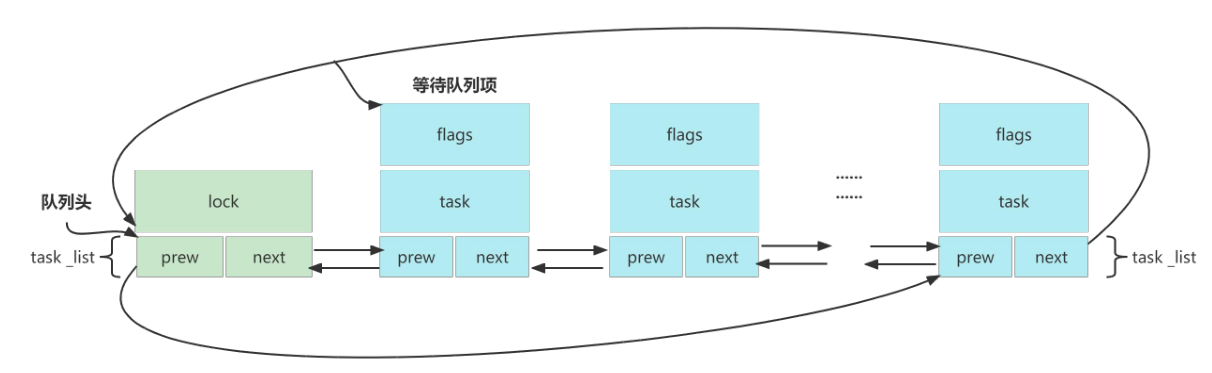
Definition
include/linux/wait.h
12345678910111213141516 | typedef struct wait_queue_entry wait_queue_entry_t;struct wait_queue_entry { unsigned int flags; void *private; wait_queue_func_t func; struct list_head entry;};struct wait_queue_head { spinlock_t lock; struct list_head head;};typedef struct wait_queue_head wait_queue_head_t;struct task_struct; |
Initialize waiting queue
| API | Purpose | Description / Parameters | Notes. |
|---|---|---|---|
DECLARE_WAIT_QUEUE_HEAD(name) | Statically define wait queue head | Generate one namednameThe global/static wait queue head | Most common way |
init_waitqueue_head(wq) | Dynamically initialize the waiting queue head | Applicable to wait queue heads in dynamically allocated structures. | Memory must be allocated first. |
Wait Queue Entry API
In most cases, these APIs are not needed; task is usually current.
| API | Purpose | Description / Parameters | Notes. |
|---|---|---|---|
DECLARE_WAITQUEUE(name, task) | Statically create a wait queue entry | taskUsually fill incurrent | Global or static scenario |
init_waitqueue_entry(&entry, task) | Dynamically initialize a queue entry | task is usuallycurrent | Dynamically create an entry |
add_wait_queue(head, entry) | Add a wait entry to the wait queue | Non-exclusive wait | Mostly used for low-level calls (not recommended for direct use) |
add_wait_queue_exclusive(head, entry) | Exclusive wait | When waking up, only wakes 1 exclusive process | Used for blocking queues such as write operations |
remove_wait_queue(head, entry) | Remove an entry from the wait queue | and add_wait_queue are paired |
Sleep wait API
| API | Purpose | Description | Return value / Notes |
|---|---|---|---|
wait_event(wq, condition) | If condition is not met → sleep (non-interruptible) | Returns when condition is true | Cannot be interrupted by signals |
wait_event_timeout(wq, condition, timeout) | Non-interruptible sleep + timeout | timeout is in jiffies | Return remaining jiffies or 0 on timeout |
wait_event_interruptible(wq, condition) | Interruptible sleep | Interruptible by signals | Return when interrupted-ERESTARTSYS |
wait_event_interruptible_timeout(wq, condition, timeout) | Interruptible + timeout | Return: >0 remaining time, 0 timeout, <0 interrupted by signal | |
wait_event_killable(wq, condition) | Interrupted only by fatal signals | Safer than interruptible | Interrupted by kill signal |
wait_event_killable_timeout(wq, condition, timeout) | killable + timeout | same as above |
wait_event_interruptibleIt does not continuously poll, but only evaluates the condition when called. If the condition is false, the process will enterTASK_INTERRUPTIBLEstate and be removed from the run queue.
Afterwards, each time it is called in the wait queuewake_up_interruptible, the condition is rechecked. Ifwake_up_interruptibleWhen it runs and finds the condition true, the processes in the wait queue will be woken up and their state set toTASK_RUNNING. Processes are woken in the order they went to sleep.
To wake up all processes waiting in the queue, you should usewake_up_interruptible_all
If it is calledwake_uporwake_up_interruptible, and the condition is still FALSE, nothing will happen. If it is not calledwake_up(orwake_up_interruptible), the process will never be woken up.
wait_event、wake_up and wake_up_all. They handle processes in the queue with exclusive (uninterruptible) waiting, because they cannot be interrupted by signals. They should only be used for critical tasks.
Interruptible functions are optional (but recommended). Since they can be interrupted by signals, their return value should be checked. A non-zero value means the sleep was interrupted by some signal, and the driver should return
ERESTARTSYS。
Wake-up API
| API | Purpose | Description / Parameters | Wake-up rules |
|---|---|---|---|
wake_up(&wq) | Wake up all non-exclusive waiters in the queue | Do not modify task state | Suitable for many readers, wake-up does not need to be restricted |
wake_up_all(&wq) | Wake up all waiters | Including exclusive | Force wake up all tasks |
wake_up_interruptible(&wq) | WakeupTASK_INTERRUPTIBLETask state | Adapt to interruptible wait | |
wake_up_interruptible_all(&wq) | Wake up all interruptible waiters | ||
wake_up_nr(&wq, nr) | Wake up nr exclusive waiters | Most commonly used:wake_up(&wq) | Exclusive wakes up only one |
There are two types of waiters in the wait queue:
| Type | How did it come about? | Typical scenarios |
|---|---|---|
| Non-exclusive | add_wait_queue() | Multiple readers (read) |
| exclusive | add_wait_queue_exclusive() | Writers, resource contention |
The design goal of exclusive is:
Avoid the ‘thundering herd’
Delay and timer management
Time is one of the most commonly used resources after memory. It is used to perform almost everything: delaying work, sleeping, scheduling, timeouts, and many other tasks.
There are two types of time. The kernel uses absolute time to know the exact time, i.e., the date and time of day, while relative time is used by the kernel scheduler.
- For absolute time, there is a hardware chip called the real-time clock (RTC).
- To handle relative time, the kernel relies on a CPU feature (peripheral) called a timer; from the kernel’s perspective, it is called a kernel timer.
Kernel timers are divided into two different parts.
- Standard timers or system timers.
- High-resolution timers.
Linux kernel standard timers
Standard timers are kernel timers that run at jiffy granularity.
The hardware provides the kernel with a system timer to calculate elapsed time (i.e., a timing method based on a future time point, with the current moment as the starting point and a future moment as the ending point),The kernel can calculate and manage time only with the help of the system timer., butthe precision of kernel timers is not high, so they cannot be used as high-resolution timers.
Moreover, kernel timers do not run periodically; they automatically stop after reaching the timing endpoint. To implement periodic timing, the timer must be restarted in the timer handler function.
Definition
The Linux kernel uses the timer_list structure to represent kernel timers.
include/linux/timer.h
1234567891011121314 | struct timer_list { /* * All fields that change during normal runtime grouped to the * same cacheline */ struct hlist_node entry; unsigned long expires; void (*function)(struct timer_list *); u32 flags; struct lockdep_map lockdep_map;}; |
DEFINE_TIMER
123456789101112 | // include/linux/timer.h |
You can use the following code to define the timer and the corresponding timer handler function.
1 | DEFINE_TIMER(timer_test,function_test);//Define a timer |
timer_setup()
| Item | Description |
|---|---|
| Function definition | void timer_setup(struct timer_list *timer, void (*callback)(struct timer_list *), unsigned int flags); |
| Header file | #include <linux/timer.h> |
| timer parameter | to be initializedstruct timer_listTimer object |
| callback parameter | The callback function executed after the timer expires, of typevoid (*)(struct timer_list *) |
| parameter flags | Timer flag bits (such asTIMER_DEFERRABLE、TIMER_PINNEDetc.) |
| Function | Initialize a timer object to prepare it for first use, and set the callback function and flags. |
| Return value | No return value (void) |
| Description | It only completes initialization and does not start the timer; it must be used withadd_timer()ormod_timer()before it will start timing. |
timer_setup_on_stack()
| Item | Description |
|---|---|
| Function definition | void timer_setup_on_stack(struct timer_list *timer, void (*callback)(struct timer_list *), unsigned int flags); |
| Header file | #include <linux/timer.h> |
| timer parameter | on the stackstruct timer_listTimer object |
| callback parameter | Callback function executed when the timer expires. |
| parameter flags | Timer flag |
| Function | Initialize a stack-allocated timer object |
| Return value | No return value (void) |
| Notes. | must be withdestroy_timer_on_stack()Use in pairs, otherwise it may cause kernel debugging warnings or resource issues. |
destroy_timer_on_stack()
| Item | Description |
|---|---|
| Function definition | static inline void destroy_timer_on_stack(struct timer_list *timer); |
| Header file | #include <linux/timer.h> |
| timer parameter | on the stackstruct timer_listTimer object |
| Function | Destroy a passtimer_setup_on_stack()Initialized on-stack timer |
| Return value | No return value (void) |
| Use case | Only for timers allocated on the stack (not heap/global variables) |
| Notes. | must be withtimer_setup_on_stack()Use in pairs |
add_timer()
| Item | Description |
|---|---|
| Function definition | void add_timer(struct timer_list *timer); |
| Header file | #include <linux/timer.h> |
| timer parameter | An initialized timer object must be set.expires(Expiration Time) andfunction(callback function) |
| Function | Register the timer with the kernel to start it. WhenexpiresCallback function triggered when the timer expires |
| Return value | No return value (void) |
del_timer()
| Item | Description |
|---|---|
| Function definition | int del_timer(struct timer_list *timer); |
| Header file | #include <linux/timer.h> |
| timer parameter | The timer object to be deleted |
| Function | Delete the timer from the kernel so that it no longer triggers. It does not wait for the callback to finish executing (if you need to wait, usedel_timer_sync()) |
| Return value | Successfully deleted:1(timer is active) no longer in the active queue:0 |
Note: Delete the timer from the kernel so that it no longer triggers. If you want to wait for the callback to finish executing, usedel_timer_sync(), wait for the handler (even if executed on another CPU) to complete. You should not hold a lock that prevents the handler from completing, as this will cause a deadlock.
The timer should be released in the module cleanup routine. You can calltimer_pending()function to independently check whether the timer is running
timer_pending()
This function checks whether there is a pending triggered timer callback function.
| Item | Description |
|---|---|
| Function definition | static inline int timer_pending(const struct timer_list *timer); |
| Header file | #include <linux/timer.h> |
| timer parameter | whose status is to be checkedstruct timer_listTimer object |
| Function | Determine whether the timer is currently in the “pending” (waiting to trigger) state |
| Return value | If the timer has been added to the kernel timer queue (is timing), returns 1; otherwise returns 0 |
| Notes. | The caller must ensure that access to the timer is protected against concurrency (e.g., by locking or being in the same context) |
mod_timer()
| Item | Description |
|---|---|
| Function definition | int mod_timer(struct timer_list *timer, unsigned long expires); |
| Header file | #include <linux/timer.h> |
| timer parameter | The timer object to be modified |
| Parameter expires | New expiration time (in jiffies) |
| Function | Modify the expiration time of the timer. If the timer is not active, it willautomatically activateIf activated, it willrestart the timer |
| Return value | Before modification, the timer is activated:1 Before modification, the timer is not activated:0 |
When using add_Before the timer() function registers a timer with the Linux kernel, you also need to set the timer time, which is determined by the timer_determined by the expires parameter in the list structure, in units of ticks. The system tick frequency can be set through the menuconfig graphical interface during Linux compilation, and the specific path is as follows:
12 | -> Kernel Features -> Timer frequency (<choice> [=y]) |
The system tick rates selectable in the current kernel code are 100Hz, 250Hz, 300Hz, and 1000Hz; by default, 300Hz is selected.
Global variable jiffies
The global variable jiffies is used to record the total number of ticks generated since system startup. jiffies_64 is used for 64-bit systems, while jiffies is used for 32-bit systems. At startup, the kernel initializes this variable to 0. After that, each clock interrupt handler increments the value of this variable. The value by which jiffies increases in one second is the configured number of system ticks. This variable is defined ininclude/linux/jiffies.hin the file (already included in timer.h, no need to include it again), the specific definition is as follows:
12 | extern u64 __cacheline_aligned_in_smp jiffies_64;extern unsigned long volatile __cacheline_aligned_in_smp __jiffy_arch_data jiffies; |
jiffies and time unit conversion functions
| Function definition | Function |
|---|---|
| int jiffies_to_msecs(const unsigned long j) | willjiffiesparameter of typejconvert to the corresponding milliseconds |
| int jiffies_to_usecs(const unsigned long j) | willjiffiesparameter of typejconvert to the corresponding microseconds |
| u64 jiffies_to_nsecs(const unsigned long j) | willjiffiesparameter of typejconvert to the corresponding nanoseconds |
| long msecs_to_jiffies(const unsigned int m) | Convert milliseconds tojiffiesType |
| long usecs_to_jiffies(const unsigned int u) | Convert microseconds tojiffiesType |
| unsigned long nsecs_to_jiffies(u64 n) | Convert nanoseconds tojiffiesType |
example
123456789101112131415161718192021222324252627282930313233343536373839404142434445464748495051525354555657585960616263646566676869707172737475767778798081828384858687888990919293949596979899100101102103104105106107108109110111112113114115116117118119120121122123124125126127128129 | struct drv_data { dev_t dev_num; struct cdev cdev; struct class *class; struct device *dev;};static struct drv_data *drv_dat;static void timer_irq_func(struct timer_list *t);DEFINE_TIMER(timer_test, timer_irq_func);int timer_mod_test_open(struct inode *inode, struct file *file){ file->private_data = drv_dat; pr_info("open is called by pid: %d\n", task_pid_nr(current)); return 0;}ssize_t timer_mod_test_read(struct file *file, char __user *buf, size_t size, loff_t *offset){ size_t len = min(sizeof(u64) + 1, size); char kbuf[72]; snprintf(kbuf, sizeof(kbuf), "%llu", (unsigned long long)jiffies_to_msecs(get_jiffies_64())); if (copy_to_user(buf, kbuf, len) != 0) return -EFAULT; pr_info("read is called by pid: %d\n", task_pid_nr(current)); return len;}int timer_mod_test_release(struct inode *inode, struct file *file){ pr_info("release is called by pid: %d\n", task_pid_nr(current)); return 0;}struct file_operations fops = { .owner = THIS_MODULE, .open = timer_mod_test_open, .read = timer_mod_test_read, .release = timer_mod_test_release,};static void timer_irq_func(struct timer_list *t){ pr_info("timer_irq_func is called\n"); mod_timer(&timer_test, jiffies_64 + msecs_to_jiffies(3000));}static int __init timer_mod_test_init(void){ int ret; drv_dat = kzalloc(sizeof(struct drv_data), GFP_KERNEL); if (drv_dat == NULL) { ret = -ENOMEM; goto kzalloc_fail; } ret = alloc_chrdev_region(&drv_dat->dev_num, 1, 0, "timer_mod_test_chrdev_region"); if (ret < 0) goto alloc_chrdev_region_fail; cdev_init(&drv_dat->cdev, &fops); drv_dat->cdev.owner = THIS_MODULE; ret = cdev_add(&drv_dat->cdev, drv_dat->dev_num, 1); if (ret < 0) goto cdev_add_fail; drv_dat->class = class_create(THIS_MODULE, "chrdev"); if (IS_ERR(drv_dat->class)) { ret = PTR_ERR(drv_dat->class); goto class_create_fail; } drv_dat->dev = device_create(drv_dat->class, NULL, drv_dat->dev_num, NULL, "timer_test%d", 0); if (IS_ERR(drv_dat->dev)) { ret = PTR_ERR(drv_dat->dev); goto device_create_fail; } // After setting timer_test to 5s timer_test.expires = jiffies_64 + msecs_to_jiffies(3000); // Add a timer add_timer(&timer_test); return 0;device_create_fail: class_destroy(drv_dat->class);class_create_fail: cdev_del(&drv_dat->cdev);cdev_add_fail: unregister_chrdev_region(drv_dat->dev_num, 1);alloc_chrdev_region_fail: kfree(drv_dat);kzalloc_fail: return ret;}static void __exit timer_mod_test_exit(void){ // Delete timer del_timer(&timer_test); device_destroy(drv_dat->class, drv_dat->dev_num); class_destroy(drv_dat->class); cdev_del(&drv_dat->cdev); unregister_chrdev_region(drv_dat->dev_num, 1); kfree(drv_dat);}module_init(timer_mod_test_init);module_exit(timer_mod_test_exit);MODULE_LICENSE("GPL");MODULE_AUTHOR("even629<asqwgo@outlook.com>");MODULE_DESCRIPTION("This is a test sample for linux timer"); |
You can use atomic variables and timer to make a timer, as shown in the following example:
123456789101112131415161718192021222324252627282930313233343536373839404142434445464748495051525354555657585960616263646566676869707172737475767778798081828384858687888990919293949596979899100101102103104105106107108109110111112113114115116117118119120121122123124125126127128129130131132133 | struct timer_drv_data { dev_t dev_num; struct cdev cdev; struct class *class; struct device *dev; atomic64_t sec;};static struct timer_drv_data *timer_drv_data;static void timer_sec_func(struct timer_list *t);DEFINE_TIMER(timer_sec, timer_sec_func);int timer_sec_test_open(struct inode *inode, struct file *file){ file->private_data = timer_drv_data; // Initialized to 0 atomic64_set(&timer_drv_data->sec, 0); add_timer(&timer_sec); pr_info("open is called by pid: %d\n", task_pid_nr(current)); return 0;}ssize_t timer_sec_test_read(struct file *file, char __user *buf, size_t size, loff_t *offset){ struct timer_drv_data *dat = file->private_data; size_t len; char kbuf[128]; snprintf(kbuf, sizeof(kbuf), "current sec: %llu\n", atomic64_read(&dat->sec)); len = min(size, strlen(kbuf) + 1); if (copy_to_user(buf, kbuf, len) != 0) return -EFAULT; return len;}int timer_sec_test_release(struct inode *inode, struct file *file){ del_timer(&timer_sec); pr_info("release is called by pid: %d\n", task_pid_nr(current)); return 0;}struct file_operations fops = { .owner = THIS_MODULE, .open = timer_sec_test_open, .read = timer_sec_test_read, .release = timer_sec_test_release,};static void timer_sec_func(struct timer_list *t){ atomic64_inc(&timer_drv_data->sec); mod_timer(&timer_sec, get_jiffies_64() + msecs_to_jiffies(1000));}static int __init timer_sec_init(void){ int ret; timer_drv_data = kzalloc(sizeof(struct timer_drv_data), GFP_KERNEL); if (timer_drv_data == NULL) { ret = -ENOMEM; goto kzalloc_fail; } ret = alloc_chrdev_region(&timer_drv_data->dev_num, 0, 1, "test_chrdev_region"); if (ret < 0) goto alloc_chrdev_region_fail; cdev_init(&timer_drv_data->cdev, &fops); timer_drv_data->cdev.owner = THIS_MODULE; ret = cdev_add(&timer_drv_data->cdev, timer_drv_data->dev_num, 1); if (ret < 0) goto cdev_add_fail; timer_drv_data->class = class_create(THIS_MODULE, "chrdev"); if (IS_ERR(timer_drv_data->class)) { ret = PTR_ERR(timer_drv_data->class); goto class_create_fail; } timer_drv_data->dev = device_create(timer_drv_data->class, NULL, timer_drv_data->dev_num, NULL, "timer_sec%d", 0); if (IS_ERR(timer_drv_data->dev)) { ret = PTR_ERR(timer_drv_data->dev); goto device_create_fail; } return 0;device_create_fail: class_destroy(timer_drv_data->class);class_create_fail: cdev_del(&timer_drv_data->cdev);cdev_add_fail: unregister_chrdev_region(timer_drv_data->dev_num, 1);alloc_chrdev_region_fail: kfree(timer_drv_data);kzalloc_fail: return ret;}static void __exit timer_sec_exit(void){ class_destroy(timer_drv_data->class); cdev_del(&timer_drv_data->cdev); unregister_chrdev_region(timer_drv_data->dev_num, 1); kfree(timer_drv_data);}module_init(timer_sec_init);module_exit(timer_sec_exit);MODULE_LICENSE("GPL");MODULE_AUTHOR("even629<asqwgo@outlook.com>");MODULE_DESCRIPTION("This is a sec timer"); |
Linux High Resolution Timer (HRT)
hrtimer= **High Resolution Timer (high-precision timer)**Enabled by the kernel configurationCONFIG_HIGH_RES_TIMERSoption, with the following features:
- Nanosecond-level precision (based on ktime)
- Suitable for high-precision periodic tasks
- Runs in softirq context
- Supports periodic or one-shot triggering
Compared with traditionaltimer_listthe difference:
| Item | timer_list | hrtimer |
|---|---|---|
| Precision | jiffies level | Nanosecond-level |
| Precision depends on | HZ | hardware high-precision clock |
| Suitable for | ordinary delays | high-precision periodic tasks |
Unit Symbol Equivalent in seconds Application scenario Millisecond ms 10⁻³ s = 0.001 s Computer response, audio Microsecond μs 10⁻⁶ s Electronics, network latency Nanosecond ns 10⁻⁹ s CPU clock cycle, light propagation Picosecond ps 10⁻¹² s Laser, quantum physics Femtosecond fs 10⁻¹⁵ s Chemical reaction dynamics Attosecond as 10⁻¹⁸ s Electron motion inside atoms (related to the 2023 Nobel Prize in Physics)
Header file:
1 | |
Check whether HRT is available on the system.
- View the kernel configuration file, which should contain something like this:
CONFIG_HIGH_RES_TIMERS=y - view
cat /proc/timer_list | grep resolutionthe result of..resolutionThe item must display1 nsecs, the event handler must displayhrtimer_interrupts。 - use
clock_getressystem calls. - In the kernel code, use
#ifdef CONFIG_HIGH_RES_TIMERS。
When HRT is enabled on the system, the precision of sleep and timer system calls no longer depends on jiffies, but they are as precise as HRT. This is why some systems do not supportnanosleep()and the like.
struct hrtimer
12345678910111213141516171819202122232425262728293031 | /** * struct hrtimer - the basic hrtimer structure * @node: timerqueue node, which also manages node.expires, * the absolute expiry time in the hrtimers internal * representation. The time is related to the clock on * which the timer is based. Is setup by adding * slack to the _softexpires value. For non range timers * identical to _softexpires. * @_softexpires: the absolute earliest expiry time of the hrtimer. * The time which was given as expiry time when the timer * was armed. * @function: timer expiry callback function * @base: pointer to the timer base (per cpu and per clock) * @state: state information (See bit values above) * @is_rel: Set if the timer was armed relative * @is_soft: Set if hrtimer will be expired in soft interrupt context. * @is_hard: Set if hrtimer will be expired in hard interrupt context * even on RT. * * The hrtimer structure must be initialized by hrtimer_init() */struct hrtimer { struct timerqueue_node node; ktime_t _softexpires; enum hrtimer_restart (*function)(struct hrtimer *); struct hrtimer_clock_base *base; u8 state; u8 is_rel; u8 is_soft; u8 is_hard;}; |
hrtimer_init()
Initialize hrtimer. Before hrtimer initialization, you need to set ktime, which represents the duration.
| Item | Description |
|---|---|
| Prototype | void hrtimer_init(struct hrtimer *timer, clockid_t which_clock, enum hrtimer_mode mode); |
| Function | Initialize hrtimer |
| Parameters | timer: timer which_clock: clock source mode: mode |
| Return value | None |
Common clock:
- CLOCK_MONOTONIC
- CLOCK_REALTIME
Common mode:
- HRTIMER_MODE_REL (relative time, relative to the current time value)
- HRTIMER_MODE_ABS (absolute time)
hrtimer_start()
| Item | Description |
|---|---|
| Prototype | int hrtimer_start(struct hrtimer *timer, ktime_t tim, const enum hrtimer_mode mode); |
| Function | Start the timer |
| Parameters | timer: timer tim: time mode: mode |
| Return value | 0 or 1 |
hrtimer_cancel()
| Item | Description |
|---|---|
| Prototype | int hrtimer_cancel(struct hrtimer *timer); |
| Function | Cancel the timer |
| Return value | 1 = successfully canceled; 0 = not running |
hrtimer_try_to_cancel()
| Item | Description |
|---|---|
| Function definition | extern int hrtimer_try_to_cancel(struct hrtimer *timer); |
| Header file | #include <linux/hrtimer.h> |
| timer parameter | to be canceledstruct hrtimerHigh-resolution timer object |
| Function | Attempt to cancel a high-resolution timer (non-blocking) |
| Return value | >0: Successfully canceled (timer is active) 0: Timer is not active (expired or not started) -1: Timer callback function is executing, cannot cancel |
| Whether it blocks | ❌ Does not wait for callback execution to complete (non-blocking), can be called in interrupt context |
hrtimer_try_to_cancel internally calls hrtimer_callback_running
hrtimer_callback_running()
Independently check whether the hrtimer callback function is still running:
| Item | Description |
|---|---|
| Function definition | static inline int hrtimer_callback_running(struct hrtimer *timer); |
| Header file | #include <linux/hrtimer.h> |
| timer parameter | whose status is to be checkedstruct hrtimerHigh-resolution timer object |
| Function | Determine whether the hrtimer’s callback function is currently executing |
| Return value | If the callback is executing, returns non-zero (true); otherwise returns 0 (false) |
| Whether it blocks | ❌ Does not block, only performs a status check |
| Use case | Used to detect callback execution status, often used in conjunction withhrtimer_try_to_cancel()use |
12345678 | /* * Helper function to check, whether the timer is running the callback * function */static inline int hrtimer_callback_running(struct hrtimer *timer){ return timer->base->running == timer;} |
hrtimer_forward_now()
| Item | Description |
|---|---|
| Prototype | u64 hrtimer_forward_now(struct hrtimer *timer, ktime_t interval); |
| Function | Used for periodic timing |
| Return value | Number of forwards |
Callback return value
1234 | enum hrtimer_restart { HRTIMER_NORESTART, // Execute only once HRTIMER_RESTART, // Continue execution}; |
To prevent the timer from automatically restarting, the hrtimer callback function must return HRTIMER_NORESTART
example
12345678910111213141516171819202122232425262728293031323334353637383940 | static struct hrtimer my_timer;static ktime_t period;static enum hrtimer_restart my_timer_callback(struct hrtimer *timer){ printk("hrtimer fired\n"); // Periodic timing hrtimer_forward_now(timer, period); return HRTIMER_RESTART;}static int __init my_init(void){ printk("hrtimer init\n"); period = ktime_set(1, 0); // 1 second hrtimer_init(&my_timer, CLOCK_MONOTONIC, HRTIMER_MODE_REL); my_timer.function = my_timer_callback; hrtimer_start(&my_timer, period, HRTIMER_MODE_REL); return 0;}static void __exit my_exit(void){ hrtimer_cancel(&my_timer); printk("hrtimer exit\n");}module_init(my_init);module_exit(my_exit);MODULE_LICENSE("GPL"); |
Dynamic Tick/Tickless kernel
With the previous HZ option, even when idle, the kernel interrupts HZ times per second to schedule tasks again. If HZ is set to 1000, there will be 1000 kernel interrupts per second, preventing the CPU from staying idle for long periods, thus affecting CPU power consumption.
Now let’s take a lookKernels without a fixed or predefined tick, in these kernels,the tick is disabled until some task needs to be executed. Such kernels are called Tickless (no-tick) kernels.
In fact, tick activation is scheduled based on the next operation, so the correct name should be dynamic tick kernel. The kernel is responsible for task scheduling in the system and maintains a list of runnable tasks (run queue). When there are no tasks to schedule, the scheduler switches to the idle thread, and it enables dynamic tick by,disabling the periodic tick until the next timer expires (when a new task is queued for processing)。
The kernel also maintains a task timeout list internally (it knows when to sleep and for how long).
- In the idle state, if the next tick is farther away than the smallest timeout in the task timeout list, the kernel programs the timer with that timeout value.
- When the timer expires, the kernel re-enables the periodic tick and calls the scheduler, which schedules the task associated with the timeout.
In this way, the Tickless kernel removes the periodic tick and saves power.
Delays and sleep in the kernel
There are two types of delays, depending on the context in which the code runs:atomic or non-atomic. The header file required for handling kernel delays is#include <linux/delay.h>。
atomic context
Tasks in atomic context (such as ISRs) cannot enter a sleeping state, and cannot be scheduled. This is the reasonwhy delays in atomic context must use busy-wait loops. The kernel provides the Xdelay series of functions, which consume enough time in a busy loop (based on jiffies) to obtain the required delay.
ndelay(unsigned long nsecs)。udelay(unsigned long usecs)。mdelay(unsigned long msecs)。
For short delays in the microsecond range, it is recommended to useudelay(), becausendelay()The precision depends on the precision of the hardware timer (not necessarily guaranteed on embedded SoCs). For millisecond-level delays, usemsleep()series functions rather thanmdelay(), becausemdelay()It is busy waiting, which wastes CPU resources.
The timer handler (callback) executes in an atomic context, which means that sleeping is not allowed at all. This refers to all functions that may cause the calling program to sleep, such as allocating memory, locking mutexes, explicitly callingsleep()functions, etc.
Non-atomic context
In a non-atomic context, the kernel providessleep[_range]a series of functions; which one to use depends on how long the delay needs to be.
udelay(unsigned long usecs): Based on a busy-wait loop. If you need to sleep for a few microseconds (about 10 us or less), you should use this function.usleep_range(unsigned long min, unsigned long max): It relies on hrtimer; for sleeping from a few microseconds to a few milliseconds (10 us to 20
ms), it is recommended to use it, avoiding the use ofudelay()the busy-wait loop.msleep(unsigned long msecs): Supported by jiffies/traditional timers. For long sleeps of more than a few milliseconds (10 ms+), use this function.
Kernel source documentation
Documentation/timers/timers-howto.rstexplains in detail topics related to sleep and delay.
Calling user-space programs from the kernel
Consider the following example:
1234567891011121314151617181920212223242526272829303132333435363738394041424344 | static struct delayed_work initiate_shutdown_work;static void delayed_shutdown(struct work_struct *work){ char *cmd = "/sbin/shutdown"; char *argv[] = { cmd, "-h", "now", NULL, }; char *envp[] = { "HOME=/", "PATH=/sbin:/bin:/usr/sbin:/usr/bin", NULL, }; call_usermodehelper(cmd, argv, envp, 0);}static int __init my_shutdown_init( void ){ INIT_DELAYED_WORK(&delayed_shutdown, delayed_shutdown); schedule_delayed_work(&delayed_shutdown, msecs_to_jiffies(200)); return 0;}static void __exit my_shutdown_exit( void ){ return;}module_init( my_shutdown_init );module_exit( my_shutdown_exit );MODULE_LICENSE("GPL");MODULE_AUTHOR("John Madieu <john.madieu@gmail.com>");MODULE_DESCRIPTION("Simple module that trigger a delayed shut down"); |
In the previous example, the API used (call_usermodehelper) is part of the Usermode-helper API, and all functions are defined inkernel/kmod.cinside. Its usage is very simple. It is used by the kernel, for example, for module loading/unloading and Cgroup management.
I/O model
I/O operation process
A complete I/O process typically includes the following key steps:
- I/O call: The application initiates an I/O request to the kernel through the system call interface (e.g., reading a file).
- I/O execution: After receiving the request, the kernel operates the hardware through drivers to complete the specific I/O (e.g., reading data from disk), and returns the final result to user space.
A complete I/O process needs to include the following three steps:
- A user-space application initiates an I/O call request (system call) to the kernel.
- The OS kernel prepares the data, loading the I/O device data into the kernel buffer.
- The operating system copies data, copying the data from the kernel buffer to the user process buffer.
Classification of I/O models
In actual development, I/O operations often become a key factor affecting program performance. Suppose there is a scenario: read 100MB of data from disk and process it. Reading the data takes 20 seconds, and processing the data also takes 20 seconds. If the most traditional sequential flow is adopted—read first, then process—the entire process takes about 40 seconds, which is clearly inefficient. So can we process the data while waiting for it? Of course! This is where the I/O programming model comes in.
Under the POSIX/Linux definition, I/O models include blocking I/O, non-blocking I/O, signal-driven I/O, I/O multiplexing, and asynchronous I/O. The first four are called synchronous I/O.
- Synchronous I/O
- Blocking I/O
- Non-blocking I/O
- I/O multiplexing
- Signal-driven I/O
- Asynchronous I/O
The difference between synchronous and asynchronous lies inwhether to wait for the execution result of I/O, or rather, who completes the copying of data to user space.?。
Synchronous I/O:The final action of copying data from the kernel to user space is completed by the user thread when
read()the call is madeAsynchronous I/O:
- User mode initiates an I/O request → returns immediately
- The kernel completes the I/O in the background
- Data has been copied to user space
- The kernel notifies the process: I/O complete
Synchronous blocking I/O
When a process performs an I/O operation (such as a read operation), it first issues a system call, thereby switching to kernel space for processing,When the data in kernel space is not ready, the process will be blocked and will not continue executing downward, until the data in kernel space is ready, the data is copied from kernel space to user space, and finally returned to the application process, where user space processes the data.

Blocking I/O can obtain results in a timely manner and immediately process the obtained results. However, before obtaining the results, it cannot handle other tasks and needs to constantly monitor the results. For example,the scanf function in C language。
Synchronous non-blocking I/O
Unlike the blocking I/O model, when non-blocking I/O performs an I/O operation,if the kernel data is not ready, the kernel will immediately return an err to the processand will not block; if the kernel-space data is ready, the kernel will immediately return the data to the process in user space.

The advantage of non-blocking I/O is high efficiency; it can do other things in the same amount of time. However, its disadvantage is also obvious: when it needs to frequently check the data readiness status, it may cause high CPU usage. To solve this problem, non-blocking I/O is usually used in combination with I/O multiplexing technology.
I/O multiplexing
The select(), poll(), and epoll() functions are mechanisms for implementing I/O multiplexing.
I/O multiplexing allowsa single process to monitor multiple descriptors. When a descriptor is found to be ready, it will notify the program to perform the corresponding read/write operation.。
Take the select() function as an example, as shown in the figure. When using it, you need to pass the set of file descriptors to be monitored and the timeout period to select().
When select() is executed, the system triggers a system call,and the kernel will traverse and check whether these descriptors have triggered the target event(such as readable or writable). If an event is detected, it returns immediately; ifno event is detected, the process will enter a blocking state and sleep,until any descriptor becomes ready or a timeout occurs.。
After select() returns, user space needs to traverse all descriptors to confirm one by one which one triggered the event, thereby achieving the effect of a single thread managing multiple I/O operations simultaneously.

The advantage of I/O multiplexing is that one process/thread can simultaneously monitor and handle multiple I/O streams, greatly improving efficiency. However, I/O multiplexing is not a panacea,Although I/O multiplexing can monitor multiple I/O streams, the processing of results can only be done sequentially in practice, and is moresuitable for I/O-intensive scenarios where each I/O stream has a small amount of data and arrival times are scattered.(such as network chat).
In addition, the descriptors monitored by select have an upper limit (generally the maximum number of descriptors does not exceed 1024), andit is necessary to traverse to find out which IO produced the data. Therefore, when there are many IOs, the efficiency is not high (this problem is solved by epoll).
Signal-driven I/O
Signal-driven I/O means thatthe process tells the kernel in advance that when an event occurs on a descriptor, the kernel should send a SIGIO signal to the process to notify it, and the process can handle the event in the signal handler function.
For example, in a Linux system, when a user presses Ctrl+C to terminate a running task, the system actually sends a SIGINT signal to the process, and the default handler for this signal is to exit the current program.
Specifically for the I/O model, the process needs to first register a corresponding signal handler for the SIGIO signal and enable signal-driven mode for the corresponding descriptor. When data is ready, the process receives a SIGIO signal and can call I/O operation functions in the signal handler to process the data.

Asynchronous I/O
aio_read()The function is often used for asynchronous I/O. When a process uses itaio_read()to read data,if the data is not ready, it returns immediately without blocking。
if the data is ready, it copies the data from kernel space to a buffer in user space, and thenexecutes a defined callback function to process the received data。

However, for Linux AIO, Linux AIO only supports direct I/O modestorage files (storage file), and is mainly used inthe database niche;
Andio_uringsupports storage files and network files (network sockets), and also supports more asynchronous system calls (accept/openat/stat/...), rather than onlyread/writesystem calls.
Wait queues implement blocking I/O
In Linux drivers,blocking processes can be implemented using wait queues。
Step 1: Initialize the wait queue head and set the condition to false (condition=0).
Step 2: Call where blocking is requiredwait_event(), causing the process to enter a sleep state.
Step 3: When the condition is met, to wake up, first set the condition (condition=1), then callwake_up()function to wake up the sleeping processes in the wait queue.
Driver:
123456789101112131415161718192021222324252627282930313233343536373839404142434445464748495051525354555657585960616263646566676869707172737475767778798081828384858687888990919293949596979899100101102103104105106107108109110111112113114115116117118119120121122123124125126127128129130131132133134135136137138139140141142143144145146147148149150151152153 | struct waitqueue_drv_data { dev_t dev_num; struct cdev cdev; struct class *class; struct device *dev; char kbuf[KBUF_CAPACITY]; bool kbuf_ready; wait_queue_head_t waitque;};static struct waitqueue_drv_data *drv_dat;// DECLARE_WAIT_QUEUE_HEAD(waitque);int waitqueue_test_open(struct inode *inode, struct file *file){ file->private_data = drv_dat; pr_info("waitqueue_test_open is called\n"); return 0;}ssize_t waitqueue_test_read(struct file *file, char __user *buf, size_t size, loff_t *offset){ struct waitqueue_drv_data *dat = file->private_data; size_t len; int ret; // If opened in non-blocking mode if (file->f_flags & O_NONBLOCK) { if (!dat->kbuf_ready) return -EAGAIN; } else { // Open in blocking mode ret = wait_event_interruptible(dat->waitque, dat->kbuf_ready == true); if (ret < 0) { pr_err("waitque_test_read is interrupted\n"); return ret; } } len = min(size, (size_t)strlen(dat->kbuf)); if (copy_to_user(buf, dat->kbuf + *offset, len) != 0) return -EFAULT; dat->kbuf_ready = false; return len;}ssize_t waitqueue_test_write(struct file *file, const char __user *buf, size_t size, loff_t *offset){ struct waitqueue_drv_data *dat = file->private_data; size_t len = min(size, (size_t)(KBUF_CAPACITY - 1)); if (copy_from_user(dat->kbuf, buf, len) != 0) return -EFAULT; dat->kbuf[len] = '\0'; dat->kbuf_ready = true; wake_up_interruptible(&dat->waitque); return len;}int waitqueue_test_release(struct inode *inode, struct file *file){ pr_info("waitqueue_test_release is called\n"); return 0;}static struct file_operations fops = { .owner = THIS_MODULE, .open = waitqueue_test_open, .read = waitqueue_test_read, .write = waitqueue_test_write, .release = waitqueue_test_release,};static int __init waitqueue_test_init(void){ int err; drv_dat = (struct waitqueue_drv_data *)kzalloc(sizeof(struct waitqueue_drv_data), GFP_KERNEL); if (drv_dat == NULL) goto kzalloc_fail; err = alloc_chrdev_region(&drv_dat->dev_num, 0, 1, "waitque_drv_chrdev_region"); if (err < 0) goto alloc_chrdev_region_fail; cdev_init(&drv_dat->cdev, &fops); drv_dat->cdev.owner = THIS_MODULE; err = cdev_add(&drv_dat->cdev, drv_dat->dev_num, 1); if (err < 0) goto cdev_add_fail; drv_dat->class = class_create(THIS_MODULE, "chrdev"); if (IS_ERR(drv_dat->class)) { err = PTR_ERR(drv_dat->class); goto class_create_fail; } drv_dat->dev = device_create(drv_dat->class, NULL, drv_dat->dev_num, NULL, "waitqueue_test%d", 0); if (IS_ERR(drv_dat->dev)) { err = PTR_ERR(drv_dat->dev); goto device_create_fail; } // Initialize waiting queue init_waitqueue_head(&drv_dat->waitque); return 0;device_create_fail: class_destroy(drv_dat->class);class_create_fail: cdev_del(&drv_dat->cdev);cdev_add_fail: unregister_chrdev_region(drv_dat->dev_num, 1);alloc_chrdev_region_fail: kfree(drv_dat);kzalloc_fail: return err;}static void __exit waitqueue_test_exit(void){ device_destroy(drv_dat->class, drv_dat->dev_num); class_destroy(drv_dat->class); cdev_del(&drv_dat->cdev); unregister_chrdev_region(drv_dat->dev_num, 1); kfree(drv_dat);}module_init(waitqueue_test_init);module_exit(waitqueue_test_exit);MODULE_LICENSE("GPL");MODULE_AUTHOR("even629<asqwgo@163.com>");MODULE_DESCRIPTION("waitqueue sample"); |
Test
1234567891011121314 | $ cat /dev/waitqueue_test0 &[ 18.186918] waitqueue_test_open is called$ echo "Hello World" > /dev/waitqueue_test0[ 33.059018] waitqueue_test_open is called[ 33.060401] waitqueue_test_release is calledHello World$ echo "Hello Linux" > /dev/waitqueue_test0[ 43.618554] waitqueue_test_open is called[ 43.619516] waitqueue_test_release is calledHello Linux |
Non-blocking access
The application can use the example code shown below to implement blocking access:
12345 | int fd;int data = 0;fd = open("/dev/xxx_dev", O_RDWR);/* Open in blocking mode */ret = read(fd, &data, sizeof(data));/* Read data */ |
It can be seen that forthe default read mode for device driver files is blocking, so the previous experiment routine tests all used blocking I/O.
If the application wants to access the driver device file in a non-blocking manner, it can use the following code:
1234 | int fd;int data = 0;fd = open("/dev/xxx_dev", O_RDWR | O_NONBLOCK); /*Open in non-blocking mode */ret = read(fd, &data, sizeof(data)); /* Read data */ |
Use the open function to open “/dev/xxx_dev” device file, add the parameter “O__NONBLOCK”, indicating that the device is opened in non-blocking mode, so reading data from the device is non-blocking.
Driver
Through the f in the file structure_In flags, check whether the application passes O_Open in NONBLOCK mode
12345678 | static ssize_t cdev_test_read(struct file *file, char __user *buf, size_t size, loff_t *off){ struct device_test *test_dev=(struct device_test *)file->private_data; if(file->f_flags & O_NONBLOCK ){ if (test_dev->flag !=1) return -EAGAIN; } ... |
Implementation of IO multiplexing
IO multiplexing is a synchronous IO model. IO multiplexing canenable a process to monitor multiple file descriptorsOnce a file descriptor is ready, the application is notified to perform the corresponding read/write operation. When no file descriptor is ready, the application is blocked, thereby releasing CPU resources.
At the application layer, Linux provides three models for implementing IO multiplexing: select, poll, and epoll.
- poll and select are basically the same; both can monitor multiple file descriptors, and obtain ready file descriptors by polling the file descriptors.
- epoll changes active polling into passive notification; when an event occurs, it passively receives the notification.
Linux application-layer poll
| Item | content |
|---|---|
| Function | Monitor read/write events or exception events of multiple file descriptors |
| Prototype | int poll(struct pollfd *fds, nfds_t nfds, int timeout); |
| Parameters | -fds: struct pollfd array, describing the monitored file descriptors and events - nfds: number of monitored fds- timeout: timeout (ms)>0: wait for the specified time; = 0: return immediately; -1: block forever until an event occurs |
| Return value | >0: returns revents ≠ 0 the number of fds =0: timeout -1: failure |
struct pollfd
12345 | struct pollfd { int fd; // monitored file descriptors short events; // events to be monitored short revents; // events returned by the kernel}; |
events and revents of pollfd
| Event type | Constant | As the value of events | As the value of revents | Description |
|---|---|---|---|---|
| Read event | POLLIN | ✔ | ✔ | Has normal data to read |
| Read event | POLLRDNORM | ✔ | ✔ | Readable (normal data) |
| Read event | POLLRDBAND | ✔ | ✔ | Readable (out-of-band data) |
| Read event | POLLPRI | ✔ | ✔ | Readable (high-priority data) |
| Write event | POLLOUT | ✔ | ✔ | Writable |
| Write event | POLLWRNORM | ✔ | ✔ | Writable (normal data) |
| Write event | POLLWRBAND | ✔ | ✔ | Writable (out-of-band data) |
| Error event | POLLERR | ✔ | An error occurred | |
| Error event | POLLHUP | ✔ | A hang occurred | |
| Error event | POLLNVAL | ✔ | Descriptor is not an open file |
Driver-level poll
| Item | content |
|---|---|
| Prototype | unsigned int (*poll)(struct file *filp, struct poll_table_struct *wait); |
| Function | Tell the kernel whether the current device can be accessed in a non-blocking manner (readable/writable). |
| Parameters | -filp: pointer to the file structure - wait: poll_table passed in by the kernel, used to register wait queues |
| Return value | Returns a status bitmask (same as events such as POLLIN/POLLOUT). |
If you need to implement passive waiting (without wasting CPU cycles when monitoring character devices), you must implementpoll()function, whenever a user-space program executes a system call on the file associated with the deviceselect()orpoll()it will be calledpoll()function.
The core kernel function of this method ispoll_wait(), which is defined in<linux/poll.h>in; this header file should be included in the driver code.
Implementation in the driver
poll_wait()
| Item | content |
|---|---|
| Function | Add the driver’s wait queue to the poll_table, used for select/poll/epoll. |
| Prototype | void poll_wait(struct file *filp, wait_queue_head_t *queue, poll_table *wait); |
| Header file | #include <linux/poll.h> |
| Parameters | -filp: file - queue: wait queue head (wait_queue_head_t) - wait: poll_table (from the application layer) |
| Return value | None |
| Features | Will not block! It only registers the wait queue. |
poll_wait()According to the events registered in thestruct poll_tablestructure (passed as the third parameter), add the device associated with thestruct filepstructure (as the first parameter) to the list of devices that can wake up the process (specified by the second parameterstruct wait_queue_head_tstructure, in which the process sleeps).
The user process can runpoll()、select()orepoll()The system call adds a set of files that need to be waited on to the wait queue, to learn whether any related device is ready.
Afterwards, the kernel will call the poll entry of the driver associated with each device file. Each driver’s poll method then calls poll_wait to register events for processes that need to receive kernel notifications, put the processes to sleep before these events occur, and register the driver as one that can wake up the processes.
Step
- For each event type (read, write, exception) that requires passive waiting, declare a wait queue; when no data is readable or the device is not writable, put the task into that queue:
12 | static DECLARE_WAIT_QUEUE_HEAD(my_wq);static DECLARE_WAIT_QUEUE_HEAD(my_rq); |
- Implement the poll function like this.
12345678910111213 | static unsigned int eep_poll(struct file *file, poll_table *wait){ unsigned int reval_mask = 0; poll_wait(file, &my_wq, wait); poll_wait(file, &my_rq, wait); if (new-data-is-ready) reval_mask |= (POLLIN | POLLRDNORM); if (ready_to_be_written) reval_mask |= (POLLOUT | POLLWRNORM); return reval_mask;} |
- When there is new data or the device is writable, notify the wait queue:
12 | wake_up_interruptible(&my_rq); /* Ready to read */wake_up_interruptible(&my_wq); /* Ready to write */ |
The following two methods can be used to notify the readable event:
- Notify in the driver’s write() method, which means the written data can be read back;
- Notify in the IRQ handler, which means data sent by the external device can be read back.
The following two methods can be used to notify the writable event:
- Notify in the driver’s read() method, which means the buffer is empty and can be refilled;
- Notify in the IRQ handler, which means the device has finished sending data and is ready to receive data again.
example
app read.c
123456789101112131415161718192021222324252627282930313233343536373839404142434445464748495051525354555657585960616263646566676869707172737475767778798081828384858687888990919293 | int main(int argc, char **argv){ pid_t pid; int fd, ret; char prefix[32]; int ops_nr = 10; pid = fork(); if (pid < 0) { perror("[fork error]"); exit(EXIT_FAILURE); } else if (pid == 0) { //child char buf[32]; int i; sprintf(prefix, "[child, pid:%d]:", getpid()); fd = open("/dev/poll_test0", O_RDWR); if (fd < 0) { fprintf(stderr, "%s Error: %s(errno:%d)\n", prefix, strerror(errno), errno); exit(EXIT_FAILURE); } // child write for about 10 secs for (i = 0; i < ops_nr; i++) { sprintf(buf, "%d", i); ret = write(fd, buf, strlen(buf) + 1); if (ret < 0) { close(fd); fprintf(stderr, "%s Error: %s(errno:%d)\n", prefix, strerror(errno), errno); exit(EXIT_FAILURE); } sleep(1); } close(fd); } else { // parent char buf[32]; struct pollfd poll_fds[1]; sprintf(prefix, "[parent, pid:%d]:", getpid()); fd = open("/dev/poll_test0", O_RDWR); if (fd < 0) { fprintf(stderr, "%s Error: %s(errno:%d)\n", prefix, strerror(errno), errno); exit(EXIT_FAILURE); } poll_fds[0].fd = fd; poll_fds[0].events = POLLIN; for (;;) { ret = poll(poll_fds, sizeof(poll_fds) / sizeof(struct pollfd), 3000); if (ret == 0) { printf("timeout\n"); } else if (ret < 0) { close(fd); fprintf(stderr, "%s Error: %s(errno:%d)\n", prefix, strerror(errno), errno); exit(EXIT_FAILURE); } else { if (poll_fds[0].revents & POLLIN) { ret = read(fd, buf, sizeof(buf)); if (ret < 0) { close(fd); fprintf(stderr, "%s Error: %s(errno:%d)\n", prefix, strerror(errno), errno); exit(EXIT_FAILURE); } printf("%s read: %s, read ret: %d\n", prefix, buf, ret); ops_nr--; if (ops_nr == 0) { break; } } else { printf("%s poll_fds[0].revents is %d\n", prefix, poll_fds[0].revents); } } } close(fd); } return 0;} |
Driver
123456789101112131415161718192021222324252627282930313233343536373839404142434445464748495051525354555657585960616263646566676869707172737475767778798081828384858687888990919293949596979899100101102103104105106107108109110111112113114115116117118119120121122123124125126127128129130131132133134135136137138139140141142143144145146147148149150151152153154155156157158159160161162163164165166167168169170171172173174175176177178179180181182183184185186187188189190191192193194195196197198199200 | struct poll_test_drv_data { dev_t dev_num; struct cdev cdev; struct class *class; struct device *dev; char kbuf[KBUF_SIZE]; wait_queue_head_t waitque; struct mutex lock;};static struct poll_test_drv_data *drv_dat;int poll_test_open(struct inode *inode, struct file *file){ file->private_data = drv_dat; pr_info("open is called by pid: %d\n", current->pid); return 0;}ssize_t poll_test_read(struct file *file, char __user *buf, size_t size, loff_t *offset){ int ret; size_t len; struct poll_test_drv_data *dat = file->private_data; pr_info("read is called by pid: %d\n", current->pid); if (file->f_flags & O_NONBLOCK) { mutex_lock(&dat->lock); if (dat->kbuf[0] == '\0') { mutex_unlock(&dat->lock); return -EAGAIN; } mutex_unlock(&dat->lock); } else { /* The wait_event condition must be "reentrant and re-checkable". */ ret = wait_event_interruptible(dat->waitque, ({ int ready; mutex_lock(&dat->lock); ready = (dat->kbuf[0] != '\0'); mutex_unlock(&dat->lock); ready; })); if (ret < 0) { pr_info("pid: %d read is interrupted while waiting\n", current->pid); return ret; } } mutex_lock(&dat->lock); len = min(size, strlen(dat->kbuf) + 1); if (copy_to_user(buf, dat->kbuf, len)) { mutex_unlock(&dat->lock); return -EFAULT; } dat->kbuf[0] = '\0'; // reset kbuf string mutex_unlock(&dat->lock); return len;}ssize_t poll_test_write(struct file *file, const char __user *buf, size_t size, loff_t *offset){ size_t len; struct poll_test_drv_data *dat = file->private_data; pr_info("write is called by pid: %d\n", current->pid); len = min(size, (size_t)(KBUF_SIZE - 1)); mutex_lock(&dat->lock); if (copy_from_user(dat->kbuf, buf, len)) { mutex_unlock(&dat->lock); return -EFAULT; } dat->kbuf[len] = '\0'; // make sure kbuf a valid string(end with '\0') mutex_unlock(&dat->lock); /* Wake up after unlocking */ wake_up_interruptible(&dat->waitque); return len;}__poll_t poll_test_poll(struct file *file, struct poll_table_struct *p){ struct poll_test_drv_data *dat = file->private_data; __poll_t mask = 0; pr_info("poll is called by pid: %d\n", current->pid); poll_wait(file, &dat->waitque, p); mutex_lock(&dat->lock); if (dat->kbuf[0] != '\0') mask |= POLLIN | POLLRDNORM; mutex_unlock(&dat->lock); return mask;}int poll_test_release(struct inode *inode, struct file *file){ pr_info("release is called by pid: %d\n", current->pid); return 0;}static struct file_operations fops = { .owner = THIS_MODULE, .open = poll_test_open, .read = poll_test_read, .write = poll_test_write, .poll = poll_test_poll, .release = poll_test_release,};static int __init poll_test_init(void){ int ret; drv_dat = (struct poll_test_drv_data *)kzalloc(sizeof(struct poll_test_drv_data), GFP_KERNEL); if (drv_dat == NULL) { ret = -ENOMEM; goto kzalloc_fail; } ret = alloc_chrdev_region(&drv_dat->dev_num, 0, 1, "test_chrdev_region"); if (ret < 0) goto alloc_chrdev_region_fail; cdev_init(&drv_dat->cdev, &fops); drv_dat->cdev.owner = THIS_MODULE; ret = cdev_add(&drv_dat->cdev, drv_dat->dev_num, 1); if (ret < 0) goto cdev_add_fail; drv_dat->class = class_create(THIS_MODULE, "chrdev"); if (IS_ERR(drv_dat->class)) { ret = PTR_ERR(drv_dat->class); goto class_create_fail; } drv_dat->dev = device_create(drv_dat->class, NULL, drv_dat->dev_num, NULL, "poll_test%d", 0); if (IS_ERR(drv_dat->dev)) { ret = PTR_ERR(drv_dat->dev); goto device_create_fail; } drv_dat->kbuf[0] = '\0'; // always keep kbuf a valid string mutex_init(&drv_dat->lock); // Initialize waiting queue init_waitqueue_head(&drv_dat->waitque); return 0;device_create_fail: class_destroy(drv_dat->class);class_create_fail: cdev_del(&drv_dat->cdev);cdev_add_fail: unregister_chrdev_region(drv_dat->dev_num, 1);alloc_chrdev_region_fail: kfree(drv_dat);kzalloc_fail: return ret;}static void __exit poll_test_exit(void){ device_destroy(drv_dat->class, drv_dat->dev_num); class_destroy(drv_dat->class); cdev_del(&drv_dat->cdev); unregister_chrdev_region(drv_dat->dev_num, 1); kfree(drv_dat);}module_init(poll_test_init);module_exit(poll_test_exit);MODULE_LICENSE("GPL");MODULE_AUTHOR("even629<asqwgo@163.com>");MODULE_DESCRIPTION("This is a test sample for poll_test"); |
Test:
1234567891011121314151617181920212223242526272829303132333435363738394041424344454647484950515253545556 | $ insmod poll_test.ko[ 12.171314] poll_test: loading out-of-tree module taints kernel.$ ./test_poll.o[ 15.908771] open is called by pid: 101[ 15.908795] open is called by pid: 102[ 15.909346] write is called by pid: 102[ 15.909902] poll is called by pid: 101[ 15.910627] read is called by pid: 101[parent, pid:101]: read: 0, read ret: 2[ 15.915991] poll is called by pid: 101[ 16.914086] write is called by pid: 102[ 16.917324] poll is called by pid: 101[ 16.917645] read is called by pid: 101[parent, pid:101]: read: 1, read ret: 2[ 16.918526] poll is called by pid: 101[ 17.917861] write is called by pid: 102[ 17.919219] poll is called by pid: 101[ 17.919745] read is called by pid: 101[parent, pid:101]: read: 2, read ret: 2[ 17.922355] poll is called by pid: 101[ 18.920467] write is called by pid: 102[ 18.921819] poll is called by pid: 101[ 18.923714] read is called by pid: 101[parent, pid:101]: read: 3, read ret: 2[ 18.924807] poll is called by pid: 101[ 19.923667] write is called by pid: 102[ 19.925368] poll is called by pid: 101[ 19.926362] read is called by pid: 101[parent, pid:101]: read: 4, read ret: 2[ 19.927909] poll is called by pid: 101[ 20.926284] write is called by pid: 102[ 20.927049] poll is called by pid: 101[ 20.927249] read is called by pid: 101[parent, pid:101]: read: 5, read ret: 2[ 20.927689] poll is called by pid: 101[ 21.927490] write is called by pid: 102[ 21.928342] poll is called by pid: 101[ 21.928747] read is called by pid: 101[parent, pid:101]: read: 6, read ret: 2[ 21.929097] poll is called by pid: 101[ 22.929789] write is called by pid: 102[ 22.931600] poll is called by pid: 101[ 22.932469] read is called by pid: 101[parent, pid:101]: read: 7, read ret: 2[ 22.934791] poll is called by pid: 101[ 23.932151] write is called by pid: 102[ 23.933917] poll is called by pid: 101[ 23.936726] read is called by pid: 101[parent, pid:101]: read: 8, read ret: 2[ 23.938596] poll is called by pid: 101[ 24.933805] write is called by pid: 102[ 24.935854] poll is called by pid: 101[ 24.936546] read is called by pid: 101[parent, pid:101]: read: 9, read ret: 2[ 24.937991] release is called by pid: 101[ 25.937143] release is called by pid: 102 |
Signal-driven I/O
Signal-driven I/O does not require the application to query the device status. Once the device is ready, it triggers the SIGIO signal, which in turn calls the registered handler function.
To implement signal-driven I/O, the application and the driver need to cooperate. The application uses signal-driven I/O in three steps:
- Step 1: Register the signal handler. The application uses the signal function to register a handler for the SIGIO signal.
- Step 2: Set the process that can receive this signal (fcntl function)
- Step 3: Enable signal-driven I/O. Usually use the F_SETFL command of the fcntl function to set the FASYNC flag.
User space can use either O_ASYNC or FASYNC
Driver implementation
When the application enables signal-driven I/O, the fasync function in the driver is triggered. So first implement the fasync function in the file_operations structure. The function prototype is as follows:
1 | int (*fasync) (int fd,struct file *filp,int on) |
The fasync function in the driver calls fasync_helper function to operate on the fasync_struct structure; the fasync_helper function prototype is as follows:
1 | int fasync_helper(int fd,struct file *filp,int on,struct fasync_struct **fapp) |
wherestruct fasync_structdefined as follows:
12345678 | struct fasync_struct { rwlock_t fa_lock; int magic; int fa_fd; struct fasync_struct *fa_next; /* singly linked list */ struct file *fa_file; struct rcu_head fa_rcu;}; |
struct fasync_structIt is a linked list node used by the kernel to manage which processes wish to receive SIGIO / SIGURG signals for a certain file.
- Each
fasync_struct= one subscriberWhat is stored in the driver is linked list head pointer
kill_fasync()Traverse this linked list to send signals
When the device is ready,the driver needs to call the kill_fasync function to notify the application, at this time the application’s SIGIO signal handler will be executed. kill_fasync is responsible for sending the specified signal, and its function prototype is as follows:
1 | void kill_fasync(struct fasync_struct **fp,int sig,int band) |
- Function parameters:
- fp: the one to operate on
fasync_struct - sig: the signal to send
- band: set to POLLIN when readable, and set to POLLOUT when writable
- fp: the one to operate on
example
app
123456789101112131415161718192021222324252627282930313233343536373839404142434445464748495051525354555657585960616263646566676869707172737475767778798081828384858687888990 | static int fd;static char buf[32];static char prefix[32];static volatile sig_atomic_t data_ready = 0;void handle_sigio(int sig){ data_ready = 1;}int main(int argc, char **argv){ pid_t pid; int ret; pid = fork(); if (pid < 0) { perror("[fork error]"); exit(EXIT_FAILURE); } else if (pid == 0) { // child write int i; sprintf(prefix, "[child pid:%d]", getpid()); fd = open("/dev/signal_io_test0", O_RDWR); if (fd < 0) { perror(prefix); exit(EXIT_FAILURE); } for (i = 0; i < INT_MAX; i++) { sprintf(buf, "Hello num %d", i); ret = write(fd, buf, strlen(buf) + 1); if (ret < 0) { perror(prefix); close(fd); exit(EXIT_FAILURE); } printf("%s: write: %s\n", prefix, buf); sleep(1); } close(fd); } else { // parent read by signal int flags; sprintf(prefix, "[parent pid:%d]", getpid()); fd = open("/dev/signal_io_test0", O_RDWR); if (fd < 0) { perror(prefix); exit(EXIT_FAILURE); } sprintf(prefix, "[parent pid:%d]", getpid()); // 1. Register the signal handler for the SIGIO signal // signal(SIGIO, handle_sigio); // better not use signal // use sigaction instead struct sigaction act; act.sa_handler = handle_sigio; sigemptyset(&act.sa_mask); //Which signals should be 'temporarily blocked' while this signal handler is executing act.sa_flags = 0; // Do not enable any special behavior sigaction(SIGIO, &act, NULL); // 2. Set the process that can receive this signal fcntl(fd, F_SETOWN, getpid()); // 3. Enable signal-driven I/O flags = fcntl(fd, F_GETFL); fcntl(fd, F_SETFL, flags | O_ASYNC); for (;;) { pause(); // wait for signal if (data_ready) { data_ready = 0; ret = read(fd, buf, sizeof(buf)); printf("%s: read: %s\n", prefix, buf); } } close(fd); } return 0;} |
Driver
123456789101112131415161718192021222324252627282930313233343536373839404142434445464748495051525354555657585960616263646566676869707172737475767778798081828384858687888990919293949596979899100101102103104105106107108109110111112113114115116117118119120121122123124125126127128129130131132133134135136137138139140141142143144145146147148149150151152153154155156157158159160161162163164165166167168169170171172173174175176177178179180181182183184185186187188189190191192193194195196197198199200201202203204205206207208 | struct drv_data { dev_t dev_num; struct cdev cdev; struct class *class; struct device *dev; wait_queue_head_t waitq; char kbuf[KBUF_SIZE]; struct mutex lock; struct fasync_struct *fa;};static struct drv_data *drv_dat;int signal_io_open(struct inode *inode, struct file *file){ file->private_data = drv_dat; pr_info("signal_io_open is called by pid: %d\n", task_pid_nr(current)); return 0;}ssize_t signal_io_read(struct file *file, char __user *buf, size_t size, loff_t *offset){ struct drv_data *dat = file->private_data; size_t len; int ret; if (file->f_flags & O_NONBLOCK) { // Non-blocking mode mutex_lock(&drv_dat->lock); if (dat->kbuf[0] == '\0') { mutex_unlock(&drv_dat->lock); return -EAGAIN; } mutex_unlock(&drv_dat->lock); } else { // Blocking mode ret = wait_event_interruptible(drv_dat->waitq, ({ bool status; mutex_lock(&drv_dat->lock); status = (dat->kbuf[0] != '\0'); mutex_unlock(&drv_dat->lock); status; })); if(ret < 0){ pr_info("signal_io_read called by pid: %d is interrupted\n", task_pid_nr(current)); return ret; } } mutex_lock(&dat->lock); len = min(size, strlen(dat->kbuf) + 1); if (copy_to_user(buf, dat->kbuf, len) != 0) { mutex_unlock(&dat->lock); return -EFAULT; } dat->kbuf[0] = '\0'; // clear kbuf mutex_unlock(&dat->lock); pr_info("signal_io_read is called by pid: %d\n", task_pid_nr(current)); return len;}ssize_t signal_io_write(struct file *file, const char __user *buf, size_t size, loff_t *offset){ struct drv_data *dat = file->private_data; int len = min(size, (size_t)(KBUF_SIZE - 1)); mutex_lock(&dat->lock); if (copy_from_user(drv_dat->kbuf, buf, len) != 0) { mutex_unlock(&dat->lock); return -EFAULT; } dat->kbuf[len] = '\0'; mutex_unlock(&dat->lock); wake_up_interruptible(&dat->waitq); kill_fasync(&dat->fa, SIGIO, POLLIN); pr_info("signal_io_write is called by pid: %d\n", task_pid_nr(current)); return len;}__poll_t signal_io_poll(struct file *file, struct poll_table_struct *p){ struct drv_data *dat = file->private_data; __poll_t mask = 0; pr_info("signal_io_poll is called by pid: %d\n", task_pid_nr(current)); poll_wait(file, &dat->waitq, p); mutex_lock(&dat->lock); if (dat->kbuf[0] != '\0') { mask |= POLLIN | POLLRDNORM; } mutex_unlock(&dat->lock); return mask;}int signal_io_fasync(int fd, struct file *file, int on){ struct drv_data *dat = file->private_data; pr_info("signal_io_fasync is called by pid: %d\n", task_pid_nr(current)); return fasync_helper(fd, file, on, &dat->fa);}int signal_io_release(struct inode *inode, struct file *file){ pr_info("signal_io_release is called by pid: %d\n", task_pid_nr(current)); /* Force removal from the asynchronous queue */ signal_io_fasync(-1, file, 0); return 0;}struct file_operations fops = { .owner = THIS_MODULE, .open = signal_io_open, .read = signal_io_read, .write = signal_io_write, .poll = signal_io_poll, .fasync = signal_io_fasync, .release = signal_io_release,};static int __init signal_io_init(void){ int ret; drv_dat = (struct drv_data *)kzalloc(sizeof(struct drv_data), GFP_KERNEL); if (drv_dat == NULL) { ret = -ENOMEM; goto kzalloc_fail; } ret = alloc_chrdev_region(&drv_dat->dev_num, 0, 1, "chrdev_test_region"); if (ret < 0) goto alloc_chrdev_region_fail; cdev_init(&drv_dat->cdev, &fops); drv_dat->cdev.owner = THIS_MODULE; ret = cdev_add(&drv_dat->cdev, drv_dat->dev_num, 1); if (ret < 0) goto cdev_add_fail; drv_dat->class = class_create(THIS_MODULE, "chrdev_test"); if (IS_ERR(drv_dat->class)) { ret = PTR_ERR(drv_dat->class); goto class_create_fail; } drv_dat->dev = device_create(drv_dat->class, NULL, drv_dat->dev_num, NULL, "signal_io_test%d", 0); if (IS_ERR(drv_dat->dev)) { ret = PTR_ERR(drv_dat->dev); goto device_create_fail; } drv_dat->kbuf[0] = '\0'; // Initialize waiting queue init_waitqueue_head(&drv_dat->waitq); // Initialize the mutex lock mutex_init(&drv_dat->lock); return 0;device_create_fail: class_destroy(drv_dat->class);class_create_fail: cdev_del(&drv_dat->cdev);cdev_add_fail: unregister_chrdev_region(drv_dat->dev_num, 1);alloc_chrdev_region_fail: kfree(drv_dat);kzalloc_fail: return ret;}static void __exit signal_io_exit(void){ device_destroy(drv_dat->class, drv_dat->dev_num); class_destroy(drv_dat->class); cdev_del(&drv_dat->cdev); unregister_chrdev_region(drv_dat->dev_num, 1); kfree(drv_dat);}module_init(signal_io_init);module_exit(signal_io_exit);MODULE_LICENSE("GPL");MODULE_AUTHOR("even629<asqwgo@163.com>");MODULE_DESCRIPTION("test sample for signal io"); |
Test:
123456789101112131415161718192021222324252627282930313233343536373839404142434445464748495051525354555657585960616263646566 | $ insmod signal_io.ko[ 13.310579] signal_io: loading out-of-tree module taints kernel.$ ./test_signal.o[ 16.052738] signal_io_open is called by pid: 102[ 16.052761] signal_io_open is called by pid: 101[ 16.053719] signal_io_write is called by pid: 102[ 16.053816] signal_io_fasync is called by pid: 101[child pid:102]: write: Hello num 0[ 17.062149] signal_io_write is called by pid: 102[child pid:102]: write: Hello num 1[ 17.063588] signal_io_read is called by pid: 101[parent pid:101]: read: Hello num 1[ 18.066214] signal_io_write is called by pid: 102[ 18.068176] signal_io_read is called by pid: 101[child pid:102]: write: Hello num 2[parent pid:101]: read: Hello num 2[ 19.072969] signal_io_write is called by pid: 102[child pid:102]: write: Hello num 3[ 19.078051] signal_io_read is called by pid: 101[parent pid:101]: read: Hello num 3[ 20.078613] signal_io_write is called by pid: 102[ 20.079554] signal_io_read is called by pid: 101[child pid:102]: write: Hello num 4[parent pid:101]: read: Hello num 4[ 21.081299] signal_io_write is called by pid: 102[child pid:102]: write: Hello num 5[ 21.082047] signal_io_read is called by pid: 101[parent pid:101]: read: Hello num 5[ 22.082641] signal_io_write is called by pid: 102[child pid:102]: write: Hello num 6[ 22.083896] signal_io_read is called by pid: 101[parent pid:101]: read: Hello num 6[ 23.085311] signal_io_write is called by pid: 102[child pid:102]: write: Hello num 7[ 23.086379] signal_io_read is called by pid: 101[parent pid:101]: read: Hello num 7[ 24.088591] signal_io_write is called by pid: 102[child pid:102]: write: Hello num 8[ 24.091260] signal_io_read is called by pid: 101[parent pid:101]: read: Hello num 8[ 25.094550] signal_io_write is called by pid: 102[ 25.095438] signal_io_read is called by pid: 101[child pid:102]: write: Hello num 9[parent pid:101]: read: Hello num 9[ 26.098043] signal_io_write is called by pid: 102[ 26.100002] signal_io_read is called by pid: 101[child pid:102]: write: Hello num 10[parent pid:101]: read: Hello num 10[ 27.103532] signal_io_write is called by pid: 102[child pid:102]: write: Hello num 11[ 27.105751] signal_io_read is called by pid: 101[parent pid:101]: read: Hello num 11[ 28.112041] signal_io_write is called by pid: 102[child pid:102]: write: Hello num 12[ 28.114740] signal_io_read is called by pid: 101[parent pid:101]: read: Hello num 12[ 29.118790] signal_io_write is called by pid: 102[ 29.121123] signal_io_read is called by pid: 101[child pid:102]: write: Hello num 13[parent pid:101]: read: Hello num 13^C[ 29.356357] signal_io_fasync is called by pid: 101[ 29.356383] signal_io_release is called by pid: 102[ 29.356413] signal_io_fasync is called by pid: 102[ 29.356999] signal_io_release is called by pid: 101[ 29.357737] signal_io_fasync is called by pid: 101 |
Asynchronous I/O
Asynchronous I/O relies on the implementation in application-layer glibc and can be independent of the Linux kernel.
Reference:

Forio_uringYou can refer to this article on this site.
Linux kernel printing
dmesg
In the terminal, you can use the dmesg command to obtain kernel print information. The specific usage of this command is as follows:
dmesg command
- Full English name: display message (display information)
- Function: The kernel stores print information in a ring buffer. You can use the dmesg command to view kernel print information.
- Common parameters:
- -C, --clear: clear the kernel ring buffer
- -c, --read-clear: read and clear all messages
- -T, --display timestamp
The dmesg command can also be used in combination with the grep command. For example, to find print information containing the keyword usb, you can use the following command:
1 | dmesg | grep usb |
Combine with the tail command to view the last 100 lines.
1 | dmesg | tail -n 100 |
kmsg file
All kernel print information is output to the ring buffer ‘log_buf’. In order to conveniently read kernel print information in user space, the Linux kernel driver maps this ring buffer to the file node kmsg under the /proc directory.
When reading the Log Buffer via cat or other applications, you can continuously wait for new logs, sothe method of accessing /proc/kmsg is suitable for long-term log reading, and as soon as a new log appears, it can be printed out.
First, use the following command to read the kmsg file. It will block when there is no new kernel print information.
1 | cat /proc/kmsg |
Adjust kernel print level
The kernel’s log printing is controlled by the corresponding print level. When printk is called, the kernel compares the message log level with the current console log level; if the former is
higher than the latter (lower value), the message will be printed to the console immediately.
You can check the log level parameters like this: You can control the output of printed logs by adjusting the kernel print level. Use the following command to view the current default print level.
1 | cat /proc/sys/kernel/printk |
It can be seen that the kernel print level is determined by four numbers, ‘7 4 1 7’ correspond to console_loglevel、default_message_loglevel、minimum_console_loglevel、default_console_loglevel, the specific types are described as follows:
- console_loglevel
- Description: Controls which levels of messages can be output to Terminal(console)。
- Rule: Only when the message’s log priority is higher than console_loglevel will it be displayed on the terminal.
- Example: “7” means messages of all levels (0~7) are allowed to be output to the terminal.
- default_message_loglevel
- Description:
printkThe default log level (priority) when the function prints messages. - Example: “4” means the default printed message level is warning。
- Description:
- minimum_console_loglevel
- Description: The minimum value that console_loglevel can be set to.
- Example: “1” means console_loglevel can be set to a minimum of 1, which is emergency (emerg)。
- default_console_loglevel
- Description: The default value of console_loglevel when the kernel starts.
- Example: “7” means by default, it allows all levels to be output to the terminal.
include/linux/printk.c
1234567 | int console_printk[4] = { CONSOLE_LOGLEVEL_DEFAULT, /* console_loglevel */ MESSAGE_LOGLEVEL_DEFAULT, /* default_message_loglevel */ CONSOLE_LOGLEVEL_MIN, /* minimum_console_loglevel */ CONSOLE_LOGLEVEL_DEFAULT, /* default_console_loglevel */};EXPORT_SYMBOL_GPL(console_printk); |
include/linux/kern_levels.h
123456789101112131415161718192021222324252627282930313233343536373839 | /* SPDX-License-Identifier: GPL-2.0 *//* * Annotation for a "continued" line of log printout (only done after a * line that had no enclosing \n). Only to be used by core/arch code * during early bootup (a continued line is not SMP-safe otherwise). *//* integer equivalents of KERN_<LEVEL> */ |
| Number | Level name | Description |
|---|---|---|
| 0 | KERN_EMERG | Emergency, system is unusable |
| 1 | KERN_ALERT | Alert, action must be taken immediately |
| 2 | KERN_CRIT | Critical |
| 3 | KERN_ERR | Error |
| 4 | KERN_WARNING | Warning |
| 5 | KERN_NOTICE | Notice |
| 6 | KERN_INFO | Info |
| 7 | KERN_DEBUG | Debug Messages |
Modify kernel print level:
123 | echo 0 4 1 7 > /proc/sys/kernel/printk# If you see 'permission denied', use the following command:echo "7 4 1 7" | sudo tee /proc/sys/kernel/printk |
Before printing a message, printk can include the corresponding print level macro definition. The specific format is as follows:
1 | printk(打印等级 "打印信息") |
For example:
1 | printk(KERN_ERR "This is an error\n"); |
If the debug level is omitted
printk("This is anerror\n"), then the kernel will, according toCONFIG_DEFAULT_MESSAGE_LOGLEVELthe configuration option (this is the default
kernel log level) provide a debug level to the function.
In fact, you can use the following macros, whose names are more meaningful. They are wrappers for the previously defined content pr_emerg、pr_alert、pr_crit、pr_err、pr_warning、pr_notice、pr_info and pr_debug:
1 | pr_err("This is the same error\n"); |
llseek: Device Driver Positioning
Application layer lseek()
All open files have acurrent file offset, hereinafter referred to as cfo. cfo is usually anon-negative integer, used to indicate the number of bytes from the beginning of the file to the current position of the file. Read and write operations usually start at cfo and increase cfo by the number of bytes read or written. When a file is opened, cfo is initialized to 0, unless O_APPEND is used. The lseek function can be used to change the file’s cfo.
| Item | Description |
|---|---|
| Function definition | off_t lseek(int fd, off_t offset, int whence); |
| Header file | #include <sys/types.h>#include <unistd.h> |
| Parameters fd | file descriptor to be operated on |
| Parameters off_t offset | Offset,in bytes,Positive and negative values indicate moving forward and backward, respectively |
| Parameters whence | Position base point, selectable SEEK_SET(beginning of file),SEEK_CUR(current pointer position),SEEK_END(end of file) |
| Function | Move the file read/write pointer; get the file length; expand file space |
| Return value | SuccessReturns the new file offset, returns -1 on failure |
Example:
Set the file position pointer to 100 (beginning + 100 bytes)
1lseek(fd,100,SEEK_SET);Set the file position to the end of the file
1lseek(fd,0,SEEK_END);Determine the current file position
1lseek(fd,0,SEEK_CUR);
Driver layer llseek()
1 | loff_t (*llseek)(struct file *file, loff_t offset, int whence); |
- Function: File pointer offset operation (similar to lseek system call).
- Parameters:
file: File object.offset: The offset relative to the current file position, defining how much the current position will change.whence: Defines where to start seeking; possible values are as follows:SEEK_SET: Relative to the beginning of the fileSEEK_CUR: Relative to the current file pointerSEEK_END: Relative to the end of the file
- Return value:
- New file pointer position (
loff_t) - On error, returns a negative value (e.g.
-EINVAL)
- New file pointer position (
Usage steps
- Use a switch statement to check each whence case. Since its values are limited, adjust newpos accordingly:
12345678910111213 | switch( whence ) { case SEEK_SET:/* Position relative to the beginning of the file */ newpos = offset; /* The offset becomes the new position*/ break; case SEEK_CUR: /* Position relative to the current file position */ newpos = file->f_pos + offset; /* Simply add the offset to the current position */ break; case SEEK_END: /* Position relative to the end of the file*/ newpos = filesize + offset; break; default: return -EINVAL;} |
- Check whether newpos is valid:
12 | if ( newpos < 0 ) return -EINVAL; |
- Update f_pos using the new position.
1 | filp->f_pos = newpos; |
- Return the new file pointer position.
1 | return newpos; |
example
123456789101112131415161718192021222324252627282930313233343536373839404142434445464748495051525354555657585960616263646566676869707172737475767778798081828384858687888990919293949596979899100101102103104105106107108109110111112113114115116117118119120121122123124125126127128129130131132133134135136137138139140141142143144145146147148149150151152153154155156157158159160161162163164165166167168169170171172173174 | struct test_drv_data { dev_t dev_num; struct cdev cdev; struct class *class; struct device *dev; struct mutex lock; char kmem[KMEM_SIZE];};static struct test_drv_data *drv_dat;int test_open(struct inode *inode, struct file *file){ file->private_data = drv_dat; return 0;}ssize_t test_read(struct file *file, char __user *buf, size_t size, loff_t *offset){ int ret; struct test_drv_data *dat = file->private_data; size_t len; if (*offset >= KMEM_SIZE) return 0; // EOF len = min(size, (size_t)(KMEM_SIZE - *offset)); ret = mutex_lock_interruptible(&dat->lock); if (ret < 0) { pr_info("test_read is interrupted while acquiring the mutex\n"); return ret; } if (copy_to_user(buf, dat->kmem + *offset, len) != 0) { mutex_unlock(&dat->lock); return -EFAULT; } mutex_unlock(&dat->lock); *offset += len; return len; }ssize_t test_write(struct file *file, const char __user *buf, size_t size, loff_t *offset){ int ret; struct test_drv_data *dat = file->private_data; size_t len = min(size, (size_t)(KMEM_SIZE - *offset)); if (*offset > KMEM_SIZE) return 0; // EOF ret = mutex_lock_interruptible(&dat->lock); if (ret < 0) { pr_info("test_read is interrupted while acquiring the mutex\n"); return ret; } if (copy_from_user(dat->kmem + *offset, buf, len) != 0) { mutex_unlock(&dat->lock); return -EFAULT; } mutex_unlock(&dat->lock); *offset += len; return len;}loff_t test_llseek(struct file *file, loff_t offset, int whence){ loff_t new_offset; switch (whence) { case SEEK_SET: new_offset = offset; break; case SEEK_CUR: new_offset = file->f_pos + offset; break; case SEEK_END: new_offset = KMEM_SIZE + offset; break; default: return -EINVAL; } if (new_offset < 0 || new_offset > KMEM_SIZE) return -EINVAL; file->f_pos = new_offset; return new_offset; // return fixed_size_llseek(file, offset, whence, KMEM_SIZE);}int test_release(struct inode *inode, struct file *file){ return 0;}struct file_operations fops = { .owner = THIS_MODULE, .open = test_open, .read = test_read, .write = test_write, .llseek = test_llseek, .release = test_release,};static int __init llseek_test_init(void){ int ret; drv_dat = kzalloc(sizeof(struct test_drv_data), GFP_KERNEL); if (drv_dat == NULL) { ret = -ENOMEM; goto kzalloc_fail; } ret = alloc_chrdev_region(&drv_dat->dev_num, 0, 1, "test_chrdev_region"); if (ret < 0) goto alloc_chrdev_region; cdev_init(&drv_dat->cdev, &fops); drv_dat->cdev.owner = THIS_MODULE; ret = cdev_add(&drv_dat->cdev, drv_dat->dev_num, 1); if (ret < 0) goto cdev_add_fail; drv_dat->class = class_create(THIS_MODULE, "chrdev"); if (IS_ERR(drv_dat->class)) { ret = PTR_ERR(drv_dat->class); goto class_create_fail; } drv_dat->dev = device_create(drv_dat->class, NULL, drv_dat->dev_num, NULL, "llseek_test%d", 0); if (IS_ERR(drv_dat->dev)) { ret = PTR_ERR(drv_dat->dev); goto device_create_fail; } mutex_init(&drv_dat->lock); return 0;device_create_fail: class_destroy(drv_dat->class);class_create_fail: cdev_del(&drv_dat->cdev);cdev_add_fail: unregister_chrdev_region(drv_dat->dev_num, 1);alloc_chrdev_region: kfree(drv_dat);kzalloc_fail: return ret;}static void __exit llseek_test_exit(void){ device_destroy(drv_dat->class, drv_dat->dev_num); class_destroy(drv_dat->class); cdev_del(&drv_dat->cdev); unregister_chrdev_region(drv_dat->dev_num, 1); kfree(drv_dat);}module_init(llseek_test_init);module_exit(llseek_test_exit);MODULE_LICENSE("GPL");MODULE_AUTHOR("even629<asqwgo@outlook.com>");MODULE_DESCRIPTION("This is a test description for llseek"); |
For devices with a fixed buffer size, you can directly return what the kernel has already implementedfixed_size_llseek(file, offset, whence, KMEM_SIZE);
Test case:
123456789101112131415161718192021222324252627282930313233343536373839404142434445464748495051525354555657585960616263646566676869707172737475767778798081828384858687888990919293949596979899100101102103104105106107108109110111112113114115116117118119120121 | #include <stdio.h>#include <stdlib.h>#include <unistd.h>#include <fcntl.h>#include <string.h>#include <errno.h>#define DEV_PATH "/dev/llseek_test0"#define BUF_SIZE 64static void dump_buf(const char *tag, const char *buf, ssize_t len){ printf("%s (%zd bytes): \"", tag, len); for (ssize_t i = 0; i < len; i++) { if (buf[i] >= 32 && buf[i] <= 126) putchar(buf[i]); else printf("\\x%02x", (unsigned char)buf[i]); } printf("\"\n");}int main(void){ int fd; char buf[BUF_SIZE]; ssize_t ret; off_t off; printf("open %s\n", DEV_PATH); fd = open(DEV_PATH, O_RDWR); if (fd < 0) { perror("open"); return 1; } /* ================= write ================= */ const char *msg = "Hello llseek test!"; printf("\n[TEST] write \"%s\"\n", msg); ret = write(fd, msg, strlen(msg)); if (ret < 0) { perror("write"); goto out; } printf("write ret = %zd\n", ret); /* ================= SEEK_SET ================= */ printf("\n[TEST] lseek SEEK_SET 0\n"); off = lseek(fd, 0, SEEK_SET); if (off < 0) { perror("lseek SEEK_SET"); goto out; } printf("current offset = %ld\n", off); memset(buf, 0, sizeof(buf)); ret = read(fd, buf, sizeof(buf)); if (ret < 0) { perror("read"); goto out; } dump_buf("read", buf, ret); /* ================= SEEK_CUR ================= */ printf("\n[TEST] lseek SEEK_CUR -6\n"); off = lseek(fd, -6, SEEK_CUR); if (off < 0) { perror("lseek SEEK_CUR"); } else { printf("current offset = %ld\n", off); } memset(buf, 0, sizeof(buf)); ret = read(fd, buf, 6); dump_buf("read", buf, ret); /* ================= SEEK_END ================= */ printf("\n[TEST] lseek SEEK_END -5\n"); off = lseek(fd, -5, SEEK_END); if (off < 0) { perror("lseek SEEK_END"); } else { printf("current offset = %ld\n", off); } memset(buf, 0, sizeof(buf)); ret = read(fd, buf, 5); dump_buf("read", buf, ret); /* ================= EOF ================= */ printf("\n[TEST] read until EOF\n"); off = lseek(fd, 0, SEEK_SET); printf("seek to %ld\n", off); while (1) { ret = read(fd, buf, 8); if (ret == 0) { printf("EOF reached\n"); break; } if (ret < 0) { perror("read"); break; } dump_buf("chunk", buf, ret); } /* ================= invalid lseek ================= */ printf("\n[TEST] invalid lseek (beyond end)\n"); off = lseek(fd, 100, SEEK_SET); if (off < 0) printf("expected error: %s\n", strerror(errno)); else printf("unexpected success, off=%ld\n", off);out: close(fd); return 0;} |
Test:
12345678910111213141516171819202122232425262728 | $ ./test_llseek.oopen /dev/llseek_test0[TEST] write "Hello llseek test!"write ret = 18[TEST] lseek SEEK_SET 0current offset = 0read (32 bytes): "Hello llseek test!\x00\x00\x00\x00\x00\x00\x00\x00\x00\x00\x00\x00\x00\x00"[TEST] lseek SEEK_CUR -6current offset = 26read (6 bytes): "\x00\x00\x00\x00\x00\x00"[TEST] lseek SEEK_END -5current offset = 27read (5 bytes): "\x00\x00\x00\x00\x00"[TEST] read until EOFseek to 0chunk (8 bytes): "Hello ll"chunk (8 bytes): "seek tes"chunk (8 bytes): "t!\x00\x00\x00\x00\x00\x00"chunk (8 bytes): "\x00\x00\x00\x00\x00\x00\x00\x00"EOF reached[TEST] invalid lseek (beyond end)expected error: Invalid argument |
ioctl device operation
Application-layer ioctl()
| Item | Description |
|---|---|
| Function definition | int ioctl(int fd, unsigned long op, … /* arg */ ); |
| Header file | #include <sys/ioctl.h>(May require device-specific header files, such aslinux/ioctl.h) |
| Parameter fd | The opened device file descriptor (e.g.,/dev/...) |
| The op parameter | I/O control command (usually constructed via_IO,_IOR,_IOW,_IOWRand other macros) |
| Parameter arg(optional) | Data associated with the request command, which can beint*,void*,struct *etc. |
| Function | Execute control commands on the device driver (non-data read/write type), used to configure hardware, obtain status, send control instructions, etc. |
| Return value | Success: usually 0(may also return other positive values, depending on request) Failure: returns -1, and sets errno |
Among the above three parameters, the most important is the second parameter, op, which is of type unsigned int. In order to efficiently use the op parameter to pass more control information, an unsigned int op is split into 4 segments, each with its own meaning. The unsigned int cmd bit-field breakdown is as follows:
12 | | 31 30 | 29 ................ 16 | 15 ...... 8 | 7 .......... 0 || dir | size | type | nr | |
- op[31:30]dirData (args) transfer direction (read/write)
- op[29:16]sizeData (args) size
- op[15:8]typeThe command type, which can be understood as the command’s key., generally an ASCII code (a character from 0-255; some characters are already occupied, and the sequence number segment of each character may be partially occupied).
- op[7:0]nrThe sequence number of the command, which is an 8-bit number (sequence number, between 0-255)
The op parameter is ioctl composition macrosdefined, and the four composition macros are defined as follows:
- Define a command, but no parameter is needed:
12 | _IOC(_IOC_NONE,(type),(nr),0) |
- Define a command, the application reads parameters from the driver:
12 | _IOC(_IOC_READ,(type),(nr),(_IOC_TYPECHECK(size))) |
- Define a command, the application writes parameters to the driver:
12 | _IOC(_IOC_WRITE,(type),(nr),(_IOC_TYPECHECK(size))) |
- Define a command whose parameters are passed bidirectionally (write first, then read):
1 | |
The macro definition parameters are described as follows:
- type:The command type, generally an ASCII code value, called the magic number. A driver generally uses one type.
- nr: The sequence number under this command. A driver has multiple commands, generally their type and sequence number are different.
- size: The type of args
For example, the following code can be used to define three macros: one that requires no parameters, one that writes parameters to the driver, and one that reads parameters from the driver:
123 |
In the Linux kernel’s ioctl interface, each ioctl command can only pass one user-space pointer (i.e., one parameter). But this does not mean that only one integer can be passed; you can pass a structure pointer to implement “multiple parameters”.。
SIZE = the size of the data structure of the arg parameter (in bytes).It is automatically encoded when the driver creates the ioctl command code.Example:
1_IOR('M', 1, int)will automatically
1sizeof(int) = 4encode into op. If it is:
1_IOW('M', 2, struct task_info)then:
1sizeof(struct task_info)The user calls
After the kernel receives it:
1copy_from_user(&kernel_buffer, (void __user *)arg, sizeof(struct task_info));
of the kernel source code Documentation/driver-api/ioctl.rstWill be explained in detail in the following.
exampleeep_ioctl.h::
123456789101112131415161718192021222324252627 | /** A number needs to be selected for the driver,and the sequence number of each command*//** The partition name must be the maximum32bytes*//** DefinitionioctlNumber*/ |
Driver-layer ioctl()
12 | long unlocked_ioctl(struct file *file, unsigned int cmd, unsigned long arg);long compat_ioctl (struct file *file, unsigned int cmd, unsigned long arg); |
unlocked_ioctlFor user programs with ‘native bit width’
compat_ioctlFor ‘32-bit user programs running on a 64-bit kernel’Calling an undefined
ioctlcommand returns-ENOTTYerror
The kernel will use ioctl decomposition macro Parse cmd:
_IOC_DIR(cmd)— Data direction_IOC_TYPE(cmd)— Device magic_IOC_NR(cmd)— Command number_IOC_SIZE(cmd)— Transfer data size
example
123456789101112131415161718192021222324252627282930313233343536373839404142434445464748495051525354555657585960616263646566676869707172737475767778798081828384858687888990919293949596979899100101102103104105106107108109110111112113114115116117118119120121122123124125126127128129130131132133134135136137138139 | struct device_test{ dev_t dev_num; //Device ID int major ; //major device number int minor ; //secondary device number struct cdev cdev_test; // cdev struct class *class; //Class struct device *device; //device int counter; };static struct device_test dev1;static void fnction_test(struct timer_list *t);//Define the function_test timing functionDEFINE_TIMER(timer_test,fnction_test);//Define a timervoid fnction_test(struct timer_list *t){ printk("this is fnction_test\n"); mod_timer(&timer_test,jiffies_64 + msecs_to_jiffies(dev1.counter));//Use the mod_timer function to reset the timer time}static int cdev_test_open(struct inode *inode, struct file *file){ file->private_data=&dev1;//Set private data return 0;}static int cdev_test_release(struct inode *inode, struct file *file){ file->private_data=&dev1;//Set private data return 0;}static long cdev_test_ioctl(struct file *file, unsigned int cmd, unsigned long arg){ struct device_test *test_dev = (struct device_test *)file->private_data;//Set private data switch(cmd){ case TIMER_OPEN: add_timer(&timer_test);//Add a timer break; case TIMER_CLOSE: del_timer(&timer_test);//Delete a timer break; case TIMER_SET: test_dev->counter = arg; timer_test.expires = jiffies_64 + msecs_to_jiffies(test_dev->counter);//Set the timer time break; default: break; } return 0;}/*Device operation functions*/struct file_operations cdev_test_fops = { .owner = THIS_MODULE, //Pointing the owner field to this module prevents the module from being unloaded while its operations are in use. .open = cdev_test_open, .release = cdev_test_release, .unlocked_ioctl = cdev_test_ioctl,};static int __init timer_dev_init(void) //Driver entry function{ /*Register character device driver*/ int ret; /*1 Create device number*/ ret = alloc_chrdev_region(&dev1.dev_num, 0, 1, "alloc_name"); //Dynamically allocate device number if (ret < 0) { goto err_chrdev; } printk("alloc_chrdev_region is ok\n"); dev1.major = MAJOR(dev1.dev_num); //Get major device number dev1.minor = MINOR(dev1.dev_num); //Get the minor device number. printk("major is %d \n", dev1.major); //Print major device number printk("minor is %d \n", dev1.minor); //Print minor device number /*2 Initialize cdev*/ dev1.cdev_test.owner = THIS_MODULE; cdev_init(&dev1.cdev_test, &cdev_test_fops); /*3 Add a cdev to complete the registration of the character device to the kernel*/ ret = cdev_add(&dev1.cdev_test, dev1.dev_num, 1); if(ret<0) { goto err_chr_add; } /*4 Create class*/ dev1. class = class_create(THIS_MODULE, "test"); if(IS_ERR(dev1.class)) { ret=PTR_ERR(dev1.class); goto err_class_create; } /*5 Create device*/ dev1.device = device_create(dev1.class, NULL, dev1.dev_num, NULL, "test"); if(IS_ERR(dev1.device)) { ret=PTR_ERR(dev1.device); goto err_device_create; }return 0;err_device_create: class_destroy(dev1.class); //Delete classerr_class_create: cdev_del(&dev1.cdev_test); //Delete cdeverr_chr_add: unregister_chrdev_region(dev1.dev_num, 1); //Unregister device numbererr_chrdev: return ret;}static void __exit timer_dev_exit(void) //Driver exit function{ /*Unregister character device*/ unregister_chrdev_region(dev1.dev_num, 1); //Unregister device number cdev_del(&dev1.cdev_test); //Delete cdev device_destroy(dev1.class, dev1.dev_num); //Delete device class_destroy(dev1.class); //Delete class}module_init(timer_dev_init);module_exit(timer_dev_exit);MODULE_LICENSE("GPL v2");MODULE_AUTHOR("topeet"); |
Encapsulate API functions provided by the driver
As driver engineers, we can certainly understand what each line of code does. However, in general, applications are written by professional application engineers. The above coding style is not conducive to application engineers’ understanding and program portability, so encapsulating the application API is an inevitable thing.
Compile into library files,One .c file per function, each compiled into a library file
Optimize driver stability and efficiency
Detect ioctl commands
The cmd command of ioctl is obtained by composing macros, and there are corresponding decomposition macros to obtain each parameter. The four decomposition macros are as follows:
- Parse the cmd command to obtain the command type:
1 | _IOC_TYPE(cmd) |
- Parse the cmd command to determine the transmission direction of the data (args):
1 | _IOC_DIR(cmd) |
- Parse the cmd command to get the command’s sequence number:
1 | _IOC_NR(cmd) |
- Parse the cmd command to get the size of the data (args):
1 | _IOC_SIZE(cmd) |
In the driver, the above decomposition macros can be used to judge parameters such as the type of incoming ioctl command, thereby determining whether the incoming parameters are correct, so as to optimize the stability of the driver.
Check whether the transfer address is reasonable.
access_ok()
| Item | Description |
|---|---|
| Function prototype | int access_ok(const void __user *addr, unsigned long size); |
| Header file | #include <linux/uaccess.h> |
| Parameter addr | User-space pointer variable pointing to the starting address of the memory block to be checked. |
| Parameter size | The size of the memory block to check (in bytes) |
| Function | Check whether the specified user-space memory block is accessible (read/write), to protect the security of kernel access to user-space data. |
| Return value | Success:1(Accessible) Failure:0(inaccessible) |
Example:
1234 | len = sizeof(struct args);if(!access_ok(arg,len)){ return -1;} |
Branch prediction optimization
Modern CPUs all have ICache and pipeline mechanisms. That is, when executing the current instruction, the ICache prefetches subsequent instructions to improve efficiency. However, if the result of a conditional branch is a jump to another instruction, then prefetching the next instruction is a waste of time.
likely and unlikely macros
And what we are going to use likely and unlikely macros, which will make the compiler always place the code with a high probability of execution in a forward position, thereby improving the efficiency of the driver.
The likely and unlikely macros are defined in the kernel source file include/linux/compiler.h, and the specific definitions are as follows:
12 |
__builtin_The role of expect is to inform the compiler that the expression exp is more likely to equal c, allowing the compiler to better optimize the code based on this factor. Therefore, the role of likely and unlikely is to express that the expression x is more likely to be true (likely) or less likely to be true (unlikely).
Example:
123 | if(unlikely(copy_from_user(&test,(int *)arg,sizeof(test)) != 0)){ printk("copy_from_user error\n");} |
Driver debugging
debugfs
example
Kernel Examplearch/arm/mm/ptdump_debugfs.c
123456789101112131415161718192021222324252627282930 | // SPDX-License-Identifier: GPL-2.0static int ptdump_show(struct seq_file *m, void *v){ struct ptdump_info *info = m->private; ptdump_walk_pgd(m, info); return 0;}static int ptdump_open(struct inode *inode, struct file *file){ return single_open(file, ptdump_show, inode->i_private);}static const struct file_operations ptdump_fops = { .open = ptdump_open, .read = seq_read, .llseek = seq_lseek, .release = single_release,};void ptdump_debugfs_register(struct ptdump_info *info, const char *name){ debugfs_create_file(name, 0400, NULL, info, &ptdump_fops);} |
Only need debugfs.h and seq_The two header files, file.h, are sufficient; use seq_file is used for simpler printing.
Debug printing
dump_stack()
dump_stack()Its function is:
Print the current CPU’s call stack (call trace) to the kernel log.
Calling it in kernel code is equivalent to executing in user modebacktrace()or the C library’sprintf("%pS", __builtin_return_address())and similar functions.
Example:
12345678 | static int __init helloworld_init(void){ printk(KERN_EMERG "helloworld_init\n"); dump_stack(); return 0;} |
WARN_ON(condition)
WARN_ON(condition) function: When the condition in parentheses is true, the kernel throws a stack traceback and prints the function call relationship.。
It is usually used to throw a warning in the kernel, implying that something unreasonable has happened.
WARN_ON actually also calls dump_stack, except that it adds a parameter condition to determine whether the condition is true., for example, WARN_ON(1) means the condition is true, and the function will execute successfully.
Example:
12345678 | static int __init helloworld_init(void){ printk(KERN_EMERG "helloworld_init\n"); WARN_ON(1); return 0;} |
BUG() and BUG_ON(condition)
There are many places in the kernel that call statements similar to BUG_ON() statements, which are very much like a kernel runtime assertion, meaning that the BUG_ON() statement,Once BUG_ON() executes, the kernel will immediately throw an oops(only when Linux encounters a fatal error will it throw an oops), causing a stack traceback and printing of error information.
Most architectures define BUG() and BUG_ON() as some kind of illegal operation, which naturally produces the required oops. The application layer can see that a segmentation fault has occurred.
The parameter condition determines whether the condition is true. For example, BUG_ON(1) means the condition is true, and the function will execute successfully.
123456789 | static int __init helloworld_init(void){ printk(KERN_EMERG "helloworld_init\n"); BUG_ON(1); return 0;} |
panic (fmt…)
panic(fmt…) function: The output printing will cause the system to crash and will print out the function call relationship and register values.
12345678 | static int __init helloworld_init(void){ printk(KERN_EMERG "helloworld_init\n"); panic("!!!!!!!!!!!!!!!!!!!!!!!!!!!!"); return 0;} |