
Timeline
Timeline
2025-11-09
init
This article introduces the basics of the Linux driver framework, including the three major driver categories (character devices, block devices, network devices), the main directory structure of the Linux kernel source code and its functions. It also analyzes the components of the simplest Linux driver module (header files, load/unload functions, license declarations, module parameters, etc.), and explains the correspondence between module loading success and return values, as well as the module information storage mechanism.
Linux Driver Notes
| Table of Contents | Links |
|---|---|
| 1. Linux Driver Framework | |
| 2. Linux Driver Loading Logic | |
| 3. Character Device Basics | |
| 4. Concurrency and Race Conditions | |
| 5. Advanced Character Device Topics | |
| 6. Interrupts | |
| 7. Platform Bus | |
| 8. Device Tree | |
| 9. Device Model | |
| 10. Hotplug | |
| 11. pinctrl Subsystem | |
| 12. GPIO subsystem | |
| 13. Input subsystem | |
| 14. 1-Wire | |
| 15. I2C | |
| 16. SPI | |
| 17. UART | |
| 18. PWM | |
| 19. RTC | |
| 20. Watchdog | |
| 21. CAN | |
| 22. Network devices | |
| 23. ADC | |
| 24. IIO | |
| 25. USB | |
| 26. LCD |

Linux kernel related resources:
https://github.com/0voice/linux_kernel_wiki/blob/main/README.md
Linux driver abstraction
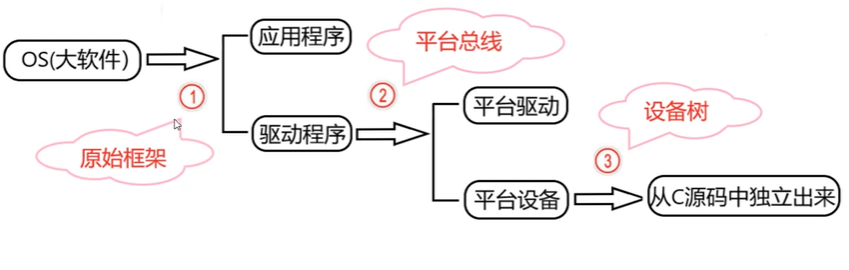


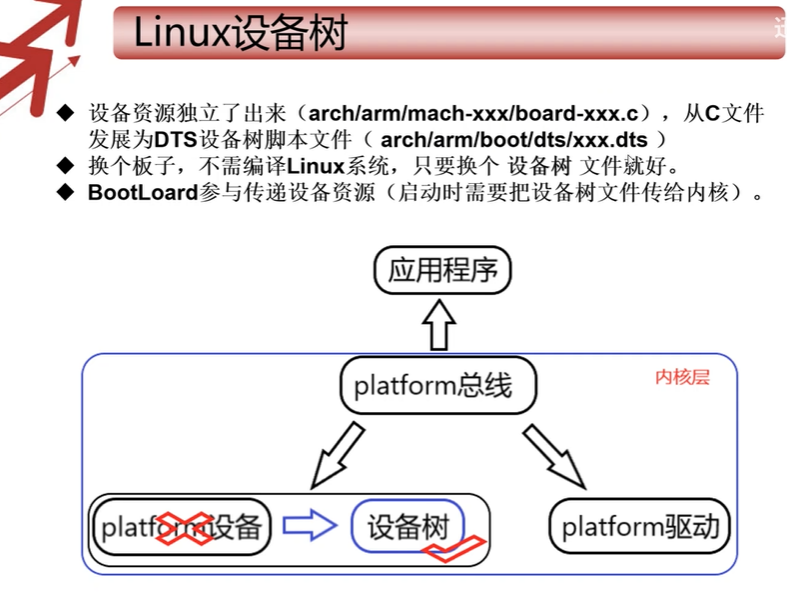
Linux divides storage and peripherals into 3 basic categories:Character device driver,Block device driver,Network device driver。
Linux source code directory structure
| Table of Contents | Description |
|---|---|
| arch | Architecture-related directory, containing adaptation code for multiple CPU architectures (such as ARM, x86, MIPS, etc.) |
| block | Block device related code directory; in Linux, storage devices such as hard disks and SD cards are managed as block devices. |
| crypto | Cryptographic algorithm directory, containing implementation code for various encryption-related algorithms. |
| Documentation | Official Linux kernel documentation directory, containing detailed descriptions of kernel functions, interfaces, etc. |
| drivers | Driver directory, containing driver code for various hardware devices supported by the Linux system. |
| firmware | Firmware directory, storing firmware files required by hardware devices. |
| fs | File system directory, containing implementation code for file systems such as ext2, ext3, FAT, etc. |
| include | Common header file directory, providing header files shared by various kernel modules. |
| init | Kernel startup initialization directory, storing initialization code for the Linux kernel boot stage. |
| ipc | Inter-process communication directory, containing implementation code for IPC mechanisms such as pipes, message queues, shared memory, etc. |
| kernel | Kernel core directory, containing the core functional code of the kernel itself. |
| lib | Library function directory, storing various library functions used by the kernel. |
| mm | Memory management directory (mm is an abbreviation for memory management), responsible for kernel memory management functions. |
| net | Network-related directory, storing implementation code for network functions such as the TCP/IP protocol stack. |
| scripts | Script directory, storing script files used in processes such as kernel compilation and testing. |
| security | Security-related directory, storing implementation code for kernel security mechanisms. |
| sound | Audio-related directory, storing code for audio device drivers and audio processing. |
| tools | Tools directory, storing utility programs used for Linux kernel development and debugging. |
| usr | Code directory related to Linux kernel startup. |
| virt | Kernel virtual machine related directory, storing implementation code for kernel-level virtualization features. |
Analysis of the simplest Linux driver structure.
- Components
- Header file (required): The driver must include kernel-related header files, among which
<linux/module.h>and<linux/init.h>is essential. - Driver loading function (required): When loading the driver, this function is automatically executed by the kernel.
- Driver unloading function (required): When unloading the driver, this function is automatically executed by the kernel.
- License declaration (required): Because the Linux kernel follows the GPL license, drivers must also comply with the relevant license when loaded; common license types include GPL v2 and others.
- Module parameters (optional): These are values passed to the kernel module when the module is loaded.
- Author and version information (optional): Used to declare the driver’s author and code version information.
- Header file (required): The driver must include kernel-related header files, among which
- Example
1234567891011121314151617181920212223 | static int __init hello_world_init(void){ printk(KERN_INFO "Hello World: Module loaded\n"); return 0;}static void __exit hello_world_exit(void){ printk(KERN_INFO "Hello World: Module unloaded\n");}module_init(hello_world_init);module_exit(hello_world_exit);MODULE_LICENSE("GPL");MODULE_AUTHOR("Zhao Hang");MODULE_DESCRIPTION("Hello World Kernel Module"); |
The module is loaded successfully if and only if the init function in module_init returns 0; a negative return value indicates loading failure.
Module information
123456789101112131415161718192021222324252627282930313233343536373839404142 | $ objdump -h hello_world.kohello_world.ko: file format elf64-littleSections:Idx Name Size VMA LMA File off Algn 0 .text 00000000 0000000000000000 0000000000000000 00000040 2**0 CONTENTS, ALLOC, LOAD, READONLY, CODE 1 .init.text 00000034 0000000000000000 0000000000000000 00000040 2**2 CONTENTS, ALLOC, LOAD, RELOC, READONLY, CODE 2 .exit.text 00000024 0000000000000000 0000000000000000 00000074 2**2 CONTENTS, ALLOC, LOAD, RELOC, READONLY, CODE 3 .note.gnu.property 00000020 0000000000000000 0000000000000000 00000098 2**3 CONTENTS, ALLOC, LOAD, READONLY, DATA 4 .note.gnu.build-id 00000024 0000000000000000 0000000000000000 000000b8 2**2 CONTENTS, ALLOC, LOAD, READONLY, DATA 5 .note.Linux 00000018 0000000000000000 0000000000000000 000000dc 2**2 CONTENTS, ALLOC, LOAD, READONLY, DATA 6 .rodata.str1.8 0000002b 0000000000000000 0000000000000000 000000f8 2**3 CONTENTS, ALLOC, LOAD, READONLY, DATA 7 .modinfo 000000b2 0000000000000000 0000000000000000 00000123 2**0 CONTENTS, ALLOC, LOAD, READONLY, DATA 8 __versions 00000080 0000000000000000 0000000000000000 000001d8 2**3 CONTENTS, ALLOC, LOAD, READONLY, DATA 9 __patchable_function_entries 00000008 0000000000000080 0000000000000080 00000258 2**3 CONTENTS, ALLOC, LOAD, RELOC, DATA 10 .data 00000000 0000000000000000 0000000000000000 00000260 2**0 CONTENTS, ALLOC, LOAD, DATA 11 .gnu.linkonce.this_module 000003c0 0000000000000000 0000000000000000 00000260 2**6 CONTENTS, ALLOC, LOAD, RELOC, DATA, LINK_ONCE_DISCARD 12 .plt 00000001 0000000000000000 0000000000000000 00000620 2**0 CONTENTS, ALLOC, LOAD, READONLY, CODE 13 .init.plt 00000001 0000000000000000 0000000000000000 00000621 2**0 ALLOC, READONLY 14 .text.ftrace_trampoline 00000001 0000000000000000 0000000000000000 00000621 2**0 CONTENTS, ALLOC, LOAD, READONLY, CODE 15 .bss 00000000 0000000000000000 0000000000000000 00000622 2**0 ALLOC 16 .comment 00000026 0000000000000000 0000000000000000 00000622 2**0 CONTENTS, READONLY 17 .note.GNU-stack 00000000 0000000000000000 0000000000000000 00000648 2**0 CONTENTS, READONLY |
The kernel module uses its.modinfosection to store information about the module, and allMODULE_*All macros update the content of this section with the values passed as parameters. Some of these macros areMODULE_DESCRIPTION()、MODULE_AUTHOR()andMODULE_LICENSE(). The real low-level macro provided by the kernel to add entries to the module information section isMODULE_INFO(tag,info), and the general form of information it adds istag=info. This means driver authors are free to add any form of information they want, for example:
1 | MODULE_INFO(my_field_name, "What easy value"); |
.modinfoThe content of the section:
123456789101112131415 | $ readelf -x .modinfo hello_world.koHex dump of section '.modinfo': 0x00000000 64657363 72697074 696f6e3d 68656c6c description=hell 0x00000010 6f20776f 726c6421 00617574 686f723d o world!.author= 0x00000020 6576656e 36323900 6c696365 6e73653d even629.license= 0x00000030 47504c00 73726376 65727369 6f6e3d41 GPL.srcversion=A 0x00000040 34303030 33444636 33303137 39423643 40003DF630179B6C 0x00000050 46314430 34350064 6570656e 64733d00 F1D045.depends=. 0x00000060 6e616d65 3d68656c 6c6f5f77 6f726c64 name=hello_world 0x00000070 00766572 6d616769 633d352e 31302e31 .vermagic=5.10.1 0x00000080 31302d76 382b2053 4d502070 7265656d 10-v8+ SMP preem 0x00000090 7074206d 6f645f75 6e6c6f61 64206d6f pt mod_unload mo 0x000000a0 64766572 73696f6e 73206161 72636836 dversions aarch6 0x000000b0 3400 4. |
You can also usemodinfoview
123456789 | $ modinfo hello_world.kofilename: /home/zhaohang/repository/linux/linux_driver_learning/01_hello_world/hello_world.kodescription: hello world!author: even629license: GPLsrcversion: A40003DF630179B6CF1D045depends:name: hello_worldvermagic: 5.10.110-v8+ SMP preempt mod_unload modversions aarch64 |
Compiling Linux drivers
- Put the driver inside the Linux kernel, then compile the Linux kernel. Compile the driver into the Linux kernel.
- Compile the driverinto a kernel module, independent of the Linux kernel
- Kernel modules are a special mechanism in the Linux system that cancompile some rarely used or temporarily unused functions into kernel modules, and dynamically load them into the kernel when needed.
- Using kernel modules can reduce the kernel size and speed up boot time. Moreover, drivers can be inserted or unloaded while the system is running without needing to reboot. The suffix of kernel modules is .ko
obj-<X>kbuild variables
This actually corresponds toobj-<X>mode, where<X>should be y, m, blank, or n. In general, the makefile at the top of the kernel build system uses it.
1 | obj-y += mymodule.o |
This tells kbuild that there is an object named mymodule.o in the current directory. mymodule.o will be built from mymodule.c or mymodule.S.
How and whether to build or link mymodule.o depends on<X>the value of.
- if
<X>If set to m, use the variable obj-m, and build mymodule.o as a module. - if
<X>If set to y, use the variable obj-y, and mymodule.o will be built as part of the kernel. It can also be said to be a built-in module. - if
<X>If set to n, it means the module is not compiled.
Therefore, it is often usedobj-$(CONFIG_XXX)pattern (whereCONFIG_XXXis a kernel configuration option), which can be set or unset during kernel configuration. Here is an example:
1 | obj-$(CONFIG_MYMODULE) += mymodule.o |
$(CONFIG_MYMODULE)It evaluates to y or m based on the value during kernel configuration (make menuconfig). IfCONFIG_MYMODULEis neither y nor m, the file will not be compiled or linked.
There is also another case:
1 | obj-<X> += somedir/ |
This means kbuild should enter the somedir directory, find all the makefiles in it and process them to decide which objects should be built.
into a kernel module
123456789101112 | obj-m += hello_world.oKERNEL_SRC:=/home/zhaohang/repository/linux/linux-5.10.246PWD ?=$(shell pwd)ARCH = arm64CROSS_COMPILE = aarch64-linux-gnu-all: $(MAKE) ARCH=$(ARCH) CROSS_COMPILE=$(CROSS_COMPILE) -C $(KERNEL_SRC) M=$(PWD) modulesclean: $(MAKE) ARCH=$(ARCH) CROSS_COMPILE=$(CROSS_COMPILE) -C $(KERNEL_SRC) M=$(PWD) modules clean rm -rf *.ko *.o *.mod.o *.mod.c *.symvers *.order |
The local Linux code is under /lib/modules/$(uname -r)/kernel
Compiling the driver into the kernel
Beforedrivers/char(Taking a character driver as an example) Create the folder helloworld, then put the driver source code into it, and then create a Kconfig file
12345 | config helloworld bool "helloworld support" default y help helloworld |
Modify drivers/char/Kconfig
123 | emacs ../Kconfig# Addsource "drivers/char/helloworld/Kconfig" |
Create a Makefile in the driver source code
1 | obj-$(CONFIG_helloworld) += helloworld.o |
Then add the following to the parent Makefile:
123 | emacs ../Makefile# Addobj-y += helloworld/ |
Module-related commands
Module loading command
- insmod
- Function: Load a Linux kernel module
- Syntax: insmod module_name
- Example: insmod hello_world.ko
- modprobe
- Function: Loads a kernel module, and also loads the modules that this module depends on.
- Syntax: modprobe module_name
- Example: modprobe hello_world
System administrators or those in production systems often use modprobe. modprobe is smarter: before loading the specified module, it parses the file modules.dep to load dependencies first. It automatically handles module dependencies, just like a package manager does.
But
modprobecannot directly load from arbitrary paths.kofiles — it only searches for modules in standard kernel module directories (such as/lib/modules/$(uname -r)/) and relies onmodules.depindex.
Module Unload Command
rmmod
- Function: Removes a kernel module that has been loaded into Linux.
- Syntax: rmmod module_name
- Example: rmmod hello_world
modprobe -r
- It not only attempts to unload
mymodule, but also automatically checks and unloads those dependency modules that are onlymymoduledepended on, and are not currently used by other modules/processes. - Syntax:
modprobe -r mymodule
- It not only attempts to unload
The enabling or disabling of the kernel module unload feature is determined by the value of the CONFIG_MODULE_UNLOAD configuration option. Without this option, no modules can be unloaded.
At runtime, if unloading a module would cause other adverse effects, the kernel will prevent it even if someone requests unloading. This is becausethe kernel records the usage count of modules through reference counting, so it knows whether a module is in use. If the kernel considers it unsafe to remove a module, it will not remove it. However, the following setting can change this behavior: MODULE_FORCE_UNLOAD=y
Setting Modules to Load at Boot
If you want to load some modules at boot, simply create the file/etc/modules-load.d/<filename>.conf, and add the names of the modules that should be loaded (one per line). People commonly use modules:/etc/modules-load.d/modules.confOf course, you can also create multiple .conf files as needed.
12345 | emacs /etc/modules-load.d/mymodule.conf# Below is the content of mymodule.conf.uioiwlwifii2c-dev |
Command to view module information
- lsmodcommand
- Function: List the kernel modules already loaded in Linux
- You can also use the command cat /proc/modules to check whether the module was loaded successfully.
- modinfocommand
- Function: View kernel module information
- Syntax: modinfo module_name
- Example: modinfo hello_world.ko
Configuration file
menuconfigOperations for configuring driver option states:
Driver states:
- Compile the driver as a kernel module, represented by M
- Compile the driver into the kernel, represented by*
- Do not compile
Use the spacebar to switch among these three different states.
The states of an option are:
[]: Indicates there are two states, which can only be set to selected or not selected.<>: Indicates there are three states, which can be set to selected, not selected, or compiled as a module.- () : Indicates it is used to store a string or a hexadecimal number.
Kconfig file
The Kconfig file is the source file of the graphical configuration interface. The options in the graphical configuration interface are determined by the Kconfig file. When we execute the commandmake menuconfigWhen the command is executed, the kernel configuration tool will read the files in the kernel source directory.arch/xxx/Kconfig.xxx is the value of ARCH, such as arm64, and then the corresponding configuration interface is generated for developers to use.
config file and .config file
Both the config file and the .config file are configuration files for the Linux kernel.
The config file is located in the arch/$(ARCH)/configs directory of the Linux kernel source tree, and isthe default configuration file of the Linux system。
The .config file is located in the top-level directory of the Linux kernel source tree. When compiling the Linux kernel, the configuration in the .config file is used to compile the kernel image.
If .config exists, the default configuration in the make menuconfig interface is the configuration of the current .config file. If you modify the settings in the graphical configuration interface and save, the .config file will be updated.
If the .config file does not exist, the default configuration in the make menuconfig interface is the default configuration in the Kconfig file.
Using the command make xxx_defconfig generates a .config file based on the default file in the arch/$(ARCH)/configs directory.
Kconfig syntax
Reference:

Main menu
mainmenuUsed to set the title of the main menu
Example:mainmenu "Linux/\$(ARCH) $(KERNELVERSION) Kernel Configuration"
The menu name set by the above name isLinux/\$(ARCH) $(KERNELVERSION) Kernel Configuration
Menu structure
The menu/endmenu keywords can be used to create a menu. menu marks the beginning of a menu, and endmenu marks the end of a menu. They appear in pairs.
The following describes a menu named “Network device support”.
1234 | menu "Network device support" config NETDEVICE ...endmenu |
Configuration options
Use the keywordconfigto define a new option. Each option must specify a type, and the types includebool, tristate, string, hex, intThe most common ones are bool, tristate, and string.
The bool type has two values: y and n;
The tristate type has three values: y, m, and n;
string is a string type.
help indicates help information. When you press the h key in the graphical interface, the help content pops up.
Example:
12345 | config helloworld bool "hello world support" default y help hello world |
Dependencies
Dependencies in Kconfig can be expressed using depends on and select
depends on indicates a direct dependency relationship:
12 | config A depends on B |
Indicates that option A depends on option B; option A can be selected only when option B is selected.
select indicates a reverse dependency:
12 | config A select B |
When option A is selected, option B is automatically selected.
Selectable options
Use choice and endchoice to define selectable items.
12345678 | choice prompt "a"config b bool b1config c bool c1...endchoice |
Comment
Display a comment in the graphical configuration interface.
123456 | config TEST_CONFIG bool "test" default y help just testcomment "just for test" |
source
source is used to read another Kconfig file; for example, source “init/Kconfig” reads the Kconfig file in the init directory into the current Kconfig file.
Driver module parameter passing
Significance of driver parameter passing:
Advantages:
- By passing parameters to drivers, the driver can be made more flexible and more compatible.
- Security checks can be set through driver parameter passing to prevent the driver from being misappropriated.
Disadvantages
- Makes the driver code more complex.
- Increases the driver’s resource usage.
Parameter types that can be passed to drivers
The kernel supports most common C language data types for driver parameter passing. Here, the parameter types supported by the kernel for driver passing are divided into three categories:
- Basic types:char, bool, int, long, short, byte, ushort, uint
- Array:array
- string:string
Ways to pass parameters to Linux drivers
Parameter types and corresponding functions
Parameter type Corresponding function Function Basic types module_paramPassing basic type parameters Array type module_param_arrayPassing array type parameters String type module_param_stringPassing string type parameters Function definition location: These three functions are in the Linux kernel source code’s
include/linux/moduleparam.hdefined in.
module_param
123456789101112131415161718192021222324252627 | /** * module_param - typesafe helper for a module/cmdline parameter * @name: the variable to alter, and exposed parameter name. * @type: the type of the parameter * @perm: visibility in sysfs. * * @name becomes the module parameter, or (prefixed by KBUILD_MODNAME and a * ".") the kernel commandline parameter. Note that - is changed to _, so * the user can use "foo-bar=1" even for variable "foo_bar". * * @perm is 0 if the variable is not to appear in sysfs, or 0444 * for world-readable, 0644 for root-writable, etc. Note that if it * is writable, you may need to use kernel_param_lock() around * accesses (esp. charp, which can be kfreed when it changes). * * The @type is simply pasted to refer to a param_ops_##type and a * param_check_##type: for convenience many standard types are provided but * you can create your own by defining those variables. * * Standard types are: * byte, hexint, short, ushort, int, uint, long, ulong * charp: a character pointer * bool: a bool, values 0/1, y/n, Y/N. * invbool: the above, only sense-reversed (N = true). */ |
module_param_array
12345678910111213141516 | /** * module_param_array - a parameter which is an array of some type * @name: the name of the array variable * @type: the type, as per module_param() * @nump: optional pointer filled in with the number written * @perm: visibility in sysfs * * Input and output are as comma-separated values. Commas inside values * don't work properly (eg. an array of charp). * * ARRAY_SIZE(@name) is used to determine the number of elements in the * array, so the definition must be visible. */ |
module_param_string
123456789101112131415161718 | /** * module_param_string - a char array parameter * @name: the name of the parameter * @string: the string variable * @len: the maximum length of the string, incl. terminator * @perm: visibility in sysfs. * * This actually copies the string when it's set (unlike type charp). * @len is usually just sizeof(string). */ |
MODULE_PARM_DESC
Function: describes module parameter information. Defined in include/linux/moduleparam.h
Function prototype:MODULE_PARM_DESC(_parm, desc)
Function parameters:_parm: The parameter name of the parameter to be described. desc: description information
| Parameter name | meaning |
|---|---|
name | Parameter name (can be passed on the command line) |
type | Parameter type (e.g.,int、bool、charp) |
perm | Before/sys/module/<modname>/parameters/permissions in, such as0644 |
nump | (array only) Address of the variable that stores the number of array elements |
len | (string only) Buffer length |
string | Pointer to the string buffer |
Permission definition
perm refers to parameter file in sysfsof file permission bits。
read/write permissions are ininclude/linux/stat.handinclude/uapi/linux/stat.hdefined in.
- include/linux/stat.h
12345678910111213141516 | /* SPDX-License-Identifier: GPL-2.0 */ |
- include/uapi/linux/stat.h
1234567891011121314151617181920212223242526272829303132333435363738394041424344454647 | /* SPDX-License-Identifier: GPL-2.0 WITH Linux-syscall-note */ |
The related permissions are mainlyFile access permission macros (File Permission Bits)
| Macro name | Octal value | meaning |
|---|---|---|
S_IRWXU | 00700 | Owner (U) read, write, execute permissions (RWX) |
S_IRUSR | 00400 | Owner (USR) read permission ® |
S_IWUSR | 00200 | Owner (USR) write permission (W) |
S_IXUSR | 00100 | Owner (USR) execute permission (X) |
S_IRWXG | 00070 | Group (G) read, write, execute permissions (RWX) |
S_IRGRP | 00040 | Group (GRP) read permission ® |
S_IWGRP | 00020 | Group (GRP) write permission (W) |
S_IXGRP | 00010 | Group (GRP) execute permission (X) |
S_IRWXO | 00007 | Other users (O) read, write, execute permissions (RWX) |
S_IROTH | 00004 | Other users (OTH) read permission ® |
S_IWOTH | 00002 | Other users (OTH) write permission (W) |
S_IXOTH | 00001 | Other users (OTH) execute permission (X) |
andCombined permissions
S_IRWXUGO
- Definition:
(S_IRWXU | S_IRWXG | S_IRWXO) - Meaning (expanded):
00700 | 00070 | 00007 = 00777 - Actual meaning: Allow Owner, group, other users (UGO) have read, write, execute Permissions
- Example usage: Set all users to read, write, execute, e.g., temporary directory
/tmp
S_IALLUGO
- Definition:
(S_ISUID | S_ISGID | S_ISVTX | S_IRWXUGO) - Meaning (expanded):
0004000 | 0002000 | 0001000 | 00777 = 01777 - Actual meaning: Includes special bits (SUID, SGID, Sticky) and all users’ read/write/execute permissions
- Example usage: Common permissions:
drwxrwxrwt(such as/tmp)
S_IRUGO
- Definition:
(S_IRUSR | S_IRGRP | S_IROTH) - Meaning (expanded):
00400 | 00040 | 00004 = 00444 - Actual meaning: All users Read Permissions
- Example usage: Often used for read-only files
S_IWUGO
- Definition:
(S_IWUSR | S_IWGRP | S_IWOTH) - Meaning (expanded):
00200 | 00020 | 00002 = 00222 - Actual meaning: All users Write Permissions
- Example usage: Rarely used, generally limited to specific directories
S_IXUGO
- Definition:
(S_IXUSR | S_IXGRP | S_IXOTH) - Meaning (expanded):
00100 | 00010 | 00001 = 00111 - Actual meaning: All users Execute Permissions
- Example usage: Make a script or program executable by all users
example
1234567891011121314151617181920212223242526272829303132333435363738394041424344454647484950 | static int myint = 0;module_param(myint,int, 0644);MODULE_PARM_DESC(myint, "A sample int parameter");static char* mycharp = "hello";module_param(mycharp, charp, 0644);MODULE_PARM_DESC(mycharp, "A sample charp parameter");static int myarr[3] = {1, 2, 3};static int myarr_argc = ARRAY_SIZE(myarr);module_param_array(myarr, int, &myarr_argc, 0644);MODULE_PARM_DESC(myarr, "A sample array parameter");static char mystring[] = "default_value";module_param_string(mystr, mystring, ARRAY_SIZE(mystring), 0644);MODULE_PARM_DESC(mystr, "A sample string parameter");static void print_param(void){ int i; pr_info("[myint]: %d\n", myint); pr_info("[mycharp]: %s\n", mycharp); pr_info("[myarr]: "); for(i =0;i<myarr_argc;i++){ pr_info("%d ", myarr[i]); } pr_info("[mystr]: %s\n", mystring);}static int __init param_test_init(void){ printk("param test init\n"); print_param(); return 0;}static void __exit param_test_exit(void){ print_param(); printk("param test exit\n");}module_init(param_test_init);module_exit(param_test_exit);MODULE_LICENSE("GPL");MODULE_AUTHOR("even629<asqwgo@163.com>");MODULE_DESCRIPTION("linux driver parameter test"); |
Parameters can be passed when loading the module:
1 | insmod parameter.ko myint=42 mycharp="hello world" myarr=9,8,7 mystr="hello" |
View parameters at runtime:
123 | cd /sys/module/param_test/parameters/cat myintecho 99 > myint |
Kernel symbol table import/export
Drivers can be compiled as kernel modules, i.e., KO files. Each KO file is independent, meaning modules cannot access each other. However, in some usage scenarios they need to access each other, e.g., module B wants to use a function in module A. (Module B depends on module A)
Symbol table
**A “symbol” is a function name, global variable name, etc., in the kernel.**A symbol table is a file used to record these “symbols”.
Module dependency relationships
Modules in the Linux kernel can provide functions or variables, usingEXPORT_SYMBOLthe macro to export them makes them available to other modules; these are called symbols.
Module B’s dependency on module A means that module B uses symbols exported from module A.
depmodis a user-space tool (usually provided bykmodpackage), run after the kernel is installed:
1 | depmod -a <kernel_version> |
- It scans
/lib/modules/<kernel_release>/all under.komodule files:- use
modinfo -F dependsor directly parses the ELF symbol table; - determines for each module which symbols it needs (imports) and which symbols it provides (exports);
- builds a dependency graph between modules.
- use
The generated dependency files
| files | Function |
|---|---|
modules.dep | text format, each line format:module.ko: dependent_module1.ko dependent_module2.ko ... |
modules.dep.bin | binary format, formodprobefast loading (avoid parsing text each time) |
modules.symbols/modules.symbols.bin | records all exported symbols and their owning modules (for reverse lookup) |
depmod also processes module files to extract and collect this information, and in/lib/modules/<kernel_release>/modules.aliasGenerate the modules.alias file, which maps devices to their corresponding drivers.
modprobe parses the modules.alias file.
Kernel symbol table export
Export macros
| Macro name | Applicable scenarios |
|---|---|
EXPORT_SYMBOL | Export symbols to the kernel symbol table |
EXPORT_SYMBOL_GPL | Only applies to GPL-licensed modules |
Exported symbols can be used by other modules; they only need to be declared before use.
Example
123456789101112131415161718192021222324 | int add(int a, int b){ return a+b;}EXPORT_SYMBOL(add);static int __init module_export_init(void){ pr_info("add init\n"); return 0;}static void __exit module_export_exit(void){ pr_info("add exit\n");}module_init(module_export_init);module_exit(module_export_exit);MODULE_LICENSE("GPL");MODULE_AUTHOR("even629<asqwgo@163.com>");MODULE_DESCRIPTION("A sample for module export"); |
Import
1234567891011121314151617181920212223242526272829303132 | static int a = 0;module_param(a,int, 0644);MODULE_PARM_DESC(a, "add test left num a, default 0");static int b = 0;module_param(b, int, 0644);MODULE_PARM_DESC(b, "add test left num b, default 0");extern int add(int a, int b);static int __init module_export_init(void){ pr_info("hello init\n"); pr_info("a=%d, b=%d\n", a, b); pr_info("a+b=%d\n", add(a, b)); return 0;}static void __exit module_export_exit(void){ pr_info("hello exit");}module_init(module_export_init);module_exit(module_export_exit);MODULE_LICENSE("GPL");MODULE_AUTHOR("even629<731005515@qq.com>");MODULE_DESCRIPTION("A sample for module export"); |
Note: When loading, load the exporting module first; when unloading, unload the importing module first.Because the two modules now have a dependency relationship, modprobe will automatically handle these dependencies without explicit declaration.
Using macros defined in the makefile
Core idea: to make it visible to C code, you must pass macro definitions via the compiler command line:
1 | cc -D宏名=值 source.c |
Example:
123456789 | obj-m += mydriver.o# Define a macroMY_DRIVER_VER := 0x10# Pass it to the compilerKBUILD_CFLAGS_MODULE += -DMY_DRIVER_VER=$(MY_DRIVER_VER)# or useccflags-y += -DMY_DRIVER_VER=$(MY_DRIVER_VER) |
Other variable names:
| Variable name | Scope | Typical Uses |
|---|---|---|
ccflags-y | All of the current module’s.cfiles | ordinary C compilation options |
asflags-y | assembly files | Assembly parameters |
subdir-ccflags-y | Current directory and subdirectories | Global scope |
KBUILD_CFLAGS | Global (set by kernel top-level Makefile) | Platform-level CFLAGS |
KBUILD_CFLAGS_MODULE | Kernel modules | |
EXTRA_CFLAGS | Deprecated (legacy usage) | Temporary additional options |
Then in the driver, you can use:
123456789101112131415161718 | static int __init mydriver_init(void){ pr_info("mydriver version: 0x%x\n", MY_DRIVER_VER); return 0;}static void __exit mydriver_exit(void){ pr_info("mydriver exit\n");}module_init(mydriver_init);module_exit(mydriver_exit);MODULE_LICENSE("GPL"); |