
Timeline
Timeline
2025-06-22
init
This article introduces the basics of AArch64 (ARMv8-A) assembly language. It first explains the byte sizes of bytes, bits, and common C types (char, short, int), and notes that all AArch64 instructions are 4 bytes wide and pointers are 8 bytes wide (though the actual address space is typically less than 64 bits). It then details the register system: x registers are used for 64-bit integers or pointers, w registers for 32-bit integers, d/s registers for double-precision and single-precision floating-point numbers respectively, and v registers for SIMD/Neon operations; it also explains that x29 is the stack frame pointer, x30 is the link register, and the mechanism for passing large return values through an indirect result location. The article also elaborates on the correspondence between registers and C types, and emphasizes that all pointers are stored in x registers. In the instructions section, it covers that each instruction is fixed at 4 bytes wide, most instructions have three operands, and syntax such as square brackets for dereferencing and exclamation marks for pre-decrement. Additionally, the article focuses on the usage of memory access instructions ldr/str/ldp/stp, including the three addressing modes: normal offset, post-indexed, and pre-indexed, and notes that unaligned access incurs a performance penalty.
Prerequisite knowledge
1 byte contains 8 bit
- char occupies 1 bytes
- short occupies 2 bytes
- int occupies 4 bytes
Each address represents a one-byte storage unit
1234 | gcc -E hello.c -o hello.igcc -S hello.i -o hello.sgcc -c hello.s -o hello.ogcc hello.o -o hello |
all The width of AARCH64 instructions is 4 bytes.
all The width of AARCH64 pointers is 8 bytes†.
Strictly speaking, this is correct, but in Linux systems, usually only the lower 39, 42, or 48 bits of the address are used—that is, the virtual address space size of an ARM Linux process is less than 64 bits. When treating an address as an 8-byte value, the high bits are zeroed out.
Register
Register access speed
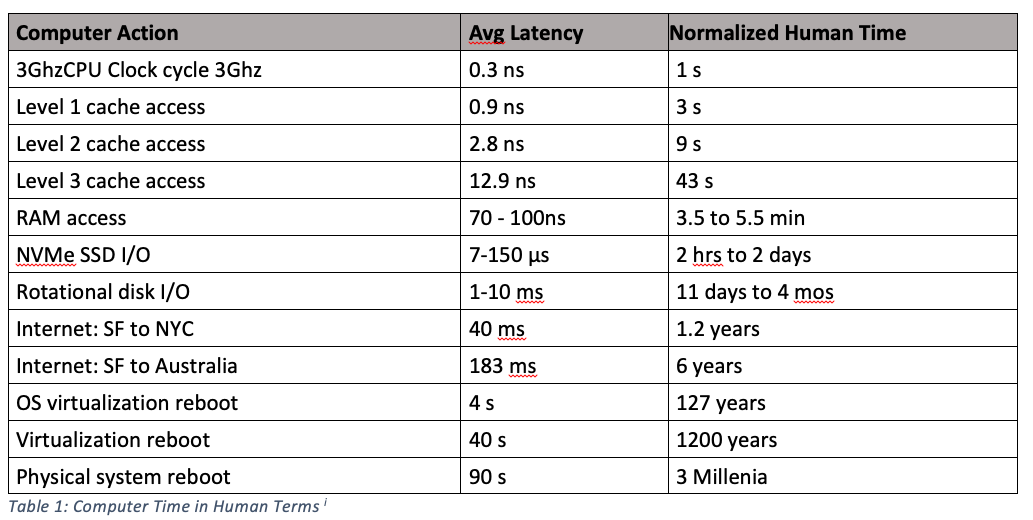
The meaning of this diagram is: if accessing a register (which can be accessed at least once per CPU clock cycle) is compared to one second, then accessing RAM is like waiting 3.5 to 5.5 minutes.
Register type
- rn represents the nth register of “a certain type”.
The type of register is specified by a letter, and which specific register of that type is specified by a number. There are also some exceptions. Below is an introductory overview:
| Letter | Type |
|---|---|
| x | 64-bit integer or pointer |
| w | 32-bit_or smaller_integer |
| d | 64-bit floating-point number (double, double-precision) |
| s | 32-bit floating-point number (float, single-precision) |
Some register types are omitted here.
(Chapter 9.1)(Cortex-A Series Programmer’s Guide for ARMv8-A)
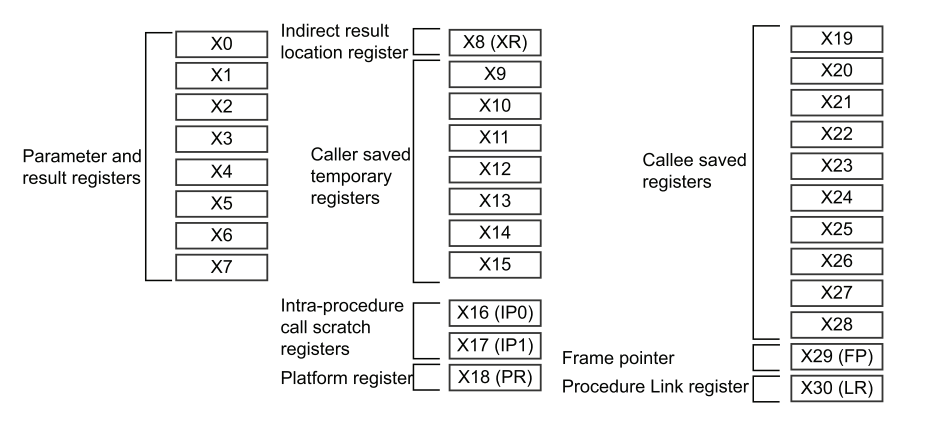
- x29 is the stack frame pointer (FP)
- x30 is the link register (LR, i.e., the return address)
- When the return type of a function is too large (e.g., exceeding 64 bits, or being a large structure or union) to be passed directly through general-purpose registers (X0~X7), the caller pre-allocates a block of memory as a “return value storage area” and passes the address of this area to the called function – the address of this memory is the “Indirect Result Location”. After the called function finishes execution, it writes the result to this address instead of returning it via registers.
Registers used for floating-point types (and vector operations) are coincident:
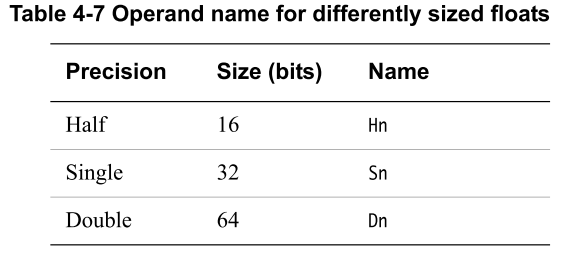
qThe register width is 16 bytes—quad words. (alias of vn, mainly used forSIMD/Neon in instructions)vregister width is also 16 bytes, isqa synonym for the register.dregister is used fordouble(double precision), with a width of 8 bytes –double precisioneachvregister can hold 2.sregister is used forfloat(single precision), with a width of 4 bytes. Eachvregister can hold 4.hregister is used forhalf-precision floating-point numbers, with a width of 2 bytes. Eachvregister can hold 8.bregister is used for byte operations. Eachvregister can hold 16.
Registers and C Types
integer
| This declares an integer | Actually this is an integer |
|---|---|
| char | wn |
| short | wn |
| int | wn |
| long | xn |
pointer
| This declares a pointer | Actually this is a pointer |
|---|---|
| type * | xn |
All pointers are stored in x registers. x registers are 64-bit, but many operating systems do not support 64-bit address space, because managing such a large address space itself takes up a lot of space. Instead,operating systems typically use a 48 to 52-bit address space。
Floating-point number
| This declares a floating-point number | Actually this is a floating-point number |
|---|---|
float | sn |
double | dn |
__fp16(half) | hn |
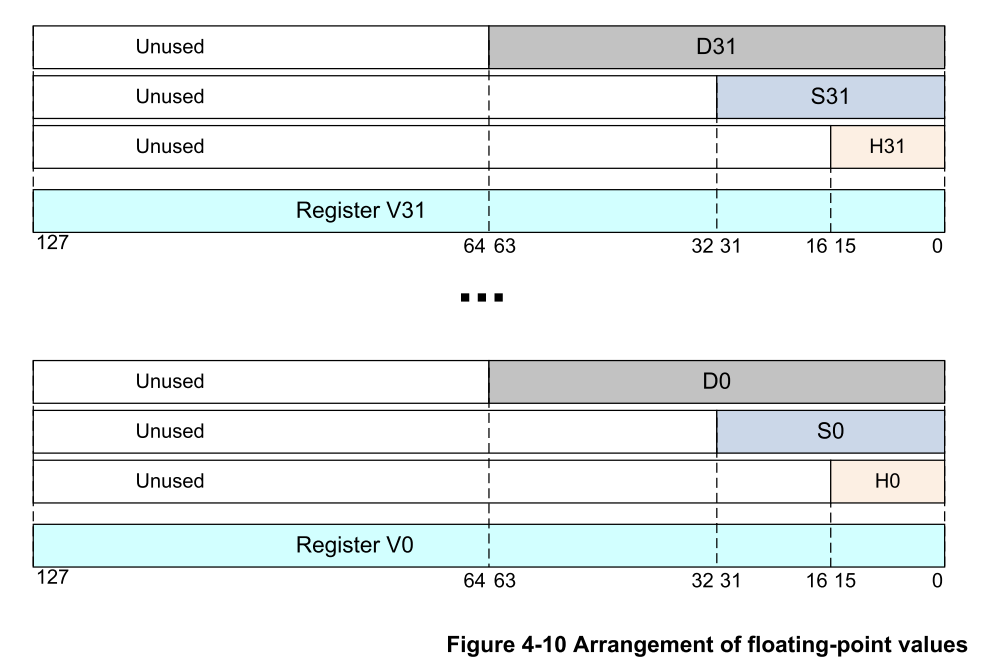
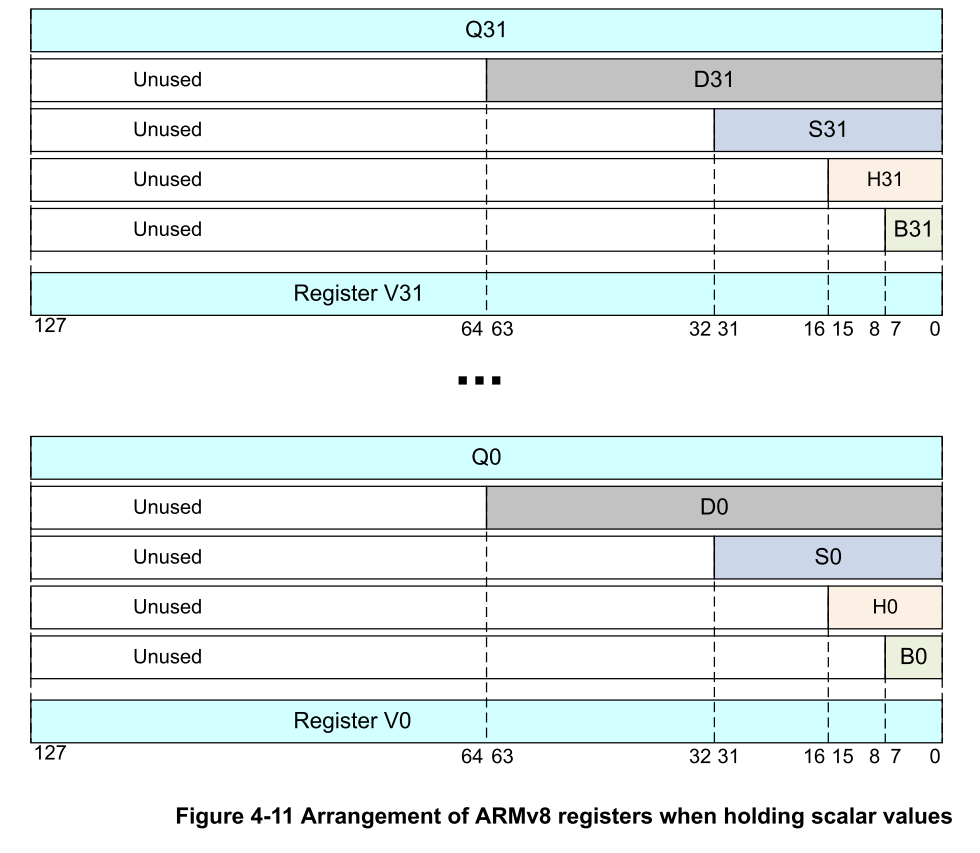
vn is the true physical register name,recommended for use, supporting the most types of access (floating-point + SIMD)
qn is an alias for vn, mainly used inSIMD/Neon instructions (Single Instruction - Multiple Data)
Instruction
Prerequisite knowledge
Each AARCH64 instructions are all 4 bytes wide. All the information the CPU needs to know about what this instruction is, what variant it might be, and what data it will use can be found within these 4 bytes.
- Most (but not all) AARCH64 instructions have three_operands_. They are interpreted as follows:
1 | op ra, rb, rc |
means:
1 | ra = rb op rc |
Example:
12 | sub x0, x0, x1 ; means x0 = x0 - x1mov x0, x1 ; means x0 = x1 |
- [ ]
[and]functions the same as the asterisk in C/C++, meaning ‘dereference’. It meanstreating the contents of the brackets as an address to access memory。
When ! appears at [] at the end, for example:
123 | stp x21, x30, [sp, -16]!stp x29, x30, [sp, -16]! |
Finally, the exclamation mark indicates that the stack pointer should be modified (i.e., -16 is applied to it), which happens before the value of the stack pointer is used as a memory address (the address to which the register will be copied)_before_This is, again,predecrement。
means:
sp = sp - 16(stack pointer moves down by 16 bytes)- store
x29into[sp]storex30into[sp + 8]
corresponds to:
1 | ldp x29, x30, [sp], 16 |
means:
- from
[sp]read 8 bytes intox29from[sp + 8]read 8 bytes intox30 sp = sp + 16(release stack frame space)
In ARM V8, the stack pointer can only be adjusted in multiples of 16.
In ARM V8, the stack pointer can only be adjusted in multiples of 16.
In ARM V8, the stack pointer can only be adjusted in multiples of 16.
x29 is the frame pointer register, but it is not mandatory to save
Memory access
ldr
load register
1234 | ldr x0, [sp] // load 8 bytes from address specified by spldr w0, [sp] // load 4 bytes from address specified by spldrh w0, [sp] // load 2 bytes from address specified by spldrb w0, [sp] // load 1 byte from address specified by sp |
When making unaligned accesses to RAM, the processor must slow down and access it byte by byte. This incurs a massive performance penalty. Properly aligned access is crucial for performance.
str
store register
1234 | str x0, [sp] // store 8 bytes to address specified by spstr w0, [sp] // store 4 bytes to address specified by spstrh w0, [sp] // store 2 bytes to address specified by spstrb w0, [sp] // store 1 byte to address specified by sp |
Type conversions between integer types are in some cases accomplished by
255and65535(corresponding tocharandshort) performingand(AND) operations, or:Whenever a narrower part of a register is written, the rest of the register is zeroed. That is:
ldrbwill overwritexthe least significant byte of the register and zero the upper 7 bytes.
ldp
load pair, same as ldr but loads a pair of values at once
stp
store pair, same as str but stores a pair of values at once
offsets
123 | 1) LDR Xt, [Xn|SP{, #pimm}] ; 64-bit general registers2) LDR Xt, [Xn|SP], #simm ; 64-bit general registers, Post-index3) LDR Xt, [Xn|SP, #simm]! ; 64-bit general registers, Pre-index |
simmrange is -256 to 255 (10-bit signed value).pimmrange is 0 to 32760 and must be a multiple of 8.
Three modes
- Offset addressing mode
1 | LDR Xt, [Xn, #pimm] |
from
Xn + pimmload data from the address intoXt; address registerXnremains unchanged;
pimmis a positive immediate, must be a multiple of 8, with a maximum of 32760.
- Post-indexed addressing mode
1 | LDR Xt, [Xn], #simm |
first use
Xn's original value as the address to load data intoXt, and then usesimmto updateXn; address registerXnchanges after reading memory;
- Pre-indexed addressing mode
1 | LDR Xt, [Xn, #simm]! |
first
Xn = Xn + simm, and then useXnas the address to load data intoXt, address registerXnchanges before reading memory;
Pseudo-instruction
1 | ldr x1, =label |
The assembler places the address of the label into a special area of memory called a “literal pool”. The key point isthis memory area is located right after (and thus close to) your code。
Then, the assembler calculates the difference between the address of the current instruction (i.e.
ldritself) and the address of the data generated by that label in the literal pool.The assembler generates a different
ldrinstruction that uses the offset of the data relative to the program counter (pc). Herepcis the address of the current instruction.Since the literal pool for your code is located near the code, the offset from the current instruction to the data in the pool is a relativelysmallnumber. Small enough to fit into a 4-byte
ldrIn the instruction.
1 | ldr x1, [pc, offset to in literal pool] |
One disadvantage of this method is that the literal pool from which addresses are loaded is located in RAM. This means that each such
ldrPseudo-instructions always generate a memory access._
literal pool
Comparison
12 | ldr x1, =qldr x1, q |
aarch64
1234567891011121314151617181920212223242526 | main // expose main to linker // begin to write code 2 // the code should certainly begin on an even addressmain: str x30, [sp, -16]! ldr x0, =fmt ldr x1, =q ldr x2, [x1] bl printf ldr x0, =fmt ldr x1, q ldr x2, [x1] bl printf ldr x30, [sp], 16 mov w0, wzr ret q: .quad 0x1122334455667788fmt: "address: %p value: %lx\n" |
Disassemble this machine code:
12345678910111213 | 0000000000007a0 <main>: 7a0: f81f0ffe str x30, [sp, #-16]! 7a4: 58000160 ldr x0, 7d0 <main+0x30> 7a8: 58000181 ldr x1, 7d8 <main+0x38> 7ac: f9400022 ldr x2, [x1] 7b0: 97ffffb4 bl 680 <printf@plt> 7b4: 580000e0 ldr x0, 7d0 <main+0x30> 7b8: 580842c1 ldr x1, 11010 <q> 7bc: f9400022 ldr x2, [x1] 7c0: 97ffffb0 bl 680 <printf@plt> 7c4: f84107fe ldr x30, [sp], #16 7c8: 2a1f03e0 mov w0, wzr 7cc: d65f03c0 ret |
as well as
123 | 000000000011010 <q>: 11010: 55667788 11014: 11223344 |
It shows
000000000011010 <q>:This means that what follows is a label in the source code.qThe corresponding data. Note the relocatable address.11010We will explain ‘relocatable address’ below.Now, looking at
7b8The first line of disassembly code. It reads asldr x1, 11010So the disassembled executable file is saying “go to address 11010 and fetch its contents”, which is our1122334455667788。
| Instruction | Meaning |
|---|---|
| ldr r, =label | Load the address of the label into r |
| ldr r, label | Load the value stored at the label into r |
Runtime address relocation
All the addresses we have seen so far are not the final addresses that the program will actually use at runtime.All addresses will be relocated.。
One of the reasons is to guard against malware. One is called**Address Space Layout Randomization (ASLR)**The technique of preventing malware authors from knowing in advance where to modify your executable file, thereby making it impossible for them to achieve their ulterior motives.
64-bit ARM Linux kernel allocates 39, 42, or 48 bits for the process’s virtual address spaceNote that 42- and 48-bit values require 6 bytes to accommodate. The virtual address space is the set of all addresses that a process can generate or use. Furthermore, all addresses used by a process are virtual addresses.
This way, the use of literal pools can be avoided.
12 | adrp x0, sadd x0, x0, :lo12:s |
Example
Load (store) integers of different sizes
| Instruction | Meaning |
|---|---|
ldr x0, [x1] | fromx1Load a 64-bit value from the specified address intox0 |
ldr w0, [x1] | fromx1Load a 32-bit value from the specified address intow0 |
ldrh w0, [x1] | fromx1Load a 16-bit value from the specified address intow0 |
ldrb w0, [x1] | fromx1Load an 8-bit value from the specified address intox0 |
- Pointers and longs use
xregisters. - All other sizes of integers use
wregisters, with the size specified by the instruction itself.
Array indexing
123456789 | long Sum(long * values, long length){ long sum = 0; for (long i = 0; i < length; i++) { sum += values[i]; } return sum;} |
Note that we use the subscript variableijust to iterate through the array. This (in this case) is extremely inefficient.
12345678910 | long Sum(long * values, long length){ long sum = 0; long * end = values + length; while (values < end) { sum += *(values++); } return sum;} |
Note that we no longer use the subscript variable. Instead, we use the pointer itself to both dereference_and_determine when to end the loop.
1234567891011121314151617181920212223 | Sum 4// x0 is the pointer to data// x1 is the length and is reused as `end`// x2 is the sum// x3 is the current dereferenced valueSum: mov x2, xzr // x2 = 0 add x1, x0, x1, lsl 3 // x1 = x0+x1*8 b 2f1: ldr x3, [x0], 8 add x2, x2, x32: cmp x0, x1 blt 1b mov x0, x2 ret |
Faster memory copy
Suppose you need tocopy 16 bytes of memoryfrom one place to another. You might do it like this:
12345 | void SillyCopy16(uint8_t * dest, uint8_t * src){ for (int i = 0; i < 16; i++) *(dest++) = *(src++);} |
This is especially stupid, because you could simply write it as follows, why loop 16 times:
12345 | void SillyCopy16(uint64_t * dest, uint64_t * src){ *(dest++) = *(src++); // 3 *dest = *src; // 4} |
Implemented in aarch64:
123456 | SillyCopy16: // 1 ldr x2, [x0], 8 // 2 str x2, [x1], 8 // 3 ldr x2, [x0] // 4 str x2, [x1] // 5 ret |
Use ldp:
1234 | SillyCopy16: ldp x2, x3, [x0] stp x2, x3, [x1] ret |
Use q registers:
1234 | SillyCopy16: ldr q2, [x0] str q2, [x1] ret |
Iterate over an array of structs
123456789101112131415161718192021222324252627282930313233343536373839404142434445464748495051 | struct Person{ char * fname; char * lname; int age;};extern int rand();extern struct Person * FindOldestPerson(struct Person *, int);struct Person * OriginalFindOldestPerson(struct Person * people, int length){ int oldest_age = 0; struct Person * oldest_ptr = NULL; if (people) { struct Person * end_ptr = people + length; while (people < end_ptr) { if (people->age > oldest_age) { oldest_age = people->age; oldest_ptr = people; } people++; } } return oldest_ptr;}int main(){ struct Person array[LENGTH]; for (int i = 0; i < LENGTH; i++) { array[i].age = rand() % 5000; } struct Person * oldest = FindOldestPerson(array, LENGTH); for (int i = 0; i < LENGTH; i++) { printf("%d", array[i].age); if (oldest == &array[i]) printf("*"); printf("\n"); }} |
Line 11Tells us that there is one named elsewhereFindOldestPersonof the function. The function must have one specified with the same name.global, so that the linker can coordinate theFindOldestPersonreference.
In-O2or-O3Optimize it,gccstoreOriginalFindOldestPerson()Compiled into 18 lines of assembly.
123456789101112131415161718192021222324252627282930313233343536373839 | FindOldestPerson // 1 // 2 2 // 3 // 4// x0 has struct Person * people // 5// will be used for oldest_ptr as this is the return value // 6// w1 has int length // 7// w2 used for oldest_age // 8// x3 used for Person * // 9// x4 used for end_ptr // 10// w5 used for scratch // 11 // 12FindOldestPerson: // 13 cbz x0, 99f // short circuit // 14 mov w2, wzr // initial oldest age is 0 // 15 mov x3, x0 // initialize loop pointer // 16 mov x0, xzr // initialize return value // 17 mov w5, 24 // struct is 24 bytes wide // 18 smaddl x4, w1, w5, x3 // initialize end_ptr // 19 b 10f // enter loop // 20 // 211: ldr w5, [x3, p.age] // fetch loop ptr -> age // 22 cmp w2, w5 // compare to oldest_age // 23 csel w2, w2, w5, gt // update based on cmp // 24 csel x0, x0, x3, gt // update based on cmp // 25 add x3, x3, 24 // increment loop ptr // 2610: cmp x3, x4 // has loop ptr reached end_ptr? // 27 blt 1b // no, not yet // 28 // 2999: ret // 30 // 31 // 32 .struct 0 // 33p.fn: 8 // 34p.ln: 8 // 35p.age: 4 // 36p.pad: 4 // 37 // 38 // 39 |
Control flow
cmp
compare
Discards the result of the subtraction but records whether the result is less than, equal to, or greater than zero. It sets the condition flags.
br
Branch to Register (branch to register)
1 | br <register> |
Unconditional jump, similar to
1 | goto *(ptr) |
ble
Branch less or equal (branch if less than or equal)
bl
Branch with Link
Jump to a function (subroutine) address, and save the return address tox30register (also calledlr,Link Register)
cbz
Compare and Branch if Zero (Compare, branch if zero)
1 | cbz <register>, <label> |
If<register>the value in is 0, jump to<label>。
Otherwise, continue executing the next instruction.
csel
Conditional Select (Conditional Selection)
1 | csel <dest>, <src1>, <src2>, <condition> |
If is satisfied<condition>, then assign<src1>the value of to<dest>;
Otherwise, assign<src2>the value of to<dest>。
Example:
12 | cmp w2, w5csel w2, w2, w5, gt // If w2 > w5, then w2 remains unchanged; otherwise, update it to w5 |
This isbranchless conditional assignment, which is moreif-elseefficient.
Equivalent to
1 | w2 = (w2 > w5) ? w2 : w5; |
Shift operation
lsl
Logical Shift Left (Logical Left Shift)
The LSL instruction performs multiplication by a power of 2.
lsr
Logical Shift Right
The LSR instruction performs division by a power of 2.
asr
Arithmetic Shift Right
The ASR instruction performs division by a power of two and preserves the sign bit.
ror
rotate right (circular right shift)
The ROR instruction performs a bitwise rotation, wrapping the bits rotated out from the least significant bit (LSB) to the most significant bit (MSB).
Namely:RORinstruction executionbitwise right rotationoperation:The bit rotated out from the least significant bit (LSB) is placed back into the most significant bit (MSB) position.
Bit Manipulation
mvn
mvn (Move Not) performs a bitwise NOT on the operand and places it into the destination register.
orr
orr (bitwise inclusive OR) performs a bitwise OR operation on the two operands, and then writes the result to the destination register
bfi
bfi (Bit Field Insert) means ‘Bit Field Insert’.
1 | bfi <Xd>, <Xn>, #<lsb>, #<width> |
<Xd>: destination register (where the result is written)<Xn>: source register (where the low-order value is taken from)<lsb>: The starting bit in the target register to begin insertion (least significant bit start)<width>: Number of bits to insert (width)
Assume:
Xd = 0b1111 0000, Xn = 0b1011 (only lower 4 bits used), lsb=1, width=3
Execution:
1 | bfi Xd, Xn, #1, #3 |
Result:
Insert the lower 3 bits 011 of Xn into bits 1~3 of Xd, replacing the original value
The result is Xd = 1111 0110
ubfm
ubfm = Unsigned BitField Move
Basic format:
1 | ubfm <dst>, <src>, #lsb, #msb |
<dst>: Target register
<src>: Source register
lsb: Starting bit (low bit index)
msb: Ending bit (high bit index)
This instruction extracts an unsigned bit field (i.e., a contiguous sequence of bits) from src, places it in the low bits of dst (starting from bit 0), and clears or ignores the other bits
In other words:
- Starting from the lsb bit of src, take up to the msb bit
- Extract this bit field
- Right-align and place it in the low bits of dst (bit 0), clearing all other bits
Example:
1 | ubfm w1, w2, #8, #15 |
- Extract bits 8 to 15 from w2 (8 bits total)
- Place it in bits 0~7 of w1
ubfiz
ubfiz (Unsigned Bit Field Insert Zeroed) inserts the low-bit field of an unsigned number into a specified position of another register, but the target register is cleared before insertion.
It is actually a specialized form of ubfm (Unsigned Bit Field Move), with semantics similar to UBFM.
Instruction format:
1 | ubfiz <dst>, <src>, #lsb, #width |
Simply put: ubfiz = insert the lower width bits of src into dst starting at bit lsb, and clear all other positions.
Where:
<src>: source register (e.g., w1)
<dst>: destination register (e.g., w2), where the final result is placed
<lsb>: starting bit position for insertion in the destination (starting from 0)
<width>: number of bits to insert (from<src>counting from the least significant bit)
All other bits in the destination register will be cleared.
For example:
1 | ubfiz w1, w1, #3, #5 |
It means:
- Extract from the lowest 5 bits of w1 (bit 0 to bit 4)
- Insert into bit 3 to bit 7 of the destination (w1) register
- all other bits of w1 (0~2 and 8~31) are cleared
Others
adr
Address
adrp
Address of Page
12345678 | .rodatafmt: "%p a: 0x%lx b: %x c: %x\n" adrp x0, fmt add x0, x0, :lo12:fmt // The assembler automatically extracts the lower 12 bits of fmt as an immediate value to calculate the page offset |
- Function: loads the symbol
fmt's located page address of the 4KB aligned pageload intox0. adrp= Address of Page。- It ignores the lower 12 bits of the symbol address, keeping only the upper bits.
- For example: if
fmtthe address of is0x400123, thenadrp x0, fmtwill round0x400000load intox0。 adrp x0, fmtwill roundfmtthe address down to the nearest 4KB boundary(i.e., clearing the lower 12 bits)
Why not directly use
ldr x0, =fmt?
- Under ARM64, using
ldr x0, =fmtmay implicitly introduce literal pool, which is detrimental to relocatable code, especially in dynamic linking or PIE (Position Independent Executable) environments. adrp+addis the recommended way to write relocatable code (relocatable and PIC-compliant)。- The dynamic linker (ld.so) under Linux supports this mode better.
| Instruction | Meaning | Supported offset range | Commonly used for |
|---|---|---|---|
adr | Getnear the current instruction’s address | ±1MB | local jumps, temporary variables, etc. |
adrp | Getthe 4KB page-aligned high address part | ±4GB (page-aligned offset) | Get global variable addresses, strings, constant table addresses, etc. |
smaddl
Signed Multiply Add Long
two 32-bit integer (signed) After multiplying, add a 64-bit integer, the result is stored in a 64-bit register.
1 | smaddl <Xd>, <Wn>, <Wm>, <Xa> |
Perform the following operations:
1 | Xd = (int64_t)(int32_t)Wn * (int64_t)(int32_t)Wm + Xa; |
Programming
if statement
if
1234 | if (a > b){ // CODE BLOCK} |
Implemented in aarch64:
123456 | // Assume value of a is in x0 // Assume value of b is in x1 cmp x0, x1 ble 1f // CODE BLOCK1: |
- If
a > b, thenx0 - x1Will_greater than zero_。 - If
a == b, thenx0 - x1Will_equal to zero_。 - If
a < b, thenx0 - x1Will_less than zero_。
ble means: jump (or goto) if the result of the previous calculation indicates ‘less than or equal to’ zero
Rule of thumb
In high-level languages, when the condition is true, you want to_Enter_the following code block.
In assembly language, when the condition is false, you want to_skip_the following code block.
temporary label
The target of a jump instruction is denoted as1f. This is atemporary labelexample.
C and C++ use a lot of curly braces. Since labels often serve as the equivalent of{and}, assembly language also uses a lot of labels. But a label is just a position marker; it is not a scope.
Temporary labels are labels represented only by numbers. Such labels can appear repeatedly (i.e., they can be reused). They become unique by their relative position before or after the point of use.
1fLook forward (f) for the next label1。1bLook backward (b) for the nearest label1。
if / else
12345678 | if (a > b){ // CODE BLOCK IF TRUE}else{ // CODE BLOCK IF FALSE} |
There are two jumps built into this code!
Implemented in aarch64:
123456789 | // Assume value of a is in x0 // Assume value of b is in x1 cmp x0, x1 ble 1f // CODE BLOCK IF TRUE b 2f1: // CODE BLOCK IF FALSE2: |
A complete example
123456789101112131415161718192021222324 | main main: stp x29, x30, [sp, -16]! mov x1, 10 mov x0, 5 cmp x0, x1 ble 1f ldr x0, =T //Pseudo Instruction bl puts b 2f1: ldr x0, =F bl puts2: ldp x29, x30, [sp], 16 mov x0, xzr ret F: "FALSE"T: "TRUE" |
Line 11is one way to load the address represented by a label. In this example, the labelTcorresponds to the address of the first character of the C string “TRUE”.Line 15loads the address of the C string containing “FALSE”.
Line 23andline 24of.ascizis a call to an_assembler pseudo-instruction_used to create a C string. Recall thatC strings are NULL-terminated. The NULL termination is represented by.ascizthe trailingz.
There is also a similar pseudo-instruction.ascii, which_that does not_NULL-terminate the string.
Loops
while loop
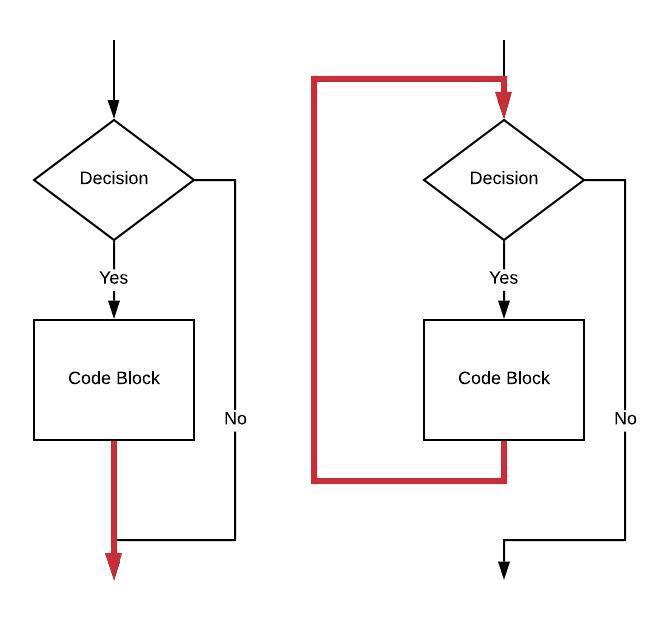
123 | while (a >= b) { // CODE BLOCK} |
aarch64:
123456789 | // Assume value of a is in x0 // Assume value of b is in x1 1: cmp x0, x1 blt 2f // CODE BLOCK b 1b2: |
for loop
1234 | for (set up; decision; post step){ // CODE BLOCK} |
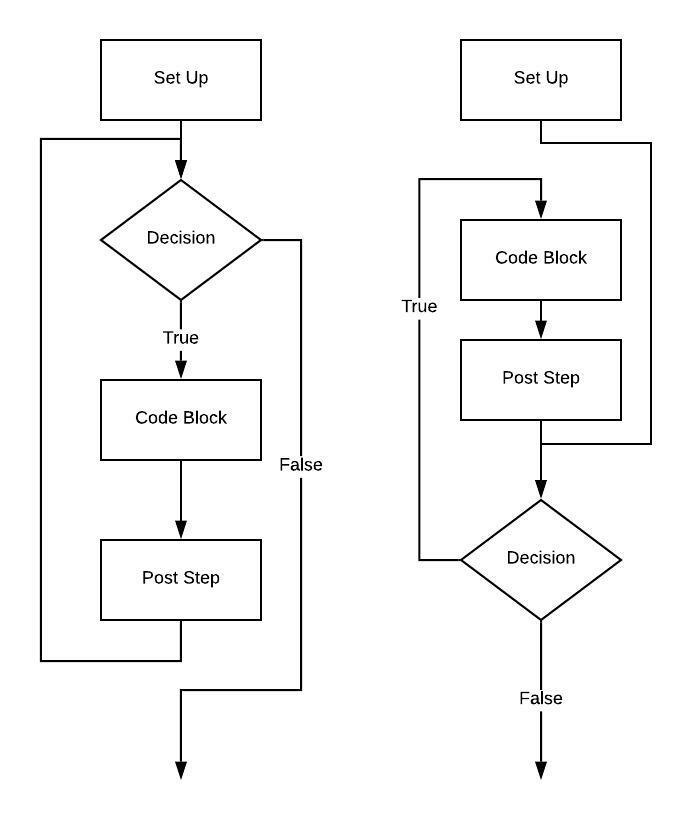
1234 | for (long i = 0; i < 10; i++){ // CODE BLOCK} |
aarch64 (left flowchart)
123456789101112 | // Assume i is implemented using x0 mov x0, xzr1: cmp x0, 10 bge 2f // CODE BLOCK add x0, x0, 1 b 1b2: |
aarch64 (right flowchart)
123456789101112 | // Assume i is implemented using x0 mov x0, xzr b 2f1: // CODE BLOCK add x0, x0, 12: cmp x0, 10 blt 1b |
continue
123456 | for (long i = 0; i < 10; i++) { // CODE BLOCK "A" if (i == 5) continue; // CODE BLOCK "B"} |
Implemented in aarch64:
123456789101112131415161718 | // Assume i is implemented using x0 mov x0, xzr1: cmp x0, 10 bge 3f // CODE BLOCK "A". // if (i == 5) // continue cmp x0, 5 beq 2f // CODE BLOCK "B"2: add x0, x0, 1 b 1b3: |
Another version:
1234567891011121314151617181920 | // Assume i is implemented using x0 mov x0, xzr b 3f1: // CODE BLOCK "A" // if (i == 5) // continue cmp x0, 5 beq 2f // CODE BLOCK "B"2: add x0, x0, 13: cmp x0, 10 blt 1b |
break
breakThe implementation of is very similar tocontinue.
123456 | for (long i = 0; i < 10; i++) { // CODE BLOCK "A" if (i == 5) break; // CODE BLOCK "B"} |
aarch64:
12345678910111213141516171819202122 | // Assume i is implemented using x0 mov x0, xzr b 3f1: // CODE BLOCK "A" // if (i == 5) // break; cmp x0, 5 beq 4f // CODE BLOCK "B"2: add x0, x0, 13: cmp x0, 10 blt 1b4: |
Structure
alignment
Data members follow natural alignment.
Namely:
- A
longwill appear at addresses that are multiples of 8. - A
intwill appear at addresses that are multiples of 4. - A
shortwill appear at even addresses. - A
charcan appear at any address.
Example
12345 | struct { long a; short b; int c;}; |
Layout:
| Offset | Width | Member |
|---|---|---|
| 0 | 8byte | a |
| 8 | 2byte | b |
| 10 | 2 | – gap – |
| 12 | 4byte | c |
1234567 | struct Foo { long a; short b; int c;};struct Foo Bar = { 0xaaaaaaaaaaaaaaaa, 0xbbbb, 0xcccccccc }; |
The hex dump will show:
1 | aaaa aaaa aaaa aaaa bbbb 0000 cccc cccc |
Note the gaps filled with zeros. Note that if this is a local variable, these zeros could be garbage values.
Changing the order:
1234567 | struct Foo { short a; char b; int c;};struct Foo Bar = { 0xaaaa, 0xbb, 0xcccccccc }; |
The hex dump will show:
1 | aaaa 00bb cccc cccc |
Note that beforeint cthere is only a one-byte gap.
Why is there a zero to the left of b?
Because this ARM processor is running in_little endian_mode.
Defining a struct
1234567 | struct Foo { short a; char b; int c;};struct Foo Bar = { 0xaaaa, 0xbb, 0xcccccccc }; |
This is one way to define and access a struct:
- Hardcoded field offset
1234567891011121314151617181920212223242526272829303132333435 | .rodatafmt: "%p a: 0x%lx b: %x c: %x\n" bar: .short 0xaaaa // a: short 2 byte 0xbb // b: char 1 byte 0x00 // padding 0xcccccccc // c: int 4 byte main 2main: stp x29, x30, [sp, -16]! // save stack frame mov x29, sp adrp x0, fmt add x0, x0, :lo12:fmt // printf format string address adrp x1, bar add x1, x1, :lo12:bar // address of bar ldrh w2, [x1, 0] // short a ldrb w3, [x1, 2] // char b ldr w4, [x1, 4] // int c bl printf // Call printf(&bar, a, b, c) // Explicit exit system call mov x8, #93 // syscall number for exit mov x0, xzr // exit code 0 svc 0 // make syscall |
:lo12:fmtwill be replaced by the assembler withfmtthe lower 12 bits of the address.
adrp x0, fmtwill roundfmtthe address down to the nearest 4KB boundary(i.e., clear the lower 12 bits), and then load this ‘page base address’ intox0。
For example:
Iffmt = 0x12345678, then:adrp x0, fmtwill get0x12345000(lower 12 bits cleared)
- another way to define a structs is
**Using.equPseudo-instruction to define symbolic constant
1234567891011121314151617181920212223242526272829303132333435363738394041 | main // main function declaration .p2align 2 foo_a, 0 // like #define foo_a 0 foo_b, 2 // like #define foo_b 2 foo_c, 4 // like #define foo_c 4main: stp x29, x30, [sp, -16]! // Save x29, x30 to the stack mov x29, sp // Set up new frame pointer // Load addresses of fmt and bar ldr x0, =fmt // Address of fmt string ldr x1, =bar // address of bar ldrh w2, [x1, foo_a] // Load bar.a into w2 ldrb w3, [x1, foo_b] // Load bar.b into w3 ldr w4, [x1, foo_c] // Load bar.c into w4 // Call printf, passing arguments mov x0, x0 // First argument: address of fmt mov x1, w2 // Second argument: value of a mov x2, w3 // Third argument: value of b mov x3, w4 // Fourth argument: value of c bl printf // Call printf // Restore stack and registers ldp x29, x30, [sp], #16 // Restore x29 and x30 ret // Return fmt: "%p a: 0x%lx b: %x c: %x\n" // printf format stringbar: .short 0xaaaa // a 0xbb // b 0 // padding 0xcccccccc // c |
- the third way:(Linux only)
**Using.structand field labels automatically derive offsets
1234567891011121314151617181920212223242526272829303132333435363738394041424344 | .rodatafmt: "%p a: 0x%lx b: %x c: %x\n" // Use .struct to simulate field offsets of struct Foo Foo, 0 .struct 0Foo_a: .struct Foo_a + 2 // short a: 2 bytesFoo_b: .struct Foo_b + 1 // char b: 1 byte .struct Foo_b + 1 // padding: 1 byteFoo_c: .struct Foo_b + 2 // int c: starts at offset 4 // Now Foo_c is at offset 4 bar: .short 0xaaaa // a: short 2 byte 0xbb // b: char 1 byte 0x00 // padding 0xcccccccc // c: int 4 byte main 2main: stp x29, x30, [sp, -16]! // save stack frame mov x29, sp adrp x0, fmt add x0, x0, :lo12:fmt // printf format string address adrp x1, bar add x1, x1, :lo12:bar // address of bar ldrh w2, [x1, Foo_a] // load bar.a (short) ldrb w3, [x1, Foo_b] // load bar.b (char) ldr w4, [x1, Foo_c] // load bar.c (int) bl printf // printf(bar, a, b, c) // explicit exit mov x8, #93 // syscall number for exit mov x0, xzr // exit code 0 svc 0 // syscall |
Using structs
To summarize the key points of usingstruct:
- all
structall have a base address - the base address corresponds to the starting position of the first data member
- all subsequent data members are offsets relative to the first member
- To correctly use
struct, you must first calculate the offset of each data member - Sometimes there is padding between data members, because all data members need to be aligned to natural boundaries.
The this pointer in C++
- Every non-static method call uses a hidden first parameter. That’s it. That’s the trick. This hidden parameter is the this pointer.
12 | TestClass tc;tc.SetString(test_string); |
It looks like we only passed one argument, test_string. But actually the compiler passed two arguments:
The first is the this pointer: which is the address of tc, passed to register x0
The second is test_string, passed to register x1
Seen in assembly:
123 | adrp x1, _test_stringadrp x0, _tc // Put the address of the tc object into x0 -- which is the this pointerbl __ZN9TestClass9SetStringEPc |
const
constThe meaning and effect of this can only bePartreflected in assembly language.
constLocal variables andconstparameters are no different from other data to the assembly language.constThe constancy of local variables and parameters is entirely enforced by the compiler.constGlobal variables are guaranteed to be constant by hardware. Attempting to modify a variable protected in this way is like poking a hornet’s nest. Best to leave it alone.
switch and jump tables
When the C++ optimizer is enabled, it analyzes your various cases and chooses one of three structures to implement your
switch。Moreover, it can use any combination of the following! Compiler authors are smart!
- It might generate a long chain of
if / else。 - It might use_binary search_to find the correct
case。 - Finally, it might use ajump table。
Suppose our cases are roughly contiguous. Given that all jump instructions are the same byte length, we can do some arithmetic on the switch variable to somehow derive the address of the case we want.
12345678910111213141516171819202122232425262728293031323334353637383940414243444546 | int main(){ int r; srand(time(0)); r = rand() & 7; switch (r) { case 0: puts("0 returned"); break; case 1: puts("1 returned"); break; case 2: puts("2 returned"); break; case 3: puts("3 returned"); break; case 4: puts("4 returned"); break; case 5: puts("5 returned"); break; case 6: puts("6 returned"); break; case 7: puts("7 returned"); break; } return 0;} |
Note that in this examplecasethe values are contiguous.
12345678 | jt: b 0f b 1f b 2f b 3f b 4f b 5f b 6f b 7f |
fmeans forward,bmeans backward
At addressjtthere is a series of jump statements… that is, jumps. Since they are arranged contiguously, this is an example of a jump table. We will calculate the entry into this_instruction array_index, and then jump to it.
1234 | lsl x0, x0, 2ldr x1, =jtadd x1, x1, x0br x1 |
- Line 2 loads the base address starting from address
jtof the “instruction array”.
Complete Example
1234567891011121314151617181920212223242526272829303132333435363738394041424344454647484950515253545556575859606162636465666768697071727374757677787980818283 | 4 mainmain: str x30, [sp, -16]! mov x0, xzr // set up call to time(nullptr) bl time // call time setting up srand bl srand // call srand setting up rand bl rand // get a random number and x0, x0, 7 // ensure its range is 0 to 7 // note use of x register is on purpose lsl x0, x0, 2 // multiply by 4 ldr x1, =jt // load base address of jump table add x1, x1, x0 // add offset to base address br x1// If, as in this case, all the "cases" have the same number of// instructions then this intermediate jump table can be omitted saving// some space and a tiny amount of time. To omit the intermediate jump// table, you'd multiply by 12 above and not 4. Twelve because each// "case" has 3 instructions (3 x 4 == 12).// Question for you: If you did omit the jump table, relative to what// would you jump (since "jt" would be gone).jt: b 0f b 1f b 2f b 3f b 4f b 5f b 6f b 7f0: ldr x0, =ZR bl puts b 99f1: ldr x0, =ON bl puts b 99f2: ldr x0, =TW bl puts b 99f3: ldr x0, =TH bl puts b 99f4: ldr x0, =FR bl puts b 99f5: ldr x0, =FV bl puts b 99f6: ldr x0, =SX bl puts b 99f7: ldr x0, =SV bl puts b 99f99: mov w0, wzr ldr x30, [sp], 16 ret .rodataZR: "0 returned"ON: "1 returned"TW: "2 returned"TH: "3 returned"FR: "4 returned"FV: "5 returned"SX: "6 returned"SV: "7 returned" |
Implementing fall-through
If the code following a case does not have a break, control flow will fall through directly to the next case.
Here is a code snippet from the program linked above:
1234567 | 0: ldr x0, =ZR bl puts b 99f1: ldr x0, =ON bl puts b 99f |
Handling gaps
The example above shows 8 consecutive cases. What happens if case 4 has no code? In other words, what happens if case 4 does not exist?
The result is as follows:
12345678910111213 | 2: ldr x0, =TW bl puts b 99f3: ldr x0, =TH bl puts b 99f4: b 99f5: ldr x0, =FV bl puts b 99f |
Other strategies for implementing switch
As mentioned above, the optimizer has at least three tools available to implement complexswitchstatements, and it can use a combination of these tools.
- For example, suppose your cases boil down to two roughly contiguous ranges of values. For instance, you have cases 0 to 9, and cases 50 to 59. You could implement this as two jump tables, and use a
if / elseto select which one to use.
Suppose yourswitchstatement,casevalues are mainly concentrated intwo small contiguous ranges, for example: one group iscase 0tocase 9, the other group iscase 50tocase 59, then you can use two jump tables to handle these two ranges, and then use anotherif / elseto decide which jump table to use.
- Suppose you have a
casestatement with manyswitchbranches, and thesecasevalues havevastly different numerical ranges, such as case 10, case 1000, case 50000…, then you canfirst use binary search to narrow down the search range, restrict the target value to asmaller range, and then use other techniques (such as jump tables, linear comparison, etc.) within this range to determine whichcasebranch it corresponds to.
Suppose you have acasestatement with manyswitchbranches, and thesecasevalues havevastly different numerical ranges, such as case 10, case 1000, case 50000…, then you canfirst use binary search to narrow down the search range, restrict the target value to asmaller range, and then use other techniques (such as jump tables, linear comparison, etc.) within this range to determine whichcasebranch it corresponds to.
- You might need to implementhierarchical jump tables, for example.
‘Hierarchical jump tables’ are an optimization structure suitable for the following situations:
casevalues are verysparse、with extremely wide ranges(for example,case 0, case 1000, case 2000...)- but they aredense in local ranges(such as
1000~1009,2000~2009)
you can:
- First, use a ‘first-level jump table’ to jump based on high bits or sectionsto a sub-jump table (sub-range).
- Then perform the specific jump in the sub-jump table。
This forms a “hierarchical structure” – a tree-like jumping process.
Strategies for implementing if-else
If you do need to implement a long chain ofif / elsestatements, consider how frequently a particular case is selected. Put the most common case at theif / elsebeginning of the sequence.
This is what is known as “making the common case fast”.
Making the common case fast is a great idea in computer science. Regardless of the language you use, it is an idea worth keeping in mind.
function
Core Concept
blThe instruction stands for Branch with Link. The concept of Link allows a function (or method) to return to the instruction immediately following the call.
The Branch with Link calculates the address of the instruction immediately following it.
It places this address into a register
x30, then jumps to the provided label. It leaves a link in the “breadcrumb” trail used to return, and following itretallows the return.
This is why if your function itself calls other functions, you absolutely must back up thex30。
An example
123456789101112 | main 2main: ldr x0, =hw bl puts ret hw: "Hello World!" |
The program will hang and must be killed with ^C.
Someone calledmain()—it is a function, someone called it using theblinstruction. At the momentmain()is entered, the address it needs to return to is stored inx30.
Then,main()called a function—in this caseputs(), but which specific function is called doesn’t matter—it called a function. In doing so, it overwrote the address inmain()with the address of line 7. That address is exactly whereputs()needs to return to.
So, when line 7 executes, it puts the contents ofx30into the program counter and jumps there.
Here is the fixed code:
1234567891011121314 | main 2main: str x30, [sp, -16]! ldr x0, =hw bl puts ldr x30, [sp], 16 ret hw: "Hello World!" |
In the AARCH64 Linux-style calling convention, the return value is placed inx0, and sometimes it is returned in other temporary registers, though this is uncommon. (Note that if the function returns afloatordouble,x0it could also bew0or the first floating-point register.)
If your function calls_any_other functions,x30must be backed up to the stack and restored before returningx30。
C or C++ does not support functions with multiple return values, but they can be written in assembly language—the rules are yours to break.
Inline functions
declared as inline(inline) functions do not actually make a function call. Instead, the function’s code, after type checking, is inserted directly where the “call” occurs, after adjusting parameter names.
Passing arguments to functions
How arguments are passed to functions may vary by operating system. This chapter targets the standard implemented on Linux.
For the purposes of the current discussion, we assume all arguments arelong int, and therefore are stored inxregisters.
Up to 8 arguments can be passed directly through temporary registers.(i.e.
x0tox7) each argument can be up to the size of an address, long, or double (8 bytes).Scratch means that the value of the register can be changed at will, without needing to back up or restore their values between function calls.
This means if your function calls any functions, you cannot expect the contents of scratch registers to remain unchanged.
An example
1234 | long func(long p1, long p2){ return p1 + p2;} |
is implemented as:
12 | func: add x0, x0, x1 ret |
If you are the author of both the caller and the callee, and both are in assembly language, you can do whatever you want with the return values. Specifically, you can return multiple values.HoweverIf you do this, you give up the possibility of calling these functions from C or C++.
const
1234 | long func(const long p1, const long p2){ return p1 + p2;} |
How does assembly language change?
Answer: Not at all!
constis an instruction to the compiler, commanding it to prohibit changingp1andp2's value. We are smart humans, knowing that assembly language never intended to modifyp1andp2, so no changes are needed.
Passing a pointer
1234 | void func(long * p1, long * p2){ *p1 = *p1 + *p2;} |
12345 | func: ldr x2, [x0] ldr x3, [x1] add x2, x2, x3 str x2, [x0] ret |
Since this is avoidfunction, when returning,x0's value is usually undefined.
Passing by reference
1234 | long func(long & p1, long & p2){ return p1 + p2;} |
1234 | func: ldr x0, [x0] ldr x1, [x1] add x0, x0, x1 ret |
Passing by reference is also an instruction to the compiler to treat the pointer slightly differently—this difference is not apparent here, so the only difference compared to the pointer-passing version is how we return the result.
More than eight arguments
1234567891011 | void SillyFunction(long p1, long p2, long p3, long p4, long p5, long p6, long p7, long p8, long p9) { printf("This example hurts: %ld %ld\n", p8, p9);}int main() { SillyFunction(1, 2, 3, 4, 5, 6, 7, 8, 9);} |
123456789101112131415161718192021222324252627282930313233343536373839404142434445 | main/* Demonstration of using more than 8 arguments to a function. This demo is LINUX only as APPLE will put all arguments beyond the first one on the stack anyway. On LINUX, all parameters to a function beyond the eight go on the stack. The first 8 go in registers x0 through x7 as normal (for LINUX).*/SillyFunction: stp x29, x30, [sp, -16]! // Changes sp. mov x29, sp // set new sp ldr x0, =fmt mov x1, x7 // The eighth parameter ldr x2, [sp, 16] // This does not alter the sp, the ninth parameter bl printf ldp x29, x30, [sp], 16 // Undoes change to sp. retmain: stp x29, x30, [sp, -16]! // sp down total of 16. mov x29, sp mov x0, 9 str x0, [sp, -16]! // sp down total of 32. mov x0, 1 mov x1, 2 mov x2, 3 mov x3, 4 mov x4, 5 mov x5, 6 mov x6, 7 mov x7, 8 bl SillyFunction add sp, sp, 16 // undoes change of sp by 16 due // to function call. ldp x29, x30, [sp], 16 // undoes change to sp of 16. ret fmt: "This example hurts my brain: %ld %ld\n" |
After executingline 24, the contents of the stack are:
12 | sp + 0 former contents of frame pointersp + 8 return address for main |
After executingline 27, the contents of the stack are:
1234 | sp + 0 9sp + 8 garbagesp + 16 former contents of frame pointersp + 24 return address for main |
After executingLine 14, the contents of the stack are:
123456 | sp + 0 return address for SillyFunctionsp + 8 garbagesp + 16 9sp + 24 garbagesp + 32 former contents of frame pointersp + 40 return address for main |
This meansline 18takes from memoryp9and puts its value into x2 (where it becomesprintf()'s third argument).
In AArch64, stack space is often aligned in 16-byte unitsallocated, but you might have only written a portion of the data, and the rest is not initialized, so we call it ‘garbage’ (undefined content)。
In ARM V8, the stack pointer can only be adjusted in multiples of 16.
In ARM V8, the stack pointer can only be adjusted in multiples of 16.
In ARM V8, the stack pointer can only be adjusted in multiples of 16.
Examples of calling some common C runtime functions
Incidentally, functions in the C runtime are broadly divided into two categories.
Some are primarily implemented by the C runtime itself.
Other functions in the C runtime act as wrappers for functions implemented by the operating system itself. These are called “system calls”.
In terms of calling functions in the C runtime, there is no practical difference between these two types. But note that there is also a way to usesvcinstructions to directly call system calls.
“C runtime”(C runtime) refers to a set of functions, variables, and basic mechanisms that provide support during program execution,mainly used to support the C standard library and program initialization/termination. This system is usually called C runtime library, common implementations on different platforms include:
- Under GNU/Linux: glibc
- Under Windows: MSVCRT
- Under macOS: libSystem.dylib (includes libc)
What does the C runtime do?
- Program initialization
- In
main()Before execution, the C runtime sets up the stack, initializes global variables, calls constructors, etc. - The typical entry point is
_start->__libc_start_main()->main()。
- In
- Provides standard library functions
- such as
printf(),malloc(),exit(),fopen()etc., these functions are implemented or wrapped by the C runtime.
- such as
- Resource management
- such as lifecycle management of memory allocation, file handles, threads, etc.
- Provides system call wrappers
- For example, when you call
write()it actually calls a wrapper provided by the C runtimewhich ultimately accesses the kernel viasyscallorsvcinstructions.
- For example, when you call
System call
Many C runtime functions are just wrappers for system calls. For example, if you call open() from the C runtime, the function does some bookkeeping and then performs the actual system call.
What is a system call?
The short answer is: a system call is a function call serviced by the operating system itself, running in the operating system’s own private memory area and able to access its internal features and data structures.
Our programs run in “userland”. The technical name for userland on ARM64 processors is EL0 (Exception Level 0).
We can only manipulate kernel space through carefully controlled mechanisms—such as system calls. The technical name for where the kernel (or system) typically runs is EL1.
There are two higher exception levels (EL2 and EL3), which are beyond the scope of this book.
The mechanism for making system calls
First, as with any function call, the arguments need to be set up. The first argument goes in the first register, and so on.
Second, load the number corresponding to the specific system call we want to make into a specific register (w8).
Finally, a special instruction, svc, triggers a trap, elevating us from userland to kernel space. In other words, svc causes a transition from EL0 to EL1. There, various checks are performed, and the actual code for the system call is run.
A description of returning from a system call is beyond the scope of this book. Hint: just as there is a special instruction to elevate from EL0 to EL1, there is also a special instruction that does the opposite.
Numbers associated with specific system calls
Reference:

getpid() example
1234567 | int main() { printf("Greetings from: %d\n", getpid()); return 0;} |
Written in assembly language using the C runtime:
1234567891011121314151617 | main 2main: stp x29, x30, [sp, -16]! bl getpid mov w1, w0 ldr x0, =fmt bl printf ldp x29, x30, [sp], 16 mov w0, wzr ret fmt: "Greetings from: %d\n" |
Finally: calling system calls directly
123456789101112131415161718 | main 2main: stp x29, x30, [sp, -16]! mov x8, 172 // getpid on ARM64 svc 0 // trap to EL1 mov w1, w0 ldr x0, =fmt bl printf ldp x29, x30, [sp], 16 mov w0, wzr ret fmt: "Greetings from: %d\n" |
We chose getpid() because it takes no arguments. When using the C runtime, we simply bl to it.Calling a system call directly is different; we must first load the number corresponding to getpid() under the AArch64 architecture into x8.。
123456789101112131415161718192021222324252627282930313233343536373839404142434445464748495051525354555657585960616263646566676869707172737475767778798081828384858687888990919293949596979899100101102103104105106107108109110111112113114115116117118119120121122123124125126127128129130131132133134135136137138139140141142143144145146147148149150151152153154155156157158159160161162163164165166167168169170171172173174175176177178179180181182183184185186187188189190191192193194 | /* Perry Kivolowitz Example of file operations.*/ main 2/* This program will * open() a file in the current directory, * write() some text to it, * seek back to the beginning of the file, * read() each line, printing it * close() the file*/// Use .req to alias registers for readability. For example, fd is actually w28, representing a file descriptor.retval w27fd w28main: stp x29, x30, [sp, -16]! stp x27, x28, [sp, -16]! bl open_file // w0 will contain either the file descriptor of the new // file or -1 for a failure. Note that the value in w0 // has also been copied to "fd" - a register alias. cmp w0, wzr bge 1f // If we get here, the open has failed. Use perror() to // print a meaningful error and branch to exit. The return // code of the program will be set to non-zero inside fail. ldr x0, =fname bl fail b 99f1: // When we get here, the file is open. Write some data to it. // If write_file returns non-zero, it signifies an error. If // so, branch to the file closing code since the file is open // after printing an error message. bl write_data cbz w0, 10f // If we get here, there was an error in write_data. Print // a reasonable error message then branch to the clean usleep // code. ldr x0, =wf // load legend bl fail // print error b 50f // branch to clean up. // Seek back to position zero preparing to read the file back. // The return value in x0 (off_t) is the return value of // lseek().10: bl seek_zero cbz x0, 20f // If we get here, the seek failed. Cause a reasonable // message to be printed then branch to the clean up code. ldr x0, =sf bl fail b 50f20: // When we get here, we have to read from the file and print // the results. To ignore the complexity of memory allocation // and buffer overrun potential, we'll read one character at a // time looking the end-of-file. // ssize_t read(int fildes, void *buf, size_t nbyte); mov w0, fd ldr x1, =buffer mov x2, 1 bl read // Check the return value - should be 1. cbz x0,50f // zero means EOF - that's OK. // If x0 is negative, that IS a problem. cmp x0, xzr bge 25f // The return value is negative - this is an error. ldr x0, =rf bl fail b 99f25: // Write the character sitting in buffer to the console. mov w0, 1 ldr x1, =buffer mov x2, 1 bl write // We will ignore the return value for the sake of brevity. // There are plenty of examples of handling a potential error // elsewhere in this code. // -- b 20b // When we get here, we are done. Close the file.50: mov w0, fd bl close mov retval, wzr99: ldp x27, x28, [sp], 16 ldp x29, x30, [sp], 16 mov w0, retval ret/* open_file() This function attempts to open a file for both reading and writing. Return values will be checked to ensure the file is opened. If successful, the fd is returned (and is squirreled away in register "fd"). If unsuccessful, the -1 returned by open() is passed back to the caller. Explanation of the magic numbers: int open(const char *pathname, int flags, mode_t mode); octal 102 for flags is O_RDWR | O_CREAT octal 600 for mode is rw------- i.e. read and write for the owner but no permissions for anyone else. There is a version of open() that takes two parameters. However, if O_CREAT is specified, the three parameter version is required.*/ O_FLAGS, 0102 O_MODE, 0600open_file: stp x29, x30, [sp, -16]! ldr x0, =fname mov w1, O_FLAGS mov w2, O_MODE bl open mov fd, w0 ldp x29, x30, [sp], 16 ret/* This function uses perror() to print a meaningful error message in the event of a failure. The string value passed to perror() arrives to us as a pointer in x0.*/fail: stp x29, x30, [sp, -16]! bl perror mov retval, 1 ldp x29, x30, [sp], 16 ret/* ssize_t write(int fd, const void *buf, size_t count); This function will write a string to the file descriptor contained in "fd" (a register alias).*/write_data: stp x29, x30, [sp, -16]! str x20, [sp, -16]! mov w0, fd // file descriptor ldr x1, =txt // address to print from ldr x2, =txt_s // load pointer to size ldr x2, [x2] // dereference the pointer mov w20, w2 // need this value for error check. bl write cmp x0, x20 // Did we write the expected amount? bne 90f // successful write - return 0 mov x0, xzr b 99f90: // failure - ensure we return non-zero! mov x0, 199: ldr x20, [sp], 16 ldp x29, x30, [sp], 16 ret/* off_t lseek(int fd, off_t offset, int whence);*/seek_zero: stp x29, x30, [sp, -16]! mov w0, fd // file descriptor mov x1, xzr // beginning of file mov w2, wzr // SEEK_SET - absolute offset bl lseek ldp x29, x30, [sp], 16 ret prog: "file_ops"wf: "write failed"rf: "read failed"sf: "lseek failed"fname: "test.txt"txt: "some data\n"txt_s: txt_s - txt - 1 // strlen(txt) (excluding the trailing NULL)buffer: 0 |
Floating-point number
What are floating-point numbers?
Reference
IEEE 754
Register
There are four top-level concepts regarding floating-point arithmetic on AARCH64.
- Floating-point values have a completely separate set of registers.
- There are instructions specifically for floating-point values.
- There are special instructions (SIMD) that can operate on a set of floating-point values.
- There are instructions to convert back and forth between integer and floating-point registers.
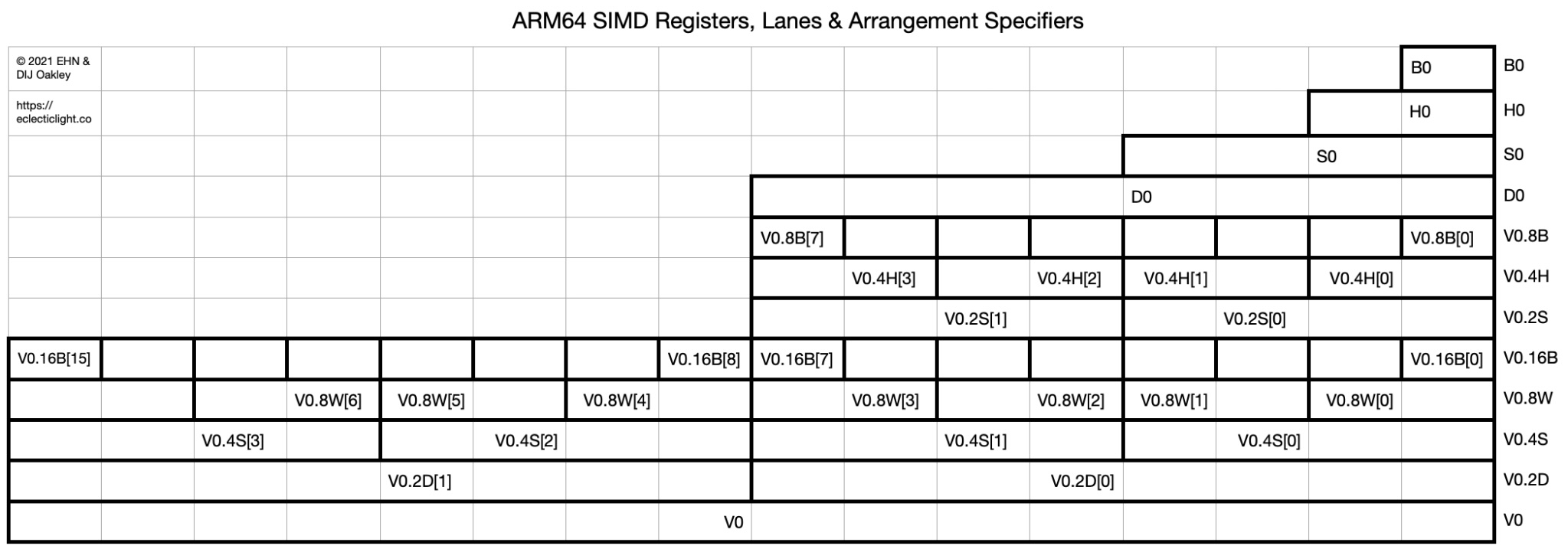
The figure above shows the different views and access methods of the SIMD (Single Instruction, Multiple Data) register V0 in the ARM64 architectureincludingArrangement Specifiers of different bit widths and Lane indices。
Illustration
This figure takes the V0 register as an exampleshowing how to access its contents using different arrangement specifiers:
| Level | Type | Description |
|---|---|---|
| Lowest level | V0 | The entire 128-bit V0 register |
| Upward | V0.2D,V0.4S,V0.8H,V0.16B | Access V0 with data views of different sizes: - D = 64-bit(2 × 64bit) - S = 32-bit(4 × 32bit) - H = 16-bit(8 × 16bit) - B = 8-bit(16 × 8bit) |
| Further up | V0.2D[0],V0.4S[0]etc. | Index of each lane, for example: - V0.4S[2]Represents the 3rd 32-bit unit- V0.16B[15]Represents the 16th 8-bit byte |
| Highest level | B0,H0,S0,D0 | is an alias forV0alias, accessed by bit width (only accesses the lowest bit data) |
Truncation towards zero
truncate
In C and C++, truncation is what we get from the following:
12 | integer_variable = int(floating_variable); // C++integer_variable = (int) floating_variable; // C |
This instruction is fcvtz—convert towards zero. Then, whether it produces a signed or unsigned result is determined by the last letter: u or s.
| Mnemonic | Meaning |
|---|---|
| fcvtzu | Truncation (always towards 0) produces an unsigned integer |
| fcvtzs | Truncation (always towards 0) produces a signed integer |
fcvtzu: Float Convert to Unsigned integer, with truncation toward zerofcvtzs: Float Convert to Signed integer, with truncation toward zero
The ARM documentation says that this instruction, which completely discards the fractional part, does rounding rather than truncating.
The choice of source register determines whether you are converting a double or single precision floating-point value.
| Source register | Convert a |
|---|---|
| dX | doubleto integer |
| sX | floatto integer |
| Destination register | Convert a |
|---|---|
| xX | 64-bit integer |
| wX | 32-bit or smaller integer |
wheredisdouble、fisfloatexample:
| C++ | Instruction |
|---|---|
int32_t(d) | fcvtzs w0, d0 |
uint32_t(d) | fcvtzu w0, d0 |
int64_t(d) | fcvtzs x0, d0 |
uint64_t(d) | fcvtzu x0, d0 |
Example
123456789101112131415161718192021222324252627282930313233343536373839404142434445464748495051525354555657585960616263646566676869707172737475767778798081828384858687888990919293949596 | main .type main, @function // Indicates telling the assembler and linker: main is a function symbol //.type <symbol>, @<type> is a pseudo-instruction of GAS (GNU Assembler), used to specify the type of a symbol. // <symbol>: symbol name, such as main // @<type>: symbol type, here @function, indicating this is a function, not a variable or labelmain: stp x29, x30, [sp, -16]! // Save frame pointer and link register mov x29, sp // Save floating-point register stp d20, d21, [sp, -16]! stp d22, d23, [sp, -16]! // Load hint information ldr x0, =leg bl printf // Load vless data into d20-d23 ldr x0, =vless ldr d20, [x0] // dless = 5.49 ldr d21, [x0, #8] // dmore = 5.51 ldr d22, [x0, #16] // ndless = -5.49 ldr d23, [x0, #24] // ndmore = -5.51 // fcvtps: round up (+∞) fcvtps x1, d20 fcvtps x2, d21 ldr x0, =fmt1 bl printf fcvtps x1, d22 fcvtps x2, d23 ldr x0, =fmt1 bl printf // fcvtns: round to nearest (tie to even) fcvtns x1, d20 fcvtns x2, d21 ldr x0, =fmt2 bl printf fcvtns x1, d22 fcvtns x2, d23 ldr x0, =fmt2 bl printf // fcvtzs: round towards zero fcvtzs x1, d20 fcvtzs x2, d21 ldr x0, =fmt4 bl printf fcvtzs x1, d22 fcvtzs x2, d23 ldr x0, =fmt4 bl printf // fcvtas: round to nearest (tie away from zero) fcvtas x1, d20 fcvtas x2, d21 ldr x0, =fmt3 bl printf fcvtas x1, d22 fcvtas x2, d23 ldr x0, =fmt3 bl printf // Restore floating-point registers and return address ldp d22, d23, [sp], #16 ldp d20, d21, [sp], #16 ldp x29, x30, [sp], #16 mov w0, wzr ret .rodatavless: .double 5.49 .double 5.51 .double -5.49 .double -5.51fmt1: "fcvtps less: %ld more: %ld\n"fmt2: "fcvtns less: %ld more: %ld\n"fmt3: "fcvtas less: %ld more: %ld\n"fmt4: "fcvtzs less: %ld more: %ld\n"leg: "less values are +/- 5.49. more values are +/- 5.51.\n" |
Note that all values are truncated to integers closer to zero.
Truncation away from zero
Truncation away from zero is not that simple. In fact, it cannot be done with a single instruction.
In C (and C++):
1 | iv = (int(fv) == fv) ? int(fv) : int(fv) + ((fv < 0) ? -1 : 1); |
If fv is already equal to an integer, then the integer value is that integer. Otherwise, iv is the integer further from zero.
In C++, a more complex version requires<cmath>, and might look like this:
1234 | template <typename T>int MyTruncate(T x) { return int((x < 0) ? floor(x) : ceil(x));} |
floor() always truncates downward (towards more negative).
ceil() always truncates upward (towards more positive).
12345678910 | RoundAwayFromZero: fcmp d0, 0 ble 1f // Value is positive, truncate towards positive infinity (ceil) frintp d0, d0 b 2f1: // Value is negative, truncate towards negative infinity (floor) frintm d0, d02: fcvtzs x0, d0 ret |
frintp(Round toward +∞)frintm(Round toward -∞)frintz(Round toward 0)frinta(Round to nearest, tie away from 0)frintn(Round to nearest, tie to even)
Rounding conversion
rounding
An instruction that performs what we normally understand as ‘rounding’ is frinta. This is a ‘round to nearest, ties away from zero’ conversion. So, 5.5 becomes 6, as we expect from ‘rounding’.
Converting integers to floating-point values
In C / C++:
12 | double_var = double(integer_var); // C++double_var = (double)integer_var; // C |
Handled by two instructions:
scvtfConverting signed integers to floating-point valuesucvtfConverting unsigned integers to floating-point values
The name of the destination register controls which floating-point value is generated. For example, specifying dX generates a double, and so on.
Floating-point literals
Recall that all AARCH64 instructions are 4 bytes long. Recall that this means there are constraints on what can be specified as a literal, because the literal must be encoded within the 4-byte instruction. If the literal is too large, an assembler error will occur.
Given that floating-point values themselves are at least 4 bytes long, using floating-point literals is severely restricted. For example:
12 | fmov d0, 1 // 1fmov d0, 1.1 // 2 |
Line 1 passes, but line 2 will throw an error.
To load a floating-point number, you can convert the value to binary and then do this:
12345678910111213141516 | main 2main: str x30, [sp, -16]! ldr s0, =0x3fc00000 fcvt d0, s0 ldr x0, =fmt bl printf ldr x30, [sp], 16 mov w0, wzr ret fmt: "%f\n" |
printf() only knows how to print double-precision values. When you specify a float, it converts it to a double before outputting it.
Manually converting floats and doubles to binary is not common for humans, although compilers are happy to do so.
For us humans, it is more common to use the assembler directives .float and .double to specify float and double values and place them in RAM.
An example:
1234567891011121314151617181920212223242526272829303132333435363738 | main 2counter x20dptr x21fptr x22 max, 4main: stp counter, x30, [sp, -16]! stp dptr, fptr, [sp, -16]! ldr dptr, =d ldr fptr, =f mov counter, xzr1: cmp counter, max beq 2f ldr d0, [dptr, counter, lsl 3] ldr s1, [fptr, counter, lsl 2] fcvt d1, s1 ldr x0, =fmt add counter, counter, 1 mov x1, counter bl printf b 1b2: ldp dptr, fptr, [sp], 16 ldp counter, x30, [sp], 16 mov w0, wzr ret fmt: "%d %f %f\n"d: .double 1.111111, 2.222222, 3.333333, 4.444444f: .float 1.111111, 2.222222, 3.333333, 4.444444 |
| Instruction | Full name / Abbreviation | Function | Common usage example |
|---|---|---|---|
.req | register require(Unofficial abbreviation) | Assign toAlias a register | foo .req x0Indicates writing laterfoois equivalent tox0 |
.equ | equate | Define aConstant symbol | BUF_SIZE .equ 64RepresentsBUF_SIZE = 64 |
On Linux, just as w/x0 to w/x7 are temporary registers and used to pass parameters, so are s/d0 to s/d7, starting from register 0. That is:
- Integer parameter passing: x0 ~ x7 (or 32-bit w0 ~ w7) are used to pass the first 8 integer parameters (int, pointer, long, etc.). More than 8 are passed via the stack.
- Floating-point parameter passing: d0 ~ d7 (64-bit double type) or s0 ~ s7 (32-bit float type) are used to pass the first 8 floating-point parameters. More than 8 floating-point parameters are also passed via the stack.
Stuffing 32 bits into a 32-bit bag
1 | ldr s0, =0x3fc00000 // Pseudo-instruction! We thought it directly loaded 0x3fc00000 into s0 |
The compiler cannot directly hardcode an arbitrary 32-bit value into an instruction (because an ARM instruction itself is only 32 bits).
So it actually is:
- Write the literal value 0x3fc00000 somewhere in memory (usually near the bottom of the current function).
- Generate an ldr instruction to load the value from this address using PC-relative load. This area is called a literal pool, which is a collection of constants.
We expect line 6 to read:
1 | ldr s0, =0x3fc00000 |
But actually it is:
1 | b+ 0x784 <main+4> ldr s0, 0x7a0 <main+32> |
Scan downwards to find 0x7a0:
1 | 0x7a0 <main+32> .inst 0x3fc00000 ; undefined |
| Pseudo-instruction | Actual effect | Actual assembly seen in GDB |
|---|---|---|
ldr s0, =0x3fc00000 | Load constant intos0Register | ldr s0, #literal_addrliteral_addr: .inst 0x3fc00000 |
ldr x0, =fmt | Load string pointer address | ldr x0, #literal_addrliteral_addr: .inst address value |
.inst 0x3fc00000 | Manually insert a 32-bit data (not necessarily a valid instruction) | Store constant (not execute) |
.instmeaning of:
- Full name:
.inst= insert instruction - Purpose: Directly insert the machine code of an ARM instruction (usually a 32-bit hexadecimal value)
1 | .inst 0xd65f03c0 // Actually a ret instruction |
In this example, the machine code 0xd65f03c0 after .inst is the 32-bit encoding of the ret instruction. That is to say:
1 | ret |
Equivalent to:
1 | .inst 0xd65f03c0 |
In the above example, you can use.instDefine an address, load from that address
Why not usemov reg, #imm?
- mov has immediate encoding limitations and cannot load arbitrary 32-bit values.
- When out of range, ldr must be used to load from memory.
fmov
The fmov instruction is used to move floating-point values between floating-point registers, and to some extent, to move data between integer registers and floating-point registers.
Load floating-point number as immediate value
As we saw with integer registers, some values can be used as immediate values, while others cannot. This depends on how many bits are required to encode the value. Too many bits… and it won’t fit into a 4-byte instruction along with the opcode.
For example, this allows:
1 | mov x0, 65535 |
But this doesn’t work:
1 | mov x0, 65537 |
The immediate constraints for fmov are much stricter because floating-point numbers are much more complex than integers.
fmov d0, #immWhether it works depends on whether the floating-point number can be precisely represented within the 8-bit encoding space:
| Structure | Bits | Description |
|---|---|---|
| Sign bit | 1 bit | represents positive or negative |
| exponent part | 3 bits | controls magnitude (multiplies by powers of 2) |
| mantissa part | 4 bits | can only be composed of combinations of 1/2, 1/4, 1/8, 1/16 |
123456 | fmov d0, 1.0 // ✅ OK: integer 1 is 2⁰, exponent can be encodedfmov d0, 1.5 // ✅ OK: 1 + 0.5 = 2⁰ + 2⁻¹, both exponent and mantissa can be encodedfmov d0, 1.75 // ✅ OK:1 + 0.5 + 0.25 = 2⁰ + 2⁻¹ + 2⁻²fmov d0, 1.875 // ✅ OK:+ 2⁻³fmov d0, 1.9375 // ✅ OK:+ 2⁻⁴fmov d0, 1.96875 // ❌ Not possible: requires 2⁻⁵, mantissa exceeds 4 bits |
Large floats cannot use fmov, use ldr instead.
fmov is a ‘bit copier’, not a ‘precision converter’. If you want to change numerical precision, you must use the fcvt series.
half precision
It does support half-precision (16-bit) floating-point values, but there is no fully unified convention on how different compilers support them. In fact, there is not just one but two competing half-precision formats: IEEE type and GOOGLE type. Additionally, many open-source developers have created their own implementations, whose naming conventions may conflict.
123 | __fp16 Foo(__fp16 g, __fp16 f) { return g + f;} |
Compiled as:
12345 | fcvt s1, h1fcvt s0, h0fadd s0, s0, s1fcvt h0, s0ret |
Note that each half-precision value is converted to single-precision. Therefore, using half-precision values in C and C++ may be inefficient.
On the other hand, if you are willing to use intrinsics and a certain SIMD instruction set provided by ARM, you can go all out. But be aware that doing so will tie your code to ARM processors in a way you might later regret.
Bit Manipulation
A bit field is a feature of the C and C++ languages that completely hides what is commonly known as ‘bit bashing’.
The order of bits in a bit-field is not guaranteed to be the same across different platforms, or even across different compilers on the same platform.
Bit fields are a syntax used to precisely control the number of binary bits occupied by members within a structure, typically used in space-sensitive scenarios like hardware registers and protocol headers.
Syntax format
1234 | struct 结构体名 { 类型 成员名 : 位宽; ...}; |
Example:
12345 | struct BF { unsigned char a : 1; unsigned char b : 2; unsigned char c : 5;}; |
- a uses 1 bit, can represent 0 or 1
- b uses 2 bits, can represent 0 ~ 3
- c uses 5 bits, can represent 0 ~ 31
The three members occupy a total of 1 + 2 + 5 = 8 bits, which is 1 byte
- Although each member has a bit width, the overall size is usually aligned to an integer type (here it is 1 byte, because 8 bits is exactly one byte).
- Different compilers may have slight differences in bit field alignment and padding details.
- When accessing, it can be used like a regular member:
1234 | struct BF bf;bf.a = 1;bf.b = 3;bf.c = 31; |
The compiler will automatically perform masking and shifting on the bit fields.
Consider a data structure that might have millions of instances in RAM, or billions of instances on disk. Suppose each instance requires 8 boolean members. The C++ standard does not define the size of bool, leaving it to the implementation. Some implementations treat bool as equivalent to int, with a length of 4 bytes. Some implement bool using char, with a length of 1 byte.
We assume the minimum case, treating bool as equivalent to char. Our struct might have millions or billions of instances, requiring 8 bools, thus 8 bytes. Multiply that by millions or billions.
Bit fields can help you here, using only one bit per boolean value. In the best case, 8 bytes are compressed into 1 byte. In the worse case, 8 × 4 = 32 bytes are compressed into 1 byte.
Assuming the smallest unit is used, i.e., each bool is 1 byte:
12345678910 | struct S { bool b0; bool b1; bool b2; bool b3; bool b4; bool b5; bool b6; bool b7;}; |
The size of this struct is 8 bytes (1 byte × 8 bools). If there are a million instances, the memory occupied is 8MB; if there are a billion instances, it is 8GB. For a 4-byte bool implementation, the size directly becomes 32 bytes, and 100 million instances would be 3.2GB.
Solution: Use bit fields to compress boolean values
Using bit fields, define 8 boolean values with a size of 1 bit:
12345678910 | struct S { unsigned char b0 : 1; unsigned char b1 : 1; unsigned char b2 : 1; unsigned char b3 : 1; unsigned char b4 : 1; unsigned char b5 : 1; unsigned char b6 : 1; unsigned char b7 : 1;}; |
8 1-bit members combined exactly occupy 1 byte.
This compresses 8 bytes into 1 byte, saving a lot of space.
In computer science, there is always an eternal trade-off between space and time. Below is a law:
If you want to make something faster, it will consume more memory.
If you want to save memory, it will take more time.
This law manifests here… Remember the example where we wanted to save memory by packing 8 bools into 1 byte? To save that little memory, we slow down, because accessing the correct bit takes several instructions, while overwriting a bool implemented with an int takes only one instruction.
As for the assembly language generated for bit fields, it depends on the optimization level. When unoptimized, the generated code will be longer and more cumbersome than ‘clever’ assembly language.
Byte Order
ARM supports both: little-endian and big-endian. However:
Standard toolchains generate little-endian code. Installing a big-endian version of the toolchain is a major undertaking.
Below is a quote from Wikipedia:
1 | ARM, C-Sky, and RISC-V have no relevant big-endian deployments, and can be considered little-endian in practice. |
Common Intel processors are also little-endian.
Assembly macros
An early innovation of assemblers was the introduction of macro capabilities. Given that writing code in assembly is somewhat tedious, macros provide a simple form of metaprogramming, where a sequence of statements can be encapsulated within a macro. You can think of macros as an early form of C++ template functions (sort of, but not quite).
Here is an example of an assembly language macro:
1234 | .macro LLD_ADDR xreg, label adrp \xreg, \label@PAGE add \xreg, \xreg, \label@PAGEOFF.endm |
It will be expanded to:
12 | adrp x0, fmt@PAGEadd x0, x0, fmt@PAGEOFF |
If the asm file ends with.s, gcc on Linux will not pass the assembly language file through the C preprocessor; but if the file ends with.S, it will.
General usage
AASCIZ
AASCIZ label, string
This macro calls .asciz with string as the string and label as the label. Additionally, this macro ensures that the string starts from a 4-byte aligned boundary.
PUSH_P, PUSH_R, POP_P and POP_R
These macros save some repetitive keystrokes. For example:
1 | PUSH_P x29, x30 |
Expands to:
1 | stp x29, x30, [sp, -16]! |
START_PROC and END_PROC
Place START_PROC after the label that introduces a function.
Place END_PROC after the last ret of the function.
They expand to: .cfi_startproc and .cfi_endproc。
MIN and MAX
Convenient macros for finding minimum and maximum values, which are more readable. Note that this macro executes a cmp, which subtracts src_a from src_b (discarding the result), with the purpose of setting the flags for the subsequent csel to interpret.
Signature:
1 | MIN src_a, src_b, dest |
src_a and src_b, the smaller one is placed into dest.
Signature:
1 | MAX src_a, src_b, dest |
src_a and src_The larger one in b is placed into dest.
MOD
The MOD macro used above is defined as:
1234 | .macro MOD src_a, src_b, dest, scratch sdiv \scratch, \src_a, \src_b msub \dest, \scratch, \src_b, \src_a.endm |
GLABEL
Mark a label as global so that it can be used externally.
Signature:
1 | GLABEL label |
will be prefixed with an underscore.
CRT
Call CRT (C runtime) function
If you create your own function without an underscore, you can just call it normally.
If you need to call functions such as those in the C runtime library, use this macro as follows:
1 | CRT strlen |
MAIN
Declare main()
Put MAIN on a separate line. Note that there is no colon.
errno
Externally defined errno is accessed through a CRT function, which is not visible when coding in C and C++. The name of this function differs on Mac and Linux. To get the address of errno, use:
1 | ERRNO_ADDR |
This macro performs the correct CRT call and leaves the address of errno in x0.
Load and Store
GLD_PTR
Load the address of a label and then dereference it, where on Apple the label is in the global space, and on Linux it is a relatively near label.
Signature:
1 | GLD_PTR xreg, label |
When this macro completes, the specified x register holds the 64-bit value at the specified label.
GLD_ADDR
Load the address of the label into the specified x register. No dereference is performed. On Apple machines, the label will be found in the global space.
Signature:
1 | GLD_ADDR xreg, label |
When this macro completes, the address of the label is in the x register.
LLD_ADDR
Similar to GLD_ADDR, this macro loads the address of a “local” label.
Signature:
1 | LLD_ADDR xreg, label |
When this macro completes, the address of the label is in the x register.
LLD_DBL
Signature:
1 | LLD_DBL xreg, dreg, label |
When this macro completes, the double at the specified local label will be stored in the specified double register.
LLD_FLT
Signature:
1 | LLD_FLT xreg, sreg, label |
When this macro completes, the float at the specified local label will be stored in the specified single-precision register.
Performance
Undoing stack pointer modifications
A little trick about undoing stack pointer modifications. You might think that stack modifications made by pushing with str or stp and their kin must be undone with ldr or ldp and their kin.
It depends.
If you need to retrieve the original contents of the registers pushed onto the stack, then using ldr or ldp is appropriate. However, if you do not need to retrieve the original contents of the registers, then using addition to undo the stack modification is faster.
Take the use of printf() as an example. On Apple Silicon systems, you must pass arguments to printf() by pushing them onto the stack. However, when printf() completes, you do not need the values you pushed. As shown above, simply add the correct value (a multiple of 16) to the stack pointer. This is faster because addition does not access RAM (or cache) like ldr does.
Others
Let the assembler calculate the length itself
1234567891011121314151617181920212223242526272829 | main 2 main: str x30, [sp, -16]! mov w0, 1 // stdout ldr x1, =s // pointer to string ldr x2, =ssize // pointer to computed length ldr w2, [x2] // actual length of string bl write ldr x0, =fmt ldr x1, =s ldr x2, =ssize ldr w2, [x2] bl printf ldr x30, [sp], 16 mov w0, wzr ret s: "Hello, World!\n"ssize: ssize - s - 1 // accounts for null at endfmt: "str: %slen: %d\n" // accounts for newline |
Atomic operations
Load-linked, store-conditional
123456789101112131415 | .p2align 2#if defined(__APPLE__) _LoadLinkedStoreConditional_LoadLinkedStoreConditional:#else LoadLinkedStoreConditionalLoadLinkedStoreConditional:#endif1: ldaxr w1, [x0] add w1, w1, 1 stlxr w2, w1, [x0] cbnz w2, 1b ret |
LL/SC is an optimistic concurrency control mechanism. Its general logic is:
Load-Linked (LDAXR): Loads the value at an address and “monitors” whether the address has been modified. You can modify this value (e.g., increment it by 1).
Store-Conditional (STLXR): Attempts to write this new value. If the address content has not been modified by someone else in the meantime, the write succeeds; otherwise, it fails. Whether it succeeds or fails is indicated by the return value of STLXR (0 means success, non-zero means failure).
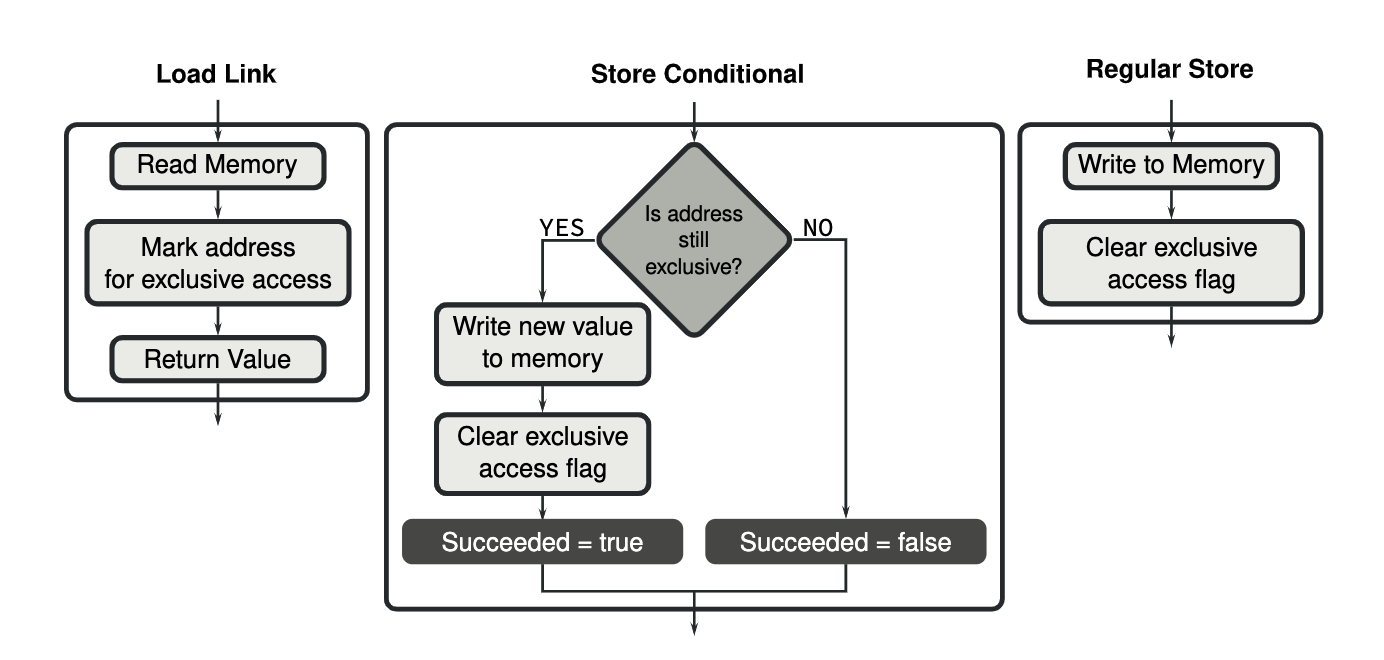
In the second version of ARMv8 (called ARMv8.1), the implementation of operations on atomic variables was improved. Load-linked and store-conditional instructions are still available, but several new instructions have been added that can perform addition, subtraction, and various bitwise operations in a single atomic instruction.
For example:
12 | mov w1, 1ldaddal w1, w0, [x0] |
Does the same work: atomically increments the value in memory pointed to by x0.
Spinlock
Below is the source code for an ARM V8 spinlock.
Lock
123456789 | Lock: START_PROC mov w3, 1 // Value to store: 1 means "lock"1: ldaxr w1, [x0] // Atomically load and mark exclusive access cbnz w1, 1b // If the lock is not 0 (held by someone else), continue spinning stlxr w2, w3, [x0] // Attempt atomic write; if successful, w2=0 cbnz w2, 1b // If it fails (contention), continue spinning ret END_PROC |
stlxr: If the exclusive tag is still valid (no one snatched the lock), then write the value of w3*x0, and put the result into w2 (0 means success)
- ldaxr dereferencing the lock itself (once again an int32_t) and marks the location of the lock as being hopefully, exclusive.
- Having gotten the value of the lock, its value is inspected and if found to be non-zero, we branch back to attempting to get it again - this is the spin.
- If the contents of the lock is 0, its value in w1 is changed to non-zero. Note, this could be made a bit better if a value of 1 was stored in another w register and simply used directly on line 10.
stlxr w2, w3, [x0]conditionally stores the changed value back to the location of the lock. If the stlxr returns 0, we got the lock. If not, we start over - somebody else got in there ahead of us. Perhaps this happened because we were descheduled. Perhaps we lost the lock to another thread running on a different core.
Unlock
123456 | Unlock: START_PROC str wzr, [x0] // Writing 0 means releasing the lock dmb ish // Memory barrier, cross-core synchronization ret END_PROC |
All it does is set to value of the lock to zero. The correct operation of the lock requires that no bad actor simply stomps on the lock by calling Unlock without first owning the lock. Just say no to lock stompers.
dmb ishsets up a data memory barrier across each processor - it makes sure threads running on different cores see the update correctly. This code seemed to work without this line but intuition suggests it could be important. In Lock() the stlxr instruction has an implied data memory barrier.
Summary (from a pseudocode perspective)
- Lock(x0):
12345 | do { w1 = *x0; // atomic exclusive load if (w1 != 0) continue; result = atomic_store_exclusive(x0, 1); // try to set lock} while (result != 0); // someone else beat us |
- Unlock(x0):
12 | *x0 = 0; // unlockdmb(ISH); // ensure all cores see the update |