
Timeline
Timeline
2025-12-31
init
2025-01-14
add buildroot
This article describes how to use Qemu to emulate Raspberry Pi 4b to set up a Linux kernel module development environment. It details the complete process of compiling the kernel and root filesystem on an Archlinux host under WSL2 using the ARM official portable cross-compiler version 11.2 (aarch64-none-linux-gnu-gcc), and compares the differences between the Archlinux default toolchain and the portable toolchain. For root filesystem construction, three approaches are introduced: BusyBox, Buildroot, and Yocto. The BusyBox approach requires manually copying dynamic libraries and installing drivers; the Buildroot approach emphasizes the necessity of using a portable toolchain and provides specific configuration items; the Yocto approach deeply analyzes distribution configuration, the sstate cache mechanism, and applicable scenarios for different target machines (QEMU-emulated x86_64, ARM64, RISC-V, and real hardware), while also explaining the characteristics of standard Poky, alternative configurations, and a minimal Poky. The article aims to help developers quickly build a reproducible Linux module development and testing platform in a virtual environment.
Environment
Host OS
Using Archlinux with WSL2
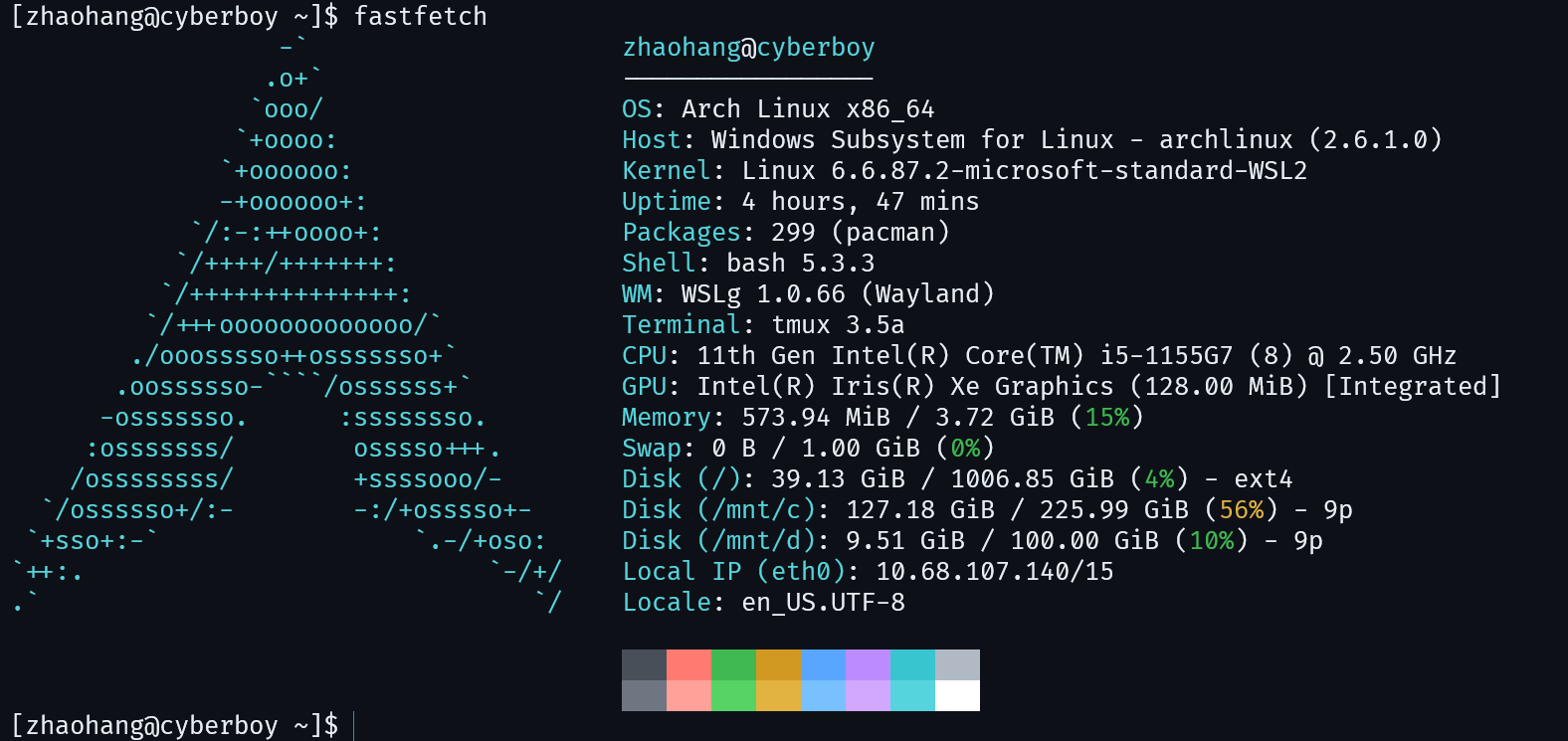
You can also use Ubuntu, see:

compiler
ARM has released 8 architectures in total: ARMv1, ARMv2, ARMv3, ARMv4, ARMv5, ARMv6, ARMv7, ARMv8.
For processors supporting the ARMv8 instruction set, you can use-march=armv8-aCompile code with the appropriate parameters; the ARM GNU compiler can be downloaded from the link below.

For example, the aarch64-linux-gnu-gcc version downloaded via pacman on Archlinux is 15.1.0, and its files are in a flat layout. It is not suitable for the Buildroot compilation toolchain.
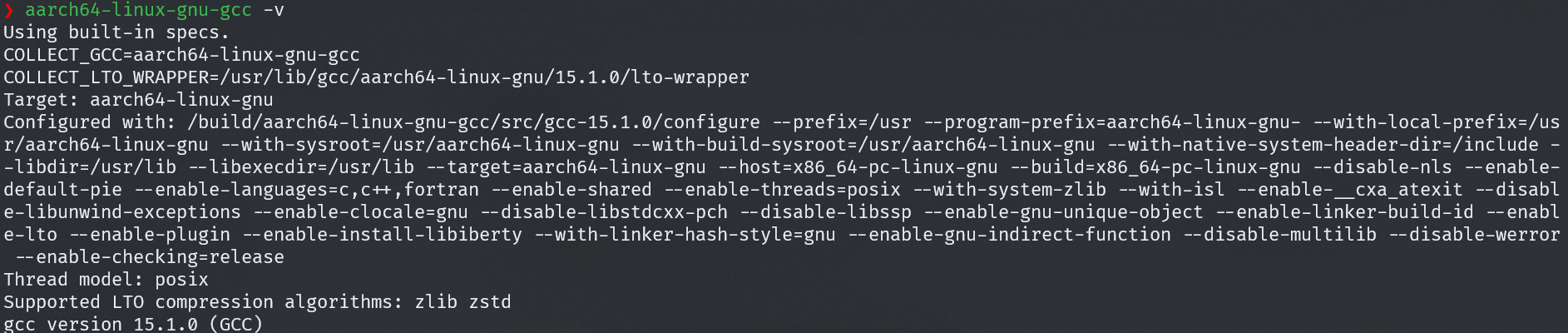
It is recommended to use the compiler from ARM’s official website. It is portable and can be used after extraction.
This article uses the 11.2 version of the cross-compiler.

You can add it to the environment variables.
123 | # ~/.bashrc or ~/.bash_profileemacs ~/.bashrcexport PATH="$HOME/tools/gcc-arm-11.2-2022.02-x86_64-aarch64-none-linux-gnu/bin:$PATH" |
Use aarch64-none-linux-gnu-gcc version 11.2.1.
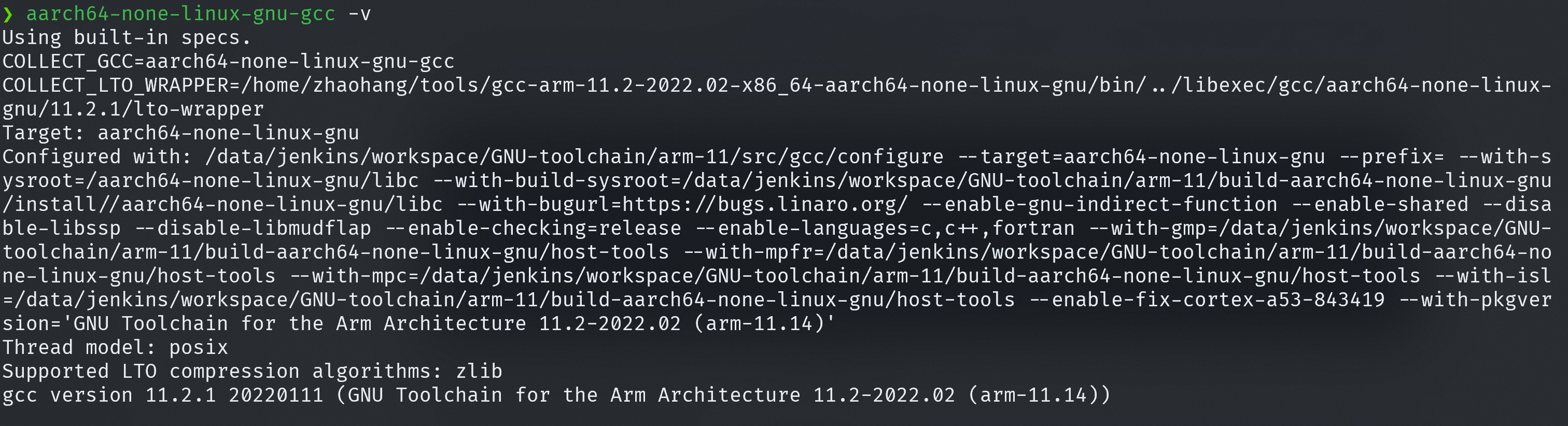
Compile the kernel.
1234567891011 | sudo pacman -Syu bcgit clone --depth=1 --branch rpi-5.10.y --single-branch https://github.com/raspberrypi/linux.git linux-5.10.y-raspimake mrpropermake ARCH=arm64 CROSS_COMPILE=aarch64-none-linux-gnu- bcm2711_defconfigmake ARCH=arm64 CROSS_COMPILE=aarch64-none-linux-gnu- modules_preparemake ARCH=arm64 CROSS_COMPILE=aarch64-none-linux-gnu- Image modules dtbs -j$(nproc)# Place the compiled kernel image and device tree in the specified directory.mkdir -p ~/tftp/raspi4bcp arch/arm64/boot/Image ~/tftp/raspi4bcp arch/arm64/boot/dts/broadcom/bcm2711-rpi-4-b.dtb ~/tftp/raspi4b |
Output:
arch/arm64/boot/Imagearch/arm64/boot/dts/broadcom/bcm2711-rpi-4-b.dtb
Compile the root filesystem.
busybox
Reference:
Note that this blog uses the aarch64-linux-gnu-gcc compiler downloaded via pacman on Archlinux. The compiler should preferably be consistent with the one used to compile the kernel; here we choose aarch64-none-linux-gnu-gcc.
When copying dynamic library files, copy the ones from the compiler directory:
12 | cp ~/tools/gcc-arm-11.2-2022.02-x86_64-aarch64-none-linux-gnu/aarch64-none-linux-gnu/libc/lib/ld-linux-aarch64.so.1 ./lib/cp ~/tools/gcc-arm-11.2-2022.02-x86_64-aarch64-none-linux-gnu/aarch64-none-linux-gnu/libc/lib64/* ./lib64/ |
After compilation, enter the Linux kernel source code and install the driver:
1234567 | # Install the driver and copy it to the root filesystem.cd /home/zhaohang/repository/linux/linux-5.10.y-raspi# busyboxmake ARCH=arm64 \ CROSS_COMPILE=aarch64-none-linux-gnu- \ INSTALL_MOD_PATH=/home/zhaohang/repository/linux/busybox-1.37.0/_install/ \ modules_install |
buildroot
The Archlinux default toolchain and the cross-toolchains provided by AUR cannot be copied and used, because Buildroot copies the toolchain to the working directory during the build. Therefore, we needSelect the Portable toolchain.。
1234567 | wget https://buildroot.org/downloads/buildroot-2025.11.tar.gz# Under WSL, PATH contains spaces; temporarily reset it.export PATH=/usr/local/sbin:/usr/local/bin:/usr/sbin:/usr/bin:/sbin:/bin:/usr/games:/usr/local/games:/usr/lib/wsl/libtar xvf buildroot-2025.11.tar.gzcd buildroot-2025.11make menuconfig |
The configuration is as follows.
12345678910111213141516171819202122232425262728293031323334353637 | Target Options ---> Target Architecture (AArch64 (little endian)) ---> Target Architecture Variant (cortex-A72) ---> Floating point strategy (FP-ARMv8) ---> MMU Page Size (4KB) ---> Target Binary Format (ELF) --->Toolchain ---> Toolchain type (External toolchain) ---> ***Toolchain External Options*** Toolchain (Custom toolchain) ---> Toolchain origin (Pre-installed toolchain) ---> (/home/zhaohang/tools/gcc-arm-11.2-2022.02-x86_64-aarch64-none-linux-gnu) Toolchain path ($(ARCH)-none-linux-gnu) Toolchain prefix External toolchain gcc version (11.x) ---> External toolchain kernel headers series (4.20.x) ---> External toolchain C library (glibc) ---> [*] Toolchain has SSP support? (NEW) [*] Toolchain has SSP strong support? (NEW) [ ] Toolchain has RPC support? (NEW) [*] Toolchain has C++ support? [ ] Toolchain has D support? (NEW) [*] Toolchain has Fortran support? [*] Toolchain has OpenMP support? [ ] Copy gdb server to the Target (NEW)System configuration ---> /dev management (Dynamic using devtmpfs + mdev) ---> [*] Enable root login with password (NEW) (root) Root passwordFilesystem images ---> [*] ext2/3/4 root filesystem ext2/3/4 variant (ext4) ---> (rootfs) filesystem label (512M) exact size |
Here, do not enable any options in kernel (they are disabled by default), because we need to compile the kernel ourselves; also do not enable any bootloader options, because using qemu to boot does not require a bootloader.
External toolchain kernel headers series (4.20.x) here refers to the kernel version corresponding to the toolchain, which can be found in
gcc-arm-11.2-2022.02-x86_64-aarch64-none-linux-gnu/aarch64-none-linux-gnu/libc/usr/include/linux/version.hthe directory; it should be 4.20.x here.
Compile:
12 | sudo pacman -Syu unzip cpio rsyncmake |
Enter the Linux kernel directory and install the driver.
123456789101112 | # Install the driver and copy it to the root filesystem.cd /home/zhaohang/repository/linux/linux-5.10.y-raspi# buildrootmake ARCH=arm64 \ CROSS_COMPILE=aarch64-none-linux-gnu- \ INSTALL_MOD_PATH=/home/zhaohang/repository/linux/buildroot-2025.11/output/target \ modules_installmake# Compile to generate rootfs.ext4.cp output/images/rootfs.ext4 ~/tftp |
yocto
1234567 | mkdir -p ~/repository/linux/yoctocd ~/repository/linux/yocto# use git to clone bitbake-setupgit clone https://git.openembedded.org/bitbakesudo pacman -Sy chrpath diffstat inetutils rpcsvc-protopython3 ./bitbake/bin/bitbake-setup init --non-interactive poky-whinlatter poky distro/poky machine/qemuarm64 |
Yocto does not automatically recognize arbitrary external toolchains!
There must be a dedicated layer that provides support for this toolchain (throughtcmode-*.incandtoolchain-*.conffile).
Common support layers:meta-arm→ Supports ARM’s official GNU Toolchain
Yocto Project / OpenEmbedded build system available in distribution configuration
poky-masterPoky is the reference distribution of the Yocto Project.
-mastermeans using latest development mainline (main branch) code, i.e. a version that has not been released and is under development。
oe-nodistro-masterOpenEmbedded (OE) is the underlying build framework of the Yocto Project.
nodistromeans ‘no distribution’ mode —is not tied to any specific distribution policy, only provides the most basic build capabilities.-masteralso indicates using development mainline。
oe-nodistro-whinlatterbased on OpenEmbedded of
nodistroconfiguration;use Yocto 5.3 version codename “whinlatter” the stable branch;
is a long-term support version;
nodistroindicates “no distribution” mode.
poky-whinlatterPoky distribution of 5.3 “whinlatter” stable version;
includes complete default configuration (such as using systemd, optional RPM/deb package formats, default toolchain, etc.);
is a long-term support version;
is the reference platform officially tested and certified by the Yocto Project.
“whinlatter” is the codename for Yocto Project 5.3(Yocto versions have been named after bird species since 4.0, 5.3 = Whinchat + Lark → “Whinlatter”).
BitBake build configuration (layers / templates)
pokyThis is standard Poky build configuration。
All packages (recipes) are built completely from source (unless you already have a local cache).
Safe, reliable, and predictable behavior.
poky-with-sstate- MMU enabled remote shared state (sstate) cache。
- During the build, it will attempt to the Yocto official or specified sstate mirror server download precompiled intermediate artifacts (such as compiled libraries, kernel modules, etc.), therebygreatly speeding up the build。
- But there are strict prerequisites:
- your local network must be very stable and have sufficient bandwidth;
- Must be able to access external sstate servers (usually requires internet);
- If the network is interrupted or the mirror does not match, it may cause build failures or inconsistencies;
- “Use with caution” is precisely a reminder of this.
sstate is Yocto’s caching mechanism: it saves the output of tasks (such as
do_compilethe result), which can be directly reused the next time the same content is built, without redoing it.
Target Machine
machine/qemux86-64PC emulating the x86_64 architecture, using QEMU virtual machine。
Based on a standard PC hardware model (such as Intel/AMD 64-bit CPU, common peripherals).
machine/qemuarm64Emulating the ARM64 (AArch64) architecture virtual device (such as a system based on Cortex-A57).
It also runs via QEMU, without needing a real ARM board.
machine/qemuriscv64- Emulating the RISC-V 64-bit architecture virtual machine.
machine/genericarm64Generic ARM64 real hardware reference configuration (not an emulator).
It is not tied to a specific board (such as Raspberry Pi, BeagleBone), but provides a “generic” ARM64 BSP.
You need to flash the generated image toa real ARM64 development boardto run on.
May lack specific board-level drivers (such as GPU, WiFi) and require manual adaptation.
machine/genericx86-64Generic x86_64 real hardware Reference configuration (e.g., ordinary PC, Intel NUC, industrial PC).
The generated image can be directly written to a USB drive and booted on real x86_64 computers.
Distribution configuration variants
distro/poky- Standard Poky distribution configurationIncludes a complete Linux system: glibc, systemd, package manager (RPM or IPK), common tools (bash, coreutils, networking, etc.).
- Uses systemd as the init system by default.
- Suitable for general development, learning, and most embedded application scenarios.
- The image is larger (several hundred MB), but fully featured.
distro/poky-altcfgAlternative configuration to Poky.
Usually used to test different combinations of underlying components, for example:
- use musl libc Alternative to glibc;
- use busybox + sysvinit Alternative to systemd;
- Smaller default image or different security policies.
Specific behavior depends on the Yocto version,Less documentation, less stable than standard Poky。
Mainly used for Yocto internal testing or advanced customization scenarios。
distro/poky-tiny- Minimal Poky, designed for resource-constrained devices.
- Features:
- use musl libc(smaller, faster);
- use busybox + sysvinit(no systemd);
- Removed a large number of non-essential packages;
- The final root filesystem can be as small as 10–20 MB。
- Limited functionality: may have no network tools, simplified shell, and no package management.
- Suitable for: microcontroller-level applications, minimal environment after the bootloader, safety-critical systems.
123456789101112131415161718 | # Enter the build environmentcd /home/zhaohang/repository/linux/yocto/bitbake-builds/poky-whinlatter# Configuration# The format of the generated filesystememacs build/conf/local.conf# Add the following contentIMAGE_FSTYPES = "ext4 cpio.gz"# Specify the toolchain installation path# EXTERNAL_TOOLCHAIN = "/home/zhaohang/tools/gcc-arm-11.2-2022.02-x86_64-aarch64-none-linux-gnu"# Activate the current buildsource ./build/init-build-env# Detect the current configurationbitbake-config-build list-fragments# Build a minimal rootfsbitbake core-image-minimal |
Kernel modules
Kernel module example code
1234567891011121314151617 | static int __init hello_world_init(void){ printk(KERN_INFO "hello world!\n"); return 0;}static void __exit hello_world_exit(void){ pr_info("hello world module exit\n");}module_init(hello_world_init);module_exit(hello_world_exit);MODULE_LICENSE("GPL");MODULE_AUTHOR("even629<asqwgo@outlook.com>");MODULE_DESCRIPTION("hello world!"); |
external module
Here we use the BusyBox root filesystem as an example
Makefile
12345678910111213141516171819202122232425262728293031323334 | DRIVER_NAME := hello_worldobj-m += $(DRIVER_NAME).oKERNEL_SRC:=/home/zhaohang/repository/linux/linux-5.10.y-raspiPWD ?=$(shell pwd)ARCH = arm64CROSS_COMPILE = aarch64-none-linux-gnu-all: buildbuild: $(MAKE) ARCH=$(ARCH) CROSS_COMPILE=$(CROSS_COMPILE) -C $(KERNEL_SRC) M=$(PWD) modulesclean: $(MAKE) ARCH=$(ARCH) CROSS_COMPILE=$(CROSS_COMPILE) -C $(KERNEL_SRC) M=$(PWD) modules clean rm -rf *.ko *.o *.mod.o *.mod.c *.symvers *.order .tmp*deploy: cp $(DRIVER_NAME).ko /home/zhaohang/repository/linux/busybox-1.37.0/_install /bin/bash /home/zhaohang/repository/linux/busybox-1.37.0/deploy.shqemu: qemu-system-aarch64 \ -M raspi4b \ -cpu cortex-a72 \ -m 2G \ -nographic \ -kernel /home/zhaohang/tftp/raspi4b/Image \ -dtb /home/zhaohang/tftp/raspi4b/bcm2711-rpi-4-b.dtb \ -initrd /home/zhaohang/tftp/initramfs.cpio.gz \ -append "console=ttyAMA0 earlycon=pl011,0xfe201000 rdinit=/linuxrc" |
The script that packages the root filesystemdeploy.shAs follows:
12345678910111213 | INSTALL_PATH=/home/zhaohang/repository/linux/busybox-1.37.0/_installcd "$INSTALL_PATH" || exit 1rm -rf ../initramfs.cpio.gz ~/tftp/initramfs.cpio.gzfind . | cpio -o -H newc | gzip -c > ../initramfs.cpio.gzcp ../initramfs.cpio.gz ~/tftpecho "cp initramfs.cpio.gz ~/tftp" |
A problem encountered is that when compiling with aarch64-linux-gnu-gcc on WSL2 Arch Linux, there is no print (aarch64-none-linux-gnu-gcc doesn’t work either). No solution has been found so far; the specific problem is described in detail on Stack Overflow:

However, this problem does not occur when using WSL2 Ubuntu 20.04.
built-in module
Beforedrivers/char(Using a character driver as an example) Create a folder named helloworld, put the driver source code into it, and then create a Kconfig file.
12345 | config HELLO_WORLD bool "helloworld support" default y help helloworld |
Modify drivers
123 | emacs ../Kconfig# Addsource "drivers/char/helloworld/Kconfig" |
Create a Makefile in the driver source directory
1 | obj-$(CONFIG_HELLO_WORLD) += helloworld.o |
Then add the following to the parent-level Makefile:
123 | emacs ../Makefile# Addobj-y += helloworld/ |
Then compile the kernel.
QEMU run
QEMU version
1234 | $ sudo pacman -Syu qemu-system-aarch64$ qemu-system-aarch64 --versionQEMU emulator version 10.1.2Copyright (c) 2003-2025 Fabrice Bellard and the QEMU Project developers |
BusyBox root filesystem
Here we compile BusyBox into initramfs.cpio.gz, as the value of the initrd parameter.
Run
123456789 | qemu-system-aarch64 \ -M raspi4b \ -cpu cortex-a72 \ -m 2G \ -nographic \ -kernel /home/zhaohang/tftp/raspi4b/Image \ -dtb /home/zhaohang/tftp/raspi4b/bcm2711-rpi-4-b.dtb \ -initrd /home/zhaohang/tftp/initramfs.cpio.gz \ -append "console=ttyAMA0 earlycon=pl011,0xfe201000 rdinit=/linuxrc" |
Incommand + a, then press x You can exit qemu
Buildroot root filesystem
For Buildroot, here we use an SD card to mount the filesystem.
123456789 | $ qemu-system-aarch64 \ -M raspi4b \ -cpu cortex-a72 \ -m 2G \ -nographic \ -kernel /home/zhaohang/tftp/raspi4b/Image \ -dtb /home/zhaohang/tftp/raspi4b/bcm2711-rpi-4-b.dtb \ -sd /home/zhaohang/tftp/rootfs.ext4 \ -append "console=ttyAMA0 earlycon=pl011,0xfe201000 root=/dev/mmcblk1 rw rootwait" |
Incommand + a, then press x You can exit qemu
Yocto root filesystem
Use initramfs.cpio.gz or use an SD card to mount the filesystem.
123456789 | $ qemu-system-aarch64 \ -M raspi4b \ -cpu cortex-a72 \ -m 2G \ -nographic \ -kernel /home/zhaohang/tftp/raspi4b/Image \ -dtb /home/zhaohang/tftp/raspi4b/bcm2711-rpi-4-b.dtb \ -initrd /home/zhaohang/repository/linux/yocto/bitbake-builds/poky-whinlatter/build/tmp/deploy/images/qemuarm64/core-image-minimal-qemuarm64.rootfs.cpio.gz \ -append "console=ttyAMA0 earlycon=pl011,0xfe201000 init=/sbin/init" |