时间轴

2026-02-16

init


USB 基础

USB(通用串行总线:Universal Serial Bus) 是计算机和电子设备间广泛使用的通用接口标准,能传输数据与供电。USB 是一个标准。

  1. 概念提出与初代标准制定(1994 - 1996 年)
    1994 年,康柏、IBM、英特尔等公司联手开发 USB 技术,想简化计算机与外设连接。1996年,USB 1.0 标准发布,支持 1.5Mbps(低速)和 12Mbps(全速)传输速率,满足鼠标、键盘等低速设备需求,还实现热插拔,方便了用户。
  2. 技术改进与普及(1998 - 2000 年)
    1998 年,USB 1.1 优化电气特性和兼容性,提高可靠性,推动设备普及。2000 年,USB 2.0 是个大突破,引入 480Mbps 高速传输模式,满足数码相机、移动硬盘等高速设备需求,成了主流接口标准。
  3. 高速发展与性能提升(2008 - 2013 年)
    2008 年,USB 3.0(后称 USB 3.1 Gen 1)问世,速率提至 5Gbps,优化电源管理与信号传输,支持高功率设备充电,满足高清视频传输等需求。2013 年,USB 3.1 Gen 2 发布,速率达10Gbps,为高性能外置 SSD 等设备提供可能。
  4. 持续演进与多样化(2014 年至今)
    2014 年,USB Type - C 接口出现,它尺寸小、能正反插、可高功率传输(最高 100W)且能高速传数据,逐渐成主流。2017 年,USB 3.2 定义不同速率标识,丰富速率选择。2019 年,USB4 基于雷电 3 技术,速率最高达 40Gbps,增强多显示器支持等功能,拓展应用场景。

USB 不断发展,在数据传输、设备兼容、供电能力等方面持续提升,成为现代电子设备必不可少的连接方式,USB 接口有不同种类,接口标准可以参考官网:

USB 接口分类

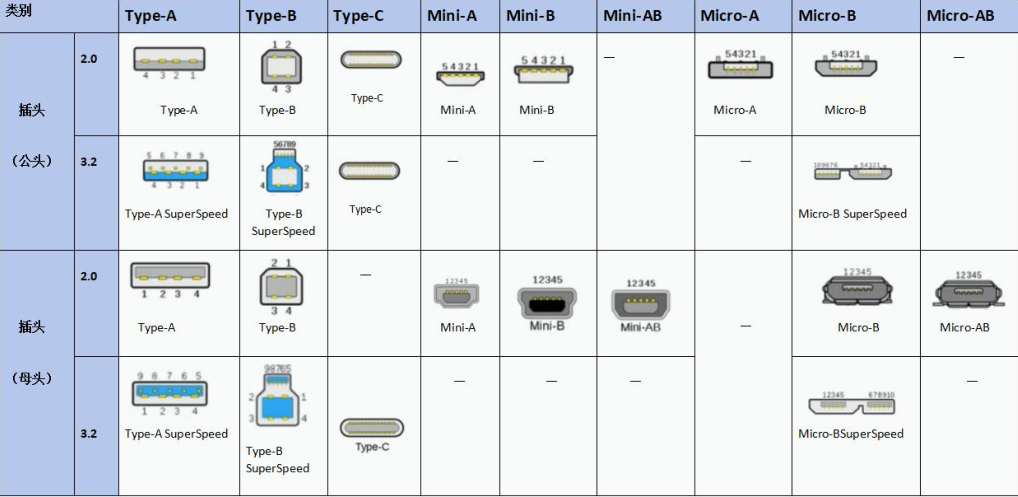
USB 接口粗略地可以分成三种,分别是 A 型,B 型和 C 型接口,分别是 Type-A 接口,Type-B 接口,Mini-USB 接口,Micro-USB 接口,Micro-B SuperSpeed 接口。接下来详细进行介绍。

  1. Type-A 接口如下图所示,是长方形接口,广泛应用于电脑,充电器等主机设备以及 U 盘,鼠标,键盘等传统外设。
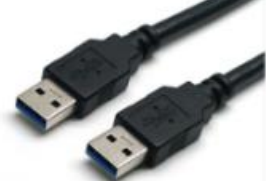
Type-A

  1. Type-B 接口如下图所示,是方正接口,多用于打印机、麦克风、扫描仪等设备
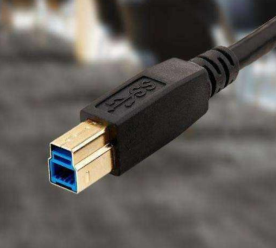
Type-B

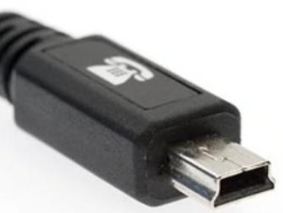
  1. Mini-B 接口如下图所示,多用于行车记录仪设备。

Mini-B

  1. Micro-USB 接口如下图所示,小型接口,曾用于老款手机、移动电源等便携设备。
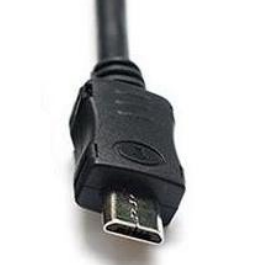
Micro-USB

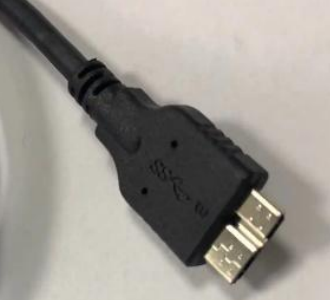
  1. Micro-B SuperSpeed 接口如下图所示,常用于移动硬盘。

Micro-B SuperSpeed

  1. Type-C 接口如下图所示,正反可插,目前 Typec 接口是手机、笔记本电脑、耳机等现代设备的主流接口。
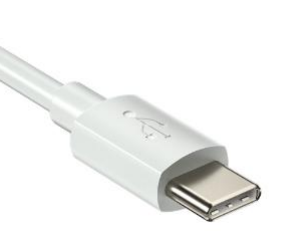
Type-C

总结:

接口类别

图中不同类型的 USB 接口虽然在外观和用途上有所差异,但它们都遵循 USB 标准协议,确保了设备之间的兼容性和互操作性。

这里要注意的是,不能仅因设备采用 Type - C 接口,就认定其具备高速数据传输能力。Type - C 只是一种外观规格,实际的数据传输速度,取决于所搭载的 USB 协议版本。例如,若采用 USB 2.0 协议,即便接口是 Type - C,其速度也相对有限,而 USB 3.0 及更高版本协议,才能实现高速传输。

USB 版本
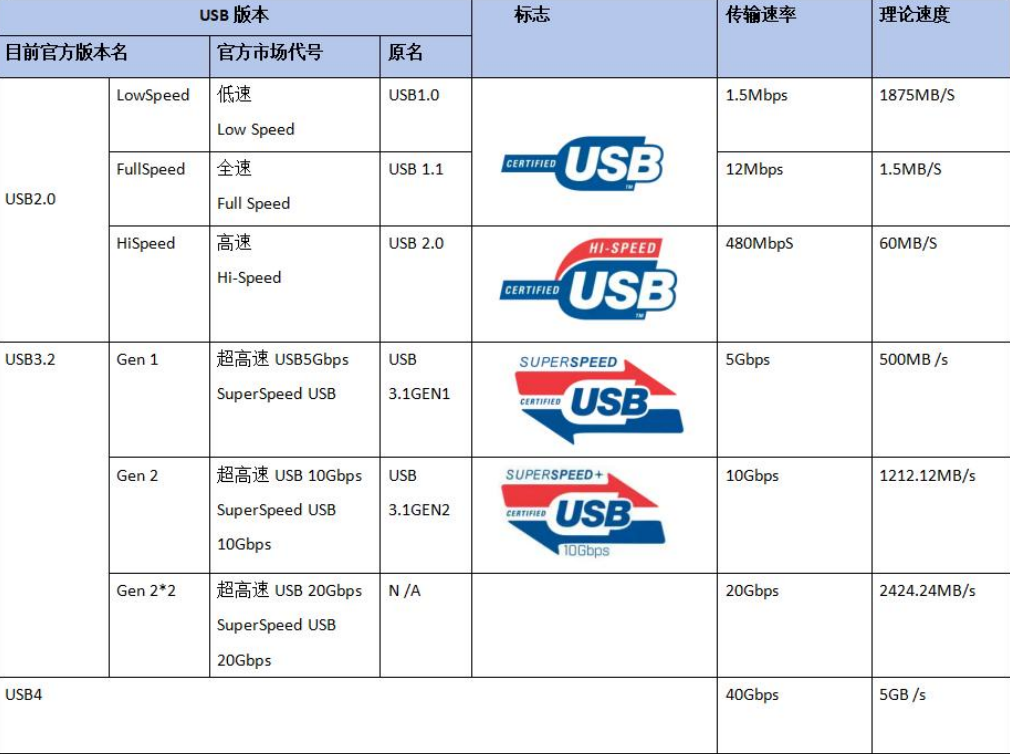
USB 版本

最初,USB 3.0 被命名为 SuperSpeed USB,强调其高速传输的特性。后来 USB 3.1 版本发布,它在传输速率上进一步提升。

然而,为了简化命名:

  • USB3.0 改名为 USB3.1 Gen 1
  • USB3.1 改名为 USB3.1 Gen2。

USB-IF 推出了最新的 USB 命名规范:

  • USB 3.1 Gen 1 又改名为 USB3.2 Gen1
  • USB 3.1 Gen 2 又改名为 USB3.2 Gen2
  • USB 3.2 Gen 2*2 为 USB3.2

经历过两次命名更改:

  • USB3.0 名称为 USB 3.2 Gen 1
  • USB3.1 名称为 USB 3.2 Gen 2
  • USB3.2 名称为 USB 3.2 Gen 2x2

根据 USB 接口颜色一般可推断出其版本

  • 黑色/白色:USB1.0/2.0
  • 深蓝色:USB3.0
  • 浅蓝色:USB2.0
  • 红色:USB3.1

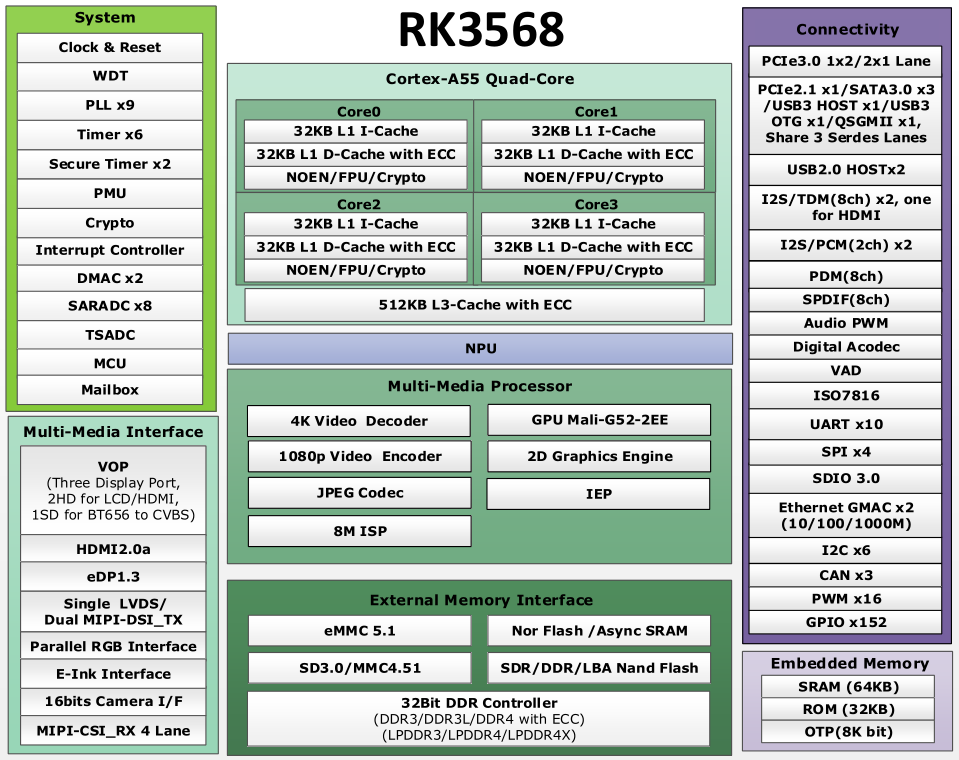
RK3568 USB接口

topeet RK3568

在上图中,我们可以看到 RK3568 处理器有 USB2.0 HOSTx2,一个 USB3.0 HOST 和一个 USB3 OTG。

USB 设备分为 Host(主设备) 和 Slave(从设备),只有当一台 Host 与另一台 Slave 连接时才能实现数据传输。

  • USB Host: USB Host是指具有 USB 主机功能的设备。USB 主设备是控制和管理 USB 总线的设备,USB 主设备通常是计算机或其他主机设备,如平板电脑,笔记本台式机等。

  • USB Slave: USB Slave是指具有 USB 从设备功能的设备。USB 从设备是受 USB 主机控制的设备,USB 从设备依赖与 USB 主机设备以进行数据传输和通信。USB 从设备可以是各种外围设备,如键盘,鼠标,U盘等。

USB OTG(USB On-The-Go)

指支持 USB OTG 功能的设备(即插即用),USB OTG允许设备在主设备和从设备之间进行切换,从而能够直接与其他 USB 设备进行通信,无需传统的 USB 主机设备。如通过 OTG 可以实现将摄像机和打印机直接连接。

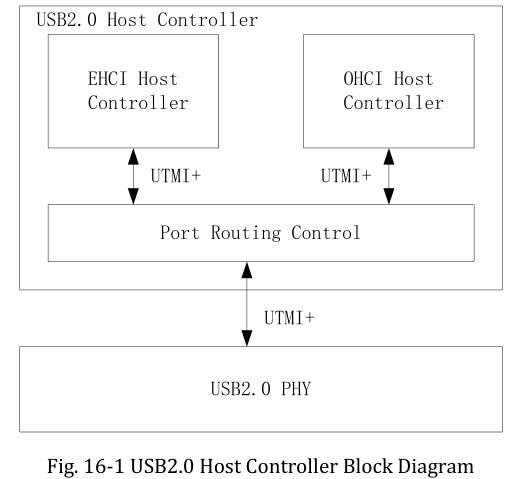
RK3568 芯片有两个 USB2.0 主机控制器,每个 USB2.0 主机控制器都通过一个增强型主机控制器接口(EHCI)主机控制器和一个开放式主机控制器接口(OHCI)主机控制器完全支持 USB2.0 功能,并且每个主机控制器都有一个 USB 端口。

  • OHCI 主机控制器仅支持全速和低速模式,用于连接全速设备和低速设备。

  • EHCI 主机控制器仅支持高速模式,用于连接高速设备。

OHCI 主机控制器和 EHCI 主机控制器共享同一个 USB 端口。EHCI 主机控制器会根据所连接设备的速度模式自动选择该 USB 端口的控制权归属(OHCI 或 EHCI)。

  • 当选择 OHCI 为主控时,OHCI 主机控制器将为所连接的设备提供服务;
  • 当选择 EHCI 为主控时,EHCI 主机控制器将为所连接的设备提供服务。

USB 2.0 Host Controller Block Diagram

RK3568 芯片有两个 USB3.0 控制器,其中一种可以用作 USB3.0 OTG(On-The-Go)控制器,另一种只能用作 USB3.0 主机控制器。USB3.0 OTG 控制器可以根据 USB2.0 物理层(PHY)的输入 ID 状态,充当静态主机、静态设备、USB2.0/3.0 OTG A 设备或 B 设备。
它能够在主机和设备之间以主机或设备的身份进行 SuperSpeed(超高速)、High-Speed(高速)、Full-Speed(全速)或 Low-Speed(低速)的数据传输。
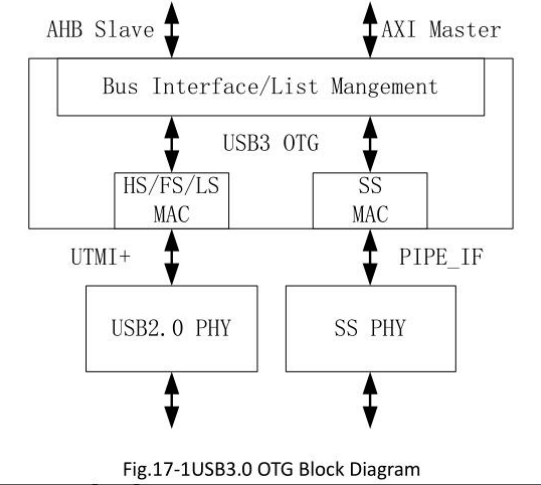
USB 3.0 OTG Block Diagram

从上图中可以看出,USB3 OTG 模块通过 HS/FS/LS MAC(高速/全速/低速 MAC)接口连接到下方的 USB2.0 PHY 模块。USB2.0 PHY 模块负责 USB2.0 的物理层功能。USB3 OTG 模块通过 SS MAC(超高速 MAC)接口连接到右侧的 SS PHY 模块。SS PHY 模块负责超高速(SuperSpeed)的物理层功能。
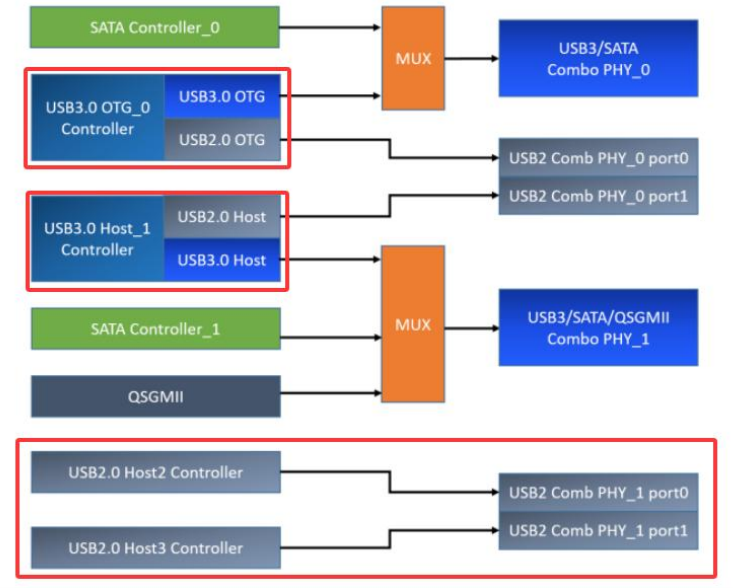
RK3568 USB的复用关系

从上述图示可知,RK3568 芯片配备两个 USB2.0 HOST,其 USB2.0 HOST 引脚不存在复用情况,USB 2.0 Host_2 控制器与 USB 2.0 Host_3 控制器分别使用 USB 2.0 Comb PHY_1 的 port0 和 port1。

同时,该芯片设有一个 USB3.0 OTG,它能向下兼容 USB2.0 OTG,且此 USB 3.0 OTG 控制器与 SATA_0 控制器复用 USB3/SATA Combo PHY_0。

另外,RK3568 芯片还有一个 USB3.0 HOST,它向下兼容 USB2.0 HOST,USB 3.0 Host_1 控制器与 SATA_1/QSGMII 控制器复用 USB3/SATA/QSGMII Combo PHY_1。

USB 3.0 OTG 控制器与 USB 3.0 Host_1 控制器分别使用 USB 2.0 Comb PHY_0 的 port0 和 port1。

topeet RK3568 USB
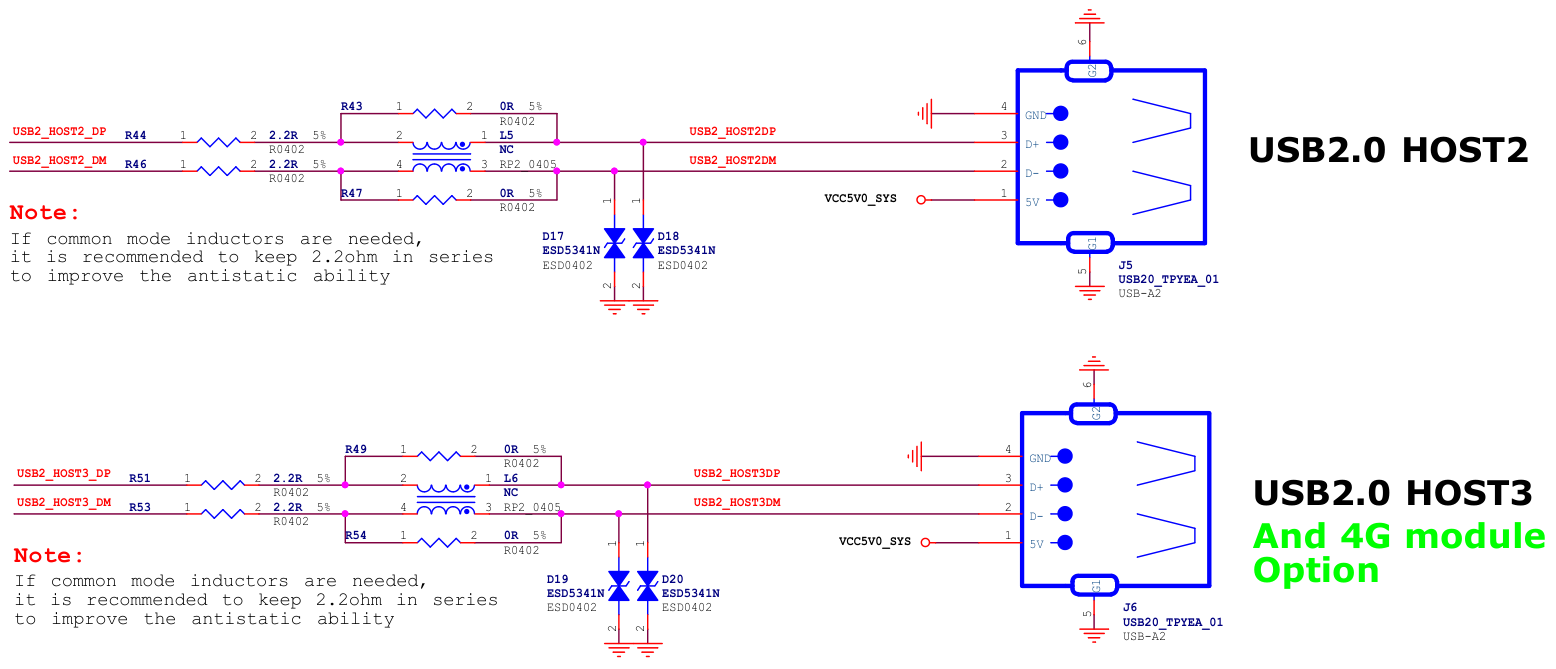
topeet RK3568 USB

两个 USB2.0 接口,其中下面的是 RTL8723DU WIFI 模块是复用的

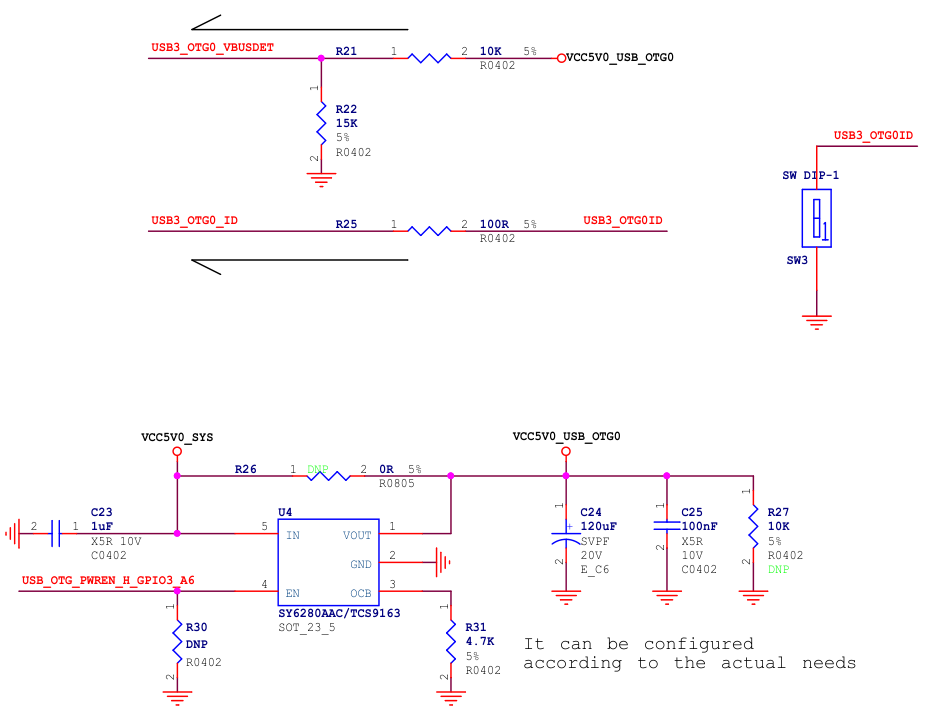
开发板上还有一个 USB3.0 OTG 接口,原理图如下图所示:
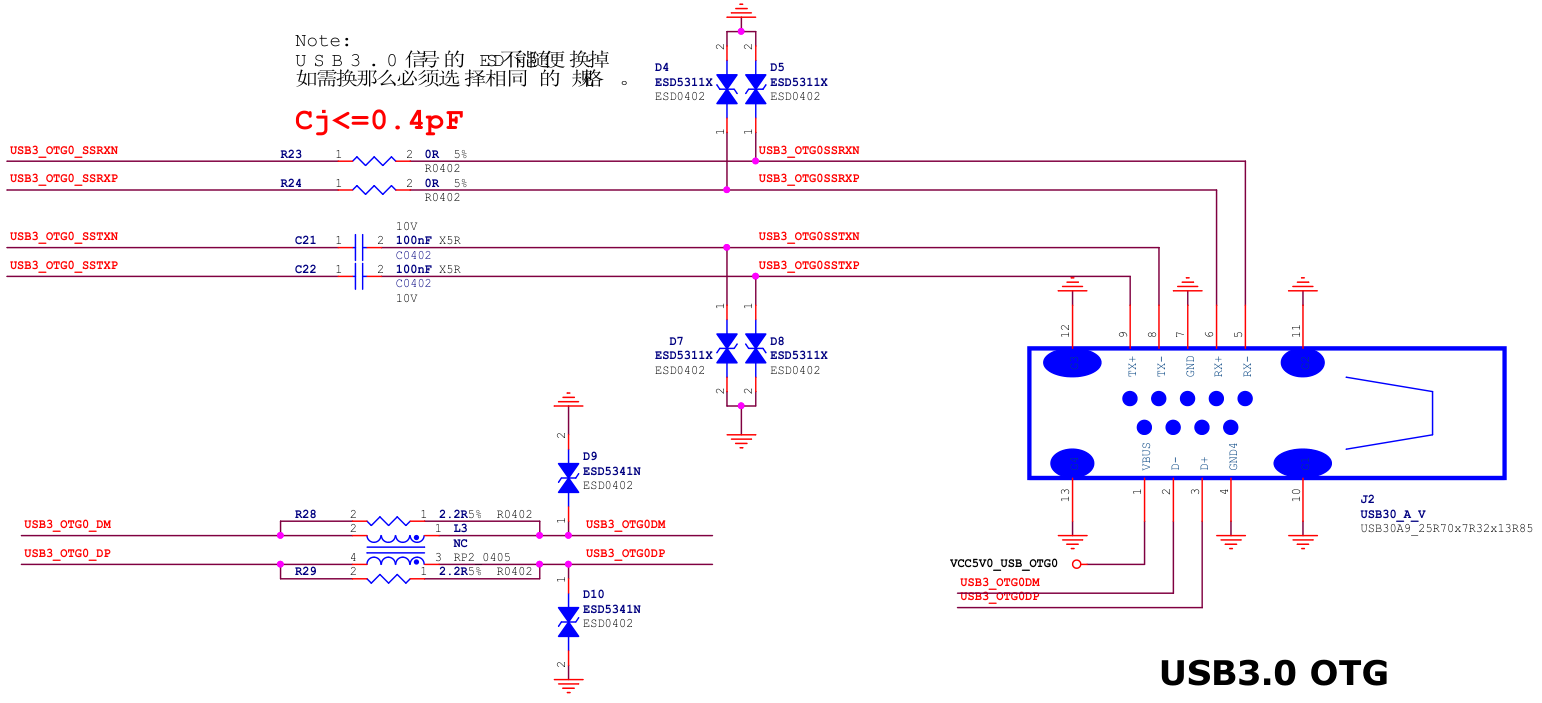
USB3.0 OTG

USB 3.0 OTG

在上面的原理图中,USB3_OTG0_VBUSDET 是一个高电平有效的检测信号,用于 OTG 和 Device 模式识别。usb3.0 otg 支持三种模式,分别是 otg 模式,device 模式,host 模式

  1. OTG 模式下:通过检测 ID 引脚电平自动切换工作模式(高电平为 Device 模式,低电平为 Host 模式),同时需要 VBUSDET 为高电平才会拉高 USB3_OTG0DP 开始枚举;
  2. Device 模式下:只需 VBUSDET 为高电平即可触发枚举,无需检测 ID 引脚;
  3. Host 模式下:完全忽略 ID 和 VBUSDET 状态。需要注意的是,虽然某些产品可能仅需 Host 模式,但由于 USB3_OTG0_DP/DM 接口同时承担系统固件烧写和 ADB 调试功能,在调试和生产时必须切换为 Device 模式,因此必须保留 VBUSDET 信号连接。

系统默认在 uboot 启动前为 Device 模式,进入 uboot 后可根据实际需求配置这三种工作模式。

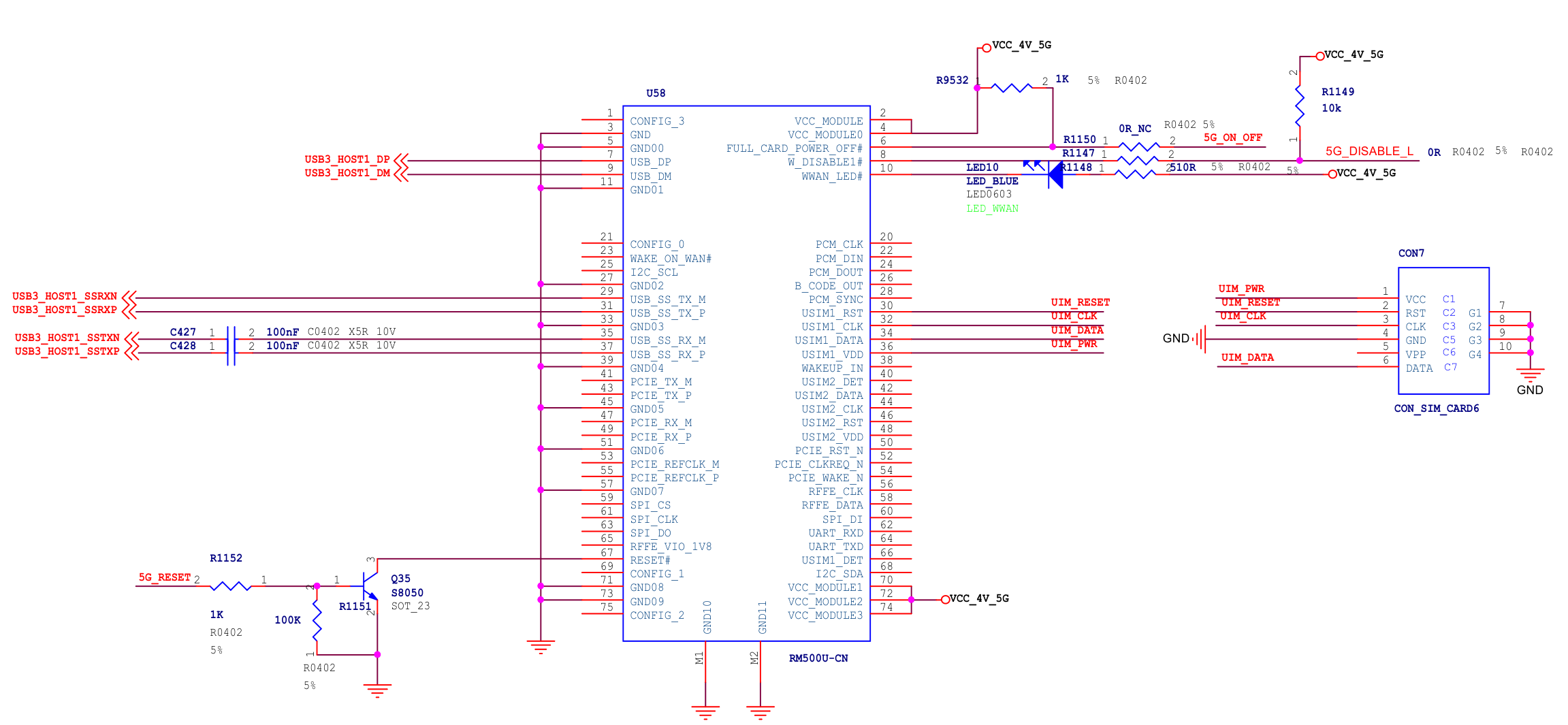
RK3568 芯片还配备了一个 USB3.0 HOST 接口。通过查看底板原理图可以发现,原理图如下所示,这个 USB3.0 HOST 接口是专门为 5G 模块(RM500U-CN 模块)预留的。在 iTOP-RK3568 开发板上,4G 和 5G 模块共用同一个 U58 座子,通过硬件设计实现了兼容。
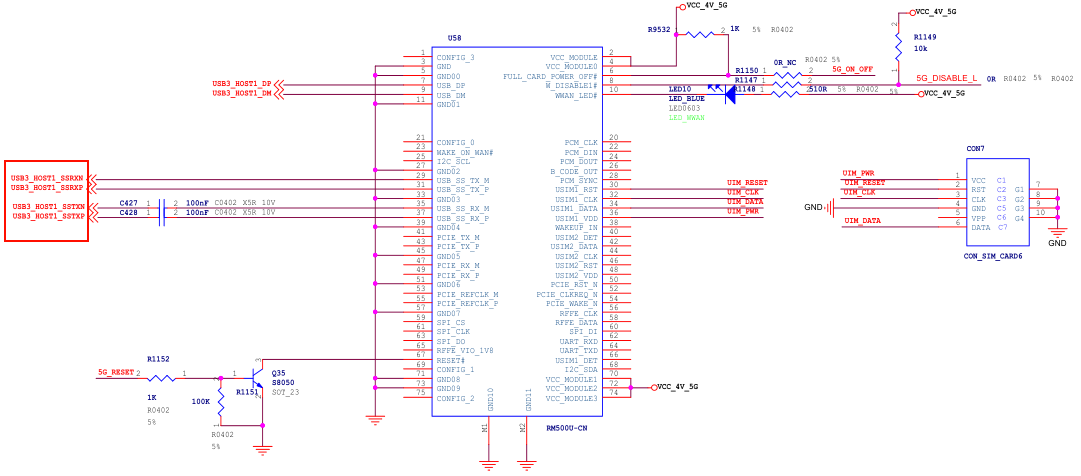
MiniPCIe2.0 Slot_Support 4G module

USB 总线架构与设备交互机制

USB 拓扑结构

USB 采用树形拓扑结构,是一种主从结构,即所有设备通过集线器(hub)连接到主机(host),形成一个树状结构,如下图所示。USB 只能主机和设备之间进行数据通信,设备和设备之间是不可以通信的
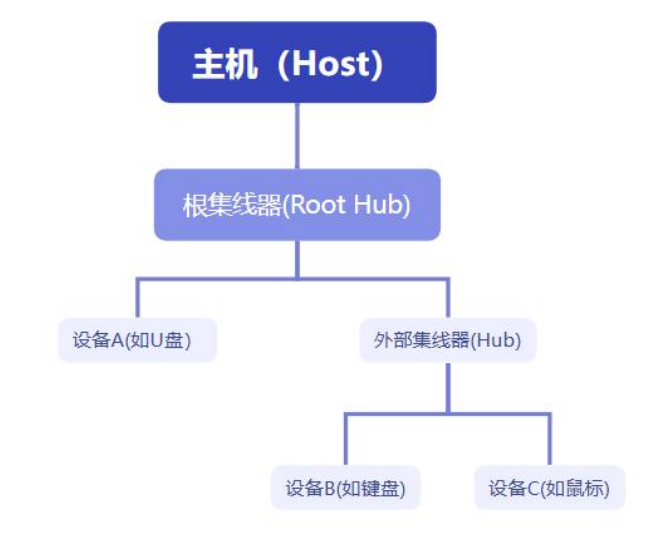
USB 拓扑结构

USB 集线器虽然能够扩展接口数量,但其扩展能力受到严格限制。根据 USB2.0 协议规范,整个系统最多支持 7 层级联扩展(从根集线器开始计算),且所有连接的设备总数不得超过 127 个(包括集线器本身,0地址有特殊作用)。这种金字塔形的拓扑结构设计(如下图所示)在保证接口扩展灵活性的同时,通过层级限制避免了信号衰减和系统过载的问题。
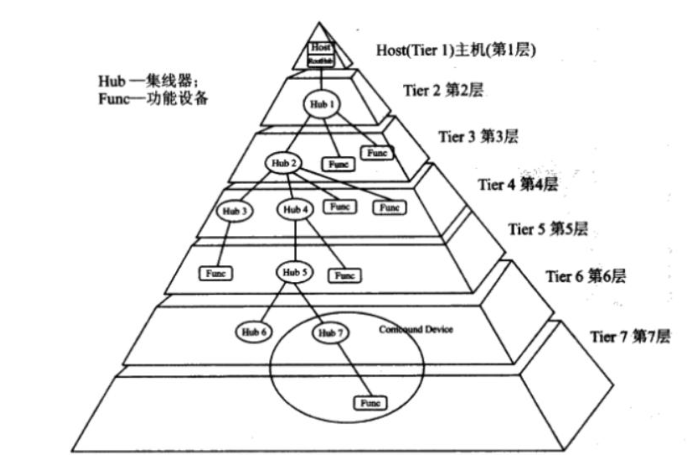
USB 集线器层级

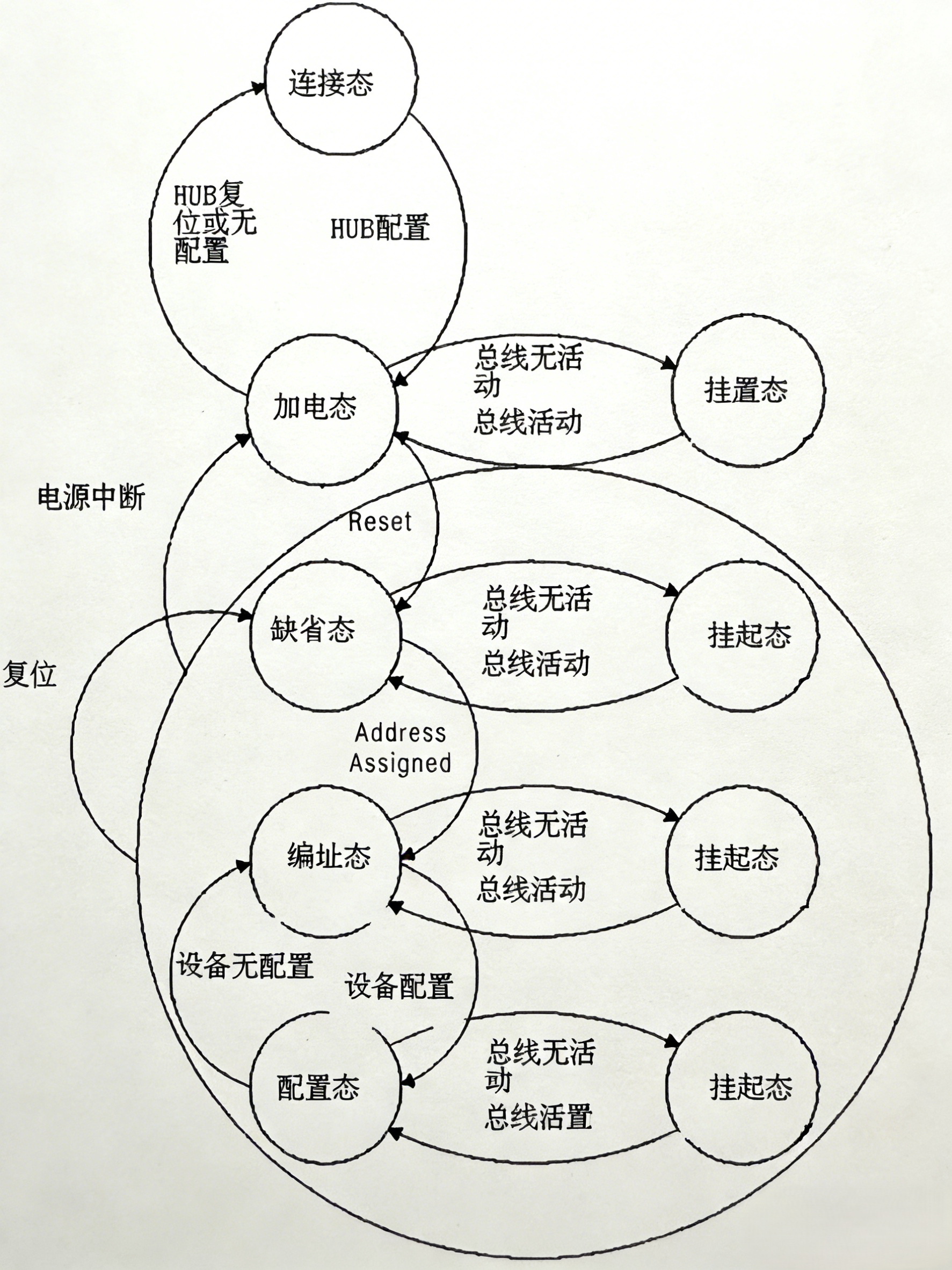
USB 设备状态迁移

USB设备状态

从 USB 设备尚未接入,到被 USB Host 完全识别并确保其功能正常,USB 设备会依次历经以下阶段。

  1. 连接状态(Attached): 这是设备物理连接到 USB 主机但还没有通电的阶段。这个阶段主要由硬件来保证。
  2. 上电状态(powered): 这是第二阶段,对应连接到 USB 主机并刚刚通电的设备。这个阶段主要由硬件来保证。
  3. 默认状态(Default): 当 USB 设备首次连接到主机时,它进入默认状态,在默认状态下,设备等待主机发送复位信号。
  4. 地址状态(Address): 在接收到复位信号之后,设备进入地址状态。在此状态下,主机为设备分配一个唯一的地址。
  5. 配置状态(Configured): 一旦设备接收到其地址,它就进入配置状态。在此状态下,设备可以选择其配置描述符,这决定了它如何与主机通信。
  6. 挂起状态(Suspend): 当 USB 设备不活动或主机进入低功耗模式时,设备可以进入挂起状态。在挂起状态下,设备不消耗或消耗极少的电力。

USB 设备硬件识别

USB HOST 是如何检测到 USB 设备插入呢?

USB2.0 向下兼容 USB1.0 和 USB1.1,分为低速(Low-speed),全速(Full-speed),高速(High-speed)三种模式。

  • 全速设备

全速设备通过以下的方式连接,如下图所示,左侧是 USB 主机端,右侧是 USB 设备端。
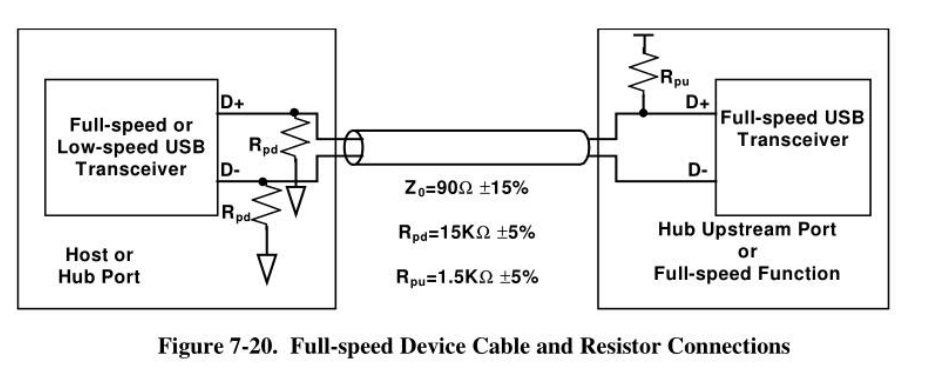
Full-speed Device Cable and Resistor Connections

如上图所示,在左边 hub 一侧,数据线 D+和 D-都有 15k 阻值的下拉电阻 Rpd (Pull-down Resistors),在右边设备端一侧,数据线 D+上有一个 1.5k 阻值的上拉电阻 Rpu (Pull-up Resistors)。

当 D+ 信号线由低电平变成高电平,USB 主机端可以判断全速设备被插入了。

  • 低速设备

低速设备通过以下的方式连接,如下图所示,左侧是 USB 主机端,右侧是 USB 设备端。
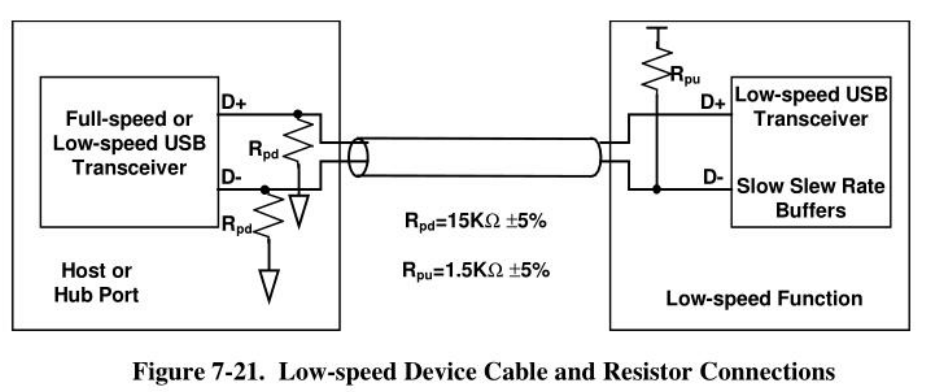
Low-speed Device Cable and Resistor Connections

如上图所示,在左边 hub 一侧,数据线 D+和 D-都有 15k 阻值的下拉电阻 Rpd (Pull-down Resistors),在右边设备端一侧,数据线 D-上有一个 1.5k 阻值的上拉电阻 Rpu (Pull-up Resistors)。

当 D- 信号线由低电平变成高电平,USB 主机端可以判断低速设备被插入了。

  • 高速设备

高速设备接入系统时,起初会被识别为全速设备。随后,HOST 会对 DEVICE 进行检测,判断其是否为高速设备,在此过程中,HOST 与 DEVICE 需相互确认。确认完成后,系统才会切换到高速模式。在高速模式下采用电流传输模式,此时需要断开 D+ 上的上拉电阻。

当设备断开连接时,其差分终端电阻随即消失,然而高速数据包仍会继续从原本设备所连端口传输。当这些数据包抵达无负载的路径端点,会产生强烈反射,反射信号返回集线器接口,致使集线器连接端口的差分电压升高。当高速设备 D+ 与 D- 上的差分信号电平大于 625mV 时,便可判定 USB 设备已断开
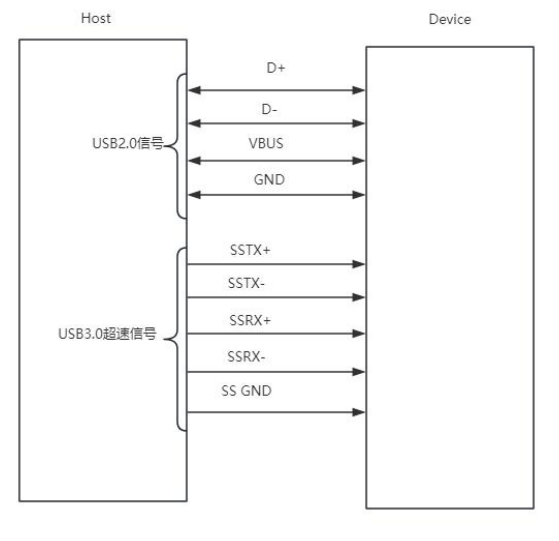
USB3.0 原理架构图

当 USB 主机和 USB 设备连接之后,会在 USB 主机和设备的 SSRX+/-上产生一个等效下拉电阻 R_Term,其范围在 18~30 欧姆,由 SSRX+/-上各一个 50 欧姆的等效下拉电阻并联组成。

下图中左边电路为不接设备时的等效电路,右边电路为接入 usb 设备时的等效电路。
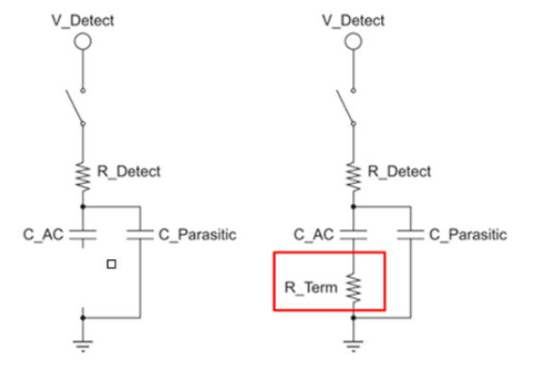
等效电路

由上图可知,左边不接设备时,电路模型实际为 RC 串联电路,充放电时间常数 T = R_Detect * C_Parasitic。右边接设备时,此时 R_term 存在,充放电时间常数T=(R_Detect+R_Term)(C_AC+C_Parasitic)。显然,后者远远大于前者,所以是否连接设备可以根
据时间常数来进行判断。

OTG 双角色切换

USB OTG 既能充当 HOST,又能扮演 Device 。

topeet RK3568 OTG 接口电路原理图如下图所示:
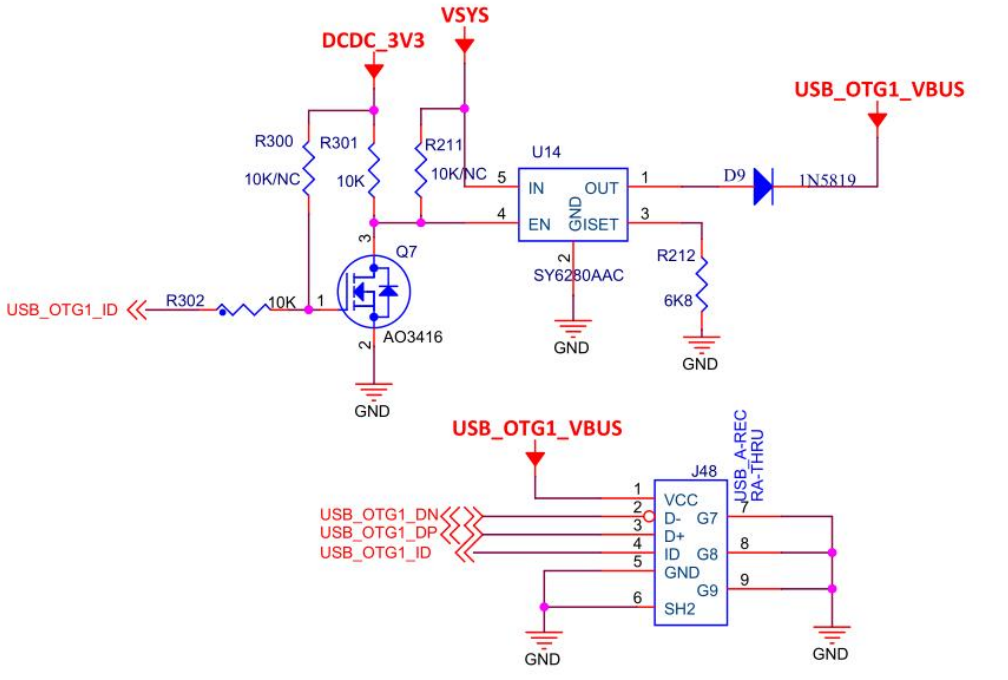
topeet RK3568  OTG 接口电路原理图

从上图可以看出,J48 为 USB 插座,USB OTG 接口中有 5 条线:2 条用来传送数据(D+、D-)、1 条电源线(VBUS)、1 条接地线(GND)、1 条 ID 线。其中 ID 线用于实现 OTG 功能,通过 ID 线来判断当前连接的是主设备(HOST)还是从设备(SLAVE)。

  • 如果连接的是一个从设备(比如 U 盘),开发板的 USB 设备作为主设备,ID 引脚会被拉低。

    • USB_OTG1_ID 引脚为低电平(即开发板作为主设备)时,Q7 截止,U14 的 EN 引脚为高电平,USB_OTG1_VBUS 输出 5V 电压给从设备供电。
  • 如果连接的是一个主设备(比如电脑),开发板的 USB 设备作为从设备,ID 引脚会保持高电平。

    • USB_OTG1_ID 引脚为高电平(即开发板作为从设备)时,Q7 导通,U14 的 EN 引脚为低电平,U14 停止工作,USB_OTG1_VBUS 不会输出 5V 电压。

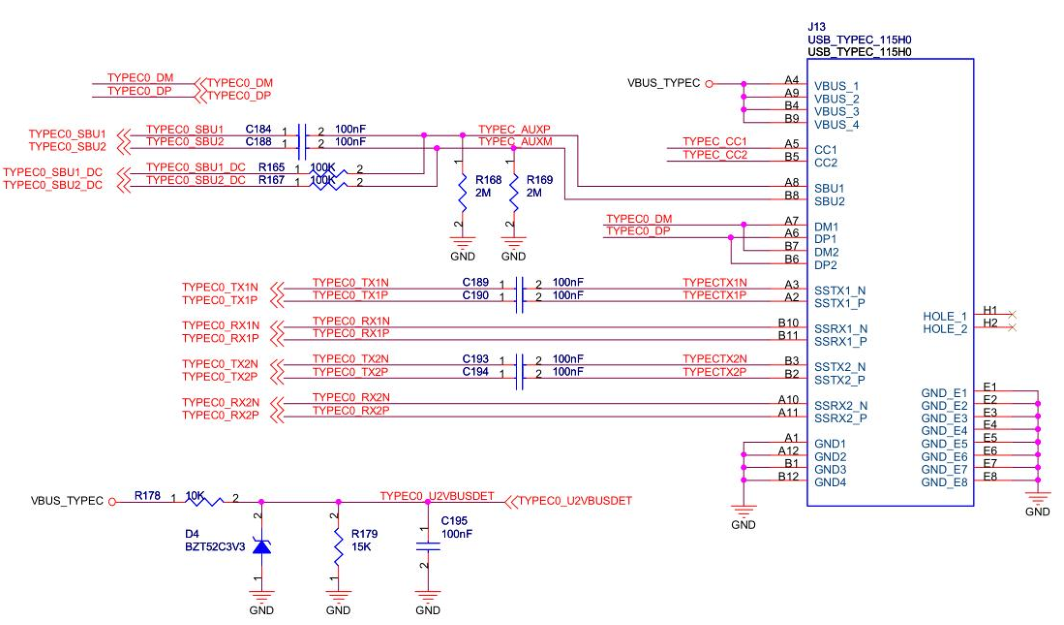
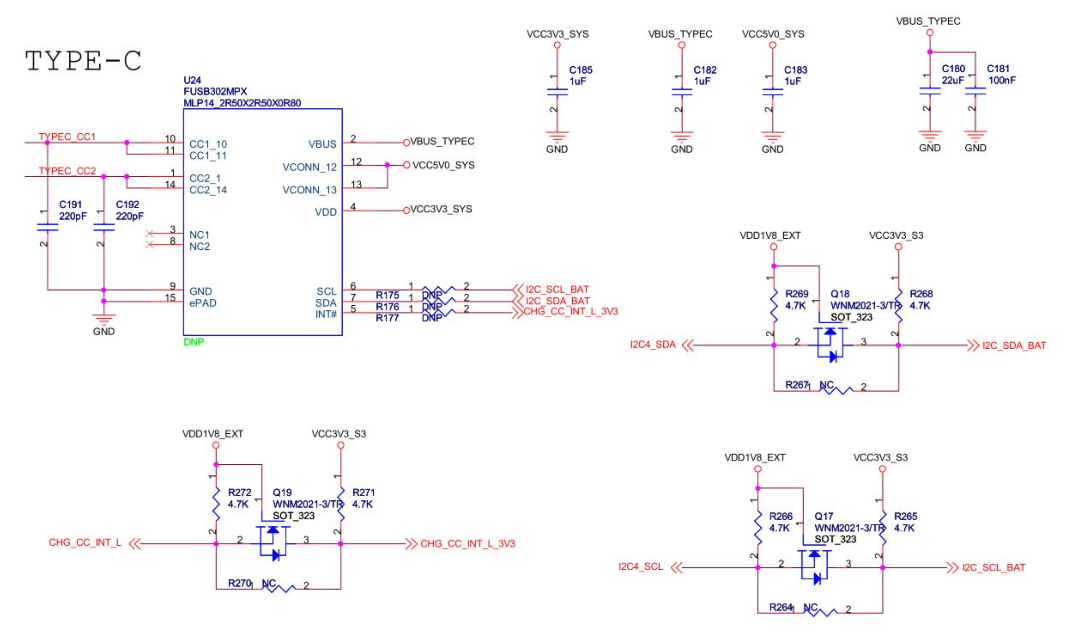
iTOP-RK3399 底板上 typec 接口如下

topeet RK3399 Type-C

topeet RK3399 Type-C

上图中 Typec_CC1Typec_CC2 引脚作为 ID 引脚来使用,其工作原理和前文所述相似。U24 芯片在检测到 CC1 和 CC2 的状态后,会向主控发出中断信号,并通过 I2C 引脚读取芯片寄存器的值。随后,主控根据这些信息来控制供电引脚。

USB 协议

USB 描述符

USB 描述符是描述 USB 设备信息的结构体。主机通过读取这些描述符来识别设备类型、功能、配置等信息,从而正确加载驱动程序并进行通信。USB 描述符主要有:

  • 设备描述符(Device Descriptor)
  • 配置描述符(Configuration Descriptor)
  • 接口描述符(Interface Descriptor)
  • 端点描述符(Endpoint Descriptor)

设备描述符

设备描述符包含了设备的基本信息,比如设备的厂商 ID,产品 ID 等。设备描述符是设备连接到主机时第一个被请求和返回的信息,提供了设备的基本特征。在 Linux 内核中,USB 设备用 usb_device 结构体来描述,USB 设备描述符定义为 usb_device_descriptor 结构体,设备描述符结构体如下所示

1
2
3
4
5
6
7
8
9
10
11
12
13
14
15
16
17
18
19
// include/uapi/linux/usb/ch9.h
/* USB_DT_DEVICE: Device descriptor */
struct usb_device_descriptor {
__u8 bLength; // 描述符长度
__u8 bDescriptorType; // 描述符类型

__le16 bcdUSB; // USB 版本号
__u8 bDeviceClass; // 设备类
__u8 bDeviceSubClass; // 设备子类
__u8 bDeviceProtocol; // 设备协议
__u8 bMaxPacketSize0; // 端点 0 的最大包长度
__le16 idVendor; // 厂商 ID
__le16 idProduct; // 产品 ID
__le16 bcdDevice; // 设备版本号
__u8 iManufacturer; // 厂商信息字符串描述符索引值
__u8 iProduct; // 产品信息字符串描述符索引值
__u8 iSerialNumber; // 产品序列号字符串描述符索引值
__u8 bNumConfigurations; // 可能得配置描述符数目
} __attribute__ ((packed));

配置描述符

配置描述符描述了设备支持的不同配置,包括接口数量,配置编号,供电信息等等。每个 USB 设备都必须有一个配置描述符。另外一个 USB 设备还可以有多个配置,但是每次传输过程仅使用其中的一个配置信息来完成。USB 配置在内核中使用 usb_host_config 结构体描述,而 USB 配置描述符定义为结构体 usb_config_descriptor,配置描述符结构体如下所示:

1
2
3
4
5
6
7
8
9
10
11
12
13
14
15
16
17
18
19
20
// include/uapi/linux/usb/ch9.h
/* USB_DT_CONFIG: Configuration descriptor information.
*
* USB_DT_OTHER_SPEED_CONFIG is the same descriptor, except that the
* descriptor type is different. Highspeed-capable devices can look
* different depending on what speed they're currently running. Only
* devices with a USB_DT_DEVICE_QUALIFIER have any OTHER_SPEED_CONFIG
* descriptors.
*/
struct usb_config_descriptor {
__u8 bLength; /* 描述符长度 */
__u8 bDescriptorType; /* 描述符类型编号 */

__le16 wTotalLength; /* 配置所返回的所有数据的大小 */
__u8 bNumInterfaces; /* 配置所支持的接口数 */
__u8 bConfigurationValue; /* Set_Configuration 命令需要的参数值 */
__u8 iConfiguration; /* 描述该配置的字符串的索引值 */
__u8 bmAttributes; /* 供电模式的选择 */
__u8 bMaxPower; /* 设备从总线提取的最大电流 */
} __attribute__ ((packed));

接口描述符

接口描述符描述了配置中的一个接口的特性,包括接口的端点个数,所属的设备类和子类等。一个 USB 配置有 1 个或多个接口描述符。USB 接口在内核中使用 usb_interface 结构体描述,而 USB 接口描述符定义为结构体 usb_interface_descriptor,接口描述符结构体如下所示:

1
2
3
4
5
6
7
8
9
10
11
12
13
14
// include/uapi/linux/usb/ch9.h
/* USB_DT_INTERFACE: Interface descriptor */
struct usb_interface_descriptor {
__u8 bLength; /* 描述符长度 */
__u8 bDescriptorType; /* 描述符类型 */

__u8 bInterfaceNumber; /* 接口的编号 */
__u8 bAlternateSetting; /* 备用的接口描述符编号 */
__u8 bNumEndpoints; /* 该接口使用的端点数,不包括端点 0 */
__u8 bInterfaceClass; /* 接口类型 */
__u8 bInterfaceSubClass; /* 接口子类型 */
__u8 bInterfaceProtocol; /* 接口所遵循的协议 */
__u8 iInterface; /* 描述该接口的字符串索引值 */
} __attribute__ ((packed));

端点描述符

端点描述符描述接口中的一个端点,端点是数据在设备和主机之间传输的终点。一个具体的端点只能属于四种传输模式中的一种。一个 USB 接口有 0 个或多个端点描述符(不包括端点 0)。在 Linux 内核中,USB 端点使用 usb_host_endpoint 结构体来描述,而 USB 端点描述符定义为 usb_endpoint_descriptor 结构体,端点描述符结构体如下所示:

1
2
3
4
5
6
7
8
9
10
11
12
13
14
15
16
17
18
19
// include/uapi/linux/usb/ch9.h
/* USB_DT_ENDPOINT: Endpoint descriptor */
struct usb_endpoint_descriptor {
__u8 bLength; // 描述符长度
__u8 bDescriptorType; // 描述符类型

__u8 bEndpointAddress; // 端点地址,位[3:0]是端点号,位 7 是方向位(1 表示 IN,0 表示 OUT)
__u8 bmAttributes; // 端点属性,位[1:0]决定传输类型(00=控制,01=等时,10=批量,11=中断)
__le16 wMaxPacketSize; // 最大包长度(单位:字节),用于限定此端点一次可以传输的数据量
__u8 bInterval; // 轮询间隔
// - 对于批量/控制传送的端点,此域忽略
// - 对于等时传送的端点,此域必须为 1
// - 对于中断传送的端点,此域值范围为 1 到 255

/* NOTE: these two are _only_ in audio endpoints. */
/* use USB_DT_ENDPOINT*_SIZE in bLength, not sizeof. */
__u8 bRefresh;
__u8 bSynchAddress;
} __attribute__ ((packed));

一个 USB 设备有一个设备描述符,设备描述符里面决定了该设备有多少种配置,每种配置对应着配置描述符;而在配置描述符中又定义了该配置里面有多少个接口,每个接口有对应的接口描述符;在接口描述符里面又定义了该接口有多少个端点,每个端点对应一个端点描述符;端点描述符定义了端点的大小,类型等等。由此我们可以看出,USB 的描述符之间的关系是一层一层的,最上一层是设备描述符,下面是配置描述符,再下面是接口描述符,再下面是端点描述符,如下图所示:
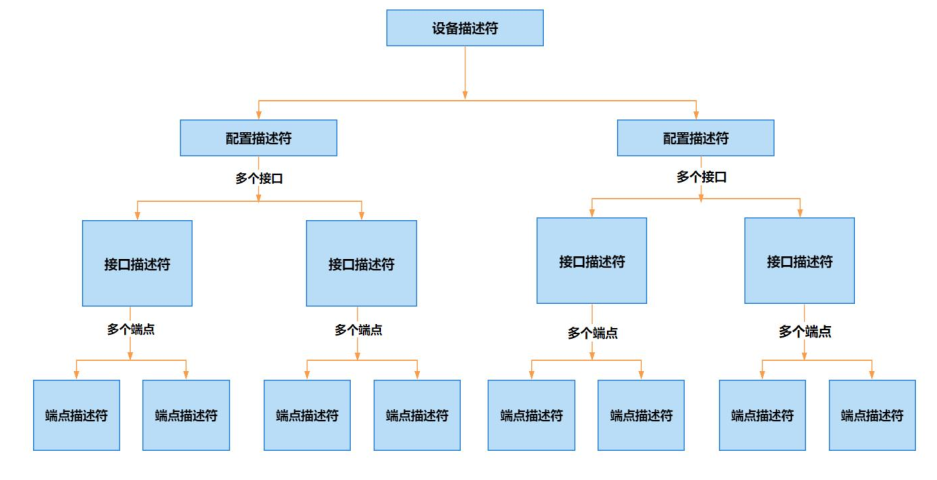
USB 描述符结构关系

比如:

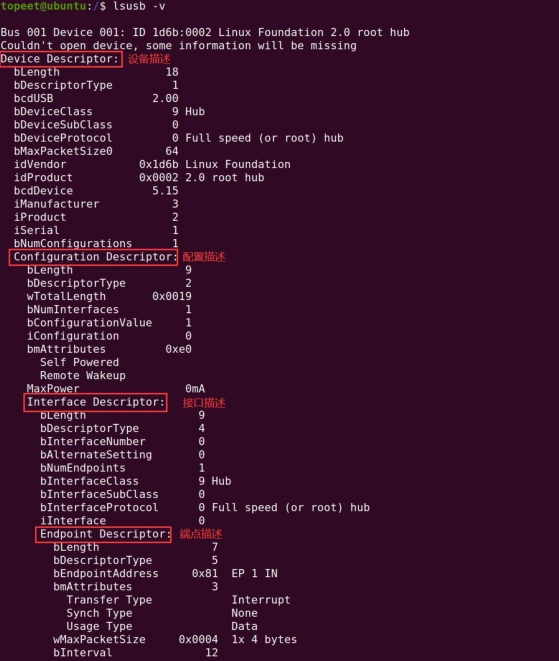
lsusb -v

可以看出 root hub 包含了一个设备描述符,一个配置描述符,一个接口描述符,一个端点描述符。图中的信息内容直接对应于 usb_device_descriptorusb_config_descriptorusb_interface_descriptorusb_endpoint_descriptor 结构体。

USB 通信数据格式

USB 通信数据格式以包(Packet)为基本单位,通过分层结构(域->包->事务->传输)实现设备与主机间的可靠通信。

域是 USB 数据的最小单位,由不同功能的二进制位组成,共 7 种类型,如下表所示

域类型 作用 长度 示例
同步域(SYNC) 同步时钟,确保收发端时钟对齐 8 位(全速 / 低速)或 32 位(高速) 0000 0001(全速)
标识域(PID) 标识包类型(如令牌、数据、握手包),包含 4 位有效码 + 4 位反码校验 8 位 0001 1000(OUT 包)
地址域(ADDR) 设备地址(7 位),支持最多 127 个设备 7 位 0101 010(地址 5)
端点域(ENDP) 端点号(4 位),每个设备最多 16 个端点 4 位 0001(端点 1)
帧号域(FRAM) 帧编号(11 位),每 1ms(全速)或 125μs(高速)递增,用于同步 11 位 0x7FF(最大帧号)
数据域(DATA) 传输数据(0-1024 字节),长度由传输类型决定 0-1024 字节 0x01 0x02 0x03
校验域(CRC) 错误校验,令牌包和数据包使用不同算法 5 位(令牌包)或 16 位(数据包) CRC-5 或 CRC-16

USB 就像一条只能排队的快递传送带(串行通信),数据(域)必须一个比特一个比特地排队往前送。

为了让数据不迷路,USB 会先把数据打包成一个个小包裹(数据包),再通过四种不同形状的“快递盒子”(包结构)来区分用途——比如装文件的、传指令的、发数据的等等,确保每个包裹能准确送到目的地。

这四种不同形状的“快递盒子”相当于四种不同的包结构,分别是令牌(Token)包数据(Data)包握手(Handshake)包特殊(Special)包

这四种包结构通过标识符 PID 来区分,在 USB 包中,PID 域使用 8 位来表示,格式如下所示:
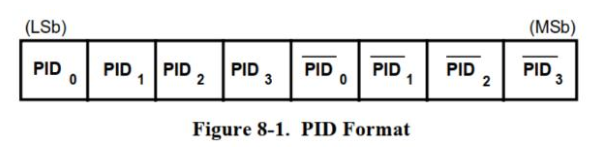
PID Format

前 4 位表示 PID,后 4 位是对前 4 位的取反。前 4 位 PID 中使用 bit1,bit0 确定分类,使用 bit3,bit2 进一步细分,如下表所示:

PID 类型 PID 名 PID[3:0] 说明
令牌类 OUT 0001B 通知设备将要输出数据
IN 1001B 通知设备将要输入数据
SOF 0101B 通知设备这是一个帧起始包
SETUP 1101B 通知设备将要开始一个控制传输
数据类 DATA0 0011B 不同类的数据包
DATA1 1011B
DATA2 0111B
MDATA 1111B
握手类 ACK 0010B 确认
NACK 1010B 不确认
STALL 1110B 挂起
NYET 0110B 未准备好
特殊类 PRE 1100B 前导,这是一个令牌包
ERR 1100B 错误,这是一个握手包
SPLIT 1000B 分裂事务(这是一个令牌包)
PING 0100B PING 测试(这是一个令牌包)
Reserved 0000B 保留,未使用

一个完整的数据包由多个不同的域组成。

所有数据包都以同步域(SYNC)开场,紧接着是包标识符(PID),最后以包结束(EOP)信号收尾。不同类型的数据包,中间的位域各有不同,常见的有包目标地址(ADDR)、包目标端点(ENDP)、数据、帧索引以及 CRC 等。具体每个数据包的结构,需要根据实际情况来分析。

事务

USB 传输的基本单位是包(Packet),包的类型由 PID 表示。一个单纯的包,是无法传输完整的数据的。比如想要输出数据,可以发出 OUT 令牌包,因为 OUT 令牌包能够指定目的地。但仅靠 OUT 令牌包还不够,数据传输还需要发出 DATA0 或 DATA1 数据包。

当设备收到数据后,还需回复一个 ACK 握手包。所以,完整的数据传输需要涉及多个包,包括令牌包、数据包、握手包,这个完整的数据传输过程被称为事务(Transaction)。事务存在不同类型,有些事务需要握手包,有些事务不需要握手包;有些事务能够传输大量数据,而有些事务只能传输少量数据。

有四类事务,分别是:

  • 批量事务

批量事务用来传输大量的数据,数据的正确性有保证,时效没有保证。

  • 中断事务

中断事务用来传输周期性的,小量的数据,数据的正确性和时效都有保证。

  • 实时事务

实时事务用来传输实时数据,数据的正确性没有保证,时效有保证。

  • 建立事务

建立事务跟批量事务类似,只不过令牌包是 SETUP 令牌包。

USB 传输方式

  1. 控制传输是 USB 协议中最基本的一种数据传输方式,主要用于进行查询、配置和给 USB 设备发送通用的命令。控制传输是双向传输,数据量通常比较小。控制传输由建立事务、批量事务组成,所有的 USB 设备都必须支持控制传输。
  2. 同步传输用于传输大量的、速率恒定的,且对服务周期有要求的数据。一般来说,同步传输常用于音频和视频类设备,因为这些设备需要实时性比较高。同步传输使用实时事务实现数据传输。
  3. 中断传输适用于传输少量或者中量的数据,要求具有固定的事务处理周期。一般来说,USB 中断传输常应用于 USB 鼠标、USB 键盘等 HID 人机交互设备中,因为这些设备要求响应快,具有固定的事务处理周期,但对数据的需求比较低,这正是 USB 中断传输的优势。中断传输是使用中断事务实现数据传输。
  4. 批量传输也叫 USB 块传输。批量传输适合于传输大量的数据,要求传输正确,但对传输时间和传输速率以及实时性均无要求。一般来说,批量传输用于 U 盘等存储类设备。批量传输是使用批量事务实现数据传输。

Bit 组成域(Field),域组成包(Packet),包组成事务(Transaction),事务组成传输(Transfer)。

USB 枚举

USB 设备连接到 USB 主机以后,主机使用总线枚举过程来识别和管理接入的设备。USB 枚举本质上是 USB 的 Host 与 Device 之间的信息交互过程。在此过程中,Device 向 Host 报告自身参数,Host 依据这些参数获取关键信息,从而明确设备的具体类型以及与之通信的方式。

基于所获信息,主机就可以加载适配该设备的驱动程序。USB 设备枚举过程如下所述:

  1. USB 设备插入 USB 接口后,主机检测 D+/D-线上的电压,确认有设备连接,USB 集线器通过中断 IN 通道,向主机报告有 USB 设备连接。
  2. 主机检测到 USB 设备插入之后对 USB 设备进行复位,复位后 USB 设备的地址为 0,这样主机就可以使用地址 0 与 USB 设备进行通信。
  3. 主机向地址 0(即刚插入的 USB 设备)的设备端点 0(默认端点)发送获取设备描述符的标准请求。USB 设备收到请求之后,将设备描述符发送给主机。主机收到设备描述符之后,返回一个 0 长度的数据确认表(ACK)。
  4. 主机对设备再次复位,复位后主机对地址为 0 的设备端点 0 发送一个设置地址请求数据包,新的设备地址就在这个数据包中。主机发送请求状态返回,设备返回 0 长度的状态数据包。
  5. 主机收到状态数据包后,发送 ACK 包给设备,设备收到 ACK 后,启用新的设备地址,以后主机通过新地址来访问该设备。
  6. 主机再次获取设备描述符,这次和第一次有点不一样,这次需要获取全部的 18 个字节的设备描述符。
  7. 接下来,主机就会获取配置描述符。主机在获取到配置描述符之后,根据里面的配置集合总长度,再获取配置集合。配置集合包括配置描述符,接口描述符,端点描述符等等。如果还有字符串描述符,系统还会获取字符串描述符。

USB 波形
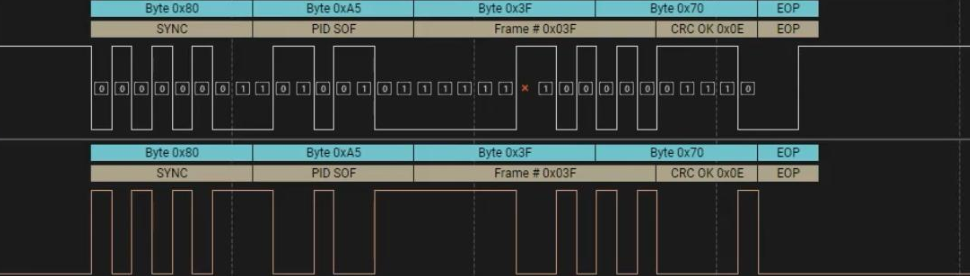
帧起始包

在上图中,是一个帧起始包。SYNC 域以 0x80(10000000)开头,用于表示时钟同步。PID 域值为 0xA5,图中标记为 SOF,表示这是一个帧起始包。
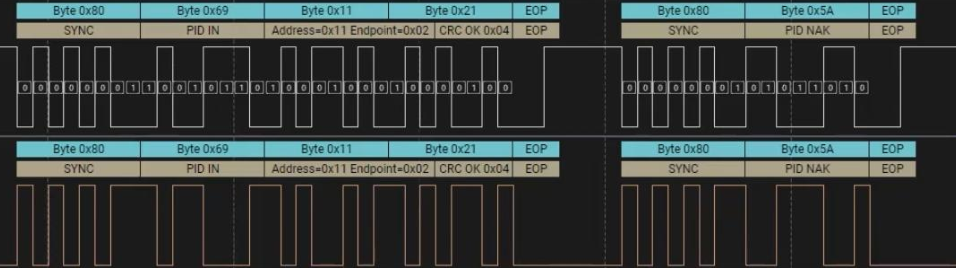
令牌包

左侧是一个令牌包。SYNC 域以 0x80(10000000)开头,用于表示时钟同步。PID 域值为 0x69,图中标记为 IN,表示通知设备将要输入数据。接下来主机请求端点 2 的数据。

在上图中,右侧是一个握手包,SYNC 域以 0x80(10000000)开头,用于表示时钟同步。PID 域值为 0x5A,图中标记为 NAK,表示设备暂时无法响应。
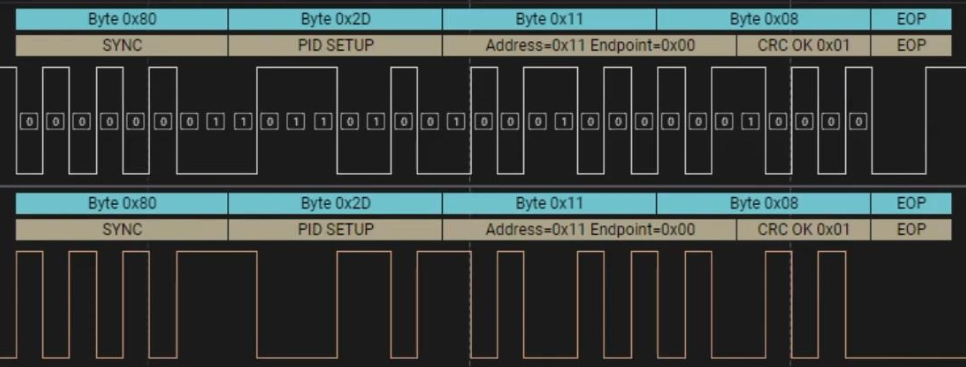
枚举阶段的控制传输请求

此波形为枚举阶段的控制传输请求。SYNC 域以 0x80(10000000)开头,用于表示时钟同步。PID 域为 SETUP,表示通知设备将要开始一个控制传输。接下来是地址域 Address=0x11 和端点域 Endpoint=0x00,表示主机向端点 0 发送控制请求。最后是校验域(CRC),包以 EOP 结束。
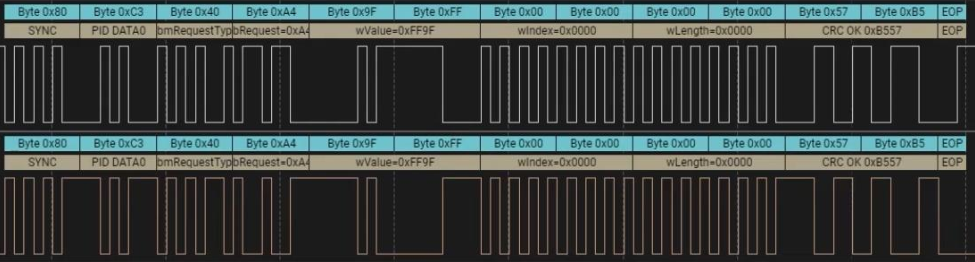
控制传输的数据阶段

SYNC 域以 0x80(10000000)开头,用于表示时钟同步。PID 域为 DATA0,表示用于控制传输的数据阶段。

应用编程基础

libusb 库简介

libusb 是一个使用 C 编写的库,它提供 USB 设备的通用访问方法。APP 通过它,可以方便地访问 USB 设备,不需要编写 USB 设备驱动程序。libusb 库有三个特点:

  1. 可移植性好,支持 Linux,macOS,Windows 系统。
  2. 简单易用,APP 不需要特权模式,也不需要提升自己权限即可访问 USB 设备
  3. 支持所有的 USB 协议,从 USB1.0 到 USB3.1,并且 API 接口保持不变,方便开发

libusb 编译

源码:

本地编译

1
2
3
4
5
6
sudo apt install autoconf automake libtool libudev-dev m4

./bootstrap.sh
./autogen.sh
make -j$(nproc)
make install

在 libusb 源码的 examples 目录下,libusb 提供了一些官方案例,如下所示:

1
2
3
4
5
6
$ ls examples
dpfp ezusb.c fxload.o listdevs.c sam3u_benchmark testlibusb.o
dpfp.c ezusb.h hotplugtest listdevs.o sam3u_benchmark.c xusb
dpfp.o ezusb.o hotplugtest.c Makefile sam3u_benchmark.o xusb.c
dpfp_threaded fxload hotplugtest.o Makefile.am testlibusb xusb.o
dpfp_threaded-dpfp.o fxload.c listdevs Makefile.in testlibusb.c
  • hotplugtest.c 用于监听系统中 USB 设备的插入和拔出。

  • listdevs.c 获取并显示系统当前的 USB 设备信息,包含:VID、PID、bus 编号、设备地址、端口号。

  • testlibusb.c 用于打印 usb 设备列表的详细信息:包括设备描述符、配置、接口、端点描述符。

交叉编译

1
2
3
4
5
6
7
8
9
10
11
12
make distclean
./autogen.sh
mkdir _install # 创建安装目录

# $HOME/tools/gcc-arm-11.2-2022.02-x86_64-aarch64-none-linux-gnu/bin 加入到环境变量
./configure --host=aarch64-none-linux-gnu --disable-udev --prefix=$PWD/_install CC=aarch64-none-linux-gnu-gcc CXX=aarch64-none-linux-gnu-g++

make -j$(nproc)

make install

ls _install

编译 examples

1
2
3
4
5
6
make -C examples \
CC=aarch64-none-linux-gnu-gcc \
CXX=aarch64-none-linux-gnu-g++ \
LDFLAGS="-L$(pwd)/_install/lib -pthread -static" \
CFLAGS="-I$(pwd)/_install/include/libusb-1.0" \
CPPFLAGS="-I$(pwd)/_install/include/libusb-1.0"

libusb API

libusb_init()

项目 说明
函数原型 int libusb_init(libusb_context **ctx);
参数 libusb_context **ctx:上下文指针,可为 NULL 使用默认上下文
返回值 成功返回 0;失败返回负数错误码
函数功能 初始化 libusb 库,必须在其他 libusb 操作前调用

libusb_get_device_list()

项目 说明
函数原型 ssize_t libusb_get_device_list(libusb_context *ctx, libusb_device ***list);
参数 ctx:上下文
list:输出设备数组
返回值 成功返回设备数量;失败返回负数
函数功能 获取当前连接的 USB 设备列表

libusb_free_device_list()

项目 说明
函数原型 void libusb_free_device_list(libusb_device **list, int unref_devices);
参数 list:设备列表
unref_devices:是否减少引用计数
返回值
函数功能 释放设备列表

libusb_open_device_with_vid_pid()

项目 说明
函数原型 libusb_device_handle *libusb_open_device_with_vid_pid(libusb_context *ctx, uint16_t vid, uint16_t pid);
参数 ctx:上下文
vid:厂商ID
pid:产品ID
返回值 成功返回设备句柄;失败返回 NULL
函数功能 根据 VID/PID 查找并打开设备

libusb_open()

项目 说明
函数原型 int libusb_open(libusb_device *dev, libusb_device_handle **dev_handle);
参数 dev:设备指针
dev_handle:输出设备句柄
返回值 成功返回 0;失败返回负数
函数功能 打开指定 USB 设备

libusb_get_device_descriptor()

项目 说明
函数原型 int libusb_get_device_descriptor(libusb_device *dev, struct libusb_device_descriptor *desc);
参数 dev:设备
desc:输出设备描述符
返回值 成功返回 0;
失败返回负数
函数功能 获取设备描述符

libusb_get_config_descriptor()

项目 说明
函数原型 int libusb_get_config_descriptor(libusb_device *dev, uint8_t config_index, struct libusb_config_descriptor **config);
参数 dev:设备
config_index:配置索引
config:输出配置描述符
返回值 成功返回 0;
失败返回负数
函数功能 获取设备配置描述符

libusb_free_config_descriptor()

项目 说明
函数原型 void libusb_free_config_descriptor(struct libusb_config_descriptor *config);
参数 config:配置描述符
返回值
函数功能 释放配置描述符

libusb_bulk_transfer()

项目 说明
函数原型 int libusb_bulk_transfer(libusb_device_handle *dev_handle, unsigned char endpoint, unsigned char *data, int length, int *actual_length, unsigned int timeout);
参数 dev_handle:设备句柄
endpoint:端点地址
data:缓冲区
length:长度
actual_length:实际长度
timeout:超时(ms)
返回值 成功返回 0;
失败返回负数
函数功能 执行 USB 批量传输

libusb_interrupt_transfer()

项目 说明
函数原型 int libusb_interrupt_transfer(libusb_device_handle *dev_handle, unsigned char endpoint, unsigned char *data, int length, int *actual_length, unsigned int timeout);
参数 dev_handle:设备句柄
endpoint:端点地址
data:缓冲区
length:长度
actual_length:实际长度
timeout:超时(ms)
返回值 成功返回 0;
失败返回负数
函数功能 执行 USB 中断传输

libusb_set_auto_detach_kernel_driver()

项目 说明
函数原型 int libusb_set_auto_detach_kernel_driver(libusb_device_handle *dev_handle, int enable);
参数 dev_handle:设备句柄
enable:1启用/0禁用
返回值 成功返回 0;
失败返回负数
函数功能 自动分离内核驱动

libusb_claim_interface()

项目 说明
函数原型 int libusb_claim_interface(libusb_device_handle *dev_handle, int interface_number);
参数 dev_handle:设备句柄
interface_number:接口号
返回值 成功返回 0;
失败返回负数
函数功能 声明设备接口

libusb_alloc_transfer()

项目 说明
函数原型 struct libusb_transfer *libusb_alloc_transfer(int iso_packets);
参数 iso_packets:等时传输包数量
返回值 成功返回 transfer 指针;
失败返回 NULL
函数功能 分配异步传输结构体

libusb_fill_interrupt_transfer()

项目 说明
函数原型 void libusb_fill_interrupt_transfer(struct libusb_transfer *transfer, libusb_device_handle *dev_handle,unsigned char endpoint, unsigned char *buffer, int length,libusb_transfer_cb_fn callback, void *user_data, unsigned int timeout)
参数 transfer:传输对象
dev_handle:设备句柄
endpoint:端点
buffer:缓冲区
length:长度
callback:回调函数
user_data:用户数据
timeout:超时
返回值
函数功能 配置异步中断传输对象

libusb_submit_transfer()

项目 说明
函数原型 int libusb_submit_transfer(struct libusb_transfer *transfer);
参数 transfer:已配置的传输对象
返回值 成功返回 0;
失败返回负数
函数功能 提交异步传输

libusb_cancel_transfer()

项目 说明
函数原型 int libusb_cancel_transfer(struct libusb_transfer *transfer);
参数 transfer:传输对象
返回值 成功返回 0;
失败返回负数
函数功能 取消异步传输

libusb_free_transfer()

项目 说明
函数原型 void libusb_free_transfer(struct libusb_transfer *transfer);
参数 transfer:传输对象
返回值
函数功能 释放传输结构

libusb_handle_events()

项目 说明
函数原型 int libusb_handle_events(libusb_context *ctx);
参数 ctx:上下文
返回值 成功返回 0;
失败返回负数
函数功能 处理待处理的事件(阻塞模式)

示例

示例一

1
2
3
4
5
6
7
8
9
10
11
12
13
14
15
16
17
18
19
20
21
22
23
24
25
26
27
28
29
30
31
32
33
34
35
36
37
38
39
40
41
42
43
44
45
46
47
48
#include <stdio.h>
#include "libusb.h"

int main(void)
{
int ret; // 函数返回值存储
int cnt; // 设备计数
libusb_device **device = NULL; // 设备列表指针
libusb_device *dev; // 单个设备指针
int i = 0; // 循环计数器

// 初始化libusb库
ret = libusb_init(NULL);
if (ret < 0) {
printf("libusb_init error \n");
return ret;
}

// 获取USB设备列表
cnt = libusb_get_device_list(NULL, &device);
if (cnt < 0) {
printf("libusb_get_device_list error \n");
return cnt;
}

// 遍历设备列表
while (dev = device[i++]) {
struct libusb_device_descriptor desc; // 设备描述符

// 获取设备描述符
ret = libusb_get_device_descriptor(dev, &desc);
if (ret < 0) {
printf("libusb_get_device_descriptor error \n");
return ret;
}

// 打印厂商ID和产品ID
printf("%04x : %04x\n", desc.idVendor, desc.idProduct);
}

// 释放设备列表(unref=1表示减少引用计数)
libusb_free_device_list(device, 1);

// 释放 libusb 库占用的所有资源
libusb_exit(NULL);

return 0;
}

示例二

1
2
3
4
5
6
7
8
9
10
11
12
13
14
15
16
17
18
19
20
21
22
23
24
25
26
27
28
29
30
31
32
33
34
35
36
37
38
39
40
41
42
43
44
45
46
47
48
49
50
51
52
53
54
55
56
57
58
59
60
61
62
63
64
65
66
67
68
69
70
71
72
73
74
75
76
77
78
79
80
81
82
83
84
85
86
87
88
89
90
91
92
93
94
95
96
97
98
99
100
101
102
#include <stdio.h>
#include "libusb.h"

int main(void)
{
// 变量声明区
int ret; // 存储函数返回值
int cnt; // 设备计数器
libusb_device **device = NULL; // USB设备列表指针
libusb_device *dev; // 单个USB设备指针
int i = 0, k = 0, j = 0; // 循环计数器
int endpoint; // 端点地址
int flag = 0; // 标志位

// 描述符结构体
struct libusb_config_descriptor *config_desc = NULL; // USB配置描述符
const struct libusb_interface_descriptor *interface_descriptor = NULL; // 接口描述符
libusb_device_handle *dev_handle = NULL; // USB设备句柄

// 数据缓冲区
unsigned char buffer[16]; // 数据接收缓冲区
int transferred; // 实际传输字节数

// 初始化libusb库
ret = libusb_init(NULL);
if (ret < 0) {
printf("libusb初始化失败\n");
return ret;
}

// 获取USB设备列表
cnt = libusb_get_device_list(NULL, &device);
if (cnt < 0) {
printf("获取设备列表失败\n");
return cnt;
}

// 遍历设备列表查找HID设备
while (dev = device[i++]) {
// 获取设备配置描述符
ret = libusb_get_config_descriptor(dev, 0, &config_desc);
if (ret < 0) {
printf("获取配置描述符失败\n");
return ret;
}

// 遍历所有接口
for (k = 0; k < config_desc->bNumInterfaces; k++) {
interface_descriptor = &config_desc->interface[k].altsetting[0];

// 查找HID类设备(Class=3)且协议为键盘(Protocol=1)
if (interface_descriptor->bInterfaceClass == 3 &&
interface_descriptor->bInterfaceProtocol == 1) {

// 遍历端点查找中断输入端点
for (j = 0; j < interface_descriptor->bNumEndpoints; j++) {
if ((interface_descriptor->endpoint[j].bmAttributes & 3) == LIBUSB_TRANSFER_TYPE_INTERRUPT ||
(interface_descriptor->endpoint[j].bmAttributes & 0x80) == LIBUSB_ENDPOINT_IN) {
endpoint = interface_descriptor->endpoint[j].bEndpointAddress;
flag = 1; // 找到目标设备
break;
}
}
}
if (flag) break;
}
if (flag) break;
}

// 打开目标设备
ret = libusb_open(dev, &dev_handle);
if (ret < 0) {
printf("打开设备失败\n");
return ret;
}

// 设置自动卸载内核驱动
libusb_set_auto_detach_kernel_driver(dev_handle, 1);

// 声明接口
libusb_claim_interface(dev_handle, interface_descriptor->bInterfaceNumber);

// 主循环:持续读取键盘数据
while (1) {
// 中断传输读取键盘数据
ret = libusb_interrupt_transfer(dev_handle, endpoint, buffer, 16, &transferred, 5000);
if (ret >= 0) { // 读取成功
// 打印接收到的键盘数据
for (i = 0; i < transferred; i++) {
printf("%02x ", buffer[i]);
}
printf("\n");
}
}

// 资源释放
libusb_free_config_descriptor(config_desc); // 释放配置描述符
libusb_free_device_list(device, 1); // 释放设备列表
libusb_exit(NULL); // 释放libusb资源

return 0;
}

示例三

1
2
3
4
5
6
7
8
9
10
11
12
13
14
15
16
17
18
19
20
21
22
23
24
25
26
27
28
29
30
31
32
33
34
35
36
37
38
39
40
41
42
43
44
45
46
47
48
49
50
51
52
53
54
55
56
57
58
59
60
61
62
63
64
65
66
67
68
69
70
71
72
73
74
75
76
77
78
79
80
81
82
83
84
85
86
87
88
89
90
91
92
93
94
95
96
97
98
99
100
101
102
103
104
105
106
107
108
109
110
111
112
113
114
115
116
117
118
119
120
121
122
123
124
125
126
127
128
#include <stdio.h>
#include "libusb.h"

// 全局变量声明
struct libusb_transfer *keyboard_transfer = NULL; // 异步传输控制块
unsigned char buffer[16]; // 键盘数据接收缓冲区
int ret; // 函数返回值存储

// 异步传输回调函数
void callback_recv(struct libusb_transfer *transfer) {
int k;
if (keyboard_transfer->status == LIBUSB_TRANSFER_COMPLETED) {
if (transfer->actual_length > 0) {
// 打印接收到的键盘数据(16进制)
for (k = 0; k < transfer->actual_length; k++) {
printf("%02x ", buffer[k]);
}
printf("\n");
}
}
// 重新提交传输请求(实现持续监听)
ret = libusb_submit_transfer(keyboard_transfer);
if (ret < 0) {
libusb_cancel_transfer(keyboard_transfer);
libusb_free_transfer(keyboard_transfer);

}
}

int main(void) {
// 设备枚举相关变量
int cnt; // 设备数量计数器
libusb_device **device = NULL; // USB设备列表
libusb_device *dev = NULL; // 当前设备指针
int i = 0, k = 0, j = 0; // 循环计数器
int endpoint; // 端点地址
int flag = 0; // 设备查找标志

// USB描述符指针
struct libusb_config_descriptor *config_desc = NULL; // 配置描述符
const struct libusb_interface_descriptor *interface_descriptor = NULL; // 接口描述符
libusb_device_handle *dev_handle = NULL; // 设备操作句柄

// 初始化libusb库
ret = libusb_init(NULL);
if (ret < 0) {
printf("libusb初始化失败\n");
return ret;
}

// 获取USB设备列表
cnt = libusb_get_device_list(NULL, &device);
if (cnt < 0) {
printf("获取设备列表失败\n");
return cnt;
}

// 遍历设备查找HID键盘
while ((dev = device[i++])) {
// 获取默认配置描述符
ret = libusb_get_config_descriptor(dev, 0, &config_desc);
if (ret < 0) {
printf("获取配置描述符失败\n");
return ret;
}

// 遍历所有接口
for (k = 0; k < config_desc->bNumInterfaces; k++) {
interface_descriptor = &config_desc->interface[k].altsetting[0];

// 检查是否为HID键盘设备(Class=3, Protocol=1)
if (interface_descriptor->bInterfaceClass == 3 &&
interface_descriptor->bInterfaceProtocol == 1) {

// 查找中断输入端点
for (j = 0; j < interface_descriptor->bNumEndpoints; j++) {
if ((interface_descriptor->endpoint[j].bmAttributes & 3) == LIBUSB_TRANSFER_TYPE_INTERRUPT ||
(interface_descriptor->endpoint[j].bmAttributes & 0x80) == LIBUSB_ENDPOINT_IN) {
endpoint = interface_descriptor->endpoint[j].bEndpointAddress;
flag = 1; // 标记已找到目标设备
break;
}
}
}
if (flag) break;
}
if (flag) break;
}

// 打开找到的键盘设备
ret = libusb_open(dev, &dev_handle);
if (ret < 0) {
printf("打开设备失败\n");
return ret;
}

// 设置自动卸载内核驱动(避免冲突)
libusb_set_auto_detach_kernel_driver(dev_handle, 1);

// 声明使用该接口
libusb_claim_interface(dev_handle, interface_descriptor->bInterfaceNumber);

// 配置异步传输
keyboard_transfer = libusb_alloc_transfer(0); // 分配传输控制块
libusb_fill_interrupt_transfer( // 填充中断传输参数
keyboard_transfer, dev_handle, endpoint,
buffer, 16, callback_recv, NULL, 5000);

// 提交异步传输请求
ret = libusb_submit_transfer(keyboard_transfer);
if (ret < 0) {
libusb_cancel_transfer(keyboard_transfer);
libusb_free_transfer(keyboard_transfer);
return ret;
}

// 主事件循环(处理USB事件)
while (1) {
libusb_handle_events(NULL);
}

// 资源清理(实际不会执行到此处)
libusb_free_config_descriptor(config_desc);
libusb_free_device_list(device, 1);
libusb_exit(NULL);

return 0;
}

USB 驱动开发框架

Linux 内核中,USB 驱动开发主要分为两类:

  • 主机(Host)端驱动程序
  • 与设备(Device)端驱动程序。

主机端的驱动程序负责管控插入主机的 USB 设备;设备端的驱动程序负责该设备作为 USB 设备与主机通信的方式。

由于“USB devices drivers”这一表述容易引发混淆,人们通常使用“usb gadget driver(USB 器件驱动程序)”来描述 USB 设备驱动程序。

在硬件层面,主机侧和设备侧的 USB 控制器,分别被称作主机控制器(Host Controller)与 USB 设备控制器(UDC),如下图所示

1
2
3
4
5
6
7
8
9
10
11
12
13
14
15
16
┌─────────────────────┐      ┌─────────────────────┐
│ USB设备驱动 │ │ Gadget Function驱动 │
└───────────┬─────────┘ └───────────┬─────────┘
│ │
┌───────────▼─────────┐ ┌───────────▼─────────┐
│ USB核心层 │ │ Gadget Function API │
└───────────┬─────────┘ └───────────┬─────────┘
│ │
┌───────────▼─────────┐ ┌───────────▼─────────┐
│ USB主机控制器驱动 │ │ UDC驱动 │
└───────────┬─────────┘ └───────────┬─────────┘
└──────────────┬──────────────┘

┌────────▼────────┐
│ USB总线 │
└─────────────────┘
  • 在 Linux 系统中,USB 驱动可以从主机侧和设备侧两个角度进行观察。从主机侧来看,USB 主机控制器驱动位于 USB 驱动最底层,负责控制硬件。在其上运行的是 USB 核心层,再上层为 USB 设备驱动。

  • 从设备侧来看,USB 设备侧驱动程序有 3 层,分别是 UDC 驱动,Gadget Function API 和 Gadget Function 驱动。

USB 驱动架构如下图所示
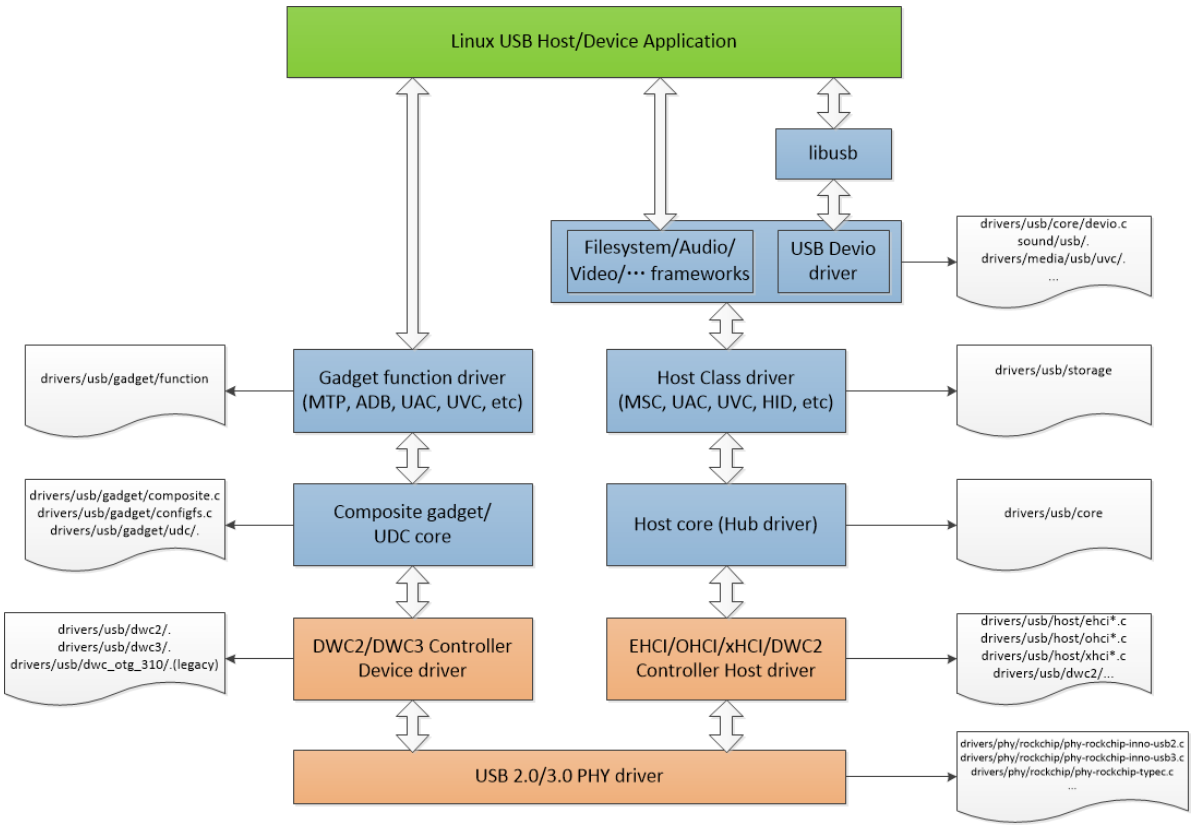
Rockchip_Developer_Guide_USB_CN.pdf 5.1 小节

Linux USB 协议栈是一个分层的架构,左边是 USB Device 驱动,右边是 USB Host 驱动,最上层是应用层,最底层是 Rockchip 系列芯片不同 USB 控制器和 PHY 的驱动,中间是 USB 核心层。

USB 键盘驱动示例

让 iTOP - RK3568 开发板充当 USB 主机,外接如 USB 键盘之类的 USB 设备。

在 Rockchip 官方的内核源码里,USB 键盘和鼠标驱动默认处于使能状态。若要进行后续的 USB 键盘驱动程序开发实验,就需取消这一默认驱动设置。由于 USB 鼠标和键盘属于 HID 设备,我们可通过输入以下命令打开内核配置界面,进而开启或者关闭 HID 驱动。

1
2
3
4
5
6
---> Device Drivers
---> HID support
---> USB HID support
<*> USB HID transport layer
[ ] PID device support
[*] /dev/hiddev raw HID device support

将 USB HID transport layer 取消使能。

其帮助信息如下:

1
2
3
4
5
6
7
8
9
10
11
12
13
14
15
16
17
18
19
20
CONFIG_USB_HID:

Say Y here if you want to connect USB keyboards, mice, joysticks, graphic tablets, or any other HID based devices to your computer via USB, as well as Uninterruptible Power Supply (UPS) and monitor control devices.

You can't use this driver and the HIDBP (Boot Protocol) keyboard and mouse drivers at the same time. More information is available: file:Documentation/input/input.rst.

If unsure, say Y.

To compile this driver as a module, choose M here: the module will be called usbhid.

Symbol: USB_HID [=y]
Type : tristate
Defined at drivers/hid/usbhid/Kconfig:5
Prompt: USB HID transport layer
Depends on: USB [=y] && INPUT [=y]
Location:
-> Device Drivers
-> HID support
-> USB HID support
Selects: HID [=y]

struct usb_driver *driver

是驱动程序的描述结构体,其核心成员定义如下所示

1
2
3
4
5
6
7
8
9
10
11
12
13
14
15
16
17
18
19
20
21
22
23
24
25
26
27
28
29
30
31
32
33
34
35
36
37
38
39
40
41
42
43
44
45
46
47
48
49
50
51
52
53
54
55
56
57
58
59
60
61
62
63
64
65
66
67
68
69
70
71
72
73
74
75
76
77
78
79
80
81
82
83
84
85
86
87
88
89
90
91
92
93
94
/**
* struct usb_driver - identifies USB interface driver to usbcore
* @name: The driver name should be unique among USB drivers,
* and should normally be the same as the module name.
* @probe: Called to see if the driver is willing to manage a particular
* interface on a device. If it is, probe returns zero and uses
* usb_set_intfdata() to associate driver-specific data with the
* interface. It may also use usb_set_interface() to specify the
* appropriate altsetting. If unwilling to manage the interface,
* return -ENODEV, if genuine IO errors occurred, an appropriate
* negative errno value.
* @disconnect: Called when the interface is no longer accessible, usually
* because its device has been (or is being) disconnected or the
* driver module is being unloaded.
* @unlocked_ioctl: Used for drivers that want to talk to userspace through
* the "usbfs" filesystem. This lets devices provide ways to
* expose information to user space regardless of where they
* do (or don't) show up otherwise in the filesystem.
* @suspend: Called when the device is going to be suspended by the
* system either from system sleep or runtime suspend context. The
* return value will be ignored in system sleep context, so do NOT
* try to continue using the device if suspend fails in this case.
* Instead, let the resume or reset-resume routine recover from
* the failure.
* @resume: Called when the device is being resumed by the system.
* @reset_resume: Called when the suspended device has been reset instead
* of being resumed.
* @pre_reset: Called by usb_reset_device() when the device is about to be
* reset. This routine must not return until the driver has no active
* URBs for the device, and no more URBs may be submitted until the
* post_reset method is called.
* @post_reset: Called by usb_reset_device() after the device
* has been reset
* @id_table: USB drivers use ID table to support hotplugging.
* Export this with MODULE_DEVICE_TABLE(usb,...). This must be set
* or your driver's probe function will never get called.
* @dev_groups: Attributes attached to the device that will be created once it
* is bound to the driver.
* @dynids: used internally to hold the list of dynamically added device
* ids for this driver.
* @drvwrap: Driver-model core structure wrapper.
* @no_dynamic_id: if set to 1, the USB core will not allow dynamic ids to be
* added to this driver by preventing the sysfs file from being created.
* @supports_autosuspend: if set to 0, the USB core will not allow autosuspend
* for interfaces bound to this driver.
* @soft_unbind: if set to 1, the USB core will not kill URBs and disable
* endpoints before calling the driver's disconnect method.
* @disable_hub_initiated_lpm: if set to 1, the USB core will not allow hubs
* to initiate lower power link state transitions when an idle timeout
* occurs. Device-initiated USB 3.0 link PM will still be allowed.
*
* USB interface drivers must provide a name, probe() and disconnect()
* methods, and an id_table. Other driver fields are optional.
*
* The id_table is used in hotplugging. It holds a set of descriptors,
* and specialized data may be associated with each entry. That table
* is used by both user and kernel mode hotplugging support.
*
* The probe() and disconnect() methods are called in a context where
* they can sleep, but they should avoid abusing the privilege. Most
* work to connect to a device should be done when the device is opened,
* and undone at the last close. The disconnect code needs to address
* concurrency issues with respect to open() and close() methods, as
* well as forcing all pending I/O requests to complete (by unlinking
* them as necessary, and blocking until the unlinks complete).
*/
struct usb_driver {
const char *name;// 驱动名称

int (*probe) (struct usb_interface *intf,
const struct usb_device_id *id); // 当检测到匹配的 USB 设备时,内核调用此函数

void (*disconnect) (struct usb_interface *intf); // 设备断开或驱动卸载时调用

int (*unlocked_ioctl) (struct usb_interface *intf, unsigned int code,
void *buf);

int (*suspend) (struct usb_interface *intf, pm_message_t message);
int (*resume) (struct usb_interface *intf);
int (*reset_resume)(struct usb_interface *intf);

int (*pre_reset)(struct usb_interface *intf);
int (*post_reset)(struct usb_interface *intf);

const struct usb_device_id *id_table; // 指向 usb_device_id 结构体数组,定义驱动支持的设备列表
const struct attribute_group **dev_groups;

struct usb_dynids dynids;
struct usbdrv_wrap drvwrap;
unsigned int no_dynamic_id:1;
unsigned int supports_autosuspend:1;
unsigned int disable_hub_initiated_lpm:1;
unsigned int soft_unbind:1;
};

struct usb_device_id

在驱动的主体结构 usb_driver 中,通过.id_table 字段将设备表与驱动绑定

1
2
3
4
5
6
7
8
9
10
11
12
13
14
15
16
17
18
19
20
21
22
23
24
25
26
27
28
29
30
31
32
33
34
35
36
37
38
39
40
41
42
43
44
45
46
47
48
49
50
51
52
53
54
55
56
57
58
59
60
61
62
63
64
65
66
67
68
69
70
71
72
73
74
/**
* struct usb_device_id - identifies USB devices for probing and hotplugging
* @match_flags: Bit mask controlling which of the other fields are used to
* match against new devices. Any field except for driver_info may be
* used, although some only make sense in conjunction with other fields.
* This is usually set by a USB_DEVICE_*() macro, which sets all
* other fields in this structure except for driver_info.
* @idVendor: USB vendor ID for a device; numbers are assigned
* by the USB forum to its members.
* @idProduct: Vendor-assigned product ID.
* @bcdDevice_lo: Low end of range of vendor-assigned product version numbers.
* This is also used to identify individual product versions, for
* a range consisting of a single device.
* @bcdDevice_hi: High end of version number range. The range of product
* versions is inclusive.
* @bDeviceClass: Class of device; numbers are assigned
* by the USB forum. Products may choose to implement classes,
* or be vendor-specific. Device classes specify behavior of all
* the interfaces on a device.
* @bDeviceSubClass: Subclass of device; associated with bDeviceClass.
* @bDeviceProtocol: Protocol of device; associated with bDeviceClass.
* @bInterfaceClass: Class of interface; numbers are assigned
* by the USB forum. Products may choose to implement classes,
* or be vendor-specific. Interface classes specify behavior only
* of a given interface; other interfaces may support other classes.
* @bInterfaceSubClass: Subclass of interface; associated with bInterfaceClass.
* @bInterfaceProtocol: Protocol of interface; associated with bInterfaceClass.
* @bInterfaceNumber: Number of interface; composite devices may use
* fixed interface numbers to differentiate between vendor-specific
* interfaces.
* @driver_info: Holds information used by the driver. Usually it holds
* a pointer to a descriptor understood by the driver, or perhaps
* device flags.
*
* In most cases, drivers will create a table of device IDs by using
* USB_DEVICE(), or similar macros designed for that purpose.
* They will then export it to userspace using MODULE_DEVICE_TABLE(),
* and provide it to the USB core through their usb_driver structure.
*
* See the usb_match_id() function for information about how matches are
* performed. Briefly, you will normally use one of several macros to help
* construct these entries. Each entry you provide will either identify
* one or more specific products, or will identify a class of products
* which have agreed to behave the same. You should put the more specific
* matches towards the beginning of your table, so that driver_info can
* record quirks of specific products.
*/
struct usb_device_id {
/* which fields to match against? */
__u16 match_flags; // 匹配标志(指定哪些字段参与匹配

/* Used for product specific matches; range is inclusive */
__u16 idVendor; // 厂商 ID(VID)
__u16 idProduct; // 产品 ID(PID)
__u16 bcdDevice_lo; // 设备版本号下限
__u16 bcdDevice_hi; // 设备版本号上限

/* Used for device class matches */
__u8 bDeviceClass; // 设备类
__u8 bDeviceSubClass; // 设备子类
__u8 bDeviceProtocol; // 设备协议

/* Used for interface class matches */
__u8 bInterfaceClass; // 接口类
__u8 bInterfaceSubClass; // 接口子类
__u8 bInterfaceProtocol; // 接口协议

/* Used for vendor-specific interface matches */
__u8 bInterfaceNumber;

/* not matched against */
kernel_ulong_t driver_info
__attribute__((aligned(sizeof(kernel_ulong_t)))); // 驱动私有数据(可选)
};

usb_register()

项目 说明
函数原型 int usb_register(struct usb_driver *driver);
头文件 #include <linux/usb.h>
参数 struct usb_driver *driver:USB 驱动描述结构体指针
返回值 成功返回 0;
失败返回负错误码
函数功能 将 USB 驱动注册到 Linux USB 子系统,使驱动能够响应匹配设备的插拔事件

usb_register 函数中,其底层调用 usb_register_driver,将驱动结构体 usb_driver 注册到内核 USB 子系统。调用 usb_register_driver 后,将 usb_driver 结构体挂载到 USB 总线(usb_bus_type)的驱动列表中,如下所示:

1
2
3
/* use a define to avoid include chaining to get THIS_MODULE & friends */
#define usb_register(driver) \
usb_register_driver(driver, THIS_MODULE, KBUILD_MODNAME)

usb_register_driver()

1
2
3
4
5
6
7
8
9
10
11
12
13
14
15
16
17
18
19
20
21
22
23
24
25
26
27
28
29
30
31
32
33
34
35
36
37
38
39
40
41
42
43
44
45
46
47
48
49
50
51
52
53
54
55
56
57
/**
* usb_register_driver - register a USB interface driver
* @new_driver: USB operations for the interface driver
* @owner: module owner of this driver.
* @mod_name: module name string
*
* Registers a USB interface driver with the USB core. The list of
* unattached interfaces will be rescanned whenever a new driver is
* added, allowing the new driver to attach to any recognized interfaces.
*
* Return: A negative error code on failure and 0 on success.
*
* NOTE: if you want your driver to use the USB major number, you must call
* usb_register_dev() to enable that functionality. This function no longer
* takes care of that.
*/
int usb_register_driver(struct usb_driver *new_driver, struct module *owner,
const char *mod_name)
{
int retval = 0;

if (usb_disabled())
return -ENODEV;

new_driver->drvwrap.for_devices = 0;
new_driver->drvwrap.driver.name = new_driver->name;
new_driver->drvwrap.driver.bus = &usb_bus_type;
new_driver->drvwrap.driver.probe = usb_probe_interface;
new_driver->drvwrap.driver.remove = usb_unbind_interface;
new_driver->drvwrap.driver.owner = owner;
new_driver->drvwrap.driver.mod_name = mod_name;
new_driver->drvwrap.driver.dev_groups = new_driver->dev_groups;
spin_lock_init(&new_driver->dynids.lock);
INIT_LIST_HEAD(&new_driver->dynids.list);

retval = driver_register(&new_driver->drvwrap.driver);
if (retval)
goto out;

retval = usb_create_newid_files(new_driver);
if (retval)
goto out_newid;

pr_info("%s: registered new interface driver %s\n",
usbcore_name, new_driver->name);

out:
return retval;

out_newid:
driver_unregister(&new_driver->drvwrap.driver);

pr_err("%s: error %d registering interface driver %s\n",
usbcore_name, retval, new_driver->name);
goto out;
}
EXPORT_SYMBOL_GPL(usb_register_driver);

usb_bus_type 结构体中有 match 成员,usb_device_match 函数负责匹配逻辑。

1
2
3
4
5
6
struct bus_type usb_bus_type = {
.name = "usb",
.match = usb_device_match,
.uevent = usb_uevent,
.need_parent_lock = true,
};

usb_device_match()

1
2
3
4
5
6
7
8
9
10
11
12
13
14
15
16
17
18
19
20
21
22
23
24
25
26
27
28
29
30
31
32
33
34
35
36
37
38
39
40
41
42
43
44
45
46
47
48
49
static int usb_device_match(struct device *dev, struct device_driver *drv)
{
/* devices and interfaces are handled separately */
if (is_usb_device(dev)) { // 判断是否为 USB 设备对象
struct usb_device *udev;
struct usb_device_driver *udrv;

/* interface drivers never match devices */
if (!is_usb_device_driver(drv)) // 检查驱动是否为设备级驱动
return 0;

udev = to_usb_device(dev);
udrv = to_usb_device_driver(drv);

/* If the device driver under consideration does not have a
* id_table or a match function, then let the driver's probe
* function decide.
*/
if (!udrv->id_table && !udrv->match)
return 1;

return usb_driver_applicable(udev, udrv);

} else if (is_usb_interface(dev)) { // 判断是否为 USB 接口对象
struct usb_interface *intf;
struct usb_driver *usb_drv;
const struct usb_device_id *id;

/* device drivers never match interfaces */
/* 设备驱动不匹配接口:防止设备驱动误绑定到接口 */
if (is_usb_device_driver(drv))
return 0;

intf = to_usb_interface(dev); // 获取接口实例
usb_drv = to_usb_driver(drv); // 获取 USB 驱动实例

/* 匹配静态设备 ID 表(驱动注册时定义的 id_table) */
id = usb_match_id(intf, usb_drv->id_table);
if (id)
return 1;

/* 匹配动态 ID(如通过 sysfs 添加的临时设备 ID) */
id = usb_match_dynamic_id(intf, usb_drv);
if (id)
return 1;
}

return 0;
}

上述函数中使用 usb_match_id 函数匹配静态设备 ID 表,usb_match_id 函数实现如下所示:

usb_match_id()

1
2
3
4
5
6
7
8
9
10
11
12
13
14
15
16
17
18
19
20
21
22
23
24
25
26
27
28
29
30
31
32
33
34
35
36
37
38
39
40
41
42
43
44
45
46
47
48
49
50
51
52
53
54
55
56
57
58
59
60
61
62
63
64
65
66
67
68
69
70
71
72
73
74
75
76
77
78
79
80
81
82
83
84
85
86
87
88
89
90
91
92
93
94
95
96
97
98
99
100
/**
* usb_match_id - find first usb_device_id matching device or interface
* @interface: the interface of interest
* @id: array of usb_device_id structures, terminated by zero entry
*
* usb_match_id searches an array of usb_device_id's and returns
* the first one matching the device or interface, or null.
* This is used when binding (or rebinding) a driver to an interface.
* Most USB device drivers will use this indirectly, through the usb core,
* but some layered driver frameworks use it directly.
* These device tables are exported with MODULE_DEVICE_TABLE, through
* modutils, to support the driver loading functionality of USB hotplugging.
*
* Return: The first matching usb_device_id, or %NULL.
*
* What Matches:
*
* The "match_flags" element in a usb_device_id controls which
* members are used. If the corresponding bit is set, the
* value in the device_id must match its corresponding member
* in the device or interface descriptor, or else the device_id
* does not match.
*
* "driver_info" is normally used only by device drivers,
* but you can create a wildcard "matches anything" usb_device_id
* as a driver's "modules.usbmap" entry if you provide an id with
* only a nonzero "driver_info" field. If you do this, the USB device
* driver's probe() routine should use additional intelligence to
* decide whether to bind to the specified interface.
*
* What Makes Good usb_device_id Tables:
*
* The match algorithm is very simple, so that intelligence in
* driver selection must come from smart driver id records.
* Unless you have good reasons to use another selection policy,
* provide match elements only in related groups, and order match
* specifiers from specific to general. Use the macros provided
* for that purpose if you can.
*
* The most specific match specifiers use device descriptor
* data. These are commonly used with product-specific matches;
* the USB_DEVICE macro lets you provide vendor and product IDs,
* and you can also match against ranges of product revisions.
* These are widely used for devices with application or vendor
* specific bDeviceClass values.
*
* Matches based on device class/subclass/protocol specifications
* are slightly more general; use the USB_DEVICE_INFO macro, or
* its siblings. These are used with single-function devices
* where bDeviceClass doesn't specify that each interface has
* its own class.
*
* Matches based on interface class/subclass/protocol are the
* most general; they let drivers bind to any interface on a
* multiple-function device. Use the USB_INTERFACE_INFO
* macro, or its siblings, to match class-per-interface style
* devices (as recorded in bInterfaceClass).
*
* Note that an entry created by USB_INTERFACE_INFO won't match
* any interface if the device class is set to Vendor-Specific.
* This is deliberate; according to the USB spec the meanings of
* the interface class/subclass/protocol for these devices are also
* vendor-specific, and hence matching against a standard product
* class wouldn't work anyway. If you really want to use an
* interface-based match for such a device, create a match record
* that also specifies the vendor ID. (Unforunately there isn't a
* standard macro for creating records like this.)
*
* Within those groups, remember that not all combinations are
* meaningful. For example, don't give a product version range
* without vendor and product IDs; or specify a protocol without
* its associated class and subclass.
*/
const struct usb_device_id *usb_match_id(struct usb_interface *interface,
const struct usb_device_id *id)
{
/* proc_connectinfo in devio.c may call us with id == NULL. */
/* 处理特殊情况:当 id 表为空时直接返回 */
if (id == NULL)
return NULL;

/* It is important to check that id->driver_info is nonzero,
since an entry that is all zeroes except for a nonzero
id->driver_info is the way to create an entry that
indicates that the driver want to examine every
device and interface. */
/*
* 遍历设备 ID 表,直到遇到全零终止条目:
* 循环条件检查 id 字段非全零
*/
for (; id->idVendor || id->idProduct || id->bDeviceClass ||
id->bInterfaceClass || id->driver_info; id++) {
/* 调用核心匹配函数,检查当前 id 是否匹配接口 */
if (usb_match_one_id(interface, id))
return id; // 匹配成功则返回条目
}

return NULL; // 遍历完未找到匹配项
}
EXPORT_SYMBOL_GPL(usb_match_id);

上述代码中的 usb_match_one_id 函数用来判断 USB 接口是否与 usb_device_id 匹配,函数实现如下所示:

usb_match_one_id()

1
2
3
4
5
6
7
8
9
10
11
12
13
14
15
16
17
18
19
20
21
22
23
24
/* returns 0 if no match, 1 if match */
int usb_match_one_id(struct usb_interface *interface,
const struct usb_device_id *id)
{
struct usb_host_interface *intf;
struct usb_device *dev;

/* proc_connectinfo in devio.c may call us with id == NULL. */
// 1. 空指针保护:若 id 为空,直接返回不匹配
if (id == NULL)
return 0;
// 2. 获取当前接口的配置(cur_altsetting)及关联的 USB 设备
intf = interface->cur_altsetting;
dev = interface_to_usbdev(interface);

// 3. 设备级匹配:检查设备描述符(VID/PID/设备类等)
if (!usb_match_device(dev, id))
return 0;

// 4. 接口级匹配:检查接口描述符(接口类/子类/协议等)
return usb_match_one_id_intf(dev, intf, id);
}
EXPORT_SYMBOL_GPL(usb_match_one_id);

根据 usb_device_id 中的 match_flags 字段,决定需要匹配的字段(如 VID、PID、接口类等),示例匹配表如下所示

1
2
3
4
5
// 定义设备匹配表
static const struct usb_device_id my_kbd_id_table[] = {
{USB_INTERFACE_INFO(USB_INTERFACE_CLASS_HID, USB_INTERFACE_SUBCLASS_BOOT, USB_INTERFACE_PROTOCOL_KEYBOARD)},
{}, // 终止符(必须保留空条目)
};

usb_deregister()

项目 说明
函数原型 void usb_deregister(struct usb_driver *driver);
头文件 #include <linux/usb.h>
参数 struct usb_driver *driver:已注册的 USB 驱动
返回值
函数功能 从 USB 子系统注销驱动,并触发所有匹配设备的 disconnect() 回调

USB Request Block

URB,即 USB Request Block,中文名为 USB 请求块。它在 USB 设备驱动里,是描述与 USB 设备进行通信时所使用的基本载体,也是核心数据结构,与网络设备驱动中的 sk_buff 结构体极为相似。URB 结构体如下所示:

1
2
3
4
5
6
7
8
9
10
11
12
13
14
15
16
17
18
19
20
21
22
23
24
25
26
27
28
29
30
31
32
33
34
35
36
37
38
39
40
41
42
43
44
45
46
47
48
49
50
51
52
53
54
55
56
57
58
59
60
61
62
63
64
65
66
67
68
69
70
71
72
73
74
75
76
77
78
79
80
81
82
83
84
85
86
87
88
89
90
91
92
93
94
95
96
97
98
99
100
101
102
103
104
105
106
107
108
109
110
111
112
113
114
115
116
117
118
119
120
121
122
123
124
125
126
127
128
129
130
131
132
133
134
135
136
137
138
139
140
141
142
143
144
145
146
147
148
149
150
151
152
153
154
155
156
157
158
159
160
161
162
163
164
165
166
167
168
169
170
171
172
173
174
175
176
177
178
179
180
181
182
183
184
185
186
187
188
189
190
191
192
193
194
195
196
197
198
199
200
201
202
203
204
205
206
207
208
209
210
211
212
213
214
215
216
217
218
219
220
221
222
223
/**
* struct urb - USB Request Block
* @urb_list: For use by current owner of the URB.
* @anchor_list: membership in the list of an anchor
* @anchor: to anchor URBs to a common mooring
* @ep: Points to the endpoint's data structure. Will eventually
* replace @pipe.
* @pipe: Holds endpoint number, direction, type, and more.
* Create these values with the eight macros available;
* usb_{snd,rcv}TYPEpipe(dev,endpoint), where the TYPE is "ctrl"
* (control), "bulk", "int" (interrupt), or "iso" (isochronous).
* For example usb_sndbulkpipe() or usb_rcvintpipe(). Endpoint
* numbers range from zero to fifteen. Note that "in" endpoint two
* is a different endpoint (and pipe) from "out" endpoint two.
* The current configuration controls the existence, type, and
* maximum packet size of any given endpoint.
* @stream_id: the endpoint's stream ID for bulk streams
* @dev: Identifies the USB device to perform the request.
* @status: This is read in non-iso completion functions to get the
* status of the particular request. ISO requests only use it
* to tell whether the URB was unlinked; detailed status for
* each frame is in the fields of the iso_frame-desc.
* @transfer_flags: A variety of flags may be used to affect how URB
* submission, unlinking, or operation are handled. Different
* kinds of URB can use different flags.
* @transfer_buffer: This identifies the buffer to (or from) which the I/O
* request will be performed unless URB_NO_TRANSFER_DMA_MAP is set
* (however, do not leave garbage in transfer_buffer even then).
* This buffer must be suitable for DMA; allocate it with
* kmalloc() or equivalent. For transfers to "in" endpoints, contents
* of this buffer will be modified. This buffer is used for the data
* stage of control transfers.
* @transfer_dma: When transfer_flags includes URB_NO_TRANSFER_DMA_MAP,
* the device driver is saying that it provided this DMA address,
* which the host controller driver should use in preference to the
* transfer_buffer.
* @sg: scatter gather buffer list, the buffer size of each element in
* the list (except the last) must be divisible by the endpoint's
* max packet size if no_sg_constraint isn't set in 'struct usb_bus'
* @num_mapped_sgs: (internal) number of mapped sg entries
* @num_sgs: number of entries in the sg list
* @transfer_buffer_length: How big is transfer_buffer. The transfer may
* be broken up into chunks according to the current maximum packet
* size for the endpoint, which is a function of the configuration
* and is encoded in the pipe. When the length is zero, neither
* transfer_buffer nor transfer_dma is used.
* @actual_length: This is read in non-iso completion functions, and
* it tells how many bytes (out of transfer_buffer_length) were
* transferred. It will normally be the same as requested, unless
* either an error was reported or a short read was performed.
* The URB_SHORT_NOT_OK transfer flag may be used to make such
* short reads be reported as errors.
* @setup_packet: Only used for control transfers, this points to eight bytes
* of setup data. Control transfers always start by sending this data
* to the device. Then transfer_buffer is read or written, if needed.
* @setup_dma: DMA pointer for the setup packet. The caller must not use
* this field; setup_packet must point to a valid buffer.
* @start_frame: Returns the initial frame for isochronous transfers.
* @number_of_packets: Lists the number of ISO transfer buffers.
* @interval: Specifies the polling interval for interrupt or isochronous
* transfers. The units are frames (milliseconds) for full and low
* speed devices, and microframes (1/8 millisecond) for highspeed
* and SuperSpeed devices.
* @error_count: Returns the number of ISO transfers that reported errors.
* @context: For use in completion functions. This normally points to
* request-specific driver context.
* @complete: Completion handler. This URB is passed as the parameter to the
* completion function. The completion function may then do what
* it likes with the URB, including resubmitting or freeing it.
* @iso_frame_desc: Used to provide arrays of ISO transfer buffers and to
* collect the transfer status for each buffer.
*
* This structure identifies USB transfer requests. URBs must be allocated by
* calling usb_alloc_urb() and freed with a call to usb_free_urb().
* Initialization may be done using various usb_fill_*_urb() functions. URBs
* are submitted using usb_submit_urb(), and pending requests may be canceled
* using usb_unlink_urb() or usb_kill_urb().
*
* Data Transfer Buffers:
*
* Normally drivers provide I/O buffers allocated with kmalloc() or otherwise
* taken from the general page pool. That is provided by transfer_buffer
* (control requests also use setup_packet), and host controller drivers
* perform a dma mapping (and unmapping) for each buffer transferred. Those
* mapping operations can be expensive on some platforms (perhaps using a dma
* bounce buffer or talking to an IOMMU),
* although they're cheap on commodity x86 and ppc hardware.
*
* Alternatively, drivers may pass the URB_NO_TRANSFER_DMA_MAP transfer flag,
* which tells the host controller driver that no such mapping is needed for
* the transfer_buffer since
* the device driver is DMA-aware. For example, a device driver might
* allocate a DMA buffer with usb_alloc_coherent() or call usb_buffer_map().
* When this transfer flag is provided, host controller drivers will
* attempt to use the dma address found in the transfer_dma
* field rather than determining a dma address themselves.
*
* Note that transfer_buffer must still be set if the controller
* does not support DMA (as indicated by hcd_uses_dma()) and when talking
* to root hub. If you have to trasfer between highmem zone and the device
* on such controller, create a bounce buffer or bail out with an error.
* If transfer_buffer cannot be set (is in highmem) and the controller is DMA
* capable, assign NULL to it, so that usbmon knows not to use the value.
* The setup_packet must always be set, so it cannot be located in highmem.
*
* Initialization:
*
* All URBs submitted must initialize the dev, pipe, transfer_flags (may be
* zero), and complete fields. All URBs must also initialize
* transfer_buffer and transfer_buffer_length. They may provide the
* URB_SHORT_NOT_OK transfer flag, indicating that short reads are
* to be treated as errors; that flag is invalid for write requests.
*
* Bulk URBs may
* use the URB_ZERO_PACKET transfer flag, indicating that bulk OUT transfers
* should always terminate with a short packet, even if it means adding an
* extra zero length packet.
*
* Control URBs must provide a valid pointer in the setup_packet field.
* Unlike the transfer_buffer, the setup_packet may not be mapped for DMA
* beforehand.
*
* Interrupt URBs must provide an interval, saying how often (in milliseconds
* or, for highspeed devices, 125 microsecond units)
* to poll for transfers. After the URB has been submitted, the interval
* field reflects how the transfer was actually scheduled.
* The polling interval may be more frequent than requested.
* For example, some controllers have a maximum interval of 32 milliseconds,
* while others support intervals of up to 1024 milliseconds.
* Isochronous URBs also have transfer intervals. (Note that for isochronous
* endpoints, as well as high speed interrupt endpoints, the encoding of
* the transfer interval in the endpoint descriptor is logarithmic.
* Device drivers must convert that value to linear units themselves.)
*
* If an isochronous endpoint queue isn't already running, the host
* controller will schedule a new URB to start as soon as bandwidth
* utilization allows. If the queue is running then a new URB will be
* scheduled to start in the first transfer slot following the end of the
* preceding URB, if that slot has not already expired. If the slot has
* expired (which can happen when IRQ delivery is delayed for a long time),
* the scheduling behavior depends on the URB_ISO_ASAP flag. If the flag
* is clear then the URB will be scheduled to start in the expired slot,
* implying that some of its packets will not be transferred; if the flag
* is set then the URB will be scheduled in the first unexpired slot,
* breaking the queue's synchronization. Upon URB completion, the
* start_frame field will be set to the (micro)frame number in which the
* transfer was scheduled. Ranges for frame counter values are HC-specific
* and can go from as low as 256 to as high as 65536 frames.
*
* Isochronous URBs have a different data transfer model, in part because
* the quality of service is only "best effort". Callers provide specially
* allocated URBs, with number_of_packets worth of iso_frame_desc structures
* at the end. Each such packet is an individual ISO transfer. Isochronous
* URBs are normally queued, submitted by drivers to arrange that
* transfers are at least double buffered, and then explicitly resubmitted
* in completion handlers, so
* that data (such as audio or video) streams at as constant a rate as the
* host controller scheduler can support.
*
* Completion Callbacks:
*
* The completion callback is made in_interrupt(), and one of the first
* things that a completion handler should do is check the status field.
* The status field is provided for all URBs. It is used to report
* unlinked URBs, and status for all non-ISO transfers. It should not
* be examined before the URB is returned to the completion handler.
*
* The context field is normally used to link URBs back to the relevant
* driver or request state.
*
* When the completion callback is invoked for non-isochronous URBs, the
* actual_length field tells how many bytes were transferred. This field
* is updated even when the URB terminated with an error or was unlinked.
*
* ISO transfer status is reported in the status and actual_length fields
* of the iso_frame_desc array, and the number of errors is reported in
* error_count. Completion callbacks for ISO transfers will normally
* (re)submit URBs to ensure a constant transfer rate.
*
* Note that even fields marked "public" should not be touched by the driver
* when the urb is owned by the hcd, that is, since the call to
* usb_submit_urb() till the entry into the completion routine.
*/
struct urb {
/* private: usb core and host controller only fields in the urb */
struct kref kref; /* reference count of the URB */
int unlinked; /* unlink error code */
void *hcpriv; /* private data for host controller */
atomic_t use_count; /* concurrent submissions counter */
atomic_t reject; /* submissions will fail */

/* public: documented fields in the urb that can be used by drivers */
struct list_head urb_list; /* list head for use by the urb's
* current owner */
struct list_head anchor_list; /* the URB may be anchored */
struct usb_anchor *anchor;
struct usb_device *dev; /* (in) pointer to associated device */
struct usb_host_endpoint *ep; /* (internal) pointer to endpoint */
unsigned int pipe; /* (in) pipe information */
unsigned int stream_id; /* (in) stream ID */
int status; /* (return) non-ISO status */
unsigned int transfer_flags; /* (in) URB_SHORT_NOT_OK | ...*/
void *transfer_buffer; /* (in) associated data buffer */
dma_addr_t transfer_dma; /* (in) dma addr for transfer_buffer */
struct scatterlist *sg; /* (in) scatter gather buffer list */
int num_mapped_sgs; /* (internal) mapped sg entries */
int num_sgs; /* (in) number of entries in the sg list */
u32 transfer_buffer_length; /* (in) data buffer length */
u32 actual_length; /* (return) actual transfer length */
unsigned char *setup_packet; /* (in) setup packet (control only) */
dma_addr_t setup_dma; /* (in) dma addr for setup_packet */
int start_frame; /* (modify) start frame (ISO) */
int number_of_packets; /* (in) number of ISO packets */
int interval; /* (modify) transfer interval
* (INT/ISO) */
int error_count; /* (return) number of ISO errors */
void *context; /* (in) context for completion */
usb_complete_t complete; /* (in) completion routine */

struct usb_iso_packet_descriptor iso_frame_desc[];
/* (in) ISO ONLY */
};

USB 设备中每一个端点都处理一个 URB 队列。USB 通讯步骤如下所述:

USB 通讯步骤

第一步使用 usb_alloc_urb 函数创建 URB 结构体,usb_alloc_urb 函数介绍如下所示:

1
struct urb *usb_alloc_urb(int iso_packets, gfp_t mem_flags);

usb_alloc_urb 函数用于创建一个 USB 请求块(URB),用于管理 USB 设备的数据传输请求。URB 是 USB 驱动开发中数据传输的核心结构体,支持以下传输类型:

  • 控制传输(Control Transfer):设备初始化、配置。
  • 中断传输(Interrupt Transfer):实时性要求高的设备(如键盘、鼠标)。
  • 批量传输(Bulk Transfer):大容量数据传输(如 U 盘)。
  • 等时传输(Isochronous Transfer):实时流数据(如摄像头、音频设备)。

函数参数:

  • int iso_packets: 等时传输的包数量(仅用于等时传输,其他传输类型设为 0)
  • gfp_t mem_flags:内存分配标志,指定内存分配方式(如 GFP_KERNELGFP_ATOMIC

成功时返回分配的 URB 指针,失败返回 NULL。

第二步 URB 初始化,被指定用于特定 USB 设备的特定端点。对于中断 URB,使用 usb_fill_int_urb 函数来初始化 URB,usb_fill_int_urb 函数介绍如下所示:

1
2
3
4
5
6
7
8
static inline void usb_fill_int_urb(struct urb *urb, // 目标 URB 指针
struct usb_device *dev, // USB 设备实例
unsigned int pipe, // 端点管道(方向+端点号)
void *transfer_buffer, // 数据缓冲区
int buffer_length, // 缓冲区长度
usb_complete_t complete_fn, // 传输完成回调函数
void *context, // 回调函数上下文数据
int interval) // 轮询间隔(单位:ms)

usb_fill_int_urb 函数用于初始化一个中断传输 URB。

函数参数:

  • struct urb *urb:要初始化的 URB 的指针
  • struct usb_device *dev:指向这个 URB 要被发送到的 USB 设备
  • unsigned int pipe:是这个 URB 要被发送到的 USB 设备的特定端点

pipe 参数使用下面的函数来创建

1
2
3
4
5
6
7
8
9
10
11
12
13
14
15
16
17
/* Create various pipes... */
#define usb_sndctrlpipe(dev, endpoint) \
((PIPE_CONTROL << 30) | __create_pipe(dev, endpoint))
#define usb_rcvctrlpipe(dev, endpoint) \
((PIPE_CONTROL << 30) | __create_pipe(dev, endpoint) | USB_DIR_IN)
#define usb_sndisocpipe(dev, endpoint) \
((PIPE_ISOCHRONOUS << 30) | __create_pipe(dev, endpoint))
#define usb_rcvisocpipe(dev, endpoint) \
((PIPE_ISOCHRONOUS << 30) | __create_pipe(dev, endpoint) | USB_DIR_IN)
#define usb_sndbulkpipe(dev, endpoint) \
((PIPE_BULK << 30) | __create_pipe(dev, endpoint))
#define usb_rcvbulkpipe(dev, endpoint) \
((PIPE_BULK << 30) | __create_pipe(dev, endpoint) | USB_DIR_IN)
#define usb_sndintpipe(dev, endpoint) \
((PIPE_INTERRUPT << 30) | __create_pipe(dev, endpoint))
#define usb_rcvintpipe(dev, endpoint) \
((PIPE_INTERRUPT << 30) | __create_pipe(dev, endpoint) | USB_DIR_IN)
  • void *transfer_buffer:指向发送数据或接收数据的缓冲区的指针
  • int buffer_length:是 transfer_buffer 指针所指向缓冲区的大小
  • usb_complete_t complete_fn:传输完成回调函数
  • void *context:完成处理函数的“上下文”
  • int interval:传递给回调函数的上下文数据(通常为驱动私有结构体指针)

对于批量 URB,使用 usb_fill_bulk_urb()函数来初始化。对于控制 URB,使用 usb_fill_control_urb() 函数来初始化。

在完成第一步和第二步创建和初始化 URB 之后,URB 便可以提交给 USB 核心了,使用 usb_submit_urb 函数来完成。usb_submit_urb 函数介绍如下所示

1
int usb_submit_urb(struct urb *urb, gfp_t mem_flags);

函数作用:

将初始化好的 USB 请求块(URB)提交给内核的 USB 子系统,启动数据传输。传输完成后,会触发 URB 中指定的回调函数。

函数参数:

  • struct urb *urb:指向 urb 的指针
  • gfp_t mem_flags:内存分配标志,指定内存分配方式(如 GFP_KERNELGFP_ATOMIC
    • GFP_ATOMIC:在中断处理函数,底半部,tasklet,定时器处理函数以及 urb 完成函数中,在调用者持有自旋锁或者读写锁时以及当驱动将 current->state 修改为非 TASK_RUNNING 时,应使用此标志。
    • GFP_NOIO: 在存储设备的块 I/O 和错误处理路径中,应使用此标志。
    • GFP_KERNEL: 如果没有任何理由使用 GFP_ATOMICGFP_NOIO,就使用 GFP_KERNEL

成功时返回 0,提交失败,返回负的错误码。

第四步,提交由 USB 核心指定的 USB 主机控制器驱动

第五步,被 USB 主机控制器处理,进行一次到 USB 设备的传送。第四步和第五步由 USB核心和主机控制器完成,不受 USB 设备驱动的控制。

第六步,当 URB 处理完成,USB 主机控制器驱动通知 USB 设备驱动

USB 键盘上报的数据为 8 个字节,这 8 个字节的数据是 USB 按键按下又抬起的数据。
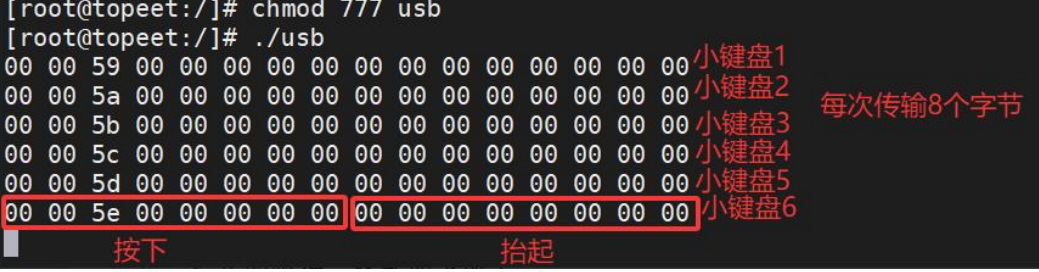
USB 键盘上报数据格式

格式如下所示:

Offset Size Description
0 Byte 特定功能按键
1 Byte 保留位
2 Byte 按键 1
3 Byte 按键 2
4 Byte 按键 3
5 Byte 按键 4
6 Byte 按键 5
7 Byte 按键 6

其中 buff[0]是一个位域,每个位对应一个特殊按键的功能,当其中一位被设置为 1 时,表示按键被按下。位域结构如下表所示:

Bit Bit Length Description
0 1 Left Ctrl
1 1 Left Shift
2 1 Left Alt
3 1 Left GUI(Windows/Super key)
4 1 Right Ctrl
5 1 Right Shift
6 1 Right Alt
7 1 Right GUI(Windows/Super key)

示例

1
2
3
4
5
6
7
8
9
10
11
12
13
14
15
16
17
18
19
20
21
22
23
24
25
26
27
28
29
30
31
32
33
34
35
36
37
38
39
40
41
42
43
44
45
46
47
48
49
50
51
52
53
54
55
56
57
58
59
60
61
62
63
64
65
66
67
68
69
70
71
72
73
74
75
76
77
78
79
80
81
82
83
84
85
86
87
88
89
90
91
92
93
94
95
96
97
98
99
100
101
102
103
104
105
106
107
108
109
110
111
112
113
114
115
116
117
118
119
120
121
122
123
124
125
126
127
128
129
130
131
132
133
134
135
136
137
138
139
140
141
142
143
144
145
146
147
148
149
150
151
152
153
154
155
156
157
158
159
160
161
162
163
164
165
166
167
168
169
170
171
172
173
174
175
176
177
#include <linux/init.h>
#include <linux/module.h>
#include <linux/usb.h>
#include <linux/usb/input.h>
#include <linux/hid.h>
#include <linux/slab.h>

struct input_dev *mykbd_inputdev = NULL;
struct urb *mykbd_urb;
unsigned char *mykbd_buf;
unsigned char mykbd_buf_old[8];
int mykbd_size;
dma_addr_t mykbd_dma;

// 键盘的键码表,包含标准键盘的按键映射
static const unsigned char usb_kbd_keycode[256] = {
0, 0, 0, 0, 30, 48, 46, 32, 18, 33, 34, 35, 23, 36, 37, 38,
50, 49, 24, 25, 16, 19, 31, 20, 22, 47, 17, 45, 21, 44, 2, 3,
4, 5, 6, 7, 8, 9, 10, 11, 28, 1, 14, 15, 57, 12, 13, 26,
27, 43, 43, 39, 40, 41, 51, 52, 53, 58, 59, 60, 61, 62, 63, 64,
65, 66, 67, 68, 87, 88, 99, 70, 119, 110, 102, 104, 111, 107, 109, 106,
105, 108, 103, 69, 98, 55, 74, 78, 96, 79, 80, 81, 75, 76, 77, 71,
72, 73, 82, 83, 86, 127, 116, 117, 183, 184, 185, 186, 187, 188, 189, 190,
191, 192, 193, 194, 134, 138, 130, 132, 128, 129, 131, 137, 133, 135, 136, 113,
115, 114, 0, 0, 0, 121, 0, 89, 93, 124, 92, 94, 95, 0, 0, 0,
122, 123, 90, 91, 85, 0, 0, 0, 0, 0, 0, 0, 0, 0, 0, 0,
0, 0, 0, 0, 0, 0, 0, 0, 0, 0, 0, 0, 0, 0, 0, 0,
0, 0, 0, 0, 0, 0, 0, 0, 0, 0, 0, 0, 0, 0, 0, 0,
0, 0, 0, 0, 0, 0, 0, 0, 0, 0, 0, 0, 0, 0, 0, 0,
0, 0, 0, 0, 0, 0, 0, 0, 0, 0, 0, 0, 0, 0, 0, 0,
29, 42, 56, 125, 97, 54, 100, 126, 164, 166, 165, 163, 161, 115, 114, 113,
150, 158, 159, 128, 136, 177, 178, 176, 142, 152, 173, 140
};

// USB设备ID匹配表(当前为空,需填充支持的设备)
const struct usb_device_id my_kbd_id_table[] = {
{ USB_INTERFACE_INFO(USB_INTERFACE_CLASS_HID, USB_INTERFACE_SUBCLASS_BOOT,
USB_INTERFACE_PROTOCOL_KEYBOARD) },
{},

};

// 处理USB键盘数据的回调函数
void mykbd_func(struct urb *urb)
{
int i;
// 处理按键数据
for (i = 0; i < 8; i++) {
input_report_key(mykbd_inputdev, usb_kbd_keycode[i + 224], (mykbd_buf[0] >> i) & 1);
}

// 处理按键状态变化
for (i = 2; i < 8; i++) {
// 检查旧按键状态
if (mykbd_buf_old[i] > 3 && memscan(mykbd_buf + 2, mykbd_buf_old[i], 6) == mykbd_buf + 8) {
if (usb_kbd_keycode[mykbd_buf_old[i]]) {
input_report_key(mykbd_inputdev, usb_kbd_keycode[mykbd_buf_old[i]], 0);
}
}
// 检查新按键状态
if (mykbd_buf[i] > 3 && memscan(mykbd_buf_old + 2, mykbd_buf[i], 6) == mykbd_buf_old + 8) {
if (usb_kbd_keycode[mykbd_buf[i]]) {
input_report_key(mykbd_inputdev, usb_kbd_keycode[mykbd_buf[i]], 1);
}
}
}

// 同步输入设备状态
input_sync(mykbd_inputdev);
// 保存当前按键状态
memcpy(mykbd_buf_old, mykbd_buf, 8);
// 重新提交URB以继续接收数据
usb_submit_urb(mykbd_urb, GFP_ATOMIC);
}

// 探测函数:当匹配到设备时调用
int my_kbd_probe(struct usb_interface *intf, const struct usb_device_id *id)
{
int i;
int ret;
int pipe;
struct usb_host_interface *interface;
struct usb_endpoint_descriptor *endpoint;
struct usb_device *mykbd_dev = interface_to_usbdev(intf);

// 初始化interface
interface = intf->cur_altsetting;
// 获取端点描述符
endpoint = &interface->endpoint[0].desc;

// 为输入设备分配内存
mykbd_inputdev = input_allocate_device();

mykbd_inputdev->name = "mykbd_inputdev";
__set_bit(EV_KEY, mykbd_inputdev->evbit);
__set_bit(EV_REP, mykbd_inputdev->evbit);
for (i = 0; i < 255; i++) {
__set_bit(usb_kbd_keycode[i], mykbd_inputdev->keybit);
}
clear_bit(0, mykbd_inputdev->keybit);

// 注册输入设备
ret = input_register_device(mykbd_inputdev);

//分配URB
mykbd_urb = usb_alloc_urb(0,GFP_KERNEL);

//获取端点最大数据包大小
mykbd_size = endpoint->wMaxPacketSize;

mykbd_buf = usb_alloc_coherent(mykbd_dev, mykbd_size, GFP_ATOMIC, &mykbd_dma);

// 获取接收中断管道
pipe = usb_rcvintpipe(mykbd_dev, endpoint->bEndpointAddress);

// 填充URB
usb_fill_int_urb(mykbd_urb, mykbd_dev, pipe, mykbd_buf, mykbd_size, mykbd_func, 0, endpoint->bInterval);

mykbd_urb->transfer_dma = mykbd_dma;
mykbd_urb->transfer_flags |= URB_NO_TRANSFER_DMA_MAP;
// 提交URB进行数据传输
usb_submit_urb(mykbd_urb, GFP_KERNEL);

return 0;
}

// 断开函数:设备移除或驱动卸载时调用
void my_kbd_disconnect(struct usb_interface *intf)
{
struct usb_device *mykbd_dev = interface_to_usbdev(intf);

// 取消URB传输
usb_kill_urb(mykbd_urb);
// 释放URB
usb_free_urb(mykbd_urb);
// 释放一致性内存
usb_free_coherent(mykbd_dev, mykbd_size, mykbd_buf, mykbd_dma);
// 注销输入设备
input_unregister_device(mykbd_inputdev);
// 释放输入设备
input_free_device(mykbd_inputdev);
}

// USB驱动结构体定义
struct usb_driver my_kbd_driver = {
.name = "my_kbd", // 驱动名称(/sys/bus/usb/drivers/下可见)
.probe = my_kbd_probe, // 设备匹配时的回调
.disconnect = my_kbd_disconnect, // 设备断开时的回调
.id_table = my_kbd_id_table, // 设备匹配表(需填充)
};

// 模块初始化函数
static int my_kdb_init(void)
{
int ret;
// 注册USB驱动到内核子系统
ret = usb_register(&my_kbd_driver);
if (ret < 0) {
printk(KERN_ERR "USB驱动注册失败: %d\n", ret);
return ret;
}
printk(KERN_INFO "USB键盘驱动已加载\n");
return 0;
}

// 模块退出函数
static void my_kdb_exit(void)
{
// 注销驱动(触发所有设备的disconnect回调)
usb_deregister(&my_kbd_driver);
printk(KERN_INFO "USB键盘驱动已卸载\n");
}

// 模块声明
module_init(my_kdb_init); // 指定初始化函数
module_exit(my_kdb_exit); // 指定退出函数
MODULE_LICENSE("GPL"); // 必须声明GPL协议

UDC 与 Gadget 驱动

USB gadget 指的是 USB 设备端的驱动框架,主要用于将具备 USB 功能的设备配置为从设备,与主机进行通信。

以智能手机为例,当手机通过 USB 线接入电脑时,手机即扮演了 USB Gadget 的角色。在接下来的实验中,我们要将开发板替代手机,扮演 USB Gadget 的角色。

根据下图的 USB 驱动开发框架图可知 Gadget 框架提供了一套标准化的 API 接口(Gadget Function API),这些接口在底层由 USB 设备控制器(UDC)驱动具体实现。

1
2
3
4
5
6
7
8
9
10
11
12
13
14
15
16
┌─────────────────────┐      ┌─────────────────────┐
│ USB设备驱动 │ │ Gadget Function驱动 │
└───────────┬─────────┘ └───────────┬─────────┘
│ │
┌───────────▼─────────┐ ┌───────────▼─────────┐
│ USB核心层 │ │ Gadget Function API │
└───────────┬─────────┘ └───────────┬─────────┘
│ │
┌───────────▼─────────┐ ┌───────────▼─────────┐
│ USB主机控制器驱动 │ │ UDC驱动 │
└───────────┬─────────┘ └───────────┬─────────┘
└──────────────┬──────────────┘

┌────────▼────────┐
│ USB总线 │
└─────────────────┘

值得注意的是,不同的 UDC(USB 设备控制器)可能需要适配不同的驱动程序,即便是基于相同 UDC 的不同硬件板卡,也可能需要对驱动程序进行修改。USB Gadget 模块的在内核

1
2
3
4
5
6
7
8
9
10
11
12
13
14
15
16
17
18
19
20
21
22
23
24
25
26
27
28
29
DeviceDrivers--->
[*]USB support--->
[*] USB Gadget Support--->
...
USBGadget Drivers (USB functions configurable through configfs)
[ ] Generic serial bulk in/out
[*] Abstract Control Model (CDC ACM)
[ ] Object Exchange Model (CDC OBEX)
[ ] Network Control Model (CDC NCM)
[ ] Ethernet Control Model (CDC ECM)
[ ] Ethernet Control Model (CDC ECM) subset
[*] RNDIS
[ ] Ethernet Emulation Model (EEM)
[*] Mass storage
[ ] Loopback and sourcesink function (for testing)
[*] Function filesystem (FunctionFS)
[*] MTP gadget
[*]
PTP gadget
[*] Accessory gadget
[*]
Audio Source gadget
[*] Uevent notification of Gadget state
[ ] Audio Class 1.0
[ ] Audio Class 2.0
[*] MIDI function
[ ] HID function
[ ] USB Webcam function
[ ] Printer function

将 iTOP-RK3568 开发板配置为 USB 网卡设备

  1. 将 RNDIS 驱动开启(如果选择编译成模块,单独编译内核不会生成 .ko文件,为了省去繁琐挂载步骤)
  2. 接下来选中一些网络协议配置

如图:

USB Gadget Support

接下来找到 USB Gadget precomposed configurations,选中 with CDC Ethernet support,如下图所示
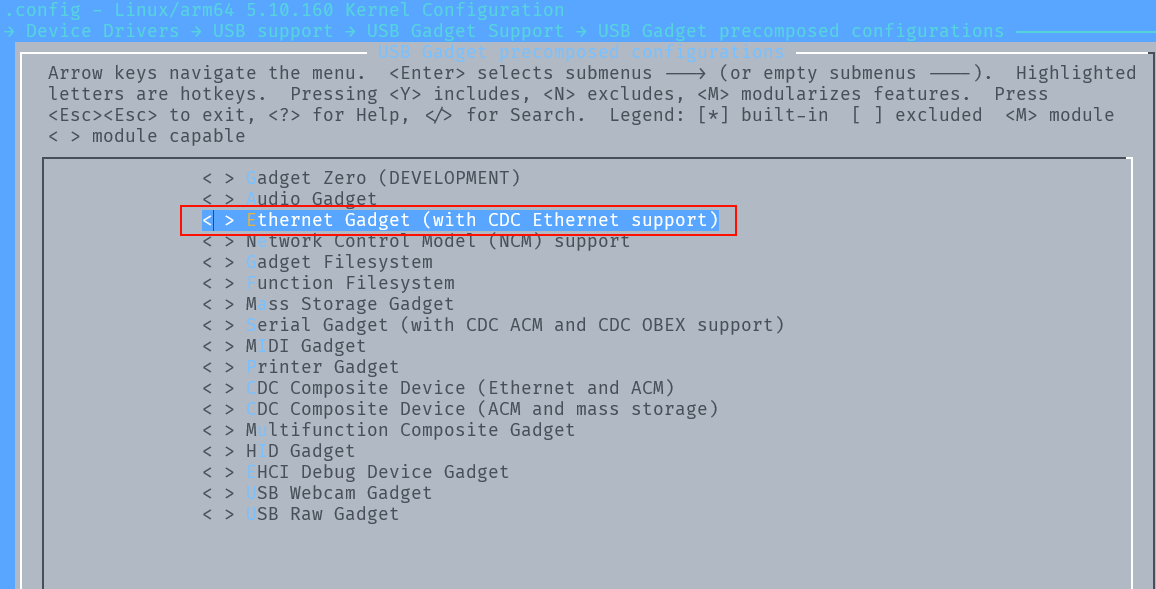
USB Gadget precomposed configurations

配置完成,重新编译内核源码,然后重新烧写内核镜像。在开发板完成重启流程后,执行ifconfig -a命令进行网络配置接口的列举,将能够观察到 usb0 网络接口。

host 和 phy 驱动
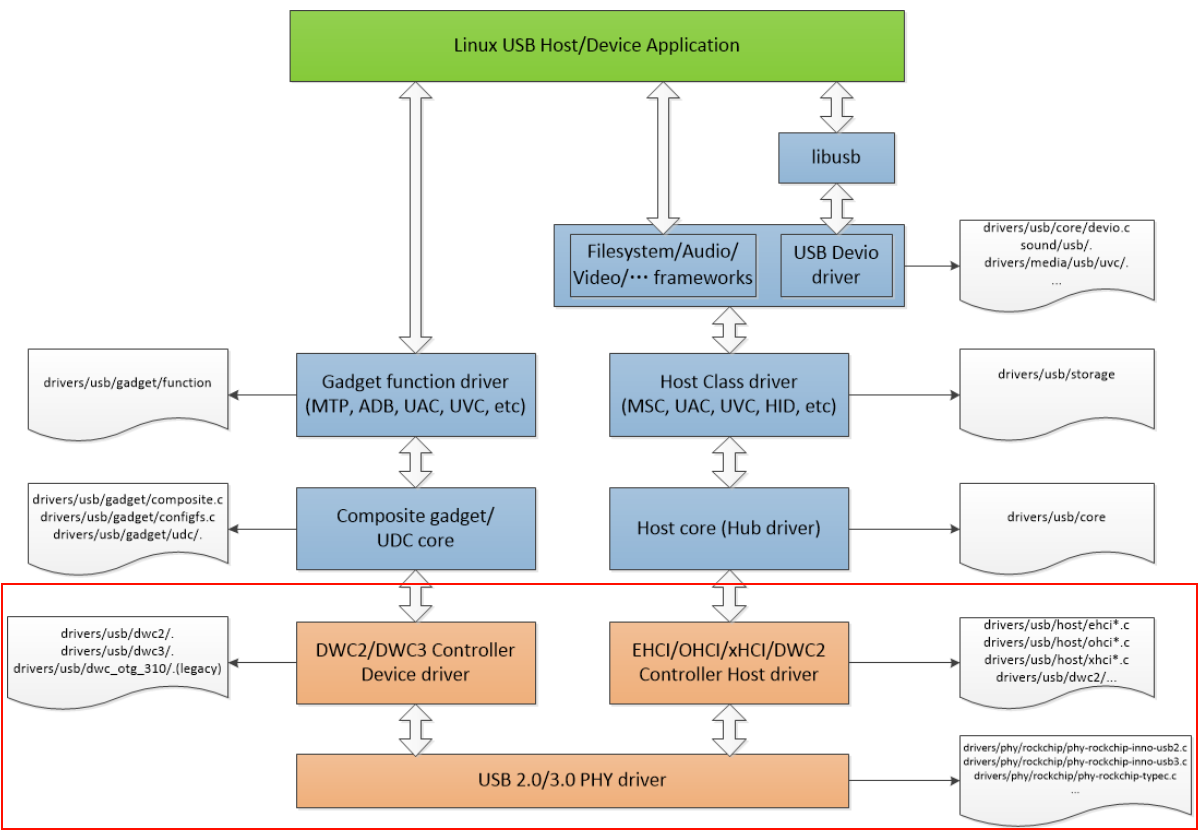
host 和 phy 驱动

在 Linux 内核源码中,USB host 和 PHY 驱动是默认加载的,USB PHY 模块位于内核的以下路径。

1
2
3
4
5
Device Drivers--->
PHY Subsystem--->
<*> Rockchip INNO USB2PHY Driver
<*> Rockchip TYPEC PHY Driver
<*> Rockchip INNO USB 3.0 PHY Driver
  • USB 2.0 PHY 使用的是 Innosilicon IP,所以应选择“Rockchip INNO USB2PHY Driver”。
  • USB 3.0 PHY 使用的是 Type-C,所以应选择“Rockchip TYPEC PHY Driver”。
  • USB 3.0 PHY 使用的是 Innosilicon USB 3.0 PHY,所以应选择:“Rockchip INNO USB 3.0 PHY Driver”

USB Host 模块的配置位于内核以下路径

1
2
3
4
5
6
7
8
9
10
11
12
Device Drivers--->
-*- Support for Host-side USB
[*] USB support--->
<*> xHCI HCD (USB 3.0) support
-*- Generic xHCI driver for a platform device
<*> EHCI HCD (USB 2.0) support
[ ] Root Hub Transaction Translators
[*] Improved Transaction Translator scheduling
<*> Generic EHCI driver for a platform device
<*> OHCI HCD (USB 1.1) support
< > OHCI support for PCI-bus USB controllers
<*> Generic OHCI driver for a platform device

必须选上 USB Support 项后才能支持 USB 模块并进行进一步的配置。如果需要支持 USB Host,首先需要选上<*>Supportfor Host-side USB 项,然后会现如下的 Host 相关的配置,其中:

  • USB Host 1.1 选择 OHCI Driver 配置
  • USB Host 2.0 选择 EHCI Driver 配置
  • USB Host 3.0 选择 xHCI Driver 配置。

上述模块确认选中之后,接下来配置设备树。

1
2
3
4
5
6
7
8
9
10
11
12
13
14
15
16
17
18
19
20
21
22
23
24
25
26
27
28
29
30
31
32
33
34
35
36
37
38
39
40
41
42
43
44
45
46
47
48
49
50
51
52
53
54
55
56
57
58
59
60
61
62
63
64
65
66
67
68
69
70
71
72
73
74
75
76
77
78
79
80
81
82
83
84
85
86
87
88
89
90
91
92
93
94
95
96
97
98
99
100
101
102
103
104
105
106
107
108
109
110
111
112
113
114
115
116
117
118
119
120
121
122
123
124
125
126
127
128
129
130
131
132
133
134
135
136
137
138
139
140
141
142
143
144
145
146
147
148
149
150
151
152
153
154
155
156
157
158
159
160
161
162
163
164
165
166
167
168
169
170
171
// rk3568.dtsi

/* USB 3.0 OTG/SATA Combo PHY_0 */
combphy0_us: phy@fe820000 {
compatible = "rockchip,rk3568-naneng-combphy";
reg = <0x0 0xfe820000 0x0 0x100>;
#phy-cells = <1>;
clocks = <&pmucru CLK_PCIEPHY0_REF>, <&cru PCLK_PIPEPHY0>,
<&cru PCLK_PIPE>;
clock-names = "refclk", "apbclk", "pipe_clk";
assigned-clocks = <&pmucru CLK_PCIEPHY0_REF>;
assigned-clock-rates = <100000000>;
resets = <&cru SRST_P_PIPEPHY0>, <&cru SRST_PIPEPHY0>;
reset-names = "combphy-apb", "combphy";
rockchip,pipe-grf = <&pipegrf>;
rockchip,pipe-phy-grf = <&pipe_phy_grf0>;
status = "disabled";
};
/* USB 3.0 Host/SATA/QSGMII Combo PHY_1 */
combphy1_usq: phy@fe830000 {
compatible = "rockchip,rk3568-naneng-combphy";
reg = <0x0 0xfe830000 0x0 0x100>;
#phy-cells = <1>;
clocks = <&pmucru CLK_PCIEPHY1_REF>, <&cru PCLK_PIPEPHY1>,
<&cru PCLK_PIPE>;
clock-names = "refclk", "apbclk", "pipe_clk";
assigned-clocks = <&pmucru CLK_PCIEPHY1_REF>;
assigned-clock-rates = <100000000>;
resets = <&cru SRST_P_PIPEPHY1>, <&cru SRST_PIPEPHY1>;
reset-names = "combphy-apb", "combphy";
rockchip,pipe-grf = <&pipegrf>;
rockchip,pipe-phy-grf = <&pipe_phy_grf1>;
status = "disabled";
};

combphy2_psq: phy@fe840000 {
compatible = "rockchip,rk3568-naneng-combphy";
reg = <0x0 0xfe840000 0x0 0x100>;
#phy-cells = <1>;
clocks = <&pmucru CLK_PCIEPHY2_REF>, <&cru PCLK_PIPEPHY2>,
<&cru PCLK_PIPE>;
clock-names = "refclk", "apbclk", "pipe_clk";
assigned-clocks = <&pmucru CLK_PCIEPHY2_REF>;
assigned-clock-rates = <100000000>;
resets = <&cru SRST_P_PIPEPHY2>, <&cru SRST_PIPEPHY2>;
reset-names = "combphy-apb", "combphy";
rockchip,pipe-grf = <&pipegrf>;
rockchip,pipe-phy-grf = <&pipe_phy_grf2>;
status = "disabled";
};

/* USB 3.0 OTG controller */
usbdrd30: usbdrd {
compatible = "rockchip,rk3568-dwc3", "rockchip,rk3399-dwc3";
clocks = <&cru CLK_USB3OTG0_REF>, <&cru CLK_USB3OTG0_SUSPEND>,
<&cru ACLK_USB3OTG0>, <&cru PCLK_PIPE>;
clock-names = "ref_clk", "suspend_clk",
"bus_clk", "pipe_clk";
#address-cells = <2>;
#size-cells = <2>;
ranges;
status = "disabled";

usbdrd_dwc3: dwc3@fcc00000 {
compatible = "snps,dwc3";
reg = <0x0 0xfcc00000 0x0 0x400000>;
interrupts = <GIC_SPI 169 IRQ_TYPE_LEVEL_HIGH>;
dr_mode = "otg";
phys = <&u2phy0_otg>, <&combphy0_us PHY_TYPE_USB3>;
phy-names = "usb2-phy", "usb3-phy";
phy_type = "utmi_wide";
power-domains = <&power RK3568_PD_PIPE>;
resets = <&cru SRST_USB3OTG0>;
reset-names = "usb3-otg";
snps,dis_enblslpm_quirk;
snps,dis-u1-entry-quirk;
snps,dis-u2-entry-quirk;
snps,dis-u2-freeclk-exists-quirk;
snps,dis-del-phy-power-chg-quirk;
snps,dis-tx-ipgap-linecheck-quirk;
snps,dis_rxdet_inp3_quirk;
snps,parkmode-disable-hs-quirk;
snps,parkmode-disable-ss-quirk;
quirk-skip-phy-init;
status = "disabled";
};
};

/* USB 3.0 Host_1 controller */
usbhost30: usbhost {
compatible = "rockchip,rk3568-dwc3", "rockchip,rk3399-dwc3";
clocks = <&cru CLK_USB3OTG1_REF>, <&cru CLK_USB3OTG1_SUSPEND>,
<&cru ACLK_USB3OTG1>, <&cru PCLK_PIPE>;
clock-names = "ref_clk", "suspend_clk",
"bus_clk", "pipe_clk";
#address-cells = <2>;
#size-cells = <2>;
ranges;
status = "disabled";

usbhost_dwc3: dwc3@fd000000 {
compatible = "snps,dwc3";
reg = <0x0 0xfd000000 0x0 0x400000>;
interrupts = <GIC_SPI 170 IRQ_TYPE_LEVEL_HIGH>;
dr_mode = "host";
phys = <&u2phy0_host>, <&combphy1_usq PHY_TYPE_USB3>;
phy-names = "usb2-phy", "usb3-phy";
phy_type = "utmi_wide";
power-domains = <&power RK3568_PD_PIPE>;
resets = <&cru SRST_USB3OTG1>;
reset-names = "usb3-host";
snps,dis_enblslpm_quirk;
snps,dis-u2-freeclk-exists-quirk;
snps,dis-del-phy-power-chg-quirk;
snps,dis-tx-ipgap-linecheck-quirk;
snps,dis_rxdet_inp3_quirk;
snps,parkmode-disable-hs-quirk;
snps,parkmode-disable-ss-quirk;
status = "disabled";
};
};

/* USB 2.0 Host_2 EHCI controller for high speed */
usb_host0_ehci: usb@fd800000 {
compatible = "generic-ehci";
reg = <0x0 0xfd800000 0x0 0x40000>;
interrupts = <GIC_SPI 130 IRQ_TYPE_LEVEL_HIGH>;
clocks = <&cru HCLK_USB2HOST0>, <&cru HCLK_USB2HOST0_ARB>,
<&cru PCLK_USB>, <&usb2phy1>;
clock-names = "usbhost", "arbiter", "pclk", "utmi";
phys = <&u2phy1_otg>;
phy-names = "usb2-phy";
status = "disabled";
};
/* USB 2.0 Host_2 OHCI controller for full/low speed */
usb_host0_ohci: usb@fd840000 {
compatible = "generic-ohci";
reg = <0x0 0xfd840000 0x0 0x40000>;
interrupts = <GIC_SPI 131 IRQ_TYPE_LEVEL_HIGH>;
clocks = <&cru HCLK_USB2HOST0>, <&cru HCLK_USB2HOST0_ARB>,
<&cru PCLK_USB>, <&usb2phy1>;
clock-names = "usbhost", "arbiter", "pclk", "utmi";
phys = <&u2phy1_otg>;
phy-names = "usb2-phy";
status = "disabled";
};

usb_host1_ehci: usb@fd880000 {
compatible = "generic-ehci";
reg = <0x0 0xfd880000 0x0 0x40000>;
interrupts = <GIC_SPI 133 IRQ_TYPE_LEVEL_HIGH>;
clocks = <&cru HCLK_USB2HOST1>, <&cru HCLK_USB2HOST1_ARB>,
<&cru PCLK_USB>, <&usb2phy1>;
clock-names = "usbhost", "arbiter", "pclk", "utmi";
phys = <&u2phy1_host>;
phy-names = "usb2-phy";
status = "disabled";
};

usb_host1_ohci: usb@fd8c0000 {
compatible = "generic-ohci";
reg = <0x0 0xfd8c0000 0x0 0x40000>;
interrupts = <GIC_SPI 134 IRQ_TYPE_LEVEL_HIGH>;
clocks = <&cru HCLK_USB2HOST1>, <&cru HCLK_USB2HOST1_ARB>,
<&cru PCLK_USB>, <&usb2phy1>;
clock-names = "usbhost", "arbiter", "pclk", "utmi";
phys = <&u2phy1_host>;
phy-names = "usb2-phy";
status = "disabled";
};

配置 USB3.0 OTG 功能,设备树配置如下:

1
2
3
4
5
6
7
8
9
10
11
12
13
14
15
16
// topeet-rk3568-linux.dtsi
&usbdrd_dwc3 {
dr_mode = "otg";
extcon = <&usb2phy0>;
status = "okay";
};

&usbdrd30 {
status = "okay";
};

// topeet-rk3568-linux.dts
//usb 与 sata0 共用 combphy0_us 这个 phy 节点
&combphy0_us {
status = "okay";
};

HOST1 配置为 USB 3.0 Host 功能,设备树配置如下:

1
2
3
4
5
6
7
8
9
10
11
12
13
// topeet-rk3568-linux.dtsi
&usbhost_dwc3 {
status = "okay";
};

&usbhost30 {
status = "okay";
};

// topeet-rk3568-linux.dts
&combphy1_usq {
status = "okay";
};

HOST1 配置成 USB 2.0 Host,设备树配置如下:

1
2
3
4
5
6
7
8
9
10
11
12
13
14
15
16
17
18
19
20
21
22
23
24
25
&usbhost30 {
status = "okay";
};

&usbhost_dwc3 {
phys = <&u2phy0_host>;
phy-names = "usb2-phy";
maximum-speed = "high-speed";
status = "okay";
};

&combphy1_usq {
rockchip,dis-u3otg1-port;
/*HOST1、SATA1 和 QSGMII 都没有使用 combphy1_usq,则此处 disabled */
status = "okay";
};

&usb2phy0 {
status = "okay";
};

&u2phy0_host {
phy-supply = <&vcc5v0_host>;
status = "okay";
}

更多详细资料可以查阅瑞芯微官方资料 rk356x_linux/doc/Common/USB/Rockchip_Developer_Guide_USB_CN.pdf

4G 模块移植

iTOP-RK3568 底板的原理图 4G 模块接口部分

上图中的 U58 接口兼容了 4G 模块和 5G 模块。在这里是使用 USB 接口与 CPU 进行连接的,目的是 CPU 通过 USB 接口将 EM05-CE(4G) 模块挂载到系统上,将 EM05-CE 模拟成一个网络设备和 4 个 USB 串口设备

  • 串口设备的作用是对模块进行一些初始化操作、错误检测、读取定位信息等
  • 网络设备的作用是将 EM05-CE 作为一个通用的网卡设备,供上层 socket 调用。

4G 模块或者 5G 模块的移植可以参考移远技术文档。

内核驱动移植

首先修改驱动支持 EM05-CE 模块的 PID 和 VID,打开 drivers/usb/serial/option.c 文件,struct usb_device_id option_ids[] 数组中添加如下代码:

1
2
3
4
5
6
7
8
9
10
11
12
13
14
15
static const struct usb_device_id option_ids[] = {
{ USB_DEVICE(0x2C7C, 0x0125) }, // add
{ USB_DEVICE(0x1286, 0x4e3c) },
{ USB_DEVICE_AND_INTERFACE_INFO(0x2c7c, 0x0900, 0xff, 0x00, 0x00) },
{ USB_DEVICE(OPTION_VENDOR_ID, OPTION_PRODUCT_COLT) },
{ USB_DEVICE(OPTION_VENDOR_ID, OPTION_PRODUCT_RICOLA) },
{ USB_DEVICE(OPTION_VENDOR_ID, OPTION_PRODUCT_RICOLA_LIGHT) },
{ USB_DEVICE(OPTION_VENDOR_ID, OPTION_PRODUCT_RICOLA_QUAD) },
...
{ USB_DEVICE_AND_INTERFACE_INFO(OPPO_VENDOR_ID, OPPO_PRODUCT_R11, 0xff, 0xff, 0x30) },
{ USB_DEVICE_AND_INTERFACE_INFO(SIERRA_VENDOR_ID, SIERRA_PRODUCT_EM9191, 0xff, 0xff, 0x30) },
{ USB_DEVICE_AND_INTERFACE_INFO(SIERRA_VENDOR_ID, SIERRA_PRODUCT_EM9191, 0xff, 0, 0) },
{ } /* Terminating entry */
};
MODULE_DEVICE_TABLE(usb, option_ids);

修改 drivers/usb/serial/usb_wwan.c 文件,添加零包机制

1
2
3
4
5
6
7
8
9
10
11
12
13
14
15
16
17
18
19
20
21
22
23
24
25
26
27
28
29
30
static struct urb *usb_wwan_setup_urb(struct usb_serial_port *port,
int endpoint,
int dir, void *ctx, char *buf, int len,
void (*callback) (struct urb *))
{
struct usb_serial *serial = port->serial;
struct usb_wwan_intf_private *intfdata = usb_get_serial_data(serial);
struct urb *urb;

urb = usb_alloc_urb(0, GFP_KERNEL); /* No ISO */
if (!urb)
return NULL;

usb_fill_bulk_urb(urb, serial->dev,
usb_sndbulkpipe(serial->dev, endpoint) | dir,
buf, len, callback, ctx);

#if 1 //Added by Quectel for zero packet
if (dir == USB_DIR_OUT) {
struct usb_device_descriptor *desc = &serial->dev->descriptor;
if (desc->idVendor == cpu_to_le16(0x2C7C))
urb->transfer_flags |= URB_ZERO_PACKET;
}
#endif

if (intfdata->use_zlp && dir == USB_DIR_OUT)
urb->transfer_flags |= URB_ZERO_PACKET;

return urb;
}

然后添加重启休眠机制,打开 drivers/usb/serial/option.c 文件,添加如下语句:

1
2
3
4
5
6
7
8
9
10
11
12
13
14
15
16
17
18
19
20
21
22
23
24
25
26
27
28
29
30
31
32
33
static struct usb_serial_driver option_1port_device = {
.driver = {
.owner = THIS_MODULE,
.name = "option1",
},
.description = "GSM modem (1-port)",
.id_table = option_ids,
.num_ports = 1,
.probe = option_probe,
.open = usb_wwan_open,
.close = usb_wwan_close,
.dtr_rts = usb_wwan_dtr_rts,
.write = usb_wwan_write,
.write_room = usb_wwan_write_room,
.chars_in_buffer = usb_wwan_chars_in_buffer,
.tiocmget = usb_wwan_tiocmget,
.tiocmset = usb_wwan_tiocmset,
.get_serial = usb_wwan_get_serial_info,
.set_serial = usb_wwan_set_serial_info,
.attach = option_attach,
.release = option_release,
.port_probe = usb_wwan_port_probe,
.port_remove = usb_wwan_port_remove,
.read_int_callback = option_instat_callback,
#ifdef CONFIG_PM
.suspend = usb_wwan_suspend,
.resume = usb_wwan_resume,
#if 1 //Added by Quectel
.reset_resume = usb_wwan_resume,
#endif

#endif
};

对于通过 USB 接口访问的模块,在 Linux 内核中集成 USB 驱动程序。我们需要配置内核选中支持 GSM 和 CDMA 模块的 USB 转串口驱动,选中下面路径的驱动,这个驱动的作用就是在内核中虚拟出/dev/ttyUSB0/dev/ttyUSB1/dev/ttyUSB2/dev/ttyUSB3 这几个串口,他们的作用分别是错误诊断、gps 信息接口、模块的的通信接口。如下所示。

1
2
3
4
--> Device Drivers
--> USB support (USB_SUPPORT [=y])
--> USB Serial Converter support (USB_SERIAL [=y])
--> USB driver for GSM and CDMA modems

拨号脚本移植

首先配置内核支持 ppp 拨号,我们在 menuconfig 中按如下所示选中下列的选项。

1
2
3
4
5
6
7
8
9
10
11
12
13
--> Device Drivers
--> Network device support
<*>PPP (point-to-point protocol) support
<*>PPP BSD-Compress compression
<*>PPP Deflate compression
<*>PPP filtering
<*>PPP MPPE compression (encryption)
<*>PPP multilink support
<*>PPP over Ethernet
<*>PPP on L2TP Access Concentrator
<*>PPP on PPTP Network Server
<*>PPP support for async serial ports
<*>PPP support for sync tty ports

硬件连接好之后,将开发板上电启动。切换成 ECM 拨号,输入命令cat /dev/ttyUSB2 & echo -e “AT+QCFG=\”usbnet\”,1\r\n” > /dev/ttyUSB2,然后重启开发板。

开发板重启之后会进行自动拨号,接着在调试串口终端输入“ifconfig”命令,可以看到有 usb0 节点,然后输入ping www.baidu.com命令查看是否可以 ping 通网络。

除了上述所讲的 ECM 拨号,我们也可以使用 quectel-CM 工具进行拨号

编译完成之后,生成 quectel-CM 可执行程序。我们将此程序拷贝到开发板上进行下面的测试。在之前操作中使用了 ECM 拨号,在使用 quectel-CM 拨号之前,我们需要输入cat /dev/ttyUSB2 & echo -e “AT+QCFG=\”usbnet\”,0\r\n” > /dev/ttyUSB2命令切换成 RmNET 拨号。然后运行 quectel-CM 可执行程序,如下图所示:

拨号脚本执行之后,在串口终端输入ifconfig命令可以看到多了 wwan0 节点。