时间轴

2025-12-31

init

2025-01-14

add buildroot


环境

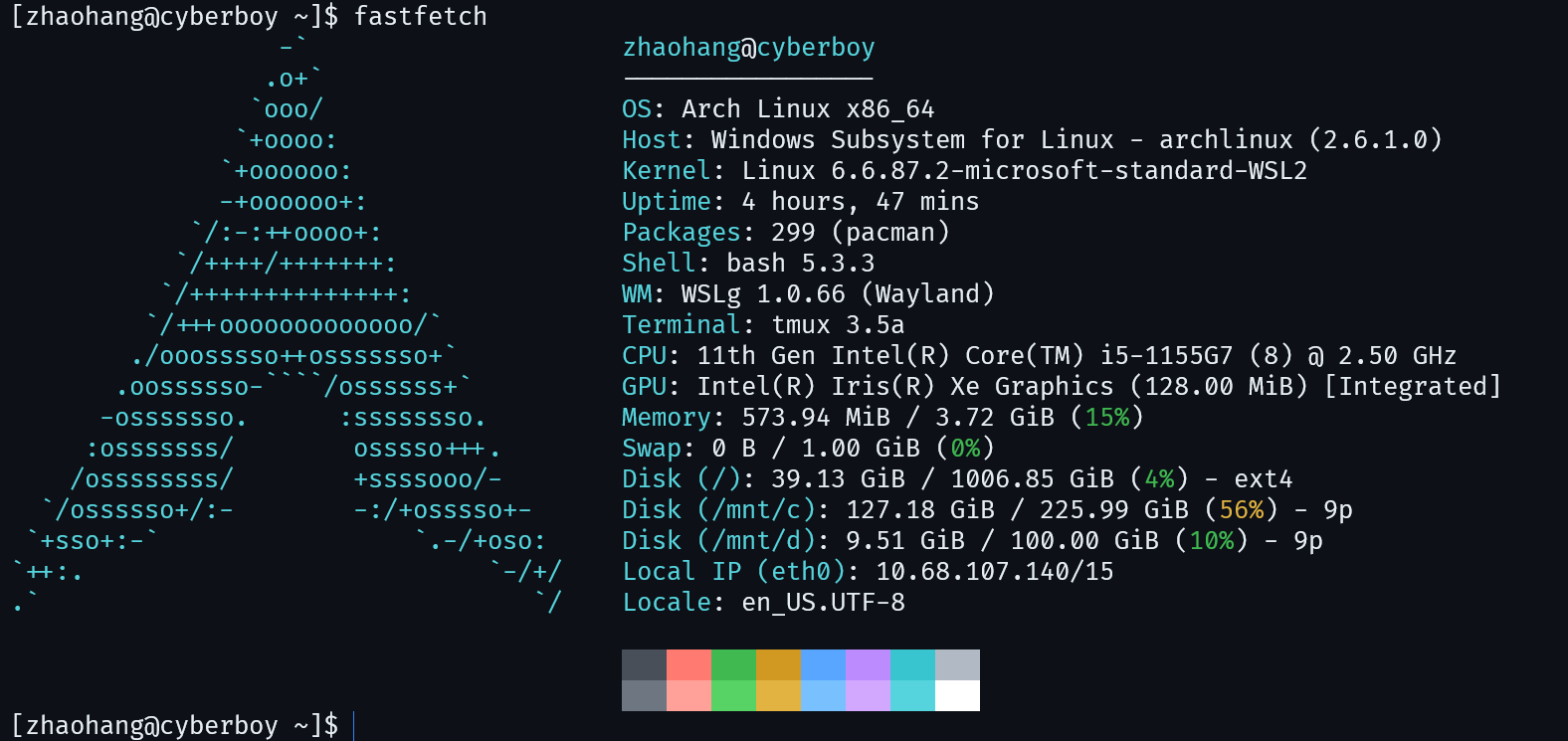
Host OS

使用WSL2的archlinux
环境

使用Ubuntu也可,参考:

compiler

ARM目前总共发布了8种架构:ARMv1、ARMv2、ARMv3、ARMv4、ARMv5、ARMv6、ARMv7、ARMv8。

针对于支持ARMv8指令集的处理器可以使用-march=armv8-a参数编译代码,ARM GNU编译器可通过下面的链接下载

比如archlinux上通过pacman下载的aarch64-linux-gnu-gcc版本是15.1.0,它的文件是flat布局的。不适用于buildroot的编译工具链。
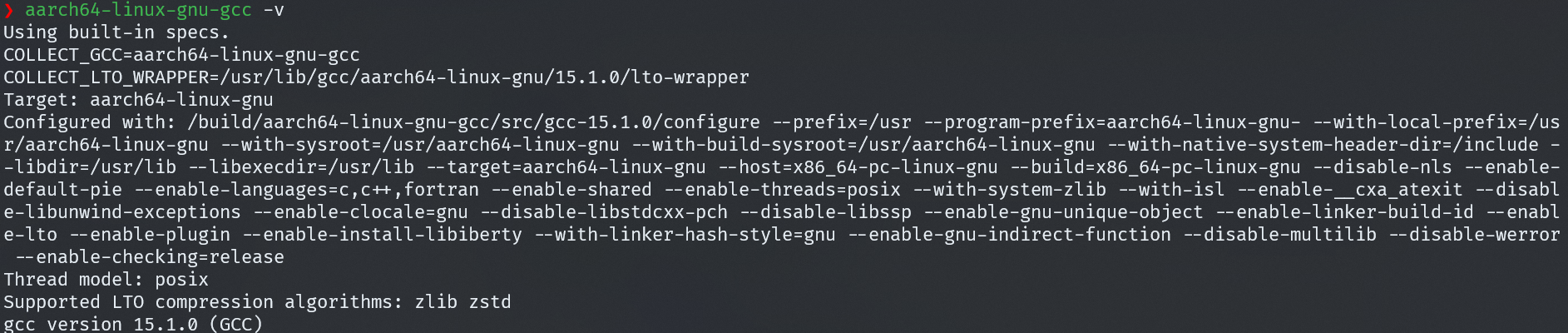
aarch64-linux-gnu-gcc

推荐使用ARM官网的编译器,它是Portable的,解压后即可使用。

本文使用的是11.2版本的交叉编译器

可以将其添加到环境变量

1
2
3
# ~/.bashrc或~/.
emacs ~/.bashrc
export PATH="$HOME/tools/gcc-arm-11.2-2022.02-x86_64-aarch64-none-linux-gnu/bin:$PATH"

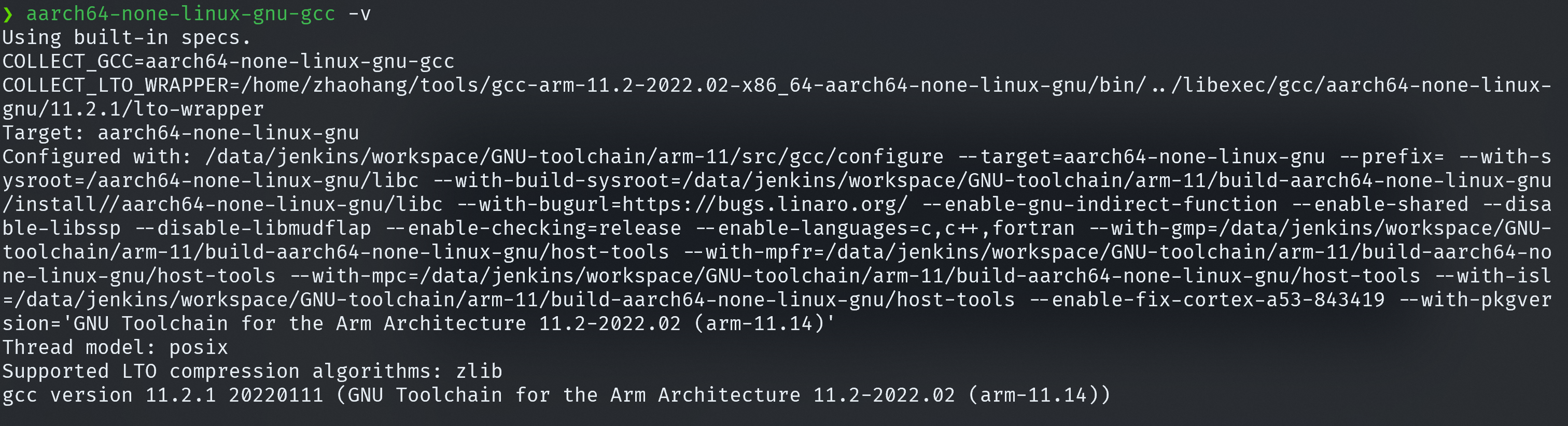
使用11.2.1版本的aarch64-none-linux-gnu-gcc

aarch64-none-linux-gnu-gcc

编译内核

1
2
3
4
5
6
7
8
9
10
11
sudo pacman -Syu bc
git clone --depth=1 --branch rpi-5.10.y --single-branch https://github.com/raspberrypi/linux.git linux-5.10.y-raspi
make mrproper
make ARCH=arm64 CROSS_COMPILE=aarch64-none-linux-gnu- bcm2711_defconfig
make ARCH=arm64 CROSS_COMPILE=aarch64-none-linux-gnu- modules_prepare
make ARCH=arm64 CROSS_COMPILE=aarch64-none-linux-gnu- Image modules dtbs -j$(nproc)

# 把编译好的内核镜像和设备树放在指定目录下
mkdir -p ~/tftp/raspi4b
cp arch/arm64/boot/Image ~/tftp/raspi4b
cp arch/arm64/boot/dts/broadcom/bcm2711-rpi-4-b.dtb ~/tftp/raspi4b

输出:

  • arch/arm64/boot/Image
  • arch/arm64/boot/dts/broadcom/bcm2711-rpi-4-b.dtb

编译根文件系统

busybox

参考:

注意这篇博客使用的是archlinux上pacman下载的aarch64-linux-gnu-gcc编译器,编译器最好和编译内核的编译器保持一致,这里我们选择aarch64-none-linux-gnu-gcc

拷贝动态库文件时要拷贝编译器目录下的:

1
2
cp ~/tools/gcc-arm-11.2-2022.02-x86_64-aarch64-none-linux-gnu/aarch64-none-linux-gnu/libc/lib/ld-linux-aarch64.so.1 ./lib/
cp ~/tools/gcc-arm-11.2-2022.02-x86_64-aarch64-none-linux-gnu/aarch64-none-linux-gnu/libc/lib64/* ./lib64/

编译完成后进入linux内核代码,安装驱动:

1
2
3
4
5
6
7
# 安装驱动,拷贝到根文件系统
cd /home/zhaohang/repository/linux/linux-5.10.y-raspi
# busybox
make ARCH=arm64 \
CROSS_COMPILE=aarch64-none-linux-gnu- \
INSTALL_MOD_PATH=/home/zhaohang/repository/linux/busybox-1.37.0/_install/ \
modules_install

buildroot

Archlinux默认工具链及AUR提供的交叉工具链都是无法复制使用的,而Buildroot在构建时会将工具链复制到工作目录执行,因此我们需要选择 Portable 的工具链

1
2
3
4
5
6
7
wget https://buildroot.org/downloads/buildroot-2025.11.tar.gz
# WSL下PATH含有空格,临时重新设置
export PATH=/usr/local/sbin:/usr/local/bin:/usr/sbin:/usr/bin:/sbin:/bin:/usr/games:/usr/local/games:/usr/lib/wsl/lib

tar xvf buildroot-2025.11.tar.gz
cd buildroot-2025.11
make menucofig

配置如下

1
2
3
4
5
6
7
8
9
10
11
12
13
14
15
16
17
18
19
20
21
22
23
24
25
26
27
28
29
30
31
32
33
34
35
36
37
Target Options  --->
Target Architecture (AArch64 (little endian)) --->
Target Architecture Variant (cortex-A72) --->
Floating point strategy (FP-ARMv8) --->
MMU Page Size (4KB) --->
Target Binary Format (ELF) --->

Toolchain --->
Toolchain type (External toolchain) --->
*** Toolchain External Options ***
Toolchain (Custom toolchain) --->
Toolchain origin (Pre-installed toolchain) ---> (/home/zhaohang/tools/gcc-arm-11.2-2022.02-x86_64-aarch64-none-linux-gnu) Toolchain path
($(ARCH)-none-linux-gnu) Toolchain prefix
External toolchain gcc version (11.x) --->
External toolchain kernel headers series (4.20.x) --->
External toolchain C library (glibc) --->
[*] Toolchain has SSP support? (NEW)
[*] Toolchain has SSP strong support? (NEW)
[ ] Toolchain has RPC support? (NEW)
[*] Toolchain has C++ support?
[ ] Toolchain has D support? (NEW)
[*] Toolchain has Fortran support?
[*] Toolchain has OpenMP support?
[ ] Copy gdb server to the Target (NEW)


System configuration --->
/dev management (Dynamic using devtmpfs + mdev) --->
[*] Enable root login with password (NEW)
(root) Root password


Filesystem images --->
[*] ext2/3/4 root filesystem
ext2/3/4 variant (ext4) --->
(rootfs) filesystem label
(512M) exact size

这里kernel中的选项都不要打开(默认是不打开的),因为我们要自己编译kernel;bootloader的选项也都不要打开,因为使用qemu启动不需要bootloader。

External toolchain kernel headers series (4.20.x) 这里指的是工具链对应的内核版本,可以在gcc-arm-11.2-2022.02-x86_64-aarch64-none-linux-gnu/aarch64-none-linux-gnu/libc/usr/include/linux/version.h目录查看,这里应该是4.20.x

编译:

1
2
sudo pacman -Syu unzip cpio rsync
make

进入linux内核目录,安装驱动

1
2
3
4
5
6
7
8
9
10
11
12
# 安装驱动,拷贝到根文件系统
cd /home/zhaohang/repository/linux/linux-5.10.y-raspi

# buildroot
make ARCH=arm64 \
CROSS_COMPILE=aarch64-none-linux-gnu- \
INSTALL_MOD_PATH=/home/zhaohang/repository/linux/buildroot-2025.11/output/target \
modules_install

make
# 编译生成rootfs.ext4
cp output/images/rootfs.ext4 ~/tftp

yocto

1
2
3
4
5
6
7
mkdir -p ~/repository/linux/yocto
cd ~/repository/linux/yocto
# use git to cline bitbake-setup
git clone https://git.openembedded.org/bitbake

sudo pacman -Sy chrpath diffstat inetutils rpcsvc-proto
python3 ./bitbake/bin/bitbake-setup init --non-interactive poky-whinlatter poky distro/poky machine/qemuarm64

Yocto 不会自动识别任意外部工具链!
必须有一个 专门的 layer 提供对该工具链的支持(通过 tcmode-*.inctoolchain-*.conf 文件)。
常见支持层:meta-arm → 支持 ARM 官方 GNU Toolchain

Yocto Project / OpenEmbedded 构建系统 中可用的 发行版(distribution)配置

  1. poky-master

    • Poky 是 Yocto Project 的参考发行版(reference distribution)。

    • -master 表示使用 最新开发主线(main branch) 的代码,即 尚未发布、正在开发中的版本

  2. oe-nodistro-master

    • OpenEmbedded (OE) 是 Yocto Project 底层的构建框架。

    • nodistro 表示“无发行版”模式——不绑定任何特定发行版策略,只提供最基础的构建能力。

    • -master 同样表示使用 开发主线

  3. oe-nodistro-whinlatter

    • 基于 OpenEmbeddednodistro 配置;

    • 使用 Yocto 5.3 版本代号 “whinlatter” 的稳定分支;

    • 属于长期支持版本;

    • nodistro 表示“无发行版”模式。

  4. poky-whinlatter

    • Poky 发行版5.3 “whinlatter” 稳定版本

    • 包含完整的默认配置(如使用 systemd、RPM/deb 包格式可选、默认工具链等);

    • 属于长期支持版本;

    • 是 Yocto Project 官方测试和认证的参考平台。

“whinlatter” 是 Yocto Project 5.3 的代号(Yocto 版本从 4.0 开始用鸟类名称命名,5.3 = Whinchat + Lark → “Whinlatter”)。

BitBake 构建配置(layers / templates)

  1. poky

    • 这是 标准的 Poky 构建配置

    • 所有软件包(recipes)都会从源码完整构建(除非你本地已有缓存)。

    • 安全、可靠、行为可预测。

  2. poky-with-sstate

    • 启用了 远程共享状态(shared state, sstate)缓存

    • 构建时会尝试从 Yocto 官方或指定的 sstate 镜像服务器 下载预编译的中间产物(如已编译的库、内核模块等),从而大幅加快构建速度

    • 但有严格前提

    • 你的 本地网络必须非常稳定且带宽充足

    • 必须能访问外部 sstate 服务器(通常需要互联网);

    • 如果网络中断或镜像不匹配,可能导致构建失败或不一致;

    • “Use with caution” 正是提醒这一点。

sstate 是 Yocto 的缓存机制:它保存任务的输出(如 do_compile 的结果),下次构建相同内容时可直接复用,无需重做。

目标机器(Target Machine)

  1. machine/qemux86-64

    • 模拟 x86_64 架构的 PC,使用 QEMU 虚拟机

    • 基于标准 PC 硬件模型(如 Intel/AMD 64 位 CPU、常见外设)。

  2. machine/qemuarm64

    • 模拟 ARM64(AArch64)架构 的虚拟设备(如基于 Cortex-A57 的系统)。

    • 也通过 QEMU 运行,无需真实 ARM 板子。

  3. machine/qemuriscv64

    • 模拟 RISC-V 64 位架构 的虚拟机。
  4. machine/genericarm64

    • 通用 ARM64 真实硬件 的参考配置(非模拟器)。

    • 不绑定具体板子(如 Raspberry Pi、BeagleBone),而是提供一个“通用”ARM64 BSP。

    • 需要将生成的镜像烧录到真实的 ARM64 开发板上运行。

    • 可能缺少特定板级驱动(如 GPU、WiFi),需自行适配。

  5. machine/genericx86-64

    • 通用 x86_64 真实硬件 的参考配置(如普通 PC、Intel NUC、工控机)。

    • 生成的镜像可直接写入 U 盘,在真实 x86_64 电脑上启动。

发行版配置变体(Distribution configuration variants)

  1. distro/poky

    • 标准 Poky 发行版配置。包含完整的 Linux 系统:glibc、systemd、包管理器(RPM 或 IPK)、常用工具(bash、coreutls、networking 等)。
    • 默认使用 systemd 作为 init 系统。
    • 适合通用开发、学习和大多数嵌入式应用场景。
    • 镜像较大(几百 MB),但功能齐全。
  2. distro/poky-altcfg

    • Poky 的替代配置(alternative configuration)。

    • 通常用于测试不同的底层组件组合,例如:

      • 使用 musl libc 替代 glibc;
      • 使用 busybox + sysvinit 替代 systemd;
      • 更小的默认镜像或不同安全策略。
    • 具体行为取决于 Yocto 版本,文档较少,稳定性不如标准 Poky

    • 主要用于 Yocto 内部测试或高级定制场景

  3. distro/poky-tiny

    • 极简版 Poky,专为资源受限设备设计。
    • 特点:
      • 使用 musl libc(更小、更快);
      • 使用 busybox + sysvinit(无 systemd);
      • 移除了大量非必要软件包;
      • 最终根文件系统可小至 10–20 MB
    • 功能有限:可能没有网络工具、shell 功能简化、无包管理。
    • 适合:微控制器级应用、启动加载器后的最小环境、安全关键系统。
1
2
3
4
5
6
7
8
9
10
11
12
13
14
15
16
17
18
# 进入构建环境
cd /home/zhaohang/repository/linux/yocto/bitbake-builds/poky-whinlatter

# 配置
# 生成文件系统的格式
emacs build/conf/local.conf
# 添加下面内容
IMAGE_FSTYPES = "ext4 cpio.gz"
# 指定工具链安装路径
# EXTERNAL_TOOLCHAIN = "/home/zhaohang/tools/gcc-arm-11.2-2022.02-x86_64-aarch64-none-linux-gnu"

# 激活当前构建
source ./build/init-build-env
# 检测当前配置
bitbake-config-build list-fragments

# 构建最小 rootfs
bitbake core-image-minimal

内核模块

内核模块示例代码

1
2
3
4
5
6
7
8
9
10
11
12
13
14
15
16
17
#include <linux/init.h>
#include <linux/module.h>

static int __init hello_world_init(void){
printk(KERN_INFO "hello world!\n");
return 0;
}

static void __exit hello_world_exit(void){
pr_info("hello world module exit\n");
}
module_init(hello_world_init);
module_exit(hello_world_exit);

MODULE_LICENSE("GPL");
MODULE_AUTHOR("even629<asqwgo@outlook.com>");
MODULE_DESCRIPTION("hello world!");

external module

这里以busybox根文件系统为例

Makefile

1
2
3
4
5
6
7
8
9
10
11
12
13
14
15
16
17
18
19
20
21
22
23
24
25
26
27
28
29
30
31
32
33
34
DRIVER_NAME := hello_world

obj-m += $(DRIVER_NAME).o
KERNEL_SRC:=/home/zhaohang/repository/linux/linux-5.10.y-raspi

PWD ?=$(shell pwd)
ARCH = arm64
CROSS_COMPILE = aarch64-none-linux-gnu-


all: build

build:
$(MAKE) ARCH=$(ARCH) CROSS_COMPILE=$(CROSS_COMPILE) -C $(KERNEL_SRC) M=$(PWD) modules

clean:
$(MAKE) ARCH=$(ARCH) CROSS_COMPILE=$(CROSS_COMPILE) -C $(KERNEL_SRC) M=$(PWD) modules clean
rm -rf *.ko *.o *.mod.o *.mod.c *.symvers *.order .tmp*

.PHONY: all deploy qemu
deploy:
cp $(DRIVER_NAME).ko /home/zhaohang/repository/linux/busybox-1.37.0/_install
/bin/bash /home/zhaohang/repository/linux/busybox-1.37.0/deploy.sh

qemu:
qemu-system-aarch64 \
-M raspi4b \
-cpu cortex-a72 \
-m 2G \
-nographic \
-kernel /home/zhaohang/tftp/raspi4b/Image \
-dtb /home/zhaohang/tftp/raspi4b/bcm2711-rpi-4-b.dtb \
-initrd /home/zhaohang/tftp/initramfs.cpio.gz \
-append "console=ttyAMA0 earlycon=pl011,0xfe201000 rdinit=/linuxrc"

其中打包根文件系统的脚本deploy.sh如下:

1
2
3
4
5
6
7
8
9
10
11
12
13
#!/bin/bash

INSTALL_PATH=/home/zhaohang/repository/linux/busybox-1.37.0/_install

cd "$INSTALL_PATH" || exit 1

rm -rf ../initramfs.cpio.gz ~/tftp/initramfs.cpio.gz

find . | cpio -o -H newc | gzip -c > ../initramfs.cpio.gz

cp ../initramfs.cpio.gz ~/tftp

echo "cp initramfs.cpio.gz ~/tftp"

遇到一个问题是在WSL2 archlinux 上用 aarch64-linux-gnu-gcc 编译时没 print(aarch64-none-linux-gnu-gcc也不行),目前没找到解决办法,在 stackoverflow 上详细描述了具体问题:

而使用WSL2 Ubuntu20.04时没有这个问题。

built-in module

drivers/char(以字符驱动为例)创建文件夹helloworld,然后将驱动源代码放入,然后创建Kconfig文件

1
2
3
4
5
config HELLO_WORLD
bool "helloworld support"
default y
help
helloworld

更改drivers

1
2
3
emacs ../Kconfig
# 添加
source "drivers/char/helloworld/Kconfig"

在驱动源码里创建Makefile

1
obj-$(CONFIG_helloworld) += helloworld.o

然后在上一级的Makefile中添加:

1
2
3
emacs ../Makefile
# 添加
obj-y += helloworld/

然后编译内核即可

qemu 运行

qemu版本

1
2
3
4
$ sudo pacman -Syu qemu-system-aarch64
$ qemu-system-aarch64 --version
QEMU emulator version 10.1.2
Copyright (c) 2003-2025 Fabrice Bellard and the QEMU Project developers

busybox 根文件系统

busybox这里我们编译成initramfs.cpio.gz,作为initrd参数的值。

运行

1
2
3
4
5
6
7
8
9
qemu-system-aarch64 \
-M raspi4b \
-cpu cortex-a72 \
-m 2G \
-nographic \
-kernel /home/zhaohang/tftp/raspi4b/Image \
-dtb /home/zhaohang/tftp/raspi4b/bcm2711-rpi-4-b.dtb \
-initrd /home/zhaohang/tftp/initramfs.cpio.gz \
-append "console=ttyAMA0 earlycon=pl011,0xfe201000 rdinit=/linuxrc"

command + a, 然后按 x 可以退出qemu

buildroot 根文件系统

buildroot这里我们使用sd卡挂载文件系统

1
2
3
4
5
6
7
8
9
$ qemu-system-aarch64 \
-M raspi4b \
-cpu cortex-a72 \
-m 2G \
-nographic \
-kernel /home/zhaohang/tftp/raspi4b/Image \
-dtb /home/zhaohang/tftp/raspi4b/bcm2711-rpi-4-b.dtb \
-sd /home/zhaohang/tftp/rootfs.ext4 \
-append "console=ttyAMA0 earlycon=pl011,0xfe201000 root=/dev/mmcblk1 rw rootwait"

command + a, 然后按 x 可以退出qemu

yocto 根文件系统

使用initramfs.cpio.gz或使用sd卡挂载文件系统

1
2
3
4
5
6
7
8
9
$ qemu-system-aarch64 \
-M raspi4b \
-cpu cortex-a72 \
-m 2G \
-nographic \
-kernel /home/zhaohang/tftp/raspi4b/Image \
-dtb /home/zhaohang/tftp/raspi4b/bcm2711-rpi-4-b.dtb \
-initrd /home/zhaohang/repository/linux/yocto/bitbake-builds/poky-whinlatter/build/tmp/deploy/images/qemuarm64/core-image-minimal-qemuarm64.rootfs.cpio.gz \
-append "console=ttyAMA0 earlycon=pl011,0xfe201000 init=/sbin/init"

参考