
Timeline
Timeline
2025-09-27
init
This article introduces two modes of GCC Inline Assembly: basic inline assembly and extended inline assembly. Basic inline assembly uses the asm keyword to embed assembly code as a string in C language, but GCC does not parse its content, and the optimizer may move instruction order. Extended inline assembly uses the asm keyword with qualifiers (volatile, inline, goto) and output operands, input operands, and clobbers to precisely control the interaction between assembly and C variables. The article details the constraints for output and input operands (e.g., '=' means write-only, '+' means read-write, 'r' means general-purpose register), and that clobbers are used to inform the compiler that registers, condition codes, or memory may be modified, thereby preventing the optimizer from reordering or caching variables. It also introduces operand numbering rules (starting from 0, outputs first then inputs), differences in constraint modifiers under ARM64, and methods for referencing variables via assembly symbolic names. In addition, the article demonstrates through experiments the use of inline assembly to implement memcpy, memset, atomic operations, system register read/write, and other functions, and explores advanced usage combined with macros, including
Reference documents:
Inline Assembly Language: embedding assembly code in C language
Purpose:
- Optimization: optimize for specific time-sensitive code
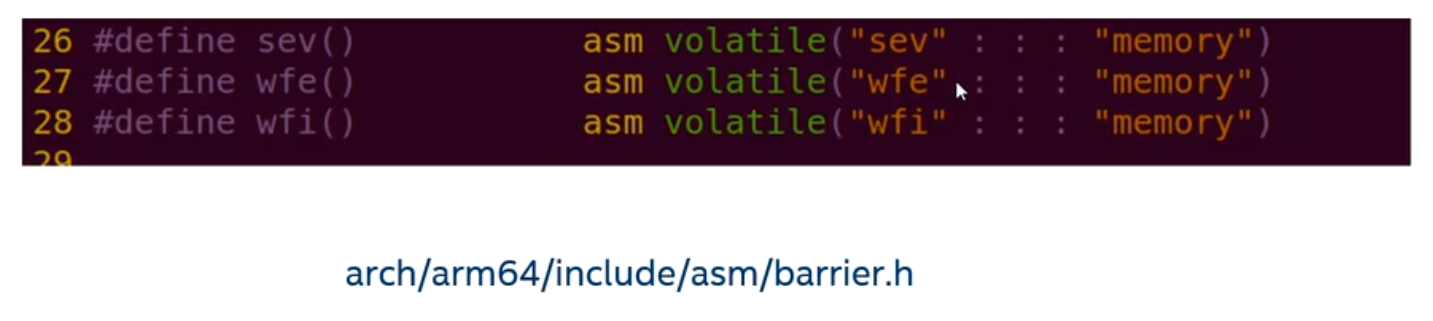
- C language needs to access certain special instructions to implement special functions, such as memory barrier instructions
Two modes of inline assembly
- Basic inline assembly
- Extended inline assembly
Basic inline assembly
Format:
1 | asm asm-qualifiers(AssemblerInstructions) |
asm keyword: indicates this is a GNU extension
Qualifiers
- volatile: this qualifier is usually not needed in basic inline assembly
- inline: inline, the asm assembly code will be as small as possible
Assembler instructions block
The GCC compiler treats inline assembly as a string
GCC compilation does not parse or analyze inline assembly
For multiple assembly instructions, you need to use “\n\t” to break lines
GCC’s optimizer can move assembly instructions forward or backward. If you need to preserve the order of assembly instructions, it is best to use multiple inline assembly blocks
Extended inline assembly
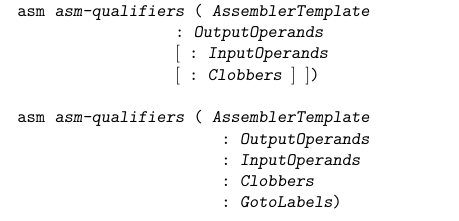
- Format
- asm keyword: indicates this is a GNU extension
- Qualifiers (asm-qualifiers)
- volatile: used to disable GCC optimization
- inline: the asm assembly code will be as small as possible
- goto: after the inline assembly ends, it jumps to a C language label
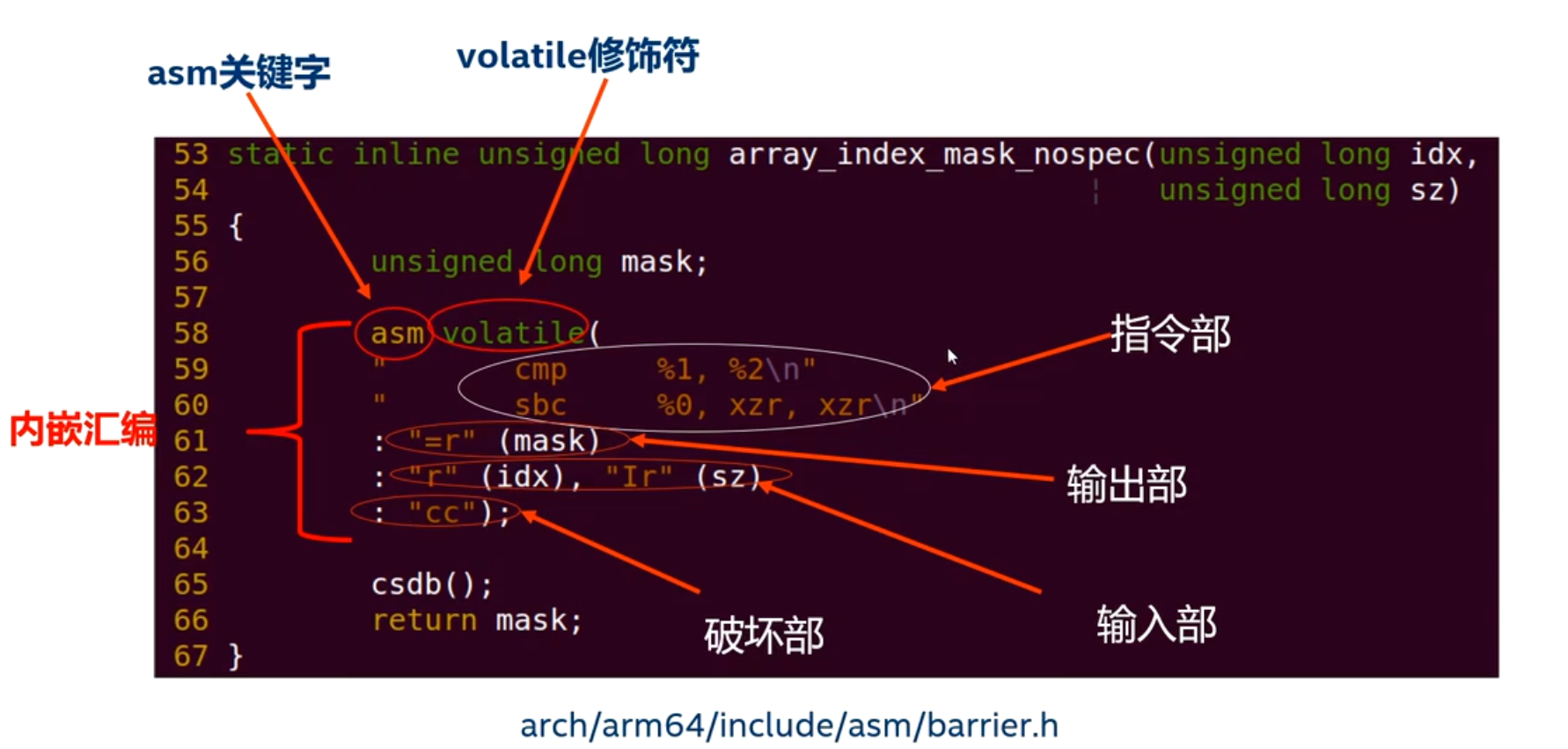
Output operands:
Used to describe, in the instruction part,C variables that can be modifiedand constraints.
- Each output constraint usually starts with “=”, followed by a letter that describes the operand type, and then the constraint about variable binding.
- The output operands usually use “=” or “+” as output constraints, where “=" means the modified operand is write-only (the original value is dead before the assembly executes, and can be written to a register).”,“+" means the modified operand is readable and writable (the initial input value is preserved and used).”
- The output operands can be empty.
1 | "=/+" + 约束修饰符 + 变量 |
Commonly used constraint modifiers include:
- ‘r’ A register operand is allowed provided that it is in a general register.
Input operands:
Used to describe, in the instruction part,**C variables that can only be read.**and constraints.
- The parameters described in the input operands are read-only. Do not attempt to modify the contents of the input operands, because the GCC compiler assumes that the contents of the input operands are the same before and after the inline assembly.
- In the input operands, you cannot use “=” or “+” constraints, otherwise the compiler will report an error.
- The input operands can be empty.
Clobbers
- The assembly code maymodify registers other than the output operands.。
- If the compiler is not told, it will assume that these registers remain unchanged, which may eventually lead to errors or unpredictable behavior.
- Clobber is also amemory barriers(especially
"memory"), to ensure that the compiler does not reorder or cache variables.
| Name | Function |
|---|---|
"x0","x1", … | General-purpose registers are modified |
"cc" | Condition code registers (flags) are modified |
"memory" | The assembly accesses memory, ensuring the compiler flushes registers to memory and reloads them. |
"redzone" | Uses stack space in the x86-64 red zone. |
"memory"Tells the GCC compiler that the inline assembly instruction changes values in memory, forcing the compiler to write all values cached in registers back to memory before executing the assembly code, and reload them after execution, in order to prevent the compiler from reordering memory accesses."cc"Indicates that the inline assembly code modifies the flag bits related to condition code/status registers.
Not allowed to write in the clobber list. Stack pointer register (esp/rsp)。
Do not list output registers repeatedly.
The four cases can be combined; just separate them with commas.
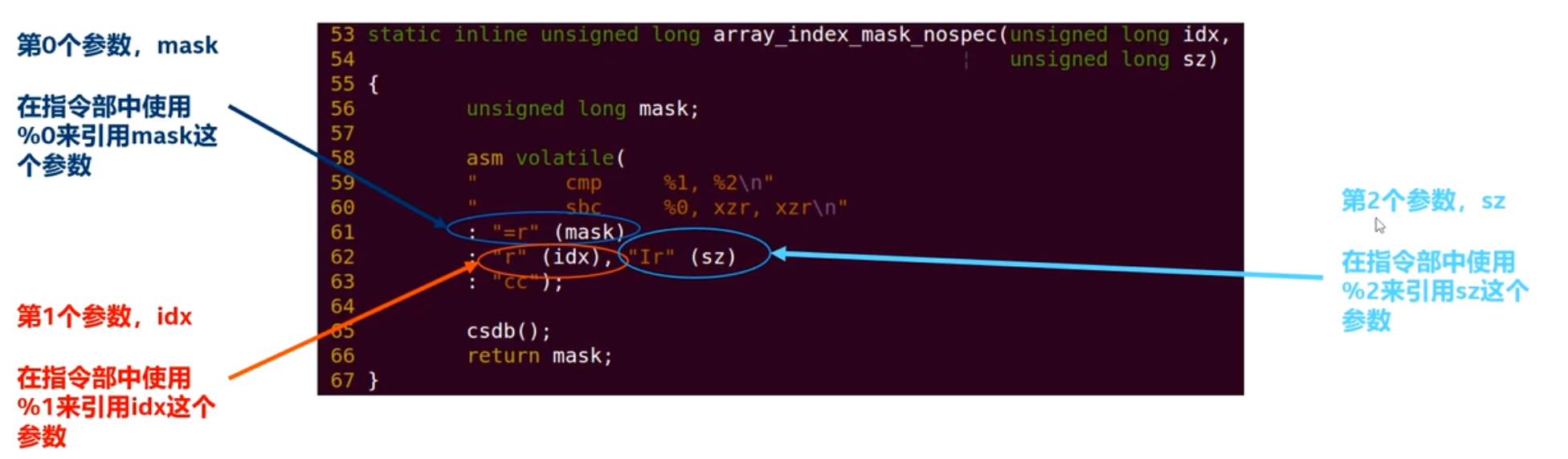
- Operand representation in the instruction part.
- Operand numbering starts from 0,First list all output operands in order, then list all input operands in order.. Therefore %0 is the first output operand (or the first input operand if there are no output operands), %1 is the second, and so on.
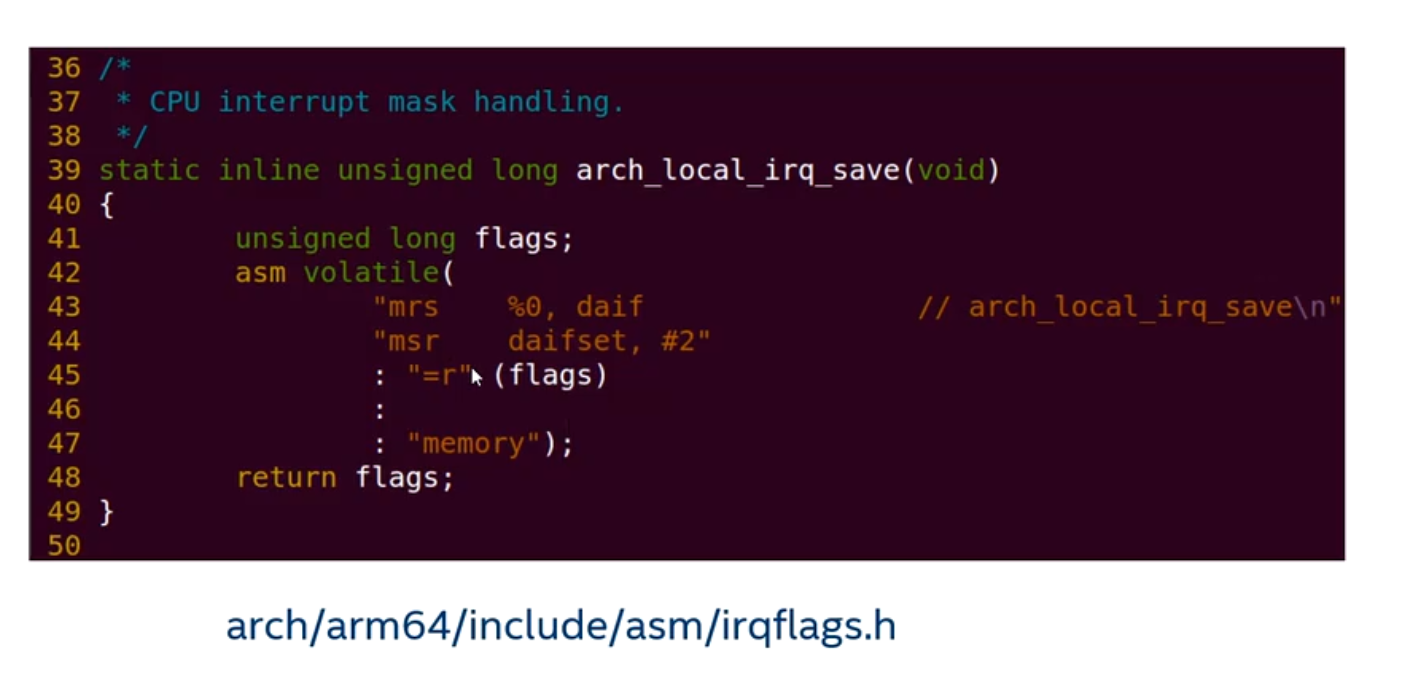
Constraint modifiers for output and input operands
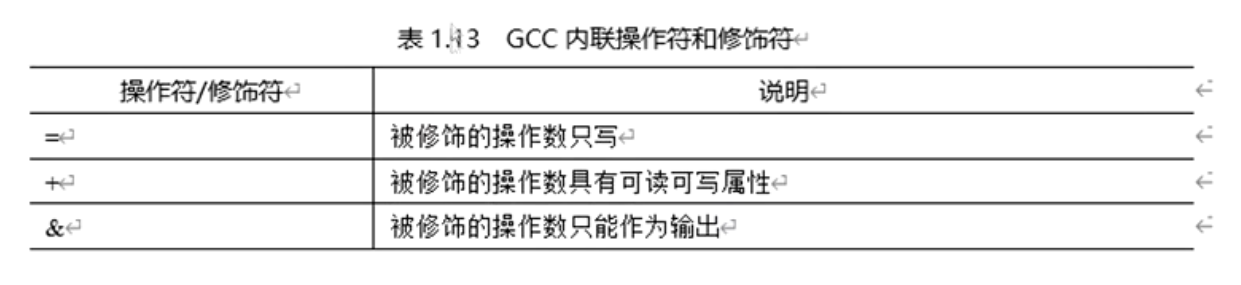
Constraint modifiers for output and input operands — general

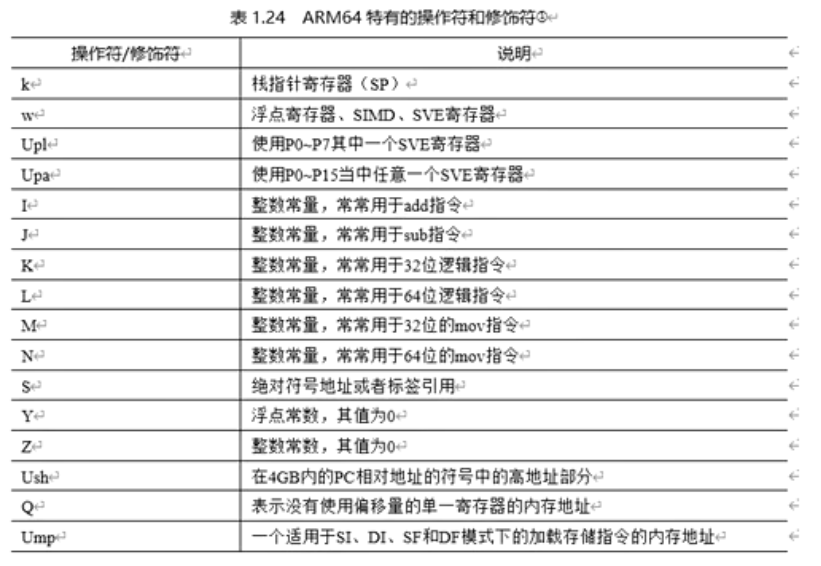
Constraint modifiers for output and input operands — ARM64
Assembly symbol names instead of the % prefix
%[name]→ Referencing constraint variables%w[name]→ Reference Low 32-bit register(such asw0, w1)%x[name]→ Reference Full 64-bit register(such asx0, x1)

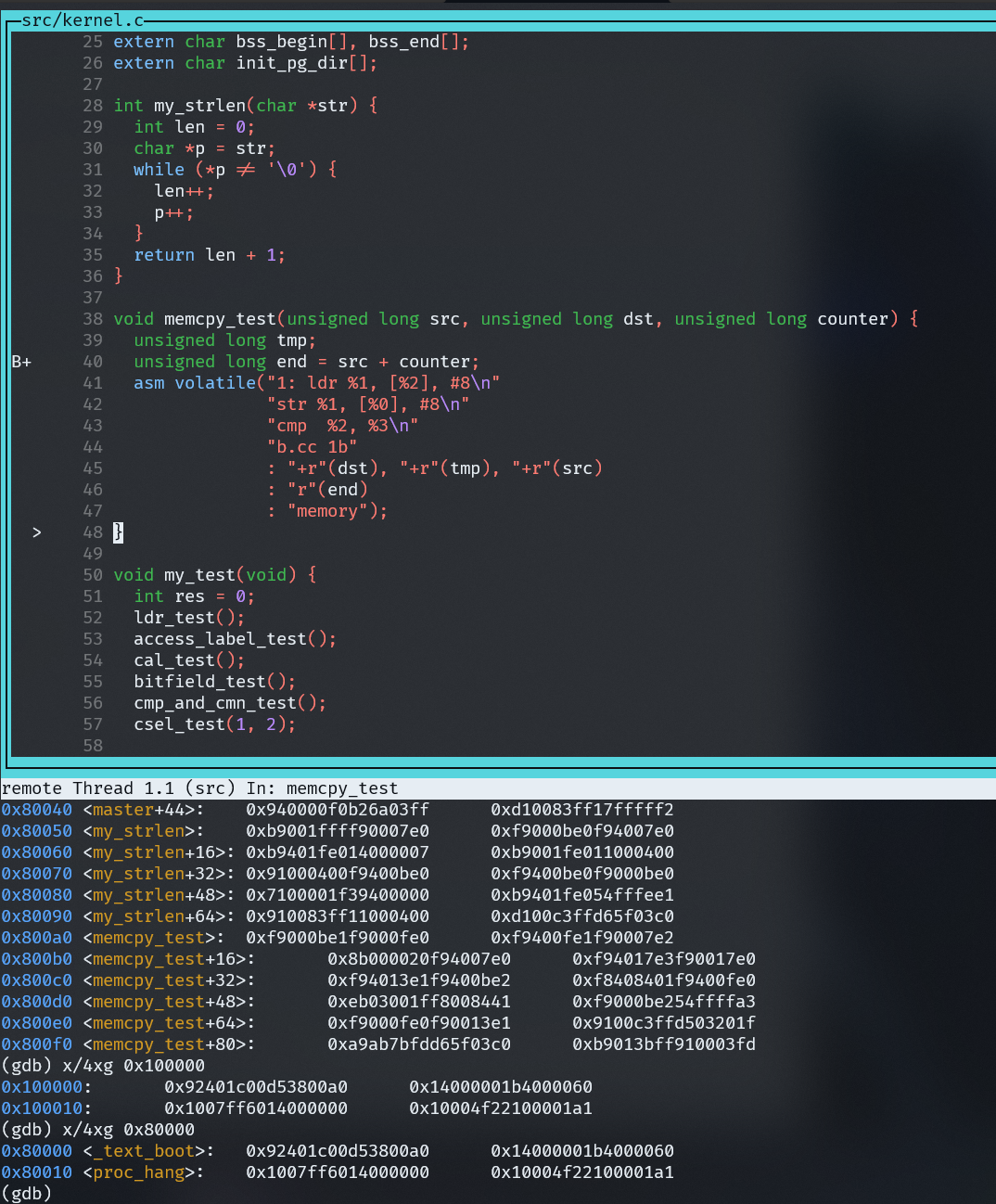
Experiment 1: Implement a simple memcpy function

Pitfalls and traps.
- GDB cannot single-step into each instruction of inline assembly in source mode(
stepiIt can single-step at the assembly level, but cannot correspond one-to-one with source lines) - The modifiers for the output and input parts must not be used incorrectly, otherwise the program will run incorrectly
Experiment 3: Implement the memset function using inline assembly
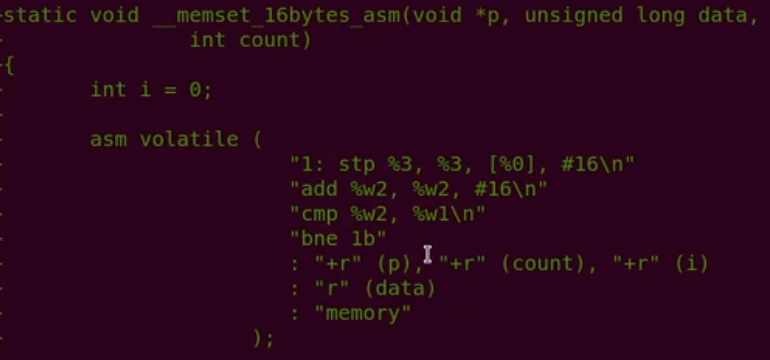
Advanced inline assembly tricks: combining with macros
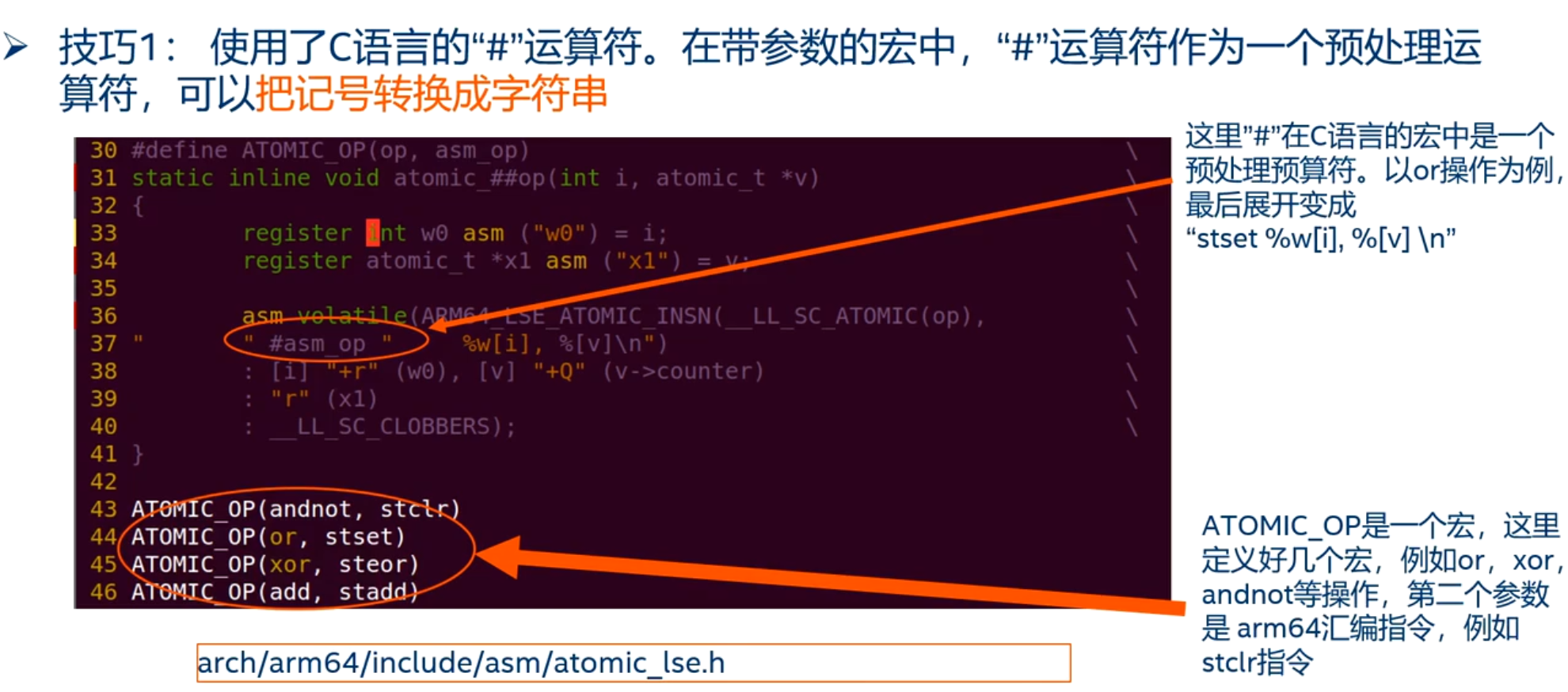
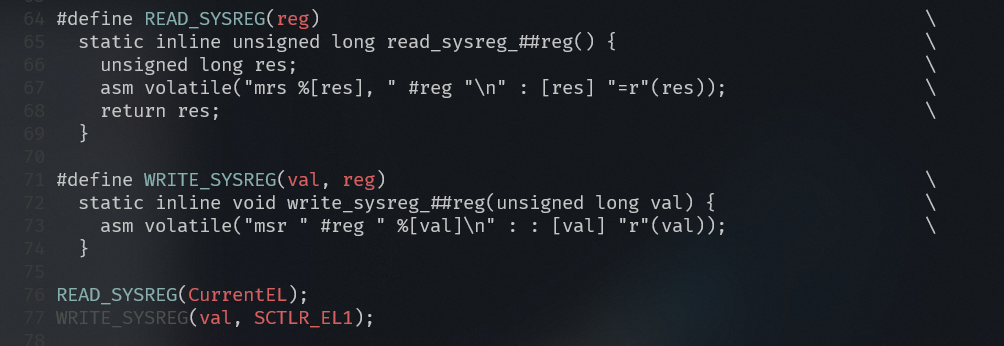
- Tip 1: Uses the C language # operator. In a parameterized macro, the ‘#’ operator, as a preprocessing operator, can convert tokens into strings.
123456789 |
You can use this macro to generate multiple atomic operation functions:
12 | ATOMIC_OP(add, "addl")ATOMIC_OP(sub, "subl") |
This expands to:
12345678910111213 | static inline void atomic_add(int i, atomic_t *v) { __asm__ __volatile__( "addl %1, %0" : "+m" (v->counter) : "ir" (i));}static inline void atomic_sub(int i, atomic_t *v) { __asm__ __volatile__( "subl %1, %0" : "+m" (v->counter) : "ir" (i));} |
Noteasm_opis a macro parameter,will be replaced with the value you provide during macro expansion, and when calling, you must pass a string literal (with double quotes), such as"addl", so that it can be directly embedded into the assembly template as an instruction string:
1 | ATOMIC_OP(add, "addl") |
After macro expansion, it is:
12345 | __asm__ __volatile__( "addl %1, %0" : "+m" (v->counter) : "ir" (i)); |
If you incorrectly pass in one without quotes
addl, it will be treated as an identifier rather than a string, and after expansion becomesaddl "%1, %0"causing an assembly syntax error.
##name—— Symbol concatenation (token pasting) operator
It directly concatenates the macro parameter and the surrounding identifiers into a new identifier (not a string).
Often used to generate variable names, function names, etc.
123 | MAKE_FUNC(test); // Expands to: void func_test(void) {} |
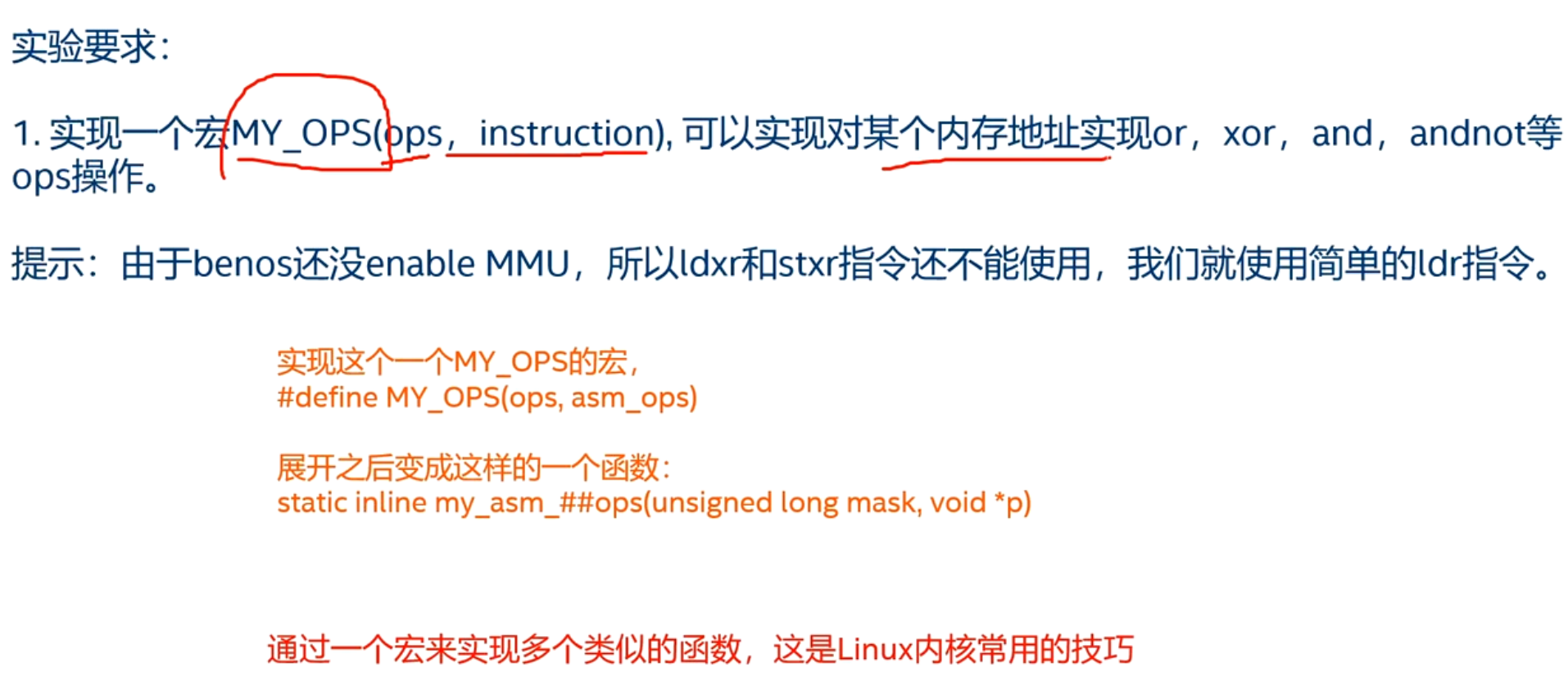
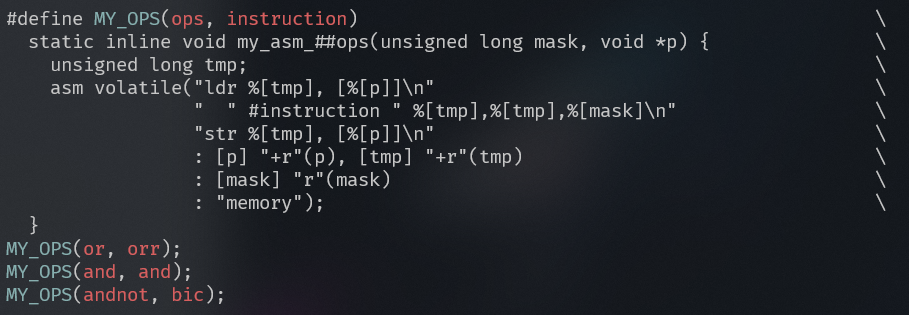
Experiment 4: Combining inline assembly and macros
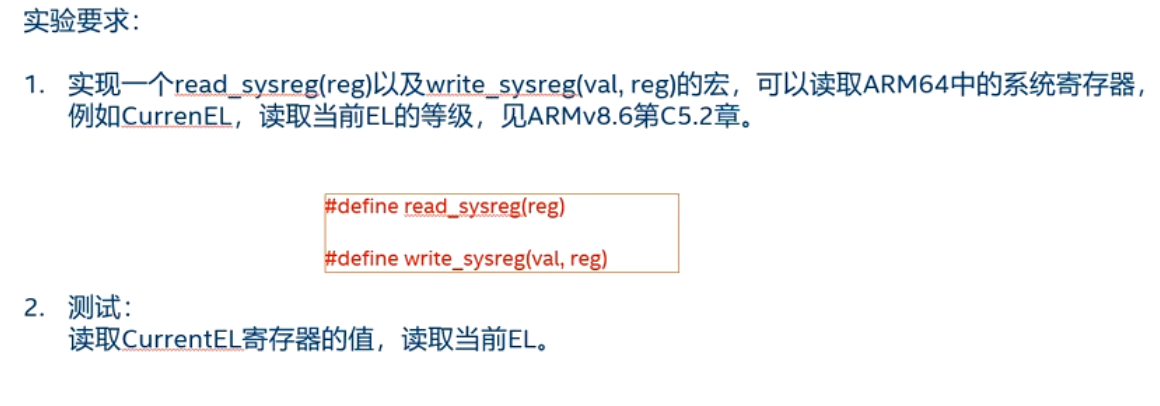
Experiment 5: Implementing macros for reading and writing system registers
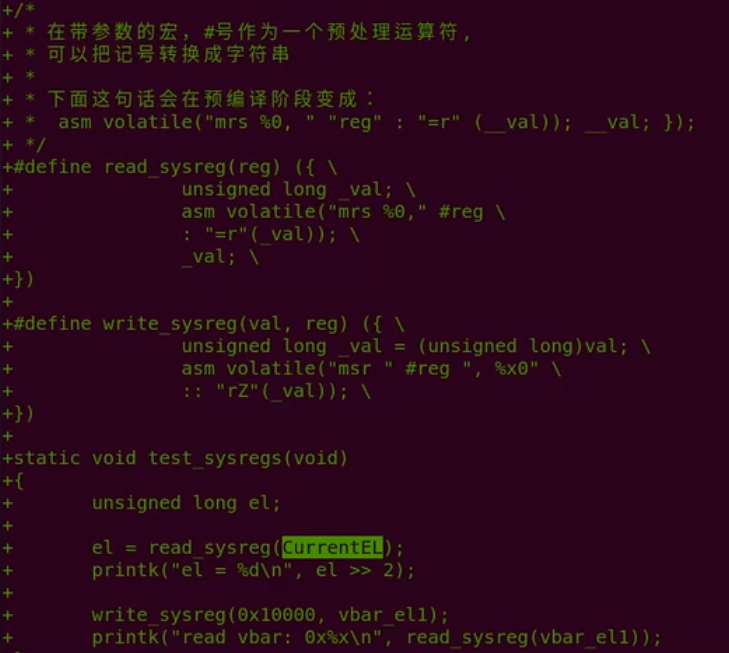
This usesGNU C statement expression Syntax:
({ ... })What is it?
This is a GNU extension, not standard C.
It allows a block of code to execute like a statement, and alsoreturn a value。
Syntax rules:
({ statement1; statement2; ...; expression; })
The last one in the code block expression(without a semicolon) is the return value.
Inline assembly: goto
The goto template of inline assembly can jump to a C language label.
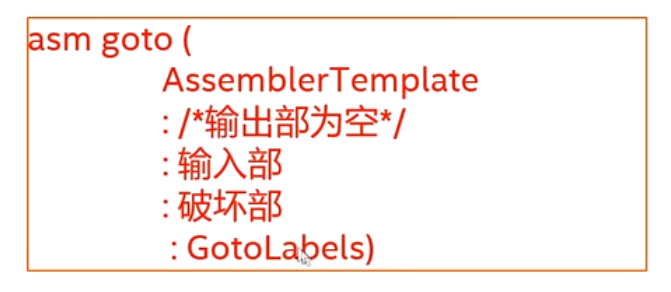
- The output section of the Goto template must be empty.
- Add a gotolabels section that lists the C labels that are allowed as jump targets.
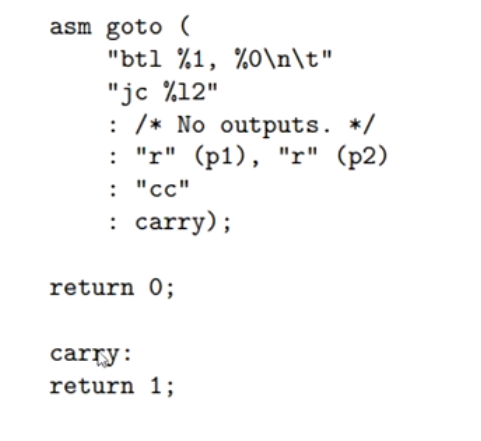
Experiment 6: Inline assembly with goto template.

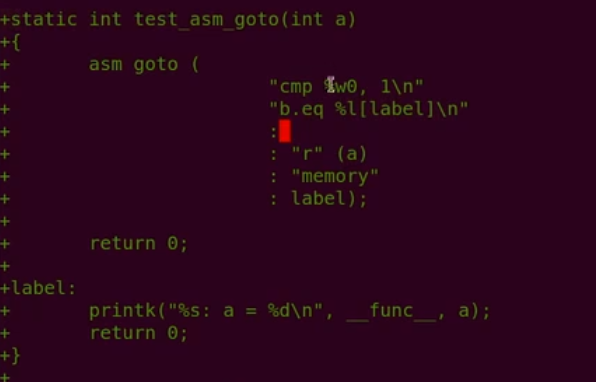
%l[label]In GCC inline assembly,asm gotoa special syntax notation that indicates a jump to a label in C code.label。
Detailed explanation:
%l[...]tells the compiler that this is alabel symbol(label), rather than an ordinary register or immediate value.labelis the label name you define in C code, such as the one in your codelabel:。asm gotoAllows assembly code to jump directly to a label in C code via conditional jump, implementing conditional branching.