
Timeline
Timeline
2025-09-27
init
This article introduces the basic functions and usage of the GNU linker (ld), including common command-line parameters (such as -T, -Map, -o) and the role of linker scripts. The article elaborates on the concepts of input sections and output sections, distinguishes between VMA (virtual memory address) and LMA (load memory address), and explains how to handle the inconsistency between the two in ROM-based image files. Subsequently, the article explains key commands in linker scripts, such as ENTRY, INCLUDE, OUTPUT, OUTPUT_FORMAT, etc., as well as symbol assignment and reference methods, emphasizing that symbols defined by the linker represent only addresses rather than variable values, and recommends using the char[] type for address operations. The article also introduces how the SECTIONS command maps input sections to output sections, and the usage of built-in functions such as ADDR, ALIGN, SIZEOF, MAX/MIN. Through three experiments, the article demonstrates printing the memory layout, handling the copy process where the load address and runtime address differ, and analyzes the differences and connections among link address, load address, and runtime address in the Linux 5.0 kernel linker script.
- A linker is a program that links one or more object files generated by a compiler or assembler, along with libraries, into an executable file.
- The GNU Linker uses the AT&T linker script language.
ld command
- aarch64-linux-gnu-ld
- Common parameters
- -T specifies the linker script
- -Map outputs a symbol table file
- -o outputs the final executable binary file
A simple example
12345678 | SECTIONS{ . = 0x10000; : {* ()} . = 0x8000000 : {*()} .bss : {*(.bss)}} |
Basic Concepts
- Input section, output section
- Each section includes a name and a size.
- Section attributes
- allocatable: at runtime, the operating system needs to allocate memory for these sections.
- loadable: at runtime, the contents of these sections need to be loaded into the allocated memory.
- Section addresses
- VMAVirtual memory address (VMA), the runtime address
- LMALoad memory address (LMA)
- Usually the ROM address is the load address (LMA), while the RAM address is the runtime address (VMA).
Linker script commands
ENTRY(symbol) sets the entry function of the program.
The linker provides the following ways to set the entry point:
- Use the -e option
- Use ENTRY(symbol)
- At the very beginning of .text
- Address 0
INCLUDE filename includes the linker script file
OUTPUT filename outputs a binary file, similar to using ‘-o filename’ on the command line.
OUTPUT_FORMAT(bfd) outputs the BFD format.
OUTPUT_ARCH(bfdarch) outputs the processor architecture format.
Symbol assignment
- Symbols can also be assigned values like in C language.

- “.” represents the location counter, indicating the current position.
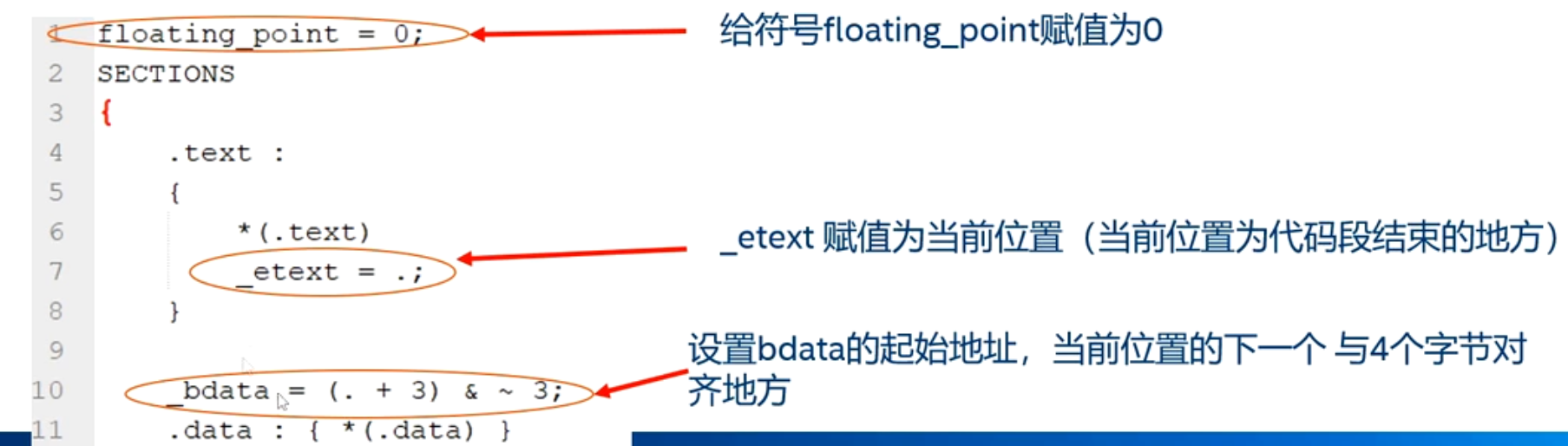
Symbol references
High-level languages often need to reference symbols defined in linker scripts.
In C language, define a variable and initialize it. For example, int foo = 100.
- The compiler defines a symbol foo in the symbol table.
- The compiler stores 100 in memory for the symbol.
Define a variable in the linker script.
- The linker only defines this symbol in the symbol table and does not allocate memory to store the variable’s value.
Accessing variables defined in the linker script:What is accessed is the address of the variable, not the value of the variable.

- We can set some symbols in each section to make it convenient for C language to access the start and end addresses of each section.

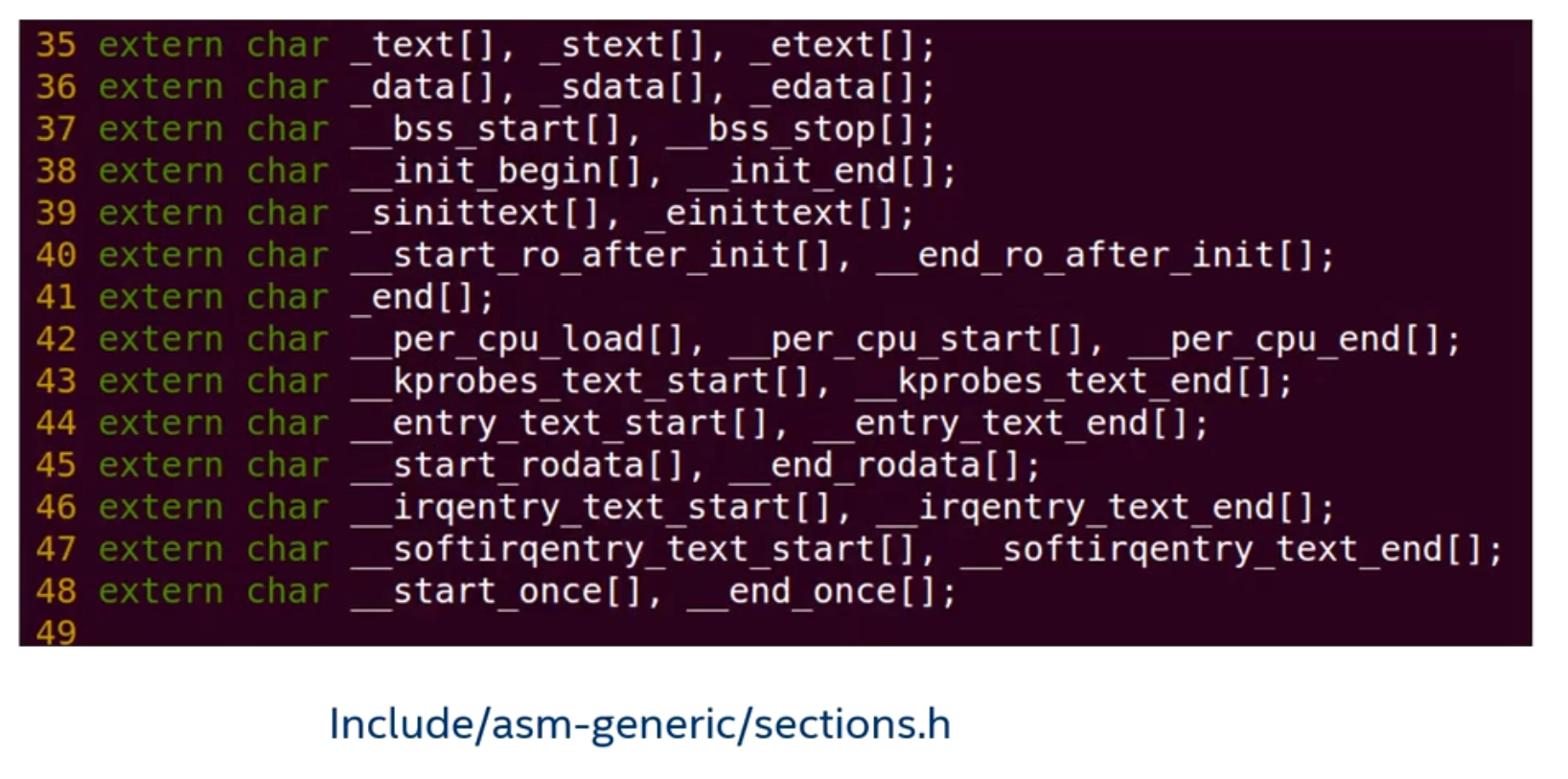
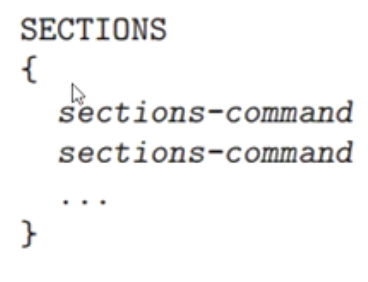
SECTIONS command
- SECTIONS command: tells the linker how to map input sections to output sections, and how to place these output sections in memory.
- Output section descriptor
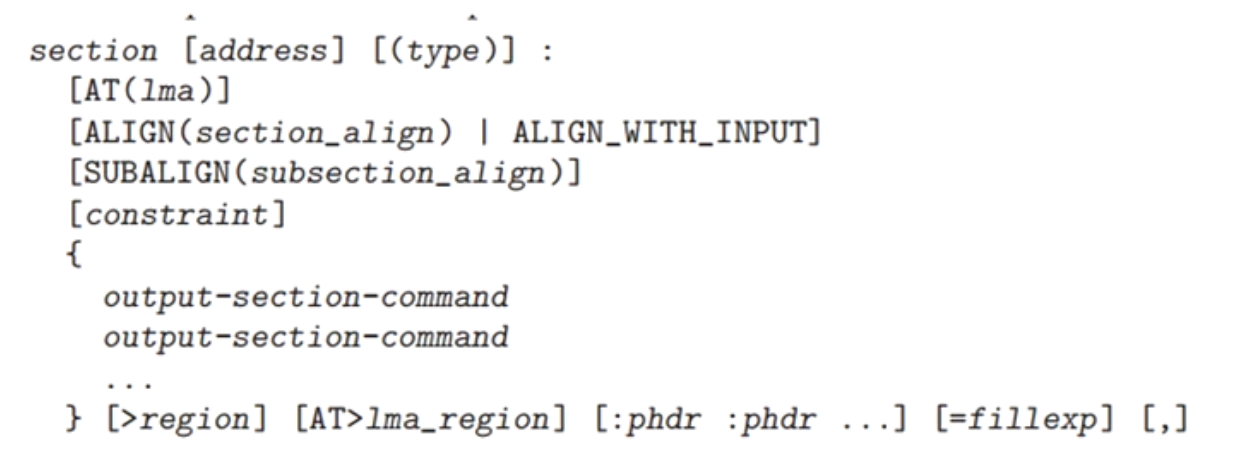

LMA load address
- Each section hasVMA(virtual address, runtime address) andLMA(load address)
- In the output section descriptorUse “AT” to specify LMA
- If LMA is not specified via “AT”, usually LMA=VMA
- BuildA ROM-based image file often sets the virtual address and load address of output sections to be different.


- The load address and link address (virtual address) of the data section are different, so program initialization needs to copy the data section from the ROM load address to the virtual address in SDRAM.
- The data load address is at
_etextthe start, and the runtime address of the data section is at_datathe start, and the size of the data section is_edata - _data, the following code copies the data section from_etextthe start to_datathe start

Common built-in functions
ADDR(section)
Returns the VMA address of a previously defined section.
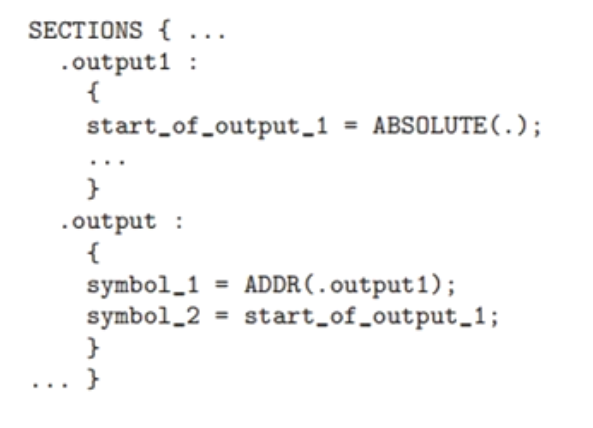
ALIGN(n)
Returns the next address aligned to n bytes, which is calculated based on the current location (location counter).
Note that here it is n bytes, not 2^n bytes (unlike the assembler’s .align).

SIZEOF(section)
Return the size of a section

MAX(exp1, exp2) / MIN(exp1, exp2)
Return the maximum or minimum of two expressions
Experiment 1: Print the memory layout of each section


- Linker-exported symbols are addresses, not variable values
These symbols in the linker script:
1 | _text = .; |
What is defined is not the variable itself, but an address label (symbol address). In C, there is no syntax corresponding to an ‘address label’, so this address can only be referenced indirectly through some kind of ‘variable’.
Declaring it with char[] is actually saying:
“This is a memory region starting at _text; I care about its address, not its specific contents.”
char[] is a ‘smallest unit’ memory representation, convenient for pointer arithmetic
char is the smallest addressable unit in C (1 byte).
So with the char[] type, we can directly perform precise address operations:
12 | extern char _text[], _etext[];size_t text_size = _etext - _text; // Calculate section length (bytes) |
If you write it as int[] or void*, this calculation may go wrong or fail to compile.
- Difference between char[] and char*:Linker symbols are ‘array addresses’, not pointer variables
Although you can also write:
1 | extern char *_text; |
But this actually means _text is a ‘variable pointing to a character’, not an address label.
char *_text;This means the compiler is going to “fetch the variable_text's value”, which must be assigned by code.
Andchar _text[];It is ‘declaring that the linker will provide this address’, and does not generate extra symbols or variables.
Therefore, it is recommended to use:
1 | extern char _text[]; |
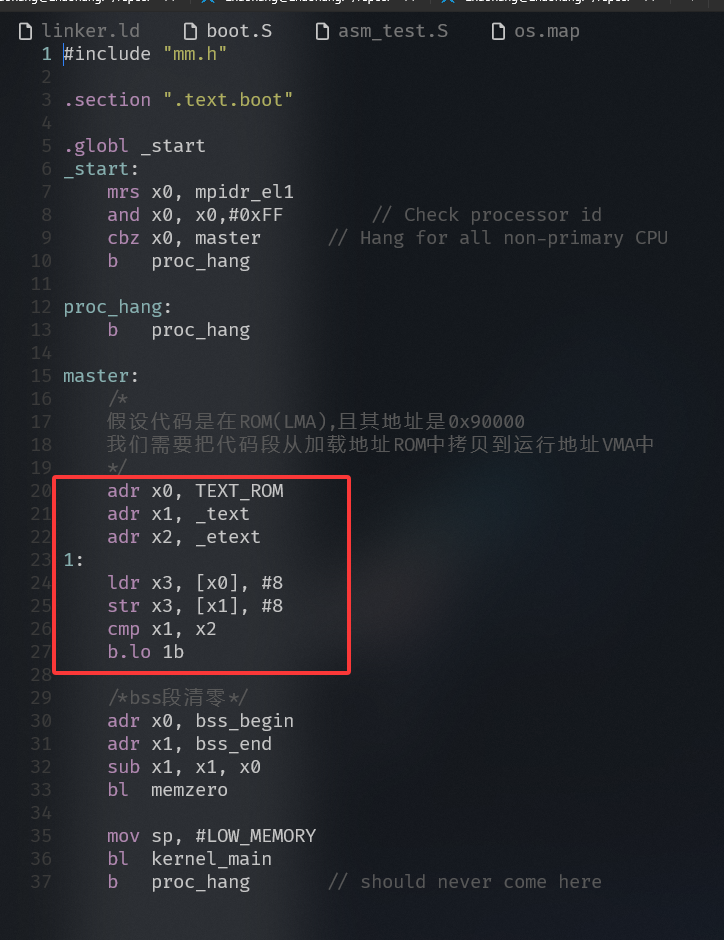
Experiment 2: Load address is not equal to run address
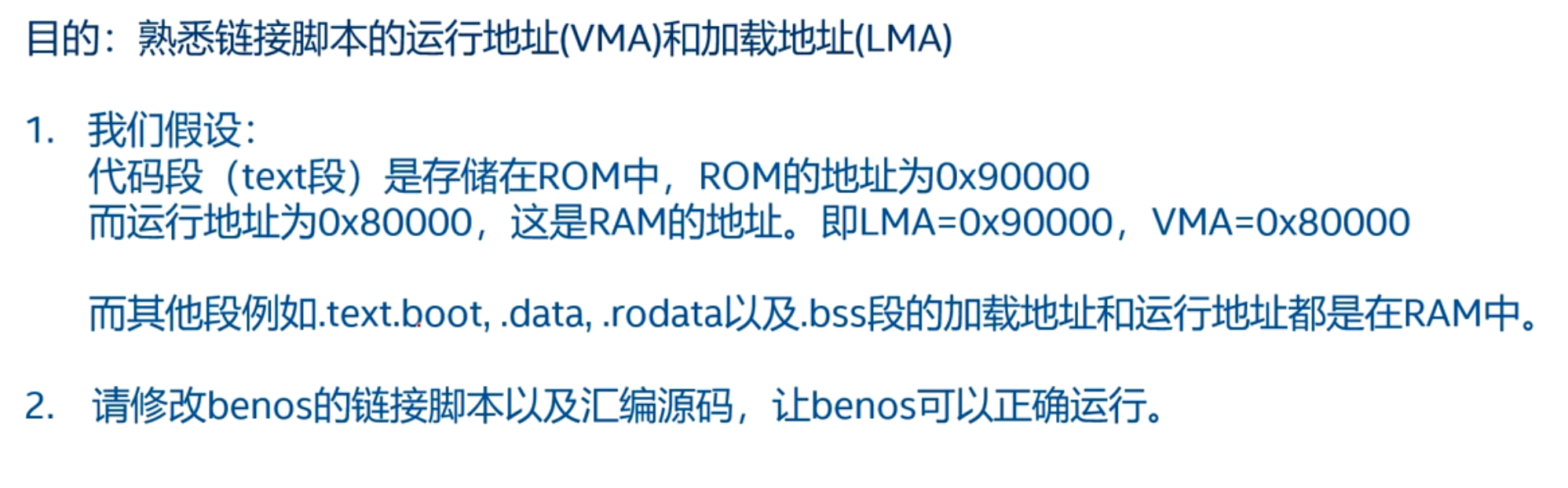
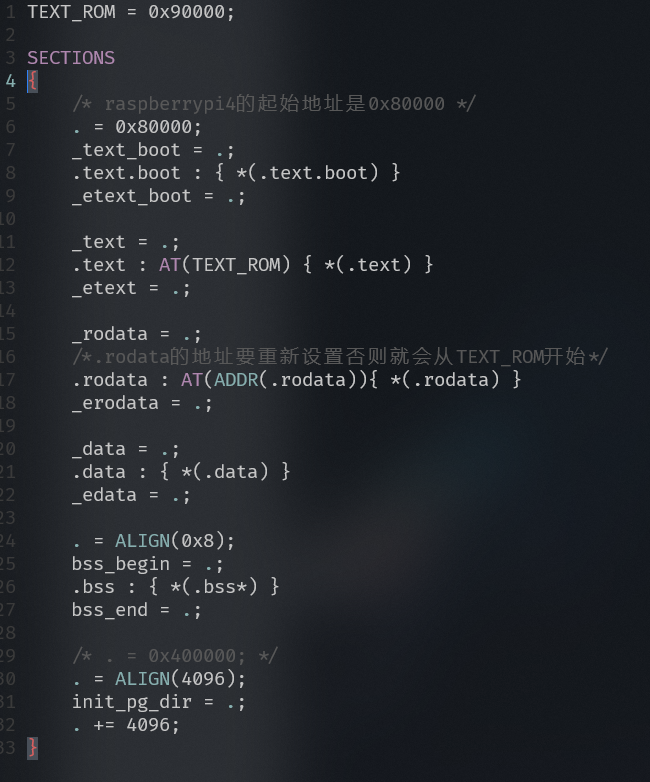
Need to copy the code from the load address to the run address
Experiment 3: Analyzing the Linker Script of the Linux 5.0 Kernel

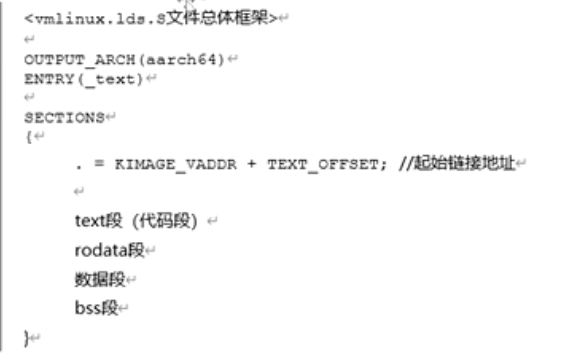

Runtime address, load address, link address
Link Address
Definition:
The addresses assigned by the compiler and linker to each section (such as .text, .data, .bss, etc.) when generating an executable file (such as an ELF file).
Characteristics:
- It is the address set by the linker during the compilation phase.
- It can be explicitly set via the linker script (ld script), for example . = 0x80000;.
- These addresses are recorded in the section headers or program headers of the executable file.
Example:
12 | . = 0x80000;.text : { *() } |
Indicates that the link address of the .text section is 0x80000 (>It should be followed by the memory region name defined by the MEMORY command; you cannot directly write an address).
Load Address
Definition:
The location where the contents of the executable file are loaded into memory, that is, the location where the OS/bootloader loads the file into memory.
Characteristics:
- It is usually equal to the link address, but in some cases (such as dynamic linking, load address relocation) it can be different.
- It is determined by the operating system or bootloader, and can also be relocated using tools such as objcopy.
Example:
- If the link address of the .text section of your ELF file is 0x80000, and the bootloader loads it to 0x100000, then:
- Link address ≠ load address
- If relocation is not performed, the program will fail at runtime (because the code contains absolute addresses).
Runtime/Execution Address
Definition:
The memory address that the CPU actually accesses when the program is executing.
Characteristics:
Usually = load address (the program executes from where it is loaded)
If the MMU (Memory Management Unit) is enabled, the run address is a virtual address, which is mapped by the MMU to the physical load address.
In bare-metal programs, generally: link address = load address = run address.