
Timeline
Timeline
2025-09-27
init
This article introduces the basic concepts and usage of the GNU AS assembler, focusing on the syntax rules under the AArch64 architecture. It first explains the relationship between GNU AS and GCC, and compares the differences between AT&T syntax and the ARM Unified Assembly Language (UAL) format. It then details label definitions, comment styles, symbol declarations (including global and local symbols), and the use of alignment directives. In terms of data definition, the article summarizes directives for integers, floating-point numbers, and strings, and explains common operations such as .rept repeat blocks and .equ/.set constant definitions. In addition, it introduces function-related directives, conditional compilation if statement structures, and .section section definitions and their attribute flags. The overall content systematically covers the core knowledge points of the GNU assembler in ARM64 development, suitable for embedded and low-level system developers.
Reference documents:
ARM64 assembler
- ARM’s official assembler
- GNU AS assembler: aarch64-linux-gnu-as
- GCC uses as as its assembler
- AT&T: originated from Bell Labs, an assembly syntax created for developing the UNIX system (under x86, GCC outputs AT&T syntax by default)
- ARM format: ARM’s official assembly syntax (under AArch64, GCC outputs ARM Unified Assembly Language (UAL) format by default)
Syntax
- label: Any identifier ending with a colon is considered a label
- Comment:
//Indicates a comment (AArch64 also supports/* */block comments)@At the beginning of a line, indicates the entire line is a comment (under AArch64, the line comment character is@, not#;#used to represent immediate values in AArch64)
- Instructions, pseudo-instructions, and registers can all be uppercase or lowercase; GNU style defaults to lowercase
Symbol
Represents the address where it is located, and can also be used as a variable or function
- Global symbol, can be declared with .global
- Local symbol, mainly used within a local scope, with a label name starting with a number between 0-99, usually used together with the b instruction
- f: indicates forward search
- b: indicates backward search
Alignment directives
- .align aligns by filling data to achieve alignment. It can fill with 0 or use the nop instruction.
- Tells the assembler that the assembly after .align must be allocated starting from the next address divisible by 2^n
- In the ARM64 system, the first parameter represents 2^n size
Data definition directives
Summary of integer and floating-point directives
| Instruction | Data type / purpose | Byte count | Supplementary notes |
|---|---|---|---|
.byte | Define an 8-bit integer | 1 B | Usually used for characters, control bits |
.hword | Define a 16-bit integer (half-word) | 2 B | Also called in some architectures.short |
.int/.long | Define a 32-bit integer | 4 B | .intIs an alias, same effect |
.quad | Define a 64-bit integer (quad-word) | 8 B | Very commonly used in AArch64 |
.float | Define an IEEE-754 single-precision floating-point number (32-bit) | 4 B | Equivalent to the one in Cfloat |
String definition pseudo-instruction
| Instruction | Description |
|---|---|
.ascii "str" | Insert the string as-is, without automatically adding\0, suitable for non-C-style strings |
.asciz "str" | At the end of the string automatically append a null character\0, suitable for C strings (recommended) |
.rept … .endr: Repeat block definition
Syntax:
123 | .rept <count> <内容>.endr |
Purpose: Repeat a section of assembly code or data definitions several times, suitable for initializing arrays or filling space.
Example:
123 | .rept 3 0.endr |
Equivalent to:
123 | .long 0.long 0.long 0 |
.equ / .set: Constant definition (assignment operation)
These two directives are completely equivalent, just with slightly different syntax styles.
.equ
1 | .equ abcd, 0x45 |
Make abcd a constant macro definition with value 0x45.
.set
1 | .set abcd, 0x45 |
Same effect, also defines abcd as 0x45.
Typical uses: for defining register addresses, constant bit masks, etc.
Common usage example (combining .equ and .rept):
123456 | .equ LED_BASE, 0x3F200000.section .rept 4 .int LED_BASE.endr |
Indicates filling the LED_BASE address 4 times, each time 4 bytes, for a total of 16 bytes.
.equwith C’s#definethe difference:
.equ/.set | #define |
|---|---|
| Assigned during assembly, value is immutable | Text substitution during preprocessing |
Can be used in expressions (e.g.,.equ val, 4+5) | Only text concatenation |
Used internally by the assembler.ifdefand other pseudo-instructions for conditional checks | Can be used with#ifdefetc. in combination |
Function-related pseudo-instructions
| Pseudo-operation | Description |
|---|---|
.global | Define a global symbol |
.include | Include header file |
.if .else .endif | Control statement structure for conditional compilation |
if statement pseudo-operation
| Instruction | Meaning description |
|---|---|
.ifdef symbol | DeterminesymbolWhether defined |
.ifndef symbol | DeterminesymbolWhethernotDefinition |
.ifc str1,str2 | Check stringstr1andstr2whether equal |
.ifeq expr | Evaluate expressionexprwhether the value is 0 |
.ifeqs str1,str2 | is equivalent to.ifc str1,str2 |
.ifge expr | Evaluate expressionexprwhether the value is ≥ 0 |
.ifle expr | Evaluate expressionexprwhether the value is ≤ 0 |
.ifne expr | Evaluate expressionexprwhether the value is not equal to 0 |
Section-related pseudo-operations
- .section indicates which section the subsequent assembly code will be linked into, such as code section, data section, etc.
- Each section starts with a section name and ends with the next section name or the end of the file.
1 | .section name, "flags" |
Flags can be added after it to indicate the attributes of the section.
| Flag | Meaning description |
|---|---|
a | allocatable: This section needs to be loaded into memory at runtime. |
d | GNU_MBIND section: A special binding section used by GNU. |
e | excluded: This section will not be included in executable files or shared libraries. |
w | writable: This section is writable. |
x | executable: This section contains executable code. |
M | mergeable: Can be merged with other sections with the same attributes (usually used for read-only strings, etc.). |
S | string: This section contains null-terminated strings. |
G | group: This section belongs to a section group (e.g., COMDAT). |
T | thread-local-storage: This section is used for thread-local storage (TLS). |
? | unspecified group: This section belongs to the group of the previous section (if any). |
Example:
1 | .section ".idmap.text","awx" |
.pushsection <name>
Place the following code or datainto the specified section, and at the same timesave the current section state。
.popsection
representsend the previous push, andrestore the original section。
Use in pairs。
The effect is only on
pushsectionandpopsectionthe code between …, and has no effect on other code.The rest of the code still belongs to the original section, for example
.textor.data。
12345678910 | .globl _start_start: nop // in the default .text section .pushsection .mydata, "a" 0x12345678 // is inserted into the .mydata section .popsection nop // returns to the .text section again |
_startand twonopboth belong to.textsection;
.long 0x12345678is inserted into the custom.mydatasection.
Macro
- .macro and .endm form a macro
- .macro is followed by the macro name, and then the macro parameters.
- To use parameters in a macro, you need to add the prefix ""
1 | .macro plus1 p, p1 |
defines a macro named plus1 with two parameters p and p1
Using parameters in a macro requires a prefix; “\p” represents the first parameter, “\p1” represents the second parameter
- When defining macro parameters, you can set an initial value.
1 | .macro reserve_str p1=0 p2 |
The first parameter p1 has an initial value, 0. In this case, you can use reserve_str a,b or reserve_str, b to call this macro
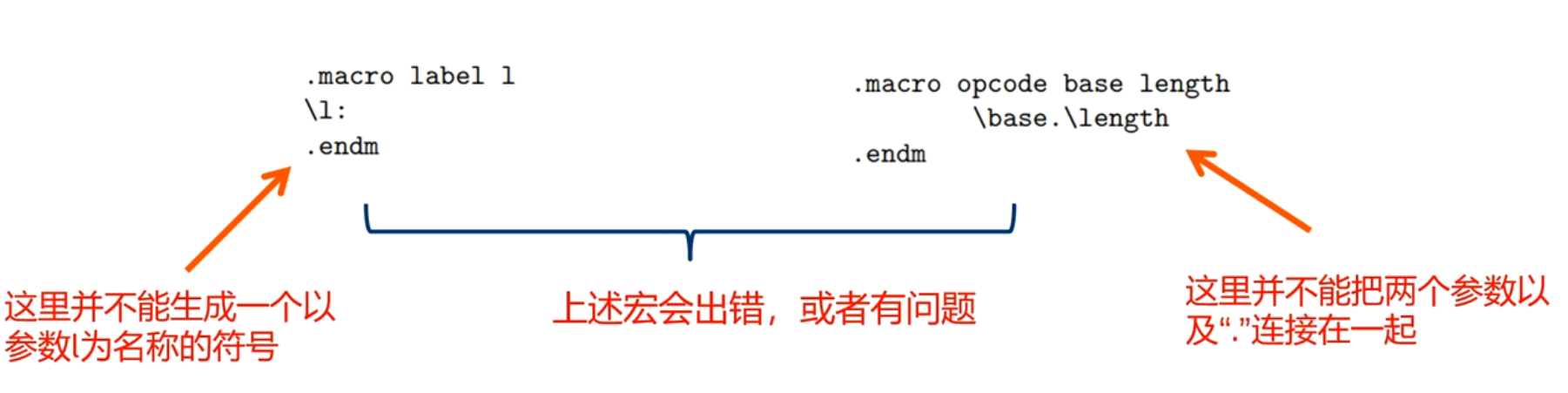
Solution:
- Use spaces or use altmacro+&

- Use “\()” to indicate concatenation

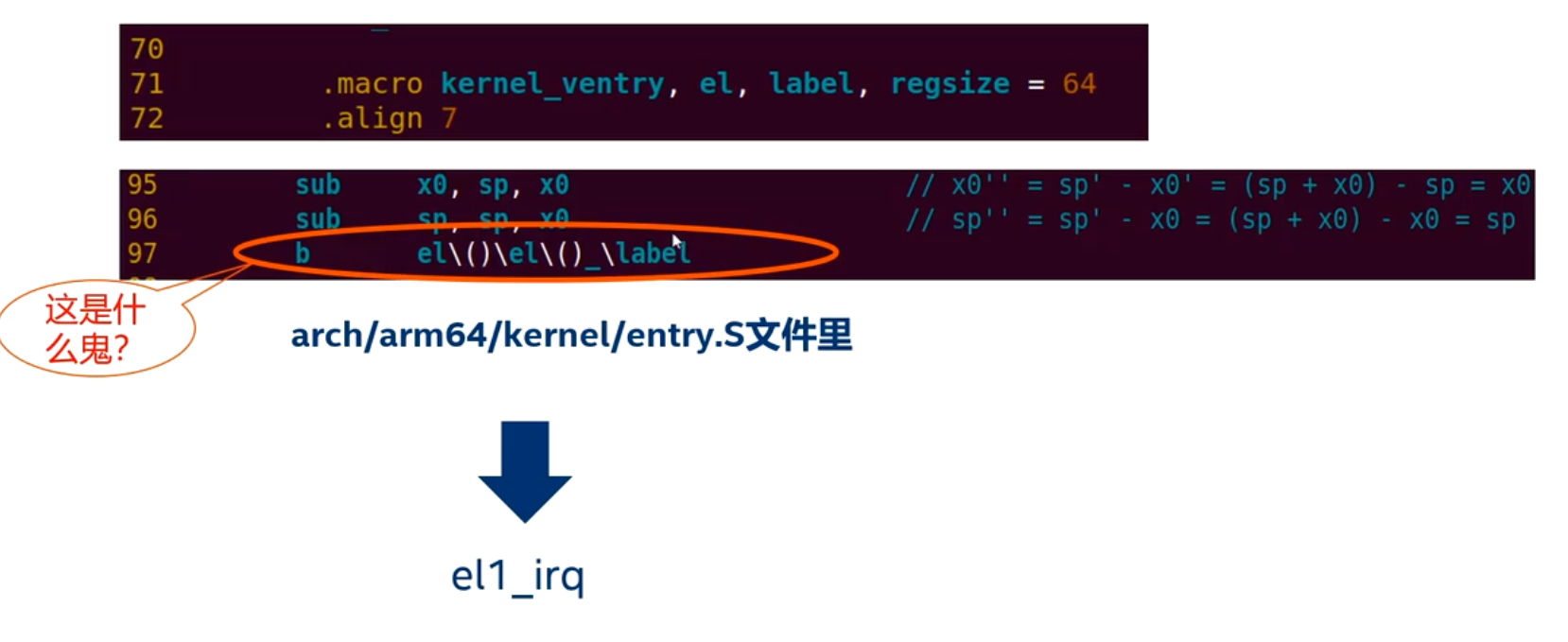
ARM64-specific features
ARM64 compilation options
- -EB: for big-endian CPUs, -EL: for little-endian CPUs
- -mabi: specify ABI mode, ilp32 for ELF32, lp64 for ELF64, default is lp64
- -mcpu=processor+extension: specify CPU model, e.g., cortex-a72
- -march=, used to specify the supported architecture, e.g., armv8.2-a
- Extensions supported by ARM64, see GNU assembler as_v2.34 Chapter 9.1.2
Special characters
//Indicates a comment@In AArch64, indicates a line comment;#Does not indicate a comment, only used as an immediate prefix:lo12:Indicates the low 12 bits (e.g.,#:lo12:foo)
12 | adrp x0, fooldr x0, [x0, #:lo12:foo] |
- ldr pseudo-instruction
- .bss switches to the bss section
- .dword/.xword 64-bit data
- name .reg register_name names a register
1 | foo w0 |