Timeline
Timeline
2025-12-29
init
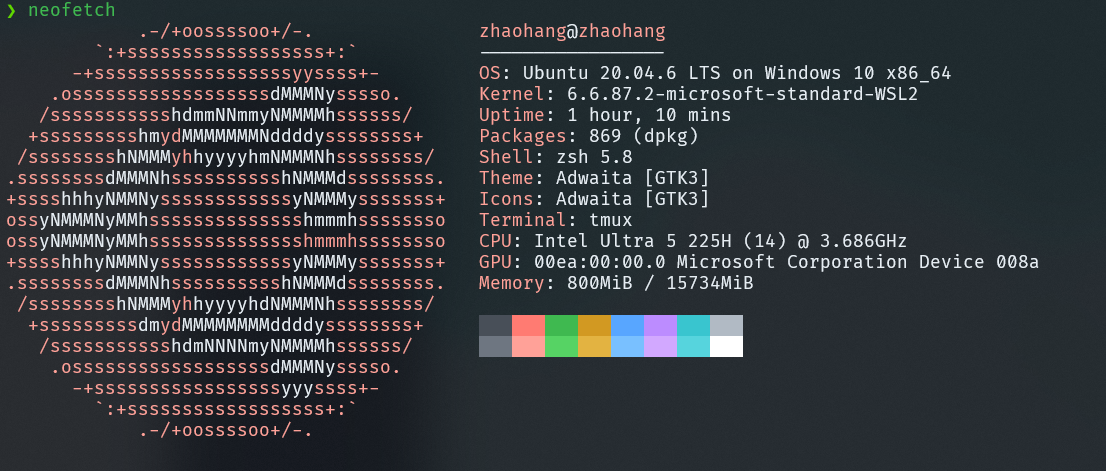
This article describes the complete process of installing Ubuntu-20.04 in WSL2 and configuring the environment. It includes migrating the WSL distribution to the D drive to save system space, as well as commands to restore the default user after migration. The article details the steps to compile and install the latest version of Emacs from source, including configuration options such as disabling X11, enabling native-comp, dynamic modules, multithreading, and tree-sitter support. In addition, it covers methods for upgrading and installing other development tools, such as obtaining the latest QEMU by compilation, installing a newer clangd, updating the git version, upgrading Python to above 3.9, and using bear written in Rust to replace the old Python script. The article aims to help users build an efficient and customizable development environment in WSL2.
Download Ubuntu for WSL
1234 | # View available downloadable imageswsl --list --online# Download Ubuntu 20.04wsl --install -d Ubuntu-20.04 |
Migrate to D drive
Create a directory on the D drive to store the new WSL, for example D:\WSL\Ubuntu-20.04
1234567 | # 1. Export its backup (for example, named Ubuntu.tar)wsl --export Ubuntu-20.04 D:\WSL\Ubuntu-20.04.tar# 2. Unregister the original onewsl --unregister Ubuntu-20.04# 3. Restore the backup file to D:\WSL\Ubuntu-20.04wsl --import Ubuntu-20.04 D:\WSL\Ubuntu-20.04 D:\WSL\Ubuntu-20.04.tar# At this point, you can delete Ubuntu-20.04.tar |
If you start WSL at this point, you may find that it seems to have recovered, but the user has become root. Use the following command to restore:
1 | Ubuntu2004 config --default-user username |
Install the latest version of Emacs
You can install a newer gcc compiler
123456789101112 | sudo add-apt-repository ppa:ubuntu-toolchain-r/testsudo apt updatesudo apt install gcc-13 g++-13sudo update-alternatives --install /usr/bin/gcc gcc /usr/bin/gcc-9 90sudo update-alternatives --install /usr/bin/g++ g++ /usr/bin/g++-9 90sudo update-alternatives --install /usr/bin/gcc gcc /usr/bin/gcc-13 130sudo update-alternatives --install /usr/bin/g++ g++ /usr/bin/g++-13 130# If you want to change it later, use the following commandsudo update-alternatives --config gcc |
Compile Emacs
123456789101112131415161718192021222324252627282930313233343536373839 | # Optional: Uninstall snapdsudo apt-get purge snapd# Compile tree-sittergit clone https://github.com/tree-sitter/tree-sitter.gitcd tree-sittergit checkout release/0.25makemake install PREFIX="$(pwd)/_install"# Fix the prefix in the .pc file (change the prefix line to the following path)nano _install/lib/pkgconfig/tree-sitter.pc# prefix=/home/zhaohang/repository/tree-sitter/_install# Set environment variables in ~/.bashrc or ~/.zshrcexport PKG_CONFIG_PATH="$HOME/repository/tree-sitter/_install/lib/pkgconfig:$PKG_CONFIG_PATH"# Download the Emacs source codewget https://mirrors.ustc.edu.cn/gnu/emacs/emacs-30.2.tar.xzcd emacs-30.2sudo apt install cmake build-essentialsudo apt install zlib1g-dev pkg-config libgnutls28-dev libncurses-dev libjansson-dev libvterm-dev libgccjit-$(gcc -dumpversion)-devexport LD_LIBRARY_PATH="$HOME/repository/tree-sitter/_install/lib:$LD_LIBRARY_PATH"./configure \ --without-x \ --without-ns \ --without-pgtk \ --with-native-compilation \ --with-modules \ --with-threads \ --with-tree-sitter \ --prefix=/usr/local \ LDFLAGS="-Wl,-rpath,$LD_LIBRARY_PATH -L$LD_LIBRARY_PATH"make -j$(nproc)sudo make install# After compilation, test it; it should output: RUNPATH /home/zhaohang/repository/tree-sitter/_install/lib:objdump -p /usr/local/bin/emacs | grep RUNPATH |
--without-xemacs-nox, does not use X11 (Xorg), can only use emacs -nw (terminal)--without-nsDisable the Cocoa/NS window system on macOS, just to prevent configure from auto-detecting the macOS GUI--without-pgtkDisable Pure GTK (the new GUI backend under Wayland)--with-native-compilationEnable native-comp (.eln) to compile Elisp into machine code--with-modulesEnable dynamic module support, requires libjansson-dev--with-threadsEnable multi-threading support--with-tree-sitterEnable tree-sitter--prefix=/usr/localInstall to /usr/local
Emacs configuration reference:

Reference for compiling the latest version of QEMU
In addition, the clangd version downloaded via apt is relatively old and may not support certain configuration options. You can install a newer version with the following command.
123456789101112 | wget https://apt.llvm.org/llvm.shchmod u+x llvm.shsudo ./llvm.sh 21sudo apt-get install clang-format-21# Install clang into the alternatives systemsudo update-alternatives --install /usr/bin/clang clang /usr/bin/clang-21 100sudo update-alternatives --install /usr/bin/clang++ clang++ /usr/bin/clang++-21 100sudo update-alternatives --install /usr/bin/clangd clangd /usr/bin/clangd-21 100sudo update-alternatives --install /usr/bin/clang-format clang-format /usr/bin/clang-format-21 100# Install libstdc++-10sudo apt install libstdc++-$(gcc -dumpversion)-dev |
The git version is too low and does not support-bparameter, you can add an apt source to update
1234 | sudo add-apt-repository ppa:git-core/ppa -ysudo apt updatesudo apt upgradesudo apt install git -y |
The Python version is 3.8; some software may depend on version 3.9 or higher:
1234567891011 | sudo add-apt-repository ppa:deadsnakes/ppasudo apt-get updatesudo apt-get install python3.9 python3-pip# Register python3.9 with priority set to 2sudo update-alternatives --install /usr/bin/python3 python3 /usr/bin/python3.9 2# Register python3.8 with priority set to 1, so that its priority is lower than python3.9sudo update-alternatives --install /usr/bin/python3 python3 /usr/bin/python3.8 1# Select the default versionsudo update-alternatives --config python3 |
Bear can also use the latest version. The old version of Bear is a Python script with low efficiency, while the new version is a binary written in Rust.
1234567891011121314 | # Download Rustcurl --proto '=https' --tlsv1.2 -sSf https://sh.rustup.rs | sh# cargo 换源 visit https://mirrors.tuna.tsinghua.edu.cn/help/crates.io-index.git/rustup update# Compile Beargit clone https://github.com/rizsotto/Bear.gitcd bearcargo build --releasesudo install -m 755 target/release/bear /usr/local/bin/# For Debian based systemsexport INSTALL_LIBDIR=lib/x86_64-linux-gnusudo mkdir -p /usr/local/libexec/bear/$INSTALL_LIBDIRsudo install -m 755 target/release/libexec.so /usr/local/libexec/bear/$INSTALL_LIBDIR/ |