
Timeline
Timeline
2025-11-01
init
This article introduces the basic knowledge of Linux system application programming, focusing on the usage of the man manual, including its installation method, the topic classification and typical uses of each chapter (1-9); it also details Linux file I/O operations, covering the function prototypes, parameter meanings, return values, and common flags of system calls such as open(), close(), read() (such as O_CREAT、O_EXCL, O_RDONLY, etc.).
man
Install
1 | sudo pacman -Sy man-pages |
This method installs the man-pages that match the current system’s glibc version.
You can also directly query the various versions of Ubuntu on the webpage.

content
| Section | Topic Categories | Content examples | Typical Uses |
|---|---|---|---|
| 1 | User Commands | ls(1),grep(1),man(1) | Ordinary shell commands and executable programs |
| 2 | System Calls | open(2),read(2),fork(2) | The system call interface provided by the kernel (C language layer) |
| 3 | C Library Functions | printf(3),malloc(3),strcpy(3) | Standard C library (libc) and other library functions |
| 4 | Devices and Special Files | null(4),tty(4) | /devthe device file interface below |
| 5 | File Formats and Conventions | passwd(5),fstab(5) | Configuration File Format Description |
| 6 | Games | fortune(6) | Legacy part, now rarely used |
| 7 | Concepts and Protocols (Miscellaneous / Conventions / Protocols) | signal(7),socket(7),regex(7) | Semantic or systematic documents (protocols, macros, standards, etc.) |
| 8 | System Administration Commands | mount(8),ifconfig(8),systemd(8) | Commands used only by root or administrator |
| 9 | Kernel development interface (Kernel Developer Docs, non-standard) | request_irq(9)(included in the kernel source) | Kernel programming API (only appears in kernel source documentation) |
use
1 | man 2 open |
I/O operations in Linux
File I/O
open()
| function | int open(const char *pathname, int flags) int open(const char *pathname, int flags, mode_t mode) |
|---|---|
| Header file | #include <sys/types.h>#include <sys/stat.h>#include <fcntl.h> |
| Parameters pathname | Path and file name |
| Parameters flags | File open mode; multiple flags can be set using bitwise OR |
| Parameters mode | Permission mask; sets read, write, and execute permissions for different users and groups, expressed in octal, required only when creating a file. |
| Return value | A successful open() call willreturn an int file descriptor, and returns -1 on error. |
| Function | Through system calls, you can open a file and obtain a file descriptor |
Optional flags for the flags parameter:
O_CREAT
Automatically creates the file if the file name to be opened does not exist.O_EXCL
Must be used together with O_CREAT to take effect; if the file exists, the open() call fails.O_RDONLY
Open file in read-only mode.O_WRONLY
Open file in write-only mode.O_RDWR
Open file in read-write mode.O_APPEND
Open file in append mode.O_NONBLOCK
Open file in non-blocking mode.
close()
| function | int close(int fd) |
|---|---|
| Header file | #include <unistd.h> |
| Parameters fd | file descriptor to be operated on |
| Return value | Returns 0 on success; returns -1 on error. |
read()
| function | ssize_t read(int fd, void *buf, size_t count) |
|---|---|
| Header file | #include <unistd.h> |
| Parameters fd | File descriptor to read |
| Parameters buf | Buffer to store the read content |
| Parameters count | Number of bytes read each time |
| Return value | If the return value is greater than 0, it indicates the number of bytes read; If it equals 0, it means the end of file (EOF) has been reached; If it equals -1, it indicates an error; in non-blocking mode, it means no data is available to read. |
write()
| function | ssize_t write(int fd, const void *buf, size_t count); |
|---|---|
| Header file | #include <unistd.h> |
| Parameters fd | file descriptor to be operated on |
| Parameters buf | Buffer, storing the data to be written |
| Parameters count | Number of bytes written each time |
| Function | Reads count bytes from the buf buffer and writes them to the file identified by fd |
| Return value | If greater than or equal to 0, it indicates success, returning the number of bytes written; Returning -1 indicates an error |
Note that you must have write permission when opening
lseek()
All open files have acurrent file offset, hereinafter referred to as cfo. cfo is usually anon-negative integer, used to indicate the number of bytes from the beginning of the file to the current position of the file. Read and write operations usually start at cfo and increase cfo by the number of bytes read or written. When a file is opened, cfo is initialized to 0, unless O_APPEND is used. The lseek function can be used to change the file’s cfo.
| Item | Description |
|---|---|
| Function definition | off_t lseek(int fd, off_t offset, int whence); |
| Header file | #include <sys/types.h>#include <unistd.h> |
| Parameters fd | file descriptor to be operated on |
| Parameters off_t offset | Offset,in bytes,Positive and negative values indicate moving forward and backward, respectively |
| Parameters whence | Position base point, selectable SEEK_SET(beginning of file),SEEK_CUR(current pointer position),SEEK_END(end of file) |
| Function | Move the file read/write pointer; get the file length; expand file space |
| Return value | SuccessReturns the new file offset (number of bytes from the beginning of the file), returns -1 on failure |
Example:
Set the file position pointer to 100 (start + 100 bytes)
1lseek(fd,100,SEEK_SET);Set the file position to the end of the file
1lseek(fd,0,SEEK_END);Determine the current file position
1lseek(fd,0,SEEK_CUR);
access()
123 | int access(const char *path, int amode); |
| Item | content |
|---|---|
| Header file | #include <unistd.h> |
| Function prototype | int access(const char *path, int amode); |
| Function | Check the specified pathpathfor the calling process’sreal user ID (real UID) and group ID (real GID) whether it is accessible (e.g., readable, writable, executable, or exists). |
| Parameters | path: the file path to check.amode: the access mode to check, which is one of the following constants or their bitwise OR: F_OK: whether the file existsR_OK: whether it is readableW_OK: whether it is writableX_OK: whether it is executable |
| Return value | On success, returns0; on failure, returns-1and setserrno。 |
| common errno | EACCES: insufficient permissionsENOENT: file does not existENOTDIR: a component of the path is not a directoryEROFS: writing to a read-only file systemELOOP: Too many symbolic linksENAMETOOLONG: Path too long |
| Behavior description | - Usereal user ID and group IDto check permissions, not the effective ID. - Ifamodeis a combination of multiple flags, they are checked separately. - Only checks access permissions, does not actually open the file. |
| Notes / Limitations | ⚠️ Not recommended because of TOCTTOU (time-of-check-to-time-of-use) race condition: the file may have been modified after the permission check. 👉 Safer approach: directly attempt the operation (e.g., open()) and catch the error. |
| Related functions | faccessat()(safer, can specify directory fd)chmod()、fstat() |
fcntl()
Operate on a file descriptor
| Item | Description |
|---|---|
| Function definition | int fcntl(int fd, int cmd, … /* arg */ ); |
| Header file | #include <unistd.h>#include <fcntl.h> |
| Parameter fd | Thefile descriptor to be operated on |
| Parameter cmd | The control command to execute (see table below) |
| Parameter arg(optional) | For different cmd, the type of arg varies; it can be int, struct flock*, etc. |
| Function | Control file descriptors, including: • Duplicate FD (F_DUPFD) • Set/Get FD flags (F_GETFD / F_SETFD) • Set/Get file status flags (F_GETFL / F_SETFL) • File locks (F_SETLK / F_SETLKW) |
| Return value | • Success: returns different values depending on cmd • Failure: returns -1, sets errno |
Common CMD commands
| cmd name | meaning | arg type | Return value |
|---|---|---|---|
| F_DUPFD | Duplicate file descriptor (≥ arg) | int | Returns new fd |
| F_GETFD | Get FD flags (e.g., FD_CLOEXEC) | None | Returns flags |
| F_SETFD | Set FD flags | int | 0 |
| F_GETFL | Get file status flags (O_NONBLOCK/O_APPEND, etc.) | None | Returns flags |
| F_SETFL | Set file status flags (commonly used to set O_NONBLOCK) | int | 0 |
| F_SETLK | Set file lock (non-blocking) | struct flock* | Success 0, failure -1 |
| F_SETLKW | Set file lock (blocking) | struct flock* | Success 0 |
| F_GETLK | Test file lock status | struct flock* | 0 |
ioctl()
| Item | Description |
|---|---|
| Function definition | int ioctl(int fd, unsigned long request, … /* arg */ ); |
| Header file | #include <sys/ioctl.h>(May require device-specific header files, such aslinux/ioctl.h) |
| Parameter fd | The opened device file descriptor (e.g.,/dev/...) |
| Parameter request | I/O control command (usually constructed via_IO,_IOR,_IOW,_IOWRand other macros) |
| Parameter arg(optional) | Data associated with the request command, which can beint*,void*,struct *etc. |
| Function | Execute control commands on the device driver (non-data read/write type), used to configure hardware, obtain status, send control instructions, etc. |
| Return value | Success: usually 0(may also return other positive values, depending on request) Failure: returns -1, and sets errno |
Among the above three parameters, the most important is the second parameter, cmd, which is of type unsigned int. In order to efficiently use the cmd parameter to convey more control information, an unsigned int cmd is split into 4 segments, each with its own meaning. The bit-field breakdown of unsigned int cmd is as follows:
12 | | 31 30 | 29 ................ 16 | 15 ...... 8 | 7 .......... 0 || dir | size | type | nr | |
- cmd[31:30]Data (args) transfer direction (read/write)
- cmd[29:16]Data (args) size
- cmd[15:8] **The type of the command, which can be understood as the key (magic number) of the command,**Generally an ASCII code (a character from 0-255; some characters are already occupied, and the sequence segment of each character may be partially occupied)
- cmd[7:0]The sequence number of the command, which is an 8-bit number (sequence number, between 0-255)
The cmd parameter is obtained from ioctl composition macro definitions. The four composition macro definitions are as follows:
- Define a command, but no parameter is needed:
12 | _IOC(_IOC_NONE,(type),(nr),0) |
- Define a command, the application reads parameters from the driver:
12 | _IOC(_IOC_READ,(type),(nr),(_IOC_TYPECHECK(size))) |
- Define a command, the application writes parameters to the driver:
12 | _IOC(_IOC_WRITE,(type),(nr),(_IOC_TYPECHECK(size))) |
- Define a command, parameters are passed bidirectionally:
1 | |
The macro definition parameters are described as follows:
- type: The type of the command, generally an ASCII code value. A driver generally uses one type.
- nr: The sequence number under this command. A driver has multiple commands, generally their type and sequence number are different.
- size: The type of args
For example, the following code can be used to define three macros: one that requires no parameters, one that writes parameters to the driver, and one that reads parameters from the driver:
123 |
Directory I/O
mkdir()
| Item | Description |
|---|---|
| function | int mkdir(const char *pathname, mode_t mode) |
| Header file | #include <sys/stat.h>#include <sys/types.h> |
| Parameters pathname | The path and name of the directory to be created |
| Parameters mode | Permission mask, set the read, write, and execute permissions for the user and group in octal. This parameter can be omitted. |
| Return value | Returns 0 on success, -1 on error. |
| Function | Create a directory |
opendir()/closedir()
| function | Description |
|---|---|
| Function definition | **DIR opendir(const char name) |
| Header file | #include <sys/types.h>#include <dirent.h> |
| Parameters name | The pathname of the directory |
| Return value | On success, returns the directory stream (DIR*type), on failure returnsNULL |
| Function | Open the specified directory and obtain a directory stream for traversing the directory. |
| function | Description |
|---|---|
| Function definition | int closedir(DIR *dirp) |
| Header file | #include <sys/types.h>#include <dirent.h> |
| Parameters dirp | The directory stream pointer to be closed |
| Function | Close the directory stream and release related resources. |
readdir()
1 | man 3 readdir |
| Item | Description |
|---|---|
| function | struct dirent *readdir(DIR *dirp); int readdir_r(DIR *dirp, struct dirent *entry, struct dirent **result); |
| Header file | #include <dirent.h> |
| Parameters DIR *dirp | The directory stream pointer to be read |
| Return value | On success, returns the pointer to the read directory entry (struct dirent*type), on failure returnsNULL |
| Function | Read directory entries in the directory to traverse the directory contents. |
In the glibc implementation, the dirent structure is defined as follows:
12345678 | struct dirent { ino_t d_ino; /* Inode number */ off_t d_off; /* Not an offset; see below */ unsigned short d_reclen; /* Length of this record */ unsigned char d_type; /* Type of file; not supported by all filesystem types */ char d_name[256]; /* Null-terminated filename */}; |
Note that the return value dirent is connected in the form of a linked list, meaning that each read reads one directory entry from the directory, and you need to read in a loop to traverse all directory entries.
Library
A library is an executable binary file, which is compiled code.。
Using libraries can improve development efficiency. In Linux, there are static libraries and dynamic libraries.
Static libraries are linked into the target code when the program is compiled. Therefore, the program no longer needs the static library at runtime. As a result, the compiled size is relatively large.Starts with lib and ends with .a。
Dynamic libraries (also called shared libraries) are not linked into the target code when the program is compiled, but are loaded when the program runs. Therefore, the program needs the dynamic library at runtime. As a result, the compiled size is relatively small.Starts with lib and ends with .so。
Static library
Steps to create a static library:
Write or prepare the source code of the library
Compile the source .c files to generate .o files
Use the ar command to create the static library
Test the library file
Example:
1234 | # -c only compiles but does not link, generating .o object filesgcc -c mylib.c -o mylib.oar cr libmylib.a mylib.o |
Meaning of the ar command:
| only partially | Explanation |
|---|---|
ar | The ‘archiver’ tool, used to package.ofiles |
c | create: create a new archive file (whether it exists or not) |
r | replace: add the object file to the archive (replace it if it already exists) |
libmylib.a | The output static library file name |
mylib.o | The object files to be added to the library |
How to use static libraries
| Step | Command example | Description |
|---|---|---|
| 1. Write the main program | main.c | Use the functions provided by the library in the program |
| 2. Compile the main program and link the static library | gcc main.c -L. -lmylib -o main | -L.Specify library file path-lSpecify the library name (remove the lib prefix and .a suffix) |
| 3. Run the program | ./main | The static library has been linked into the executable, no additional library files are needed |
Dynamic library
- Steps to create a dynamic library:
- Write or prepare the source code of the library
- Compile the source .c files to generate .o files
- Use the gcc command to create a dynamic library
- Test the library file
Example:
12 | gcc -c -fpic mylib.c -o mylib.ogcc -shared -o libmylib.so mylib.o |
first step
| Options | meaning |
|---|---|
-c | Compile only, do not link (generate.o) |
-fpic | Generate Position-independent code(Position Independent Code, PIC) |
mylib.c | Source file |
-o mylib.o | Output file name |
Step 2
| Options | meaning |
|---|---|
-shared | Generate shared object (.sofile) instead of an executable |
-o libmylib.so | Specify output file |
mylib.o | Input object file |
The system will by default look for dynamic libraries in the /lib and /usr/lib directoriesIf the library we use is not there, an error will be prompted.
The first method:
Copy the generated dynamic library to /lib or /usr/lib, because the system will search these two paths by default.The second method:
Add the path where our dynamic library is located to the environment variable. For example, if the path of our dynamic library is /home/test, we can add it like this, but this method is only valid in the current terminal window.1export LD_LIBRARY_PATH=$LD_LIBRARY_PATH:/home/test/The third method:
Modify the configuration file /etc/ld.so.conf under Ubuntu, we add the location of the dynamic library to this configuration file, and thenuse the command ldconfig to update the directory。
How to use the dynamic library
| Step | Command example | Description |
|---|---|---|
| 1. Write the main program | main.c | Use the functions provided by the library in the program |
| 2. Compile the main program and link the dynamic library | gcc main.c -L. -lmylib -o main | Similar to static libraries,-lspecify the library name,-Lspecify the path |
| 3. Set the dynamic library path | export LD_LIBRARY_PATH=$LD_LIBRARY_PATH:/home/test/ | If the library is not in the system default path (/lib or /usr/lib), you need to set the environment variable |
| 4. Run the program | ./main | The program will load the dynamic library when it runs.sofiles |
Processes and inter-process communication
Each process has a unique identifier, that is, the process ID, abbreviated as pid
Methods of inter-process communication:
- Pipe communication: named pipe, unnamed pipe
- Signal communication: sending, receiving, and processing of signals
- IPC communication: shared memory, message queues, semaphores
- Socket communication
Process basics
getpid()
| Item | getppid function description |
|---|---|
| Header file | #include <sys/types.h>#include <unistd.h> |
| function | pid_t getppid(void); |
| Return value | The PID of the parent process |
| Function | Get the PID of the current process’s parent process |
fork()
| Item | fork function description |
|---|---|
| Header file | #include <unistd.h> |
| function | pid_t fork(void); |
| Return value | When the call succeeds,The parent process returns the child process PID, and the child process returns 0.; On failure, returns -1. |
| Function | A system call that creates a child process almost identical to the parent process; it is one of the fundamental ways to achieve process concurrency. |
exec
| Item | Description |
|---|---|
| function | int execve(const char *filename, char *const argv[], char *const envp[]); |
| Header file | #include <unistd.h> |
| Parameters filename | The pathname of the new program, specifying the location of the program to be loaded into the process space. |
| Parameters argv [] | Command-line argument array,argv[0]The first element is the command name, and the subsequent elements are arguments. |
| Parameters envp [] | The environment variable array of the new program. |
| Return value | It does not return on success; if the call fails, it returns -1, and you canerrnocheck the cause of the error. |
The following functions are all implemented based on execve.
12345678910111213 | int execl(const char *path, const char *arg, .../* (char*) NULL */);int execlp(const char *file, const char *arg, .../* (char*) NULL */);int execle(const char *path, const char *arg, .../*, (char *) NULL, char * const envp[] */);int execv(const char *path, char *const argv[])int execvp(const char *file, char *const argv[]);int execvpe(const char *file, char *const argv[],char *const envp[]); |
| Function prototype | Core differences (path / arguments / environment variables) | Header file | Return value |
|---|---|---|---|
int execl(const char *path, const char *arg, .../* (char *) NULL */); | Absolute path, variable arguments, inherited environment | #include <unistd.h> | On success, does not return; on failure, returns -1. |
int execlp(const char *file, const char *arg, .../* (char *) NULL */); | Automatically searches PATH, variable arguments, inherited environment. | #include <unistd.h> | On success, does not return; on failure, returns -1. |
int execle(const char *path, const char *arg, .../*, (char *) NULL, char * const envp[] */); | Absolute path, variable arguments, custom environment | #include <unistd.h> | On success, does not return; on failure, returns -1. |
int execv(const char *path, char *const argv[]); | Absolute path, argument array, inherited environment | #include <unistd.h> | On success, does not return; on failure, returns -1. |
int execvp(const char *file, char *const argv[]); | Automatically search PATH, argument array, inherited environment | #include <unistd.h> | On success, does not return; on failure, returns -1. |
int execvpe(const char *file, char *const argv[], char *const envp[]); | Automatically search PATH, argument array, custom environment | #include <unistd.h> | On success, does not return; on failure, returns -1. |
- Path rules: with
pfunctions (execlp, execvp, execvpe) can accept a filename, automatically in the systemPATHsearch for the program in the directory specified by the environment variable; withoutpfunctions (execl, execle, execv) require the absolute path of the program (e.g.,/bin/ls)。 - Argument passing: with
lfunctions (execl, execlp, execle) use variable arguments (...) to pass command-line arguments, and must end with(char*)NULLat the end; withvfunctions (execv, execvp, execvpe) use a string arrayargvto pass arguments, the end of the array must beNULL。 - Environment variables: with
efunctions (execle, execvpe) need to manually pass an environment variable arrayenvp, customize the runtime environment of the new program; withouteThe function directly inherits the environment variables of the current process.
Example:
123456 | if (pid == 0){ printf("This is child, child pid is %d, parent pid is %d\n", getpid(), getppid()); execl("/home/test/hello","hello",NULL); exit(1);//exit(1) will not execute (unless the execl() call fails)} |
psCommand
Function: List the currently running processes in the system and their status.
Common parameters
| Parameters | meaning |
|---|---|
aux | Display all processes of all users (a: show processes other than those on the terminal, u: show user information, x: show processes without a controlling terminal) |
-ef | Similar to aux, displays full-format information |
-e | Display all processes |
-f | Full format display (Full format) |
Example:
1 | $ ps aux |
The output includes fields:
| field | meaning |
|---|---|
| USER | The user to which the process belongs |
| PID | Process ID |
| %CPU | CPU usage |
| %MEM | Memory usage |
| VSZ | Virtual memory size (KB) |
| RSS | Resident memory size (KB) |
| STAT | Process status |
| COMMAND | Command name and arguments |
Process status STAT
| Character | Description |
|---|---|
| D | Uninterruptible sleep state (usually waiting for I/O) |
| R | Running or runnable state (executing on the CPU or waiting for scheduling) |
| S | Sleep state (interruptible sleep, waiting for an event) |
| T | Stopped or traced state (e.g.Ctrl+Zstopped or being debugged) |
| Z | Zombie process (child process has ended, but the parent process has not reaped it) |
| W | Out of memory, cannot page (rare) |
Additional modifiers
| Character | Description |
|---|---|
< | High-priority process |
N | Low-priority process |
L | Has memory locked (Locked in memory) |
killCommand
Function: Send a signal to a process, usually used to terminate the process.
Example:
12 | $ kill -l$ kill -9 某个进程的pid |
Common signals
| Signal | Description |
|---|---|
SIGTERM(15) | Terminate the process, allowing the process to clean up resources; default signal. |
SIGKILL(9) | Forcefully terminate the process; cannot be caught, blocked, or ignored. |
SIGSTOP(19) | Suspend the process; can beSIGCONTResume |
SIGCONT | Continue executing the suspended process |
Orphan process
Orphan process:**After the parent process ends, the child process has not yet ended.**This child process is then called an orphan process.
Orphan processes are adopted by the init process(PID 1, usually systemd in modern Linux), and the init process is responsible for reclaiming the resources of its child processes.
Zombie process
Zombie process:After the child process ends, the parent process is still running but has not called wait() to reap the child process., this child process is called a zombie process.
wait
The wait() function is generally used in the parent process to wait for and reclaim the child process’s resources, thereby preventing the creation of zombie processes.
| Item | Description |
|---|---|
| function | pid_t wait(int *status) |
| Header file | #include <sys/wait.h> |
| Return value | On success, returns the PID of the reclaimed child process; on failure, returns -1. |
| Function and Explanation | waitIt is a system call in Unix/Linux systems used by the parent process to wait for a child process to terminate. It blocks the parent process until a child process exits, then reclaims the child process’s resources and returns its PID.statusThe pointer is used to store the exit status of the child process, which can beWIFEXITED、WEXITSTATUSand other macros to parse whether the child process exited normally or terminated abnormally, as well as the specific exit code. This function is a key tool for process synchronization and resource reclamation, and is often used in scenarios where the parent process needs to wait for the child process to complete its task before continuing, such as in multi-process programming where the parent process uniformly manages the lifecycle of child processes. |
Two macro definitions related to the parameters of the wait function:
WIFEXITED(status): ifthe child process exits normally, then the macro is true.
WEXITSTATUS(status): ifthe child process exits normally, then the value of this macro is the exit value of the child process.。
Daemon Process
**A daemon is a special type of process that runs in the background to perform specific system tasks.**Many daemons start at system boot and keep running until the system shuts down. Others start only when needed and automatically terminate after completing their tasks.
Daemons have no controlling terminal, so when certain situations occur, whether it is general reporting information or urgent information that needs to be handled by the administrator, it must be output in some way. The syslog function is the standard method for outputting this information, and itsends the information to the syslogd daemon.。
Basic Requirements for Daemons:
- Must be a child process of the init process (making the child process an orphan process).
- Must not interact with the controlling terminal.
Manually Creating a Daemon Process
Steps:
- First
fork(): Detach from the parent process
12 | pid = fork();if (pid > 0) exit(EXIT_SUCCESS); // The parent process exits. |
- Objective: Let the child process run in the background, and the parent process can immediately return to the shell.
- The child process is no longer the process group leader (for the next step
setsidmake preparations).
- Call
setsid(): Create new session (Session)
1 | setsid(); // Become the session leader of a new session and the leader of a new process group |
- Function:
- Detach from the controlling terminal (Controlling Terminal);
- No longer receive signals from the terminal (e.g.
Ctrl+C、SIGHUP); - become new session leader and process group leader。
⚠️ Must ensure invocation
setsid()the process not a process group leader, so the first stepfork()It is necessary.
- the second time
fork(): Ensure the terminal cannot be reopened
12 | pid = fork();if (pid > 0) exit(EXIT_SUCCESS); // Intermediate process exit |
- Objective: newly forked child process No longer the session leader process。
- According to POSIX regulations,Only the session leader can reapply for the controlling terminal.。
- Therefore, the second time
fork()the subsequent process can never open a tty, completely becoming an “orphan”.
- Change the working directory to the root directory
/
1 | chdir("/"); |
- Reason: prevent the daemon from occupying a mount point (such as
/home), causing the file system to be unable to unmount (umountfailed).
Optional: you can also switch to a specific log or data directory, but ensure that this directory will not be unmounted.
- Close and redirect standard file descriptors (0, 1, 2)
1234567 | close(STDIN_FILENO);close(STDOUT_FILENO);close(STDERR_FILENO);open("/dev/null", O_RDONLY); // stdin → fd 0open("/dev/null", O_WRONLY); // stdout → fd 1open("/dev/null", O_WRONLY); // stderr → fd 2 |
- Reason:
- Inherited from the parent process
stdin/stdout/stderrmay point to a terminal or pipe; - If not closed, it may cause resource leaks or unexpected output;
- Redirect to
/dev/nullcan avoid errors when library functions write (such asprintfwill not crash).
- Inherited from the parent process
- Set the file permission mask
umask(0)
1 | umask(0); |
- Function: clear the file creation mask, so that the permissions of subsequently created files/directories are completely specified by the program (such as
0644、0755)。 - making it easy to precisely control the permissions of logs, PID files, etc.
Example:
1234567891011121314151617181920212223242526272829303132333435363738394041424344454647484950515253545556575859606162636465666768697071727374757677787980818283848586878889909192939495 | volatile sig_atomic_t running = 1;void handle_sigterm(int sig) { running = 0;}int main(){ pid_t pid; // 1. Create a child process pid = fork(); if (pid < 0) { perror("create pid error"); exit(-1); } else if (pid > 0) { // pid > 0, parent process exit(EXIT_SUCCESS); } // 2. The child process calls setsid, creating a new session and becoming the leader of this new session, // and is the process group leader of this session's process group if (setsid() == -1) { perror("daemon setsid error"); exit(EXIT_FAILURE); } // 4. End the current process by creating a child process again // Make the process no longer a session leader to prevent the process from reopening the controlling terminal pid = fork(); if (pid < 0) { perror("create pid error"); exit(-1); } else if (pid > 0) { // pid > 0, parent process exit(EXIT_SUCCESS); } // 3. Switch to the root directory to prevent occupying the mounted directory if(chdir("/") == -1){ perror("chdir to / error"); } // 4. Close file descriptors: standard input, standard output, standard error close(STDIN_FILENO); close(STDOUT_FILENO); close(STDERR_FILENO); // 5. Redirect stdin, stdout, stderr open("/dev/null", O_RDONLY); // stdin → fd 0 open("/dev/null", O_WRONLY); // stdout → fd 1 open("/dev/null", O_WRONLY); // stderr → fd 2 // 6. Set the umask file mask (open all permissions) umask(0); // daemon process openlog("mydaemon", LOG_PID | LOG_CONS, LOG_DAEMON); syslog(LOG_INFO, "Daemon started"); // Register termination signal handlers signal(SIGTERM, handle_sigterm); signal(SIGQUIT, handle_sigterm); while(running) { int fd; time_t t; char *buf; fd = open("/tmp/daemon.log", O_WRONLY | O_CREAT | O_APPEND, 0644); if (fd == -1) { syslog(LOG_ERR, "Failed to open /tmp/daemon.log file"); exit(EXIT_FAILURE); } t = time(0); buf = asctime(localtime(&t)); write(fd, buf, strlen(buf)); close(fd); sleep(2); } syslog(LOG_INFO, "Daemon stopped gracefully"); closelog(); return 0;} |
Call daemon() directly
You can also call the daemon function directly:
123456789101112131415161718192021222324252627282930313233343536373839404142 | volatile sig_atomic_t running = 1;void handle_term(int sig){ running = 0;}int main(){ signal(SIGTERM, handle_term); signal(SIGQUIT, handle_term); if (daemon(0, 0) == -1) { perror("daemon error\n"); exit(EXIT_FAILURE); } openlog("daemon_log", LOG_PID | LOG_CONS, LOG_DAEMON); syslog(LOG_INFO, "daemon started via daemon()"); while (running) { time_t t = time(NULL); struct tm *tm = localtime(&t); if (tm) { char *buf = asctime(tm); syslog(LOG_INFO, "Current time: %s", buf); } sleep(2); } syslog(LOG_INFO, "Daemon stopped"); closelog(); return 0;} |
Inter-process communication
Inter-process communication is also widely used, such as data transfer between background processes and GUI interfaces, sending signals to shut down, and Ctrl+C to terminate running programs, etc.
Anonymous pipe
Anonymous pipes are the oldest form of inter-process communication and have the following two characteristics:
- Can only be used for data interaction between related processes, such as parent-child processes, sibling processes, and descendant processes. No file node is visible in the directory, and the read/write file descriptors are stored in an int array.
- Can only transmit data in one direction, that is, after the pipe is created, one process can only perform read operations, and the other process can only perform write operations. The byte order read out is the same as the order written.
| Item | Description |
|---|---|
| function | int pipe(int pipefd[2]) |
| Header file | #include <unistd.h> |
| Parameter pipefd[2] | Integer array,pipefd[0]is the read-end file descriptor,pipefd[1]is the write-end file descriptor |
| Return value | Returns 0 on success, -1 on failure |
| Function and Explanation | pipeis a system call in Unix/Linux systems used to create anonymous pipes. Anonymous pipes are a way of inter-process communication, applicable only to bidirectional communication between processes with a kinship relationship (such as parent-child processes). After creation, one process can use the write end (pipefd[1]) to write data, and the other process through the read end (pipefd[0]) to read data, achieving one-way data transmission (if bidirectional is needed, two pipes must be created). It is often used in scenarios such as command passing and data sharing between parent and child processes. For example, the parent process sends instructions to the child process through the pipe, and after execution, the child process returns the result to the parent process through the pipe. |
Step:
- Call pipe() to create an anonymous pipe;
- fork() creates a child process; one process reads using read(), and the other writes using write()。
Note:The unnamed pipe must be created before the fork function!
123456789101112131415161718192021222324252627282930313233343536373839404142434445 | int main(){ pid_t pid; int pipefd[2], ret; // Create unnamed pipe ret = pipe(pipefd); if (ret == -1) { perror("create pipe error"); } pid = fork(); if (pid < 0) { perror("fork error"); } else if (pid == 0) { // child char buf[32] = { 0 }; close(pipefd[1]); // Close write read(pipefd[0], buf, 32); close(pipefd[0]); printf("buf is %s\n", buf); printf("child process exit\n"); exit(EXIT_SUCCESS); } else { // parent int status; char *s = "hello child process"; close(pipefd[0]); // Close read write(pipefd[1], s, strlen(s)); close(pipefd[1]); wait(&status); printf("parent process exit\n"); exit(EXIT_SUCCESS); } return 0; // unreachable} |
Output:
123456 | $ makegcc -g -Wall main.c -o mypipe$ ./mypipebuf is hello child processchild process exitparent process exit |
Named pipe
| Item | Description |
|---|---|
| function | int mkfifo(const char *pathname, mode_t mode) |
| Header file | #include <sys/types.h>#include <sys/stat.h> |
| Parameters pathname | The path and name of the named pipe, used to identify the pipe file to be created. |
| Parameters mode | Permission mask, set the user and group read/write permissions in octal (e.g.0666) |
| Return value | Returns 0 on success, -1 on failure |
| Function and Explanation | mkfifoIt is a function in Unix/Linux systems used to create named pipes. A named pipe is a special file that can be used for inter-process communication between unrelated processes. After creation, one process can write data to it like operating an ordinary file, and another process can read data from it, enabling bidirectional communication between processes. It is often used in information exchange scenarios between different programs, such as server programs and client programs passing instructions and data through named pipes. When using it, pay attention to permission settings to ensure that communicating processes have corresponding read/write permissions on the pipe file. |
Usage steps:
- Use mkfifo() to create a FIFO file descriptor.
- Open the pipe file descriptor.
- Perform one-way data transmission through reading and writing file descriptors.
Example
fifo_write.c
1234567891011121314151617181920212223242526272829303132 | int main(int argc, char *argv[]){ int ret; char buf[32] = {0}; int fd; if (argc < 2){ printf("Usage:%s <fifo name> \n", argv[0]); return -1; } if (access(argv[1], F_OK) == 0){ ret = mkfifo(argv[1], 0666); if (ret == -1){ printf("mkfifo is error \n"); return -2; } printf("mkfifo is ok \n"); } fd = open(argv[1], O_WRONLY); while (1){ sleep(1); write(fd, "hello", 5); } close(fd); return 0;} |
fifo_read.c
1234567891011121314151617181920212223242526 | int main(int argc, char *argv[]){ char buf[32] = {0}; int fd; if (argc < 2){ printf("Usage:%s <fifo name> \n", argv[0]); return -1; } fd = open(argv[1], O_RDONLY); while (1){ sleep(1); read(fd, buf, 32); printf("buf is %s\n", buf); memset(buf, 0, sizeof(buf)); } close(fd); return 0;} |
It can also be created using a command.
123 | mkfifo fifolsls -al |
Pipe type files have a size of 0 and do not occupy disk space.
Signal communication
1234567891011121314 | [zhaohang@cyberboy /]$ kill -l 1) SIGHUP 2) SIGINT 3) SIGQUIT 4) SIGILL 5) SIGTRAP 6) SIGABRT 7) SIGBUS 8) SIGFPE 9) SIGKILL 10) SIGUSR111) SIGSEGV 12) SIGUSR2 13) SIGPIPE 14) SIGALRM 15) SIGTERM16) SIGSTKFLT 17) SIGCHLD 18) SIGCONT 19) SIGSTOP 20) SIGTSTP21) SIGTTIN 22) SIGTTOU 23) SIGURG 24) SIGXCPU 25) SIGXFSZ26) SIGVTALRM 27) SIGPROF 28) SIGWINCH 29) SIGIO 30) SIGPWR31) SIGSYS 34) SIGRTMIN 35) SIGRTMIN+1 36) SIGRTMIN+2 37) SIGRTMIN+338) SIGRTMIN+4 39) SIGRTMIN+5 40) SIGRTMIN+6 41) SIGRTMIN+7 42) SIGRTMIN+843) SIGRTMIN+9 44) SIGRTMIN+10 45) SIGRTMIN+11 46) SIGRTMIN+12 47) SIGRTMIN+1348) SIGRTMIN+14 49) SIGRTMIN+15 50) SIGRTMAX-14 51) SIGRTMAX-13 52) SIGRTMAX-1253) SIGRTMAX-11 54) SIGRTMAX-10 55) SIGRTMAX-9 56) SIGRTMAX-8 57) SIGRTMAX-758) SIGRTMAX-6 59) SIGRTMAX-5 60) SIGRTMAX-4 61) SIGRTMAX-3 62) SIGRTMAX-263) SIGRTMAX-1 64) SIGRTMAX |
| Signal name | Description | Default action |
|---|---|---|
| SIGHUP | Terminal hangup or controlling terminal closed (user logout). | Terminate |
| SIGINT | Terminal interrupt (Ctrl+C). | Terminate |
| SIGQUIT | Terminal quit (Ctrl+) | Terminate + stack dump (core dump) |
| SIGILL | Illegal instruction | Terminate + stack dump |
| SIGTRAP | Debug breakpoint, single-step interrupt | Terminate + stack dump |
| SIGABRT | abort()Call trigger | Terminate + stack dump |
| SIGBUS | Bus error (access to unaligned address) | Terminate + stack dump |
| SIGFPE | Arithmetic exception (e.g., division by zero) | Terminate + stack dump |
| SIGKILL | Forced termination (cannot be caught/ignored) | Terminate |
| SIGUSR1 | User-defined signal 1 | Terminate |
| SIGSEGV | Segmentation fault (invalid memory access) | Terminate + stack dump |
| SIGUSR2 | User-defined signal 2 | Terminate |
| SIGPIPE | Write to pipe with no read end | Terminate |
| SIGALRM | alarm()Expired | Terminate |
| SIGTERM | Termination signal (catchable) | Terminate |
| SIGCHLD | Child process exited or stopped | Ignore |
| SIGCONT | Continue running the stopped process | Continue execution |
| SIGSTOP | Stop process (cannot be caught) | Stop |
| SIGTSTP | User stop (Ctrl+Z) | Stop |
| SIGTTIN | Background process attempted to read from terminal | Stop |
| SIGTTOU | Background process attempted to write to terminal | Stop |
| SIGURG | Socket urgent data | Ignore |
| SIGXCPU | CPU time limit exceeded | Terminate + stack dump |
| SIGXFSZ | File size limit exceeded | Terminate + stack dump |
| SIGVTALRM | Virtual timer expired (ITIMER_VIRTUAL) | Terminate |
| SIGPROF | Profiling timer expired (ITIMER_PROF) | Terminate |
| SIGWINCH | Terminal window size changed | Ignore |
| SIGIO / SIGPOLL | Asynchronous I/O event (device readable/writable) | Ignore |
| SIGSYS | Invalid system call | Terminate + stack dump |
| SIGPWR | Power failure (some system implementations) | Ignore or terminate |
| SIGSTKFLT | Coprocessor stack error (rarely used) | Terminate |
Send signal
kill()
| Item | Description |
|---|---|
| function | int kill(pid_t pid, int sig) |
| Header file | #include <sys/types.h>#include <signal.h> |
| Parameter pid | - Greater than 0: to the process whose PID ispidsend the signal to the process- Equal to 0: send the signal to processes in the same process group - Equal to -1: send the signal to all processes with PID greater than 1 except itself - Less than -1: to the process group whose ID equals pidsend the signal to all processes in the process group of the absolute value |
| Parameter sig | The signal to be sent; when equal to 0, it is a null signal, often used for error checking |
| Return value | Returns 0 on success, -1 on error, and setserrno |
| Function and Explanation | killIt is a function in Unix/Linux systems used to send signals to a process or process group. Signals are a lightweight way of inter-process communication, which can be used to implement operations such as process interruption, termination, and status query. For example, sendingSIGTERMsignal can gracefully terminate a process, sendingSIGKILLsignal can forcibly terminate a process. It is widely used in scenarios such as process management and program debugging, and is a key tool for implementing asynchronous notification between processes. |
raise()
| Item | Description |
|---|---|
| function | int raise(int sig) |
| Header file | #include <signal.h> |
| Parameter sig | The signal to be sent |
| Function and Explanation | raiseThe function is used to send a signal to the process itself, equivalent tokill(getpid(), sig). Signals are a mechanism for asynchronous communication between processes (including itself). This function can be used to implement logic such as self-interruption and self-termination of a process. For example, when a program detects an internal error, byraise(SIGABRT)actively triggering abnormal termination, facilitating debugging and resource cleanup. |
alarm()
| Item | Description |
|---|---|
| function | unsigned int alarm(unsigned int seconds) |
| Header file | #include <unistd.h> |
| Parameters | The set alarm time (in seconds) |
| Function | After the set time expires, send to the processSIGALRMa signal, whose default action is to terminate the process |
| Note | Each process can only have one activealarmtimer; if you need to use it again, you must re-register it |
Receiving signals
Receiving signals: If we want oursignal-receiving process to be able to receive signals, then this process must not stop. There are three ways to keep the process from stopping:
- while
- sleep
- pause
pause()
| Item | Description |
|---|---|
| function | int pause(void) |
| Header file | #include <unistd.h> |
| Return value | After the process is interrupted by a signal, it returns -1 |
| Function and Explanation | pauseThe function is used to suspend the process, putting it into a sleep state until a signal is received. It is often used in scenarios where a process needs to wait for an external event (such as a signal trigger) before continuing execution, for example, to implement simple process synchronization or to wait for a specific signal to handle asynchronous events. Note that if the signal’s handling action is to terminate the process or ignore the signal,pauseit will not return; only after the signal’s handler has finished executing,pausewill it return -1, at which point you can useerrnofor further analysis (usuallyerrnoisEINTRindicates that it was interrupted by a signal). |
Signal handling
Signals are handled by the operating system,that is, signal handling occurs in kernel mode. Signals may not be handled immediately; in this case, they are stored in the signal table of the signal.

As can be seen from the figure above, there are three ways to handle signals:
- Default behavior (usually terminates the process),
- Ignore, do nothing.
- Catch and handle by invoking a signal handler (callback function form)
signal()
| Item | Description |
|---|---|
| function | sighandler_t signal(int signum, sighandler_t handler);(can be simplified tosignal(parameter1, parameter2);) |
| Header file | #include <unistd.h> |
| Parameter 1 (signum) | The signal to handle; system signals can be viewed via the terminal commandkill -lview |
| Parameter 2 (handler) | Signal handling method: - Ignore signal: fill in SIG_IGN- System default handling: fill in SIG_DFL- Catch the signal and execute a custom function: need to pass a function pointer that conforms to sighandler_ttype function pointer (function definition format isvoid function_name(int)) |
| Return value | On success, returns thehandlervalue; on failure, returnsSIG_ERR |
| Function and Explanation | signalThe function is used to modify the process’s action after receiving a signal, and is a fundamental tool for signal handling in Unix/Linux systems. Through it, you can ignore signals, use default handling, or implement custom catch logic, for example, catchingSIGINTsignal (terminal interrupt signal) to achieve graceful program exit. It should be noted that,signalThe behavior differs across different systems. In scenarios where portability is important, it is recommended to usesigactionfunction. |
Example
123456789101112 | int main(void){ signal(SIGINT,SIG_IGN); while(1){ printf("wait signal\n"); sleep(1); } return 0;} |
1234567891011121314151617181920 | void myfun(int sig){ if(sig == SIGINT){ printf("get sigint\n"); }}int main(void){ signal(SIGINT,myfun); while(1){ sleep(1); printf("wait signal\n"); } return 0;} |
Shared memory
Shared memory, as the name implies, allows two unrelated processes to access the same logical memory. Shared memory is a very efficient way to share and pass data between two running processes. The memory shared between different processes is usually the same physical memory. Processes can connect the same physical memory to their own address space, and all processes can access addresses in the shared memory. If a process writes data to shared memory, the changes will immediately affect any other process that can access the same shared memory.
Features:
- Fast speed: because shared memory does not require kernel control, there are no system calls. Also, there is no process of copying data to the kernel, so its efficiency is the highest compared to the previous ones, and it can be used for batch data transfer, such as images.
- No synchronization mechanism; it requires other tools provided by Linux for synchronization, usually semaphores.
Steps for using shared memory:
- Call shmget() to create a shared memory segment id,
- Call shmat() to attach the shared memory segment identified by id to the process’s virtual address space,
- Access the mapped address space added to the process, and use I/O operations to read and write.
shmget()
Create or get shared memory
| Item | Description |
|---|---|
| function | int shmget(key_t key, size_t size, int shmflg) |
| Parameter key | byftokThe generated key identifier, used to uniquely identify the IPC resource (shared memory) in the system. |
| Parameter size | The size of the shared memory requested. The minimum unit for memory allocation in the operating system is a page (4k bytes), and it will be aligned up to the page size. |
| Parameter shmflg | Control flags: - To create new shared memory: must combine with IPC_CREATandIPC_EXCL- To use existing shared memory: can use IPC_CREATor directly pass 0 |
| Return value | On success, returns the shared memory identifier; on failure, returns -1 and sets an error code. |
| Function and Explanation | shmgetIt is a system call in Unix/Linux systems used to create or obtain shared memory. Shared memory is the most efficient way of inter-process communication; multiple processes can share data by mapping the same block of shared memory.shmgetIt is responsible for initializing the creation of shared memory or locating existing shared memory, providing the basis for subsequentshmat(mapping),shmdt(unmapping),shmctl(control) operations. For example, when multiple processes collaborate to process large data, high-speed data transfer between processes can be achieved through shared memory. |
key == IPC_PRIVATE
- Always creates a brand new, private shared memory segment;
- This segmentcan only be accessed by the current process and its child processes (inherited via fork);
- Other unrelated processescannot find it via the key(because
IPC_PRIVATEis not a global identifier); - Commonly used forInter-process communication between parent and child
key != IPC_PRIVATE (even if a “global” key is used, such asftok()generated by)
At this point, whether a new segment is created depends on whether two conditions aresimultaneously satisfied:
- does not yet exist in the systemwith the
keycorresponding shared memory segment; shmflgcontains theIPC_CREATflag.
If both conditions are met → create a new segment;
If the segment already exists → return the ID of the existing segment(it will not be overwritten);
If not addedIPC_CREATand the segment does not exist → returns -1, errorENOENT。
Example:
123456789101112131415161718192021 | int main(void){ int shmid; shmid = shmget(IPC_PRIVATE, 1024, 0777); if (shmid < 0){ printf("shmget is error\n"); return -1; } printf("shmget is ok and shmid is %d\n", shmid); return 0;} |
If created using IPC_PRIVATE, the key value is 0
View Shared Memory Segments via command:
12345678 | $ ipcs -m------ Shared Memory Segments --------key shmid owner perms bytes nattch status# Delete$ ipcrm -m 0 |
-mindicates the operation shared memory segment, the following0Yesshmid(shared memory ID).
ftok()
Generate a unique key identifier for IPC (Inter-Process Communication) resources
| Item | Description |
|---|---|
| function | key_t ftok(const char *pathname, int proj_id) |
| Header file | #include <sys/types.h>#include <sys/ipc.h> |
Parameterspathname | The path and name of the file, used as the base identifier for generating a unique key |
Parametersproj_id | A character identifier (usually a non-zero byte value) used to distinguish different keys generated from the same file |
| Return value | On success, returnskeyvalue; on failure, returns -1 |
| Function and Explanation | ftokThe function is used to generate a unique key identifier for IPC (Inter-Process Communication) resources, and is the foundation of IPC mechanisms such as message queues, shared memory, and semaphores. It combines the file’s inode information andproj_idto generate a uniquekey, ensuring that different processes can use thiskeyto identify and access the same IPC resource. For example, when multiple processes use shared memory, they must first useftokto generate a consistentkey, and then callshmgetto create or obtain shared memory. Note that if the file path orproj_idchanges, the generatedkeywill also change, which may prevent processes from recognizing the shared resource. |
shmat()
Attach shared memory to the process’s address space
| Item | Description |
|---|---|
| function | void *shmat(int shmid, const void *shmaddr, int shmflg) |
| Header file | #include <sys/types.h>#include <sys/shm.h> |
Parametersint shmid | Shared memory identifier, i.e.,shmgetthe return value of the function, used to identify the shared memory to be attached |
Parametersconst void *shmaddr | Mapping address, usually set toNULL, and the system automatically completes the mapping of shared memory to the process address space |
Parametersint shmflg | Access permission flags,0Indicates readable and writable,SHM_RDONLYIndicates read-only |
| Return value | On success, returns the address of the shared memory mapped into the process; on failure, returns -1 ((void*)-1) |
| Function and Explanation | shmatThe function is used to attach shared memory to the process’s address space, and is a key step in the shared memory usage process. After the process obtains the virtual address of the shared memory through this function, it can read and write the shared area just like operating on ordinary memory, achieving efficient data sharing between processes. For example, in a multi-process collaborative task, data written by one process to shared memory can be read by other processes that have attached the same shared memory. When using it, note that after successful attachment, you need to useshmdtunmap to avoid resource leaks; at the same time, pay attention to access permissions to ensure that the process’s operations on shared memory comply withshmflgthe settings. |
shmdt()
Removes the mapping of shared memory in the process address space; it does not delete the shared memory object in the kernel.
| Item | Description |
|---|---|
| function | int shmdt(const void *shmaddr) |
| Header file | #include <sys/types.h>#include <sys/shm.h> |
Parametersconst void *shmaddr | The address of the shared memory after mapping into the process (i.e.,shmatthe return value of the function) |
| Return value | Returns 0 on success, -1 on failure |
| Function | Removes the address mapping between the process and shared memory (disassociates the shared memory) |
| Note | shmdtIt only removes the mapping of shared memory in the process address space, and does not delete the shared memory object in the kernel. If you need to delete the shared memory in the kernel, you need to callshmctlfunction and specifyIPC_RMIDcommand. |
shmctl()
Performs control operations on shared memory. Through differentcmdcommands, you can achievequerying and modifying shared memory attributes, and deleting objects
| Item | Description |
|---|---|
| function | int shmctl(int shmid, int cmd, struct shmid_ds *buf) |
| Header file | #include <sys/ipc.h>#include <sys/shm.h> |
Parametersint shmid | Shared memory identifier, used to specify the shared memory resource to operate on |
Parametersint cmd | Operation commands: - IPC_STAT: Get the attributes of shared memory- IPC_SET: Set the attributes of shared memory- IPC_RMID: Delete the shared memory object |
Parametersstruct shmid_ds *buf | A structure pointer used to store or set shared memory attributes. InIPC_STATandIPC_SETused when |
| Function and Explanation | shmctlThe function is used to perform control operations on shared memory and is a key tool for shared memory lifecycle management. Through differentcmdcommands, it can query and modify shared memory attributes and delete objects. For example, when a process no longer needs shared memory, it callsshmctl(shmid, IPC_RMID, NULL)to delete the shared memory object in the kernel and release system resources. This function ensures reasonable reclamation of shared memory resources, avoiding system overhead or conflicts caused by unreleased resources. |
Example
Parent and child processes communicate through shared memory.
12345678910111213141516171819202122232425262728293031323334353637383940414243444546474849505152535455565758596061626364656667686970717273 | int main(int argc, char **argv){ int shmid; pid_t pid; // IPC_PRIVATE is only accessed by the parent and child processes. shmid = shmget(IPC_PRIVATE, 4096, IPC_CREAT | IPC_EXCL | 0600); if (shmid < 0) { perror("create share memory error"); return -1; } printf("shmget is ok\n"); pid = fork(); if (pid < 0) { fprintf(stderr, "Error %s(errno: %d)\n", strerror(errno), errno); perror("fork error"); // Delete shared memory segment. if (shmctl(shmid, IPC_RMID, NULL) == -1) { fprintf(stderr, "Error %s(errno: %d)\n", strerror(errno), errno); perror("shmctl IPC_RMID"); return 1; } exit(EXIT_FAILURE); } else if (pid == 0) { void *addr = shmat(shmid, NULL, SHM_RDONLY); if (addr == (void *)-1) { fprintf(stderr, "Error %s(errno: %d)\n", strerror(errno), errno); perror("shmat(child) error"); exit(EXIT_FAILURE); } printf("Child read: %s\n", (char *)addr); shmdt(addr); // Explicit detach (not required; exit will automatically detach). exit(EXIT_SUCCESS); } else { int status; void *addr = shmat(shmid, NULL, 0); if (addr == (void *)-1) { fprintf(stderr, "Error %s(errno: %d)\n", strerror(errno), errno); perror("shmat(parent) error"); // Delete shared memory segment. if (shmctl(shmid, IPC_RMID, NULL) == -1) { perror("shmctl IPC_RMID"); return 1; } exit(EXIT_FAILURE); } strncpy((char *)addr, "hello", 6); wait(&status); shmdt(addr); // Delete shared memory segment. if (shmctl(shmid, IPC_RMID, NULL) == -1) { perror("shmctl IPC_RMID"); return 1; } exit(EXIT_SUCCESS); } return 0;} |
There is no guarantee here that the parent process has finished writing before the child process reads the shared memory, so a pipe or semaphore is needed.
Message queue
Three types of IPC
12345678910 | [zhaohang@cyberboy /]$ ipcs------ Message Queues --------key msqid owner perms used-bytes messages------ Shared Memory Segments --------key shmid owner perms bytes nattch status------ Semaphore Arrays --------key semid owner perms nsems |
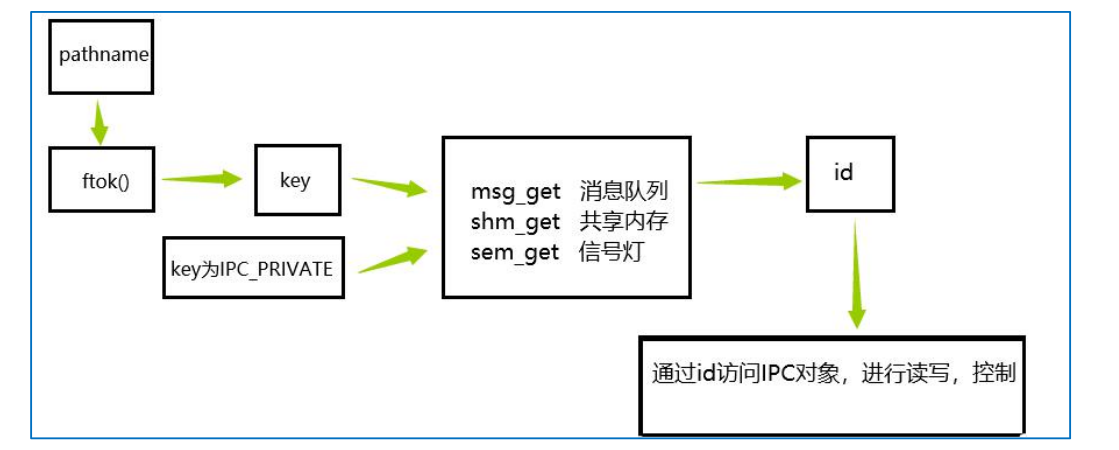
The steps for application-layer IPC communication are:
Obtain a key value; the kernel maps the key value to an IPC identifier. Common methods to obtain a key value are:
- Use the IPC_PRIVATE constant as the key value in the get call.
- Use ftok() to generate a key.
Execute the IPC get call to obtain an integer IPC identifier id via the key; each id represents an IPC object.
- Message queue: msgget()
- Shared memory: shmget()
- Semaphore: semget()
Access the IPC object via the id.
Characteristics of message queues:
- Sent messages are stored in a linked list, equivalent to a list. Processes can add and retrieve messages from the corresponding ‘list’ based on the id.
- When a process receives data, it can retrieve data from the queue by type.
Steps for using a message queue:
- Create a key;
- msgget() creates (or opens) the message queue object ID via the key;
- Use msgsnd()/msgrcv() to send and receive;
- Delete the IPC object via msgctl().
After obtaining the ID via the msgget() call, the message queue can be used to access the IPC object. Common message queue APIs are as follows:
msgget()
Used to obtain or create the unique identifier ID of a message queue.
| function | msgget |
|---|---|
| Function prototype | int msgget(key_t key, int msgflg) |
| Header file | #include <sys/types.h>#include <sys/ipc.h>#include <sys/msg.h> |
| Parameters | -key: The key value associated with the message queue- msgflg: Access permission: -IPC_CREAT: Create if the message queue does not exist -IPC_EXCL: WithIPC_CREATused together, if the message queue already exists, an error is reported - permission bits (e.g.0666): Specify the access permission of the created message queue |
| Return value | Returns the message queue ID on success, and -1 on failure. |
| Function and Explanation | Used to obtain or create the unique identifier ID of a message queue; it is the initialization step of the message queue IPC mechanism. |
msgsnd()
| function | msgsnd |
|---|---|
| Function prototype | int msgsnd(int msqid, const void *msgp, size_t msgsz, int msgflg) |
| Header file | #include <sys/types.h>#include <sys/ipc.h>#include <sys/msg.h> |
| Parameters | -msqid: Message queue ID- msgp: Pointer to the message- msgsz: Message byte count- msgflg: Send mode (0 is blocking,IPC_NOWAITis non-blocking) |
| Return value | Returns 0 on success, -1 on failure |
| Function and Explanation | Used to send data to a message queue, supports blocking/non-blocking modes, and is a core tool for inter-process message passing. |
msgctl()
| function | msgctl |
|---|---|
| Function prototype | int msgctl(int msqid, int cmd, struct msqid_ds *buf) |
| Header file | #include <sys/types.h>#include <sys/ipc.h>#include <sys/msg.h> |
| Parameters | -msqid: Message queue ID- cmd: operation command (IPC_STAT/IPC_SET/IPC_RMID)- buf: structure pointer for storing or setting attributes |
| Return value | Returns 0 on success, -1 on failure |
| Function and Explanation | Used to query, modify, or delete attributes of a message queue; it is a key function for message queue lifecycle management. |
msgrcv()
| Item | Description |
|---|---|
| function | ssize_t msgrcv(int msqid, void *msgp, size_t msgsz, long msgtyp, int msgflg) |
Parametersmsqid | The IPC identifier ID of the message queue, used to specify the queue from which to receive messages. |
Parametersmsgp | Pointer to the message buffer, used to store the received message (the message must include type and data fields). |
Parametersmsgsz | Size of the message data field (not including the bytes of the message type). |
Parametersmsgtyp | The type of message to receive, used to filter messages of a specific type. |
Parametersmsgflg | Bitmask, can combine multiple flags (such asIPC_NOWAITindicating non-blocking reception) |
| Return value | Returns the size of the received message data field on success; returns -1 on error. |
| Function and Explanation | msgrcvIt is a function in Unix/Linux systems for receiving messages from a message queue. It supports filtering reception by message type, enabling asynchronous message interaction and classified processing between processes. For example, in a scenario where multiple clients send different types of requests to a server, the server can usemsgtypdistinguish request types and process them separately. The reception mode can bemsgflgconfigured as blocking or non-blocking, flexibly adapting to different business needs. This function is a key part of implementing message consumption in the message queue IPC mechanism. |
Example
Write to the message queue:
12345678910111213141516171819202122232425262728293031323334353637383940414243444546474849505152535455 | struct msgbuf { long mtype; char mtext[128];};int main(int argc, char **argv){ key_t key; int msgid, ret; struct msgbuf msg = { .mtype = 1, // greater than 0 .mtext = "hello world!", }; key = ftok("./a.c", 'a'); if (key == -1) { fprintf(stderr, "Error: %s(errno: %d)\n", strerror(errno), errno); perror("ftok"); exit(EXIT_FAILURE); } msgid = msgget(key, 0666 | IPC_CREAT); if (msgid == -1) { fprintf(stderr, "Error: %s(errno: %d)\n", strerror(errno), errno); perror("msgget"); exit(EXIT_FAILURE); } // Blocking mode ret = msgsnd(msgid, (void *)&msg, strlen(msg.mtext)+1, 0); if (ret == -1) { fprintf(stderr, "Error: %s(errno: %d)\n", strerror(errno), errno); perror("msgsnd"); exit(EXIT_FAILURE); } printf("msgsnd ok\n"); // remove after receive // if (msgctl(msgid, IPC_RMID, NULL) == -1) { // fprintf(stderr, "Error: %s(errno: %d)", strerror(errno), errno); // perror("msgctl IPC_RMID"); // } return 0;} |
Read from the head of the message queue
1234567891011121314151617181920212223242526272829303132333435363738394041424344454647484950515253545556 | struct msgbuf { long mtype; char mtext[128];};int main(int argc, char **argv){ int msgid; key_t key; struct msgbuf msg; long mtype = 0; key = ftok("./a.c", 'a'); if (key == -1) { fprintf(stderr, "Error: %s(errno: %d)", strerror(errno), errno); perror("ftok error"); exit(EXIT_FAILURE); } msgid = msgget(key, 0666 | IPC_CREAT); if (msgid == -1) { fprintf(stderr, "Error: %s(errno: %d)", strerror(errno), errno); perror("msgget error"); exit(EXIT_FAILURE); } printf("msget is ok and msgid is %d\n", msgid); // Non-blocking mode if (msgrcv(msgid, (void *)&msg, sizeof(msg.mtext), mtype, MSG_NOERROR | IPC_NOWAIT) == -1) { if (errno != ENOMSG) { perror("msgrcv"); if (msgctl(msgid, IPC_RMID, NULL) == -1) { fprintf(stderr, "Error: %s(errno: %d)", strerror(errno), errno); perror("msgctl IPC_RMID"); } exit(EXIT_FAILURE); } printf("No message available for msgrcv()\n"); } else { printf("message received: %s\n", msg.mtext); } if (msgctl(msgid, IPC_RMID, NULL) == -1) { fprintf(stderr, "Error: %s(errno: %d)", strerror(errno), errno); perror("msgctl IPC_RMID"); } return 0;} |
Run:
123456789101112131415 | $ ./msg_write.omsgsnd ok$ ipcs -q------ Message Queues --------key msqid owner perms used-bytes messages0x613012a9 2 zhaohang 666 13 1$ ./msg_read.omsget is ok and msgid is 2message received: hello world!$ ipcs -q------ Message Queues --------key msqid owner perms used-bytes messages |
Semaphore
In order to prevent a series of problems caused by multiple programs accessing a shared resource at the same time, we need a method that can authorize access by generating and using tokens, so that at any one time only one execution thread can access the critical section of the code. A critical section refers to code that performs data updates and needs to be executed exclusively. A semaphore can provide such an access mechanism, allowing only one thread to access a critical section at a time. In other words, a semaphore is used to coordinate processes’ access to shared resources.
A semaphore can only perform two operations: wait and send signal, namely P(sv) and V(sv),
P(sv): If the value of sv is greater than zero, decrement it by 1; if its value is zero, suspend the execution of the process.
V(sv): If there are other processes suspended waiting for sv, resume one of them; if no process is suspended waiting for sv, increment it by 1.
semget()
| function | semget |
|---|---|
| Function prototype | int semget(key_t key, int nsems, int semflg) |
| Header file | #include <sys/types.h>#include <sys/ipc.h>#include <sys/sem.h> |
| Parameters | -key: semaphore key value- nsems: number of semaphores- semflg: flags (e.g., creation/access permissions) |
| Return value | On success, returns the semaphore ID; on failure, returns -1. |
| Function and Explanation | Used to create a new semaphore or obtain the ID of an existing semaphore; it is the initialization step of the semaphore IPC mechanism. |
semctl()
| function | semctl |
|---|---|
| Function prototype | int semctl(int semid, int semnum, int cmd, union semun arg) |
| Header file | #include <sys/types.h>#include <sys/ipc.h>#include <sys/sem.h> |
| Parameters | -semid: semaphore ID-semnum: semaphore number- cmd: operation command (IPC_STAT/IPC_SET/IPC_RMID/SETVALetc.)- arg:union semunA structure for storing or setting semaphore attributes. |
| Function and Explanation | Used to query, modify, initialize, or delete semaphore attributes; it is a key function in semaphore lifecycle management. |
semop()
| function | semop |
|---|---|
| Function prototype | int semop(int semid, struct sembuf *sops, size_t nsops) |
| Header file | #include <sys/types.h>#include <sys/ipc.h>#include <sys/sem.h> |
| Parameters | -semid: semaphore ID- sops:struct sembufArray of structures, each element contains a semaphore number, an operation (sem_op: 1 for V operation, -1 for P operation, 0 for wait), operation mode (sem_flg: 0 is blocking,IPC_NOWAITis non-blocking)- nsops: number of semaphores to operate on |
| Function and Explanation | Used to perform P (request resource), V (release resource) and other operations on semaphores, realizing synchronization and mutual exclusion among processes. |
Example
123456789101112131415161718192021222324252627282930313233343536373839404142434445464748495051525354555657585960616263646566676869707172737475767778798081828384858687888990919293949596979899100101102103104105106107108109110111112113114115116117118119120121122123124125126 | union semun { int val; /* Value for SETVAL */ struct semid_ds *buf; /* Buffer for IPC_STAT, IPC_SET */ unsigned short *array; /* Array for GETALL, SETALL */ struct seminfo *__buf; /* Buffer for IPC_INFO (Linux-specific) */};void do_something_exclusively(){ printf("pid[%d]: doing something exclusively\n", getpid()); sleep(2);}int main(int argc, char **argv){ pid_t pid; key_t key; int semid, ret = 0; union semun init_val = { .val = 1 }; key = ftok(".", 's'); if (key == -1) { fprintf(stderr, "Error: %s(errno: %d)", strerror(errno), errno); perror("ftok"); exit(EXIT_FAILURE); } // Create a semaphore set with one semaphore. semid = semget(key, 1, 0666 | IPC_CREAT | IPC_EXCL); if (semid == -1) { if (errno == EEXIST) { // If it already exists, obtain it directly. semid = semget(key, 1, 0666); if (semid == -1){ perror("semget an existing one failed"); exit(EXIT_FAILURE); } } else { fprintf(stderr, "Error: %s(errno: %d)", strerror(errno), errno); perror("semget"); exit(EXIT_FAILURE); } } // Initialize the semaphore to 1. ret = semctl(semid, 0, SETVAL, init_val); if (ret == -1) { fprintf(stderr, "Error: %s(errno: %d)", strerror(errno), errno); perror("semctl"); exit(EXIT_FAILURE); } printf("Before fork: Created semaphore (id=%d), value=1\n", semid); pid = fork(); if (pid < 0) { fprintf(stderr, "Error: %s(errno: %d)", strerror(errno), errno); perror("fork"); exit(EXIT_FAILURE); } else if (pid == 0) { // child process // P op struct sembuf sops = { .sem_num = 0, .sem_op = -1, .sem_flg = 0, }; if (semop(semid, &sops, 1) == -1) { perror("semop P"); fprintf(stderr, "Error: %s(errno: %d)", strerror(errno), errno); exit(EXIT_FAILURE); } do_something_exclusively(); // V op sops.sem_op = +1; if (semop(semid, &sops, 1) == -1) { perror("semop V"); fprintf(stderr, "Error: %s(errno: %d)", strerror(errno), errno); exit(EXIT_FAILURE); } } else { // parent process // P op struct sembuf sops = { .sem_num = 0, .sem_op = -1, .sem_flg = 0, }; if (semop(semid, &sops, 1) == -1) { perror("semop P"); fprintf(stderr, "Error: %s(errno: %d)", strerror(errno), errno); exit(EXIT_FAILURE); } do_something_exclusively(); // V op sops.sem_op = +1; if (semop(semid, &sops, 1) == -1) { perror("semop V"); fprintf(stderr, "Error: %s(errno: %d)", strerror(errno), errno); exit(EXIT_FAILURE); } wait(NULL); // Wait for the child process to finish; if (semctl(semid, 0, IPC_RMID) == -1) { // Parent process deletes the semaphore set fprintf(stderr, "Error: %s(errno: %d)", strerror(errno), errno); perror("semctl IPC_RMID"); exit(EXIT_FAILURE); } } return 0;} |